Object Oriented Programming: Chapter 5: Templates and Exception Handling
Exception Handling
C++ Object Oriented Programming
When any unavoidable circumstances (or runtime errors) occur in our program then exceptions are raised by handling control to special functions called handlers. This provides build‒in error handling mechanism which is known as exception handling.
Exception
Handling
• Definition:
When any unavoidable circumstances (or runtime errors) occur in our program
then exceptions are raised by handling control to special functions called
handlers. This provides build‒in error handling mechanism which is known as exception handling.
Advantages
•
The purpose of exception handling mechanism is to detect and report the
exceptional situations so that appropriate action can be taken. The exception
handling mechanism performs following
task ‒
1.
Find the problem ‒ Hit the exception
2.
Report for the occurrence of the error ‒ Throw the exception
3.
Obtain the information about the error ‒ Catch the exception
4.
Perform some corrective actions ‒ Handling of exception.
Difference between error and exception
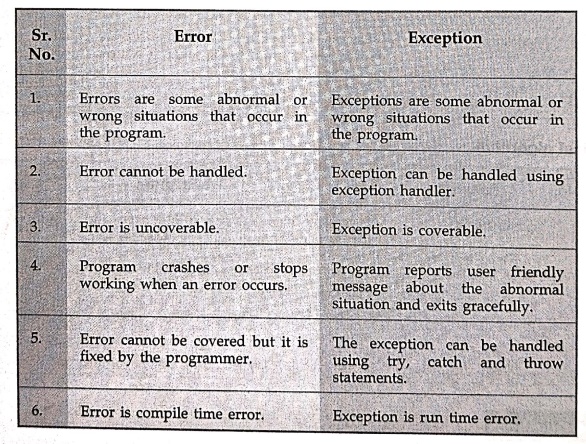
Error
1.
Errors are some abnormal or wrong situations that occur in the program.
2.
Error cannot be handled.
3.
Error is uncoverable.
4.
Program crashes or Stops working when an error occurs.
5.
Error cannot be covered but it is fixed by the programmer.
6.
Error is compile time error.
Exception
1.
Exceptions are some abnormal or wrong situations that occur in the program.
2.
Exception can be handled using exception handler.
3.
Exception is coverable.
4.
Program reports user friendly message about the abnormal situation and exits
gracefully.
5.
The exception can be handled using try, catch and throw statements.
6.
Exception is run time error.
1. try‒catch‒throw
•
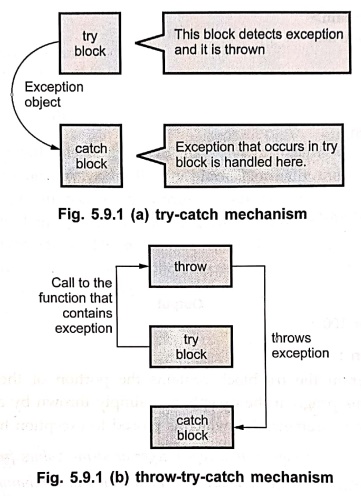
C++ exception handling mechanism makes use of three keywords ‒ try, catch and throw. The try represents
the block of statements in which there are chances of occurring some
exceptional conditions.
•
When exception detected it is thrown using the throw statement.
•
There exists a block of statements in which the exception thrown is handled
appropriately. This block is called catch
block.
Following
figures illustrates the concept of exception handling mechanisms ‒
•
Mainly exception handling is done with the help of three keywords: try, catch
and throw. The try and catch block is as shown below ‒
try
{
throw exception;
//exception is some
value
// the portion of the
code that is to be monitored for error detection
}
catch(argument)
{
//catch block softly
handles the exception
}
•
The try block contains the portion of the program that is to be examined for
error detection. If an exception (i.e. error) occurs in this block then it is
thrown using throw. Using catch the exception is caught and processed. If try
block contains all the code included in main then effectively the complete
program must be scanned for errors. Any exception is caught by the catch block.
This catch block should be immediately followed by the try block.
Let
us understand it by a simple program of exception handling ‒
#include <iostream>
using namespace std;
int main ()
{
try
{
throw 100;
}
catch (int x)
{
cout <<
"An exception at " << x << endl;
}
return 0;
}
Output
An exception at 100
Program Explanation :
•
In above program the try block contains the portion of the code for exception
handling. In this program the exception is simply thrown by a throw statement.
It accepts only one parameter 100 which is passed to exception handler as
argument.
Example:
1
Write a
C++ program to accept integer or string values from the user within a specified
range.(Range has to be specified with minimum and maximum by the user). If the
input violates the range, appropriate exception needs to be raised.
Solution:
#include <iostream>
using namespace std;
int main()
{
int Num;
try
{
cout <<
"\nEnter the number between 0 and 9: ";
cin >> Num;
if (Num < 0 || Num
> 9)
throw Num;
else
cout<<"\nThe
result is << Num;
}
catch (int Num)
{
cout<<"Error!!!"<<
Num << "not within the range of (0‒9)";
}
}
Output
Enter the number
between 0 and 9: ‒1
Error!!! ‒1 not within
the range of (0‒9)
2. Multiple Exceptions
•
The exception handler is declared by the keyword catch which is responsible to
handle the exception thrown by the try block. Normally the code within the
catch statement attempts to rectify the errors by taking appropriate action.
When an exception occurs then the control is transferred to the catch block and
at that time try block is terminated. There can be multiple exceptions in multiple catch statements with one try
block. Following is a structure of the program when multiple catch blocks are
allowed.
void function
{
…
try
{
…
}
catch(datatype1 arg)
{
…
}
catch(datatype2 arg)
{
…
…
…
catch(datatypeN arg)
{
…
}
}
The
program illustrating multiple catch statements is as shown below ‒
#include<iostream>
using namespace std;
void function(int num)
{
try
{
if(num)
throw num;
else throw "Value is zero";
}
//multiple catch for single try block
catch(int i)
{
cout << "Exception for number is
handled: << i << "\n";
}
catch(const char *str)
{
cout <<
"Exception for string is handled: ";
cout << str
<< "\n";
}
}
int main()
{
cout <<
"Start"<<endl;
function(0); // As
value of num is 'not true' else part will
function(1); // be executed
(function(2);
function(3);
cout <<
"End"<<endl;
retrun 0;
}
Output
Exception for string
is handled: Value is zero
Exception for number
is handled: 1
Exception for number
is handled: 2
Exception for number
is handled: 3
End
Example :
2
Write a
program to read 10 odd numbers. Generate the exceptions for negative and even
numbers. Provide handlers to display appropriate message.
Solution
:
#include<iostream>
#include<cmath>
using namespace std;
void MyFun(int a[10])
{
for(int i=0;i<10;i++)
{
int val;
val=a[i];
try
{
if (val< 0.0)
throw
"Negative";
else if ((val %2)==
0.0)
throw val;
else
cout <<
"The number "<<val<<"is odd"<<endl;
}
catch(char *str)
{
cout<<"Error!!
"<<str<<" Number"<<endl;
}
catch(int e)
{
cout<<"Error!!
"<<e<<" is Even number"<<endl;
}
}
}
int main()
{
int a[10];
cout<<"\n
Enter some number: ";
for(int
i=0;i<10;i++)
cin>>a[i];
MyFun(a);
return 0;
}
3. Catch all
•
Using multiple catch statements mechanism we can write a separate catch
statement for each type. But writing the catch statement for each individual
type is a complicated task. In such situation, we can write a catch statement
to catch all exceptions instead of a
certain type.
#include<iostream>
using namespace std;
void function(int num)
{
try
{
if(num)
throw num;
else throw "Value is zero";
}
//catch all
catch(...)
{
cout<<"\nAll
types of exceptions are caught here";
}
}
int main()
{
cout<<"\nStart";
function(0); // As
value of num is 'not true' else part will
function(1); // be
executed
function(2);
function(3);
cout<<"\nEnd";
return 0;
}
Output
Start
All types of
exceptions are caught here
All types of exceptions are caught here
All types of exceptions are caught here
All types of exceptions are caught here
End
Program Explanation :
1)
The catch all statement is specified by catch(...). That means the default
argument is specified.
2)
The ellipse operator(...) is used. Hence there is no need to specify the
explicit type as an argument to the catch statement.
3)
The catch all statement handles all the exceptions for which the explicit catch
statement is not written.
4. User Defined Exceptions
•
User defined exception is a kind of exception defined by the user. As most of
the exceptions that we need to handle in C++ are of class type. The object of
class type is passed to exception handler (i.e. to catch routine) and with the
help of object an error is processed. Following is a simple program that
illustrates the use of user defined
exception.
#include<iostream>
#include<cstring>
using namespace std;
// Catching class type exceptions.
class My_Exception
{
public:
char str[50];
int num;
My_Exception() { *str
= 0; num = 0; } // constructor
My_Exception(char *s,
int i)
{
strcpy(str, s);
num = i;
}
};
void main()
{
int a;
//testing if the number is positive or not
try
{
cout <<
"Enter a positive number: ";
cin >> a;
if(a<0)
throw
My_Exception("It's a negative number", a);
else
cout
<<"It's a positive number" << endl;
}
catch (My_Exception obj)
{
// catch an error
cout << obj.str
<< ": ";
cout << obj.num << endl;
}
getch();
}
Output 1
Enter a positive
number: 10
It's a positive number
Output 2
Enter a positive
number: ‒5
It's a negative
number: ‒5
For
the above code two outputs are given one when the number which we input is
positive and another when the number is negative.
Example :
3
Write a C++ program to compute the square root
of a number. The input value must be tested for validity. If it is negative,
the user defined function mysqrt() should raise exception.
Solution:
\**************************************************************
Program to handle square root function using exception handling
***************************************************************/
#include<iostream>
#include<cmath>
using namespace std;
void MySqrt(double val)
{
try
{
if (val <0.0)
throw
"Negative";
else
cout
<< "The sqrt of "<<val<<" is
"<<<sqrt(val)<<endl;
}
catch(char *str)
{
cout<<"Can
not handle "<<str<<" number"<<endl;
}
}
void main()
{
cout<<"\n Enter some number: ";
double num;
cin>>num;
MySqrt(num);
}
Output
Enter some number: ‒5
Can not handle
Negative number
Example: 4
Write a
C++ program to generate user defined exception whenever user inputs odd
numbers.
Solution:
#include<iostream>
#include<cstring>
class My Exception
{
public:
int num;
char str[50];
My_Exception()
{ num=0;}
My_Exception(char
*s,int i)
{
strcpy(str,s);
num=i;
}
};
void main()
{
int a;
try
{
cout<<"\n
Enter some number";
cin>>a;
if(a%2!=0)
throw My
Exception("Exception Raised:Odd Number!!!",a);
else
cout<<"Even
Number"<<endl;
}
catch(My_Exception obj)
{
cout<<obj.str;
}
}
Output
Enter some number5
Exception Raised:Odd
Number!!!
•
The purpose of exception handling is to handle abnormal events. The following
program illustrates that in division operation the denominator value should not
be zero and if at all it is zero then how to handle such error.
#include<iostream>
using namespace std;
int main()
{
double i, j;
void divide(double,
double );
cout <<
"Enter numerator:
cin >> i;
cout <<
"Enter denominator: ";
cin >> j;
divide(i, j);
getch();
}
void divide(double a, double b)
{
try
{
if(b==0)
throw b; // divide‒by‒zero
cout <<
"Result: " << a/b << endl; // for non zero value
}
catch (double b)
{
cout <<
"Can't divide by zero.\n";
}
}
Output
Enter numerator: 10
Enter denominator: 0
Can't divide by zero.
Example:5
Write a
C++ program to generate an exception whenever user input is even number less
than 100.
Solution :
#include<iostream>
#include<cmath>
using namespace std;
void MyFun(int val)
{
try
{
if (val < 100)
throw
"Number is Less than 100";d)
else
cout <<
"The number is << val;
}
catch (char *str)
{ cout << "Error!! " << str; }
}
int main()
{
int num;
cout<<"\n
Enter some even number: ";
cin >> num;
MyFun(num);
return 0;
}
Output
Enter some even
number: 10
Error!! Number is Less
than 100
Review Questions
1. Discuss about
exception and its advantages.
2. What is exception?
Explain the try‒catch and throw blocks in C++.
3. Explain about
exception handling with example program.
4. Write an
Illustrative program to handle multiple exceptions in C++.
5. Explain the use of
catch all in exception handling in C++.
6. What are user
defined exceptions? Explain with the help of illustrative examples.
Object Oriented Programming: Chapter 5: Templates and Exception Handling : Tag: Oops, Computer Programming : C++ Object Oriented Programming - Exception Handling
Object Oriented Programming: Chapter 5: Templates and Exception Handling
Under Subject
Object Oriented Programming (OOPs)
CS25C07 2nd Semester CSE, CSE(CY) Depts | 2025 Regulation | 2nd Semester 2025 Regulation
Related Subjects

English Essentials II
EN25C02 2nd Semester | 2025 Regulation | 2nd Semester 2025 Regulation

Tamils and Technology தமிழர்களும் தொழில்நுட்பமும்
UC25H02 2nd Semester | 2025 Regulation | 2nd Semester 2025 Regulation

Linear Algebra
MA25C02 2nd Semester | 2025 Regulation

Applied Physics (CSIE) II
PH25C03 2nd Semester AIDS, CSE, IT, CSE(CY) Dept | 2025 Regulation | 2nd Semester 2025 Regulation

Digital Principles and Computer Organization
CS25C06 2nd Semester AIDS, CSE, IT, CSE(CY) Dept | 2025 Regulation | 2nd Semester 2025 Regulation

Basic Electrical and Electronics Engineering
EE25C01 2nd Semester | 2025 Regulation | 2nd Semester 2025 Regulation
Object Oriented Programming (OOPs)
CS25C07 2nd Semester CSE, CSE(CY) Depts | 2025 Regulation | 2nd Semester 2025 Regulation

Re-Engineering for Innovation
ME25C05 2nd Semester | 2025 Regulation | 2nd Semester 2025 Regulation
Object Oriented Programming (OOPs) - Laboratory
CS25C07 2nd Semester CSE, CSE(CY) Depts | 2025 Regulation | 2nd Semester 2025 Regulation