Object Oriented Programming: Chapter 5: Templates and Exception Handling
Standard Template Library
C++ Programming
The standard template library(STL) is collection of well structured generic C++ classes (templates) and functions.
Standard
Template Library
•
The standard template library(STL) is collection of well structured generic C++
classes (templates) and functions. Basically STL consists three basic
components ‒
1.
Container 2. Algorithms 3. Iterators
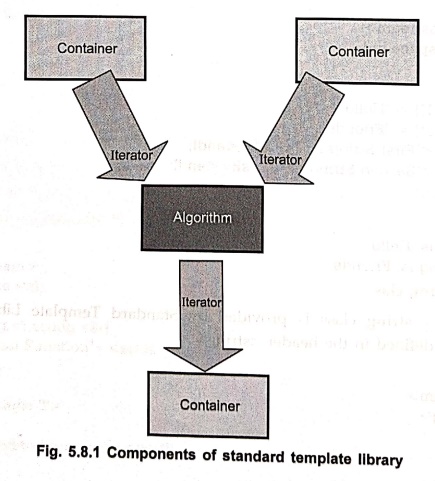
Fig. 5.8.1 Components
of standard template library
Templates
and Exception Handling
•
The standard template library is built using template and it is orthogonal in
design because components can be used in combination with one another. Let us
discuss these components in detail.
1. Container
•
The container is a collection of objects of different types. These objects
store the data. The container can be implemented using template classes.
Various types of container are ‒
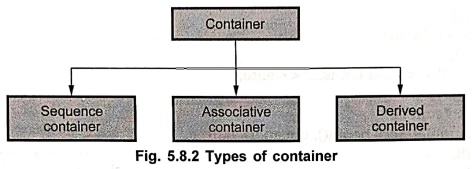
Fig. 5.8.2 Types of
container
a) sequence container ‒
It
consists of all the classes who represent the sequence or linear list. For
example, vector class defines dynamic array. Dequeue is for creating doubly
ended queue i.e. we can perform insertion and deletion of elements from both
the ends of queue and list provides a linear list.
b) Associative
container ‒ It allows efficient retrieval of values
based on keys. For example in map one can retrieve or store the data with the help
of unique key. Other examples of associative container are set, multiset,
multimap.
c) Derived container
‒ The derived containers are created from the sequence Poufs containers. The
derived containers are stack, queue and priority queue. These are 20 also known
as container adaptors.
Each container class defines a set of
functions that may be applied to the container.
•
For example, a list container includes functions that insert, delete and merge
nonish elements. A stack includes functions that push and pop values.
•
Following is a simple example of container class for list container which bobo
demonstrates sequence container.
#include <iostream>
#include <list> // list container
#include <numeric> // for accumulate
using namespace std;
// Using the list container
void print(list<double>&lst)
{
list<double>::iterator
key; // traverse iterator
for (key =
lst.begin(); key = 1st.end(); ++key)
cout << *key
<< '\t';
cout << endl;
}
int main()
{
double array[4] = {
30, 20, 10, 40 };
list<double>
obj;
for (int i = 0; i
< 4; ++i)
//inserting elements
in the list
obj.push_front(array[i]);
print(obj);
//sorting of the
list
obj.sort();
cout<<"The
sorted list is..."<<endl;
print(obj);
cout <<
"sum is
<<
accumulate(obj.begin(), obj.end(), 0.0)
<< endl;
return 0;
}
Output
40 10 20 30
The sorted list is...
10 20 30 40
sum is 100
•
In above program the list container is used. An array consists of 4 double values.
These double values will be pushed into the list container. The print function
uses isan iterator to print each element of the list. The iterator acts like a
pointer. The begin() and end() are the member functions of the list container.
The begin() represents the starting and end represents the ending locations of
the container. The sort() function is useful for sorting the elements. This
member function basically represents the stable sorting algorithm. The numeric
package is included for supporting the accumulate() function. It uses 0.0 as
the initial value and then computing the sum of all the elements starting from
the location obj.begin() to obj.end(). Various member functions of container
class are enlisted in following table.
Member ‒
Meaning
CAN::CAN() ‒ Can hold the item. It is a copy constructor.
CAN::CAN(c)
‒ Copy constructor.
c.begin() ‒
For referring the beginning location.
c.end() ‒
Ending location of the list.
c.rbegin() ‒
Beginning by a reverse iterator.
c.rend() ‒ End used by reverse iterator.
c.size() ‒ Number of elements in CAN.
c.swap(d) ‒ Swaps two CANS.
c.empty() ‒ It is Boolean. If empty it's value
is true.
The
following program shows an associative container ‒
#include <iostream>
#include <map>
#include <cstring>
using namespace std;
int main()
{
map<string, int,
less<string>> age; // map is associative container
age["Shivani"]
= 10;
age["Parth"]
= 05;
age["Prasad"]
= 25;
cout <<
"Parth is " << age["Parth"]<< " years
old.";
return 0;
}
2. Iterators
•
The iterators are basically objects but sometimes they can be pointers and
hence iterators specify the positions in container. The iterators are used to
traverse the contents of container. There are five types of iterators.
Iterator
‒
Description
Random
access ‒ Elements can be stored or retrieved randomly.
Forward ‒ The elements can be stored or retrieved but
only forward moving is allowed.
Input ‒ Elements retrieving is allowed with forward moving.
Output ‒ Elements storing is allowed with forward
moving.
Bidirectional ‒
Store and retrieve the elements and forward/backward moving is allowed.
• Levels of functionalities of different
iterators is as shown below.
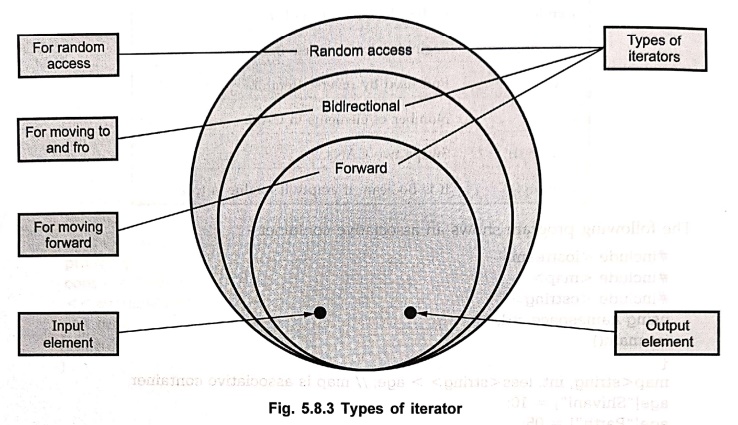
Fig. 5.8.3 Types of
iterator
#include <iostream>
#include <set>
using namespace std;
int main()
{
int arr[4] ={1,2, 3,
4 }, *ptr = arr;
set<int,
greater<int>> s;
sonar set<int,
greater<int>>: :: const_iterator it;
while (ptr != arr +
4)
s.insert(*ptr++);
cout <<
"The numbers below 5: " << endl;
for (it = s.begin();
it != s.end(); ++it)
cout << *it
<< '\t';// Using iterator 'it' traversing array
cout << endl;
return 0;
}
Output
The numbers below 5:
4 3
2 1
• The above given program is a simple example
in which the iterator for the set container is used. The iterator is given to
be variable it which traverse through the range from s.begin() to s.end(). The
iterator is basically a pointer which navigates the contents of the container.
3. Algorithms
•
The algorithms are used are used to process the contents of the containers. The
functionalities provided in container are not sufficient to perform complex
operations hence the algorithms are used to support more complex operations for
the containers. Using algorithms the reusability can be achieved in STL.
•
In order to access the STL algorithms we have to write <algorithm> in the
program.
Various
categories of algorithm are ‒
1. Sorting algorithms‒These
algorithms contain the functionalities related to sorting of the list.
2. Mutating sequence
algorithms ‒ These algorithms modify the contents of
the container. For example copy() operation will modify the contents of the
container.
3. Nonmutating sequence
algorithms ‒ These algorithms do not modify the contents of
the container as they work. For instance count() will simply count the
occurrences in the container.
4. Numerical algorithms
‒
These algorithms are useful for performing some computations. For instance sum
of all the elements can be obtained by the function accumulate().
We
will write a simple program for sorting the elements of an array using sorting
bag algorithm.
#include <iostream>
#include <algorithm>//keyword algorithm included
#define SIZE 10
using namespace std;
int main()
{
int n,item;
int array[SIZE], i;
cout<<"How Many Elements You Want to Enter";
cin>>n;
//setting the range for sorting
int *Limit= array + n;
cout<<"Enter The Numbers";
for (i = 0; i < n; ++i)
{
cin>>item;
array[i] = item;
}
//calling the function from algorithm
sort(array, Limit);
//displaying the sorted list of elements
cout<<"\n The sorted list is ..."<<endl;
for (i = 0; i < n; ++i)
cout << array[i] << '\t';
cout << endl;
return 0;
}
Output
How Many Elements You
Want to Enter 7
Enter The Numbers
4
3
1
2
7
6
5
The sorted list is …
1 2 3 4 5 6 7
•
In above program the keyword <algorithm> is used and the sort is a
function that is supported by the sorting algorithm. By this function the quick
sort is performed over the range of the array from first element to the last
element of the array. Hence we set the range by a Limit Limit variable(from 0th
position of array to N).
We
will summarize various algorithms and supporting functionalities in following
tables ‒
Sorting algorithm
Function ‒
Description
1.
sort() ‒ Using quick sort the elements are sorted.
2.
stable_sort() ‒ Using stable sorting method the elements are
sorted.
3.
merge() ‒ This
function is used for merging the elements.
4.
sort_heap() ‒ Performs sorting on already created heap.
5.
min() ‒ It finds the minimum element.
6.
max() ‒ It finds the maximum element.
7.
binary_search() ‒ It performs the binary
search on the sorted elements to search for particular element.
Mutating algorithm
Function ‒ Description
1.copy() ‒ Copies the sequence of elements.
2.copy_backward()‒Copies
the sequence of elements from end of the list, i.e. copies the list in backward
direction.
3.reverse() ‒ This function is used to
reverse the given sequence of elements.
4.unique() ‒ It finds the adjacent
duplicate elements and removes them.
Nonmutating algorithm
Function ‒ Description
1.find()
‒ It
will find the position of desired element.
2.count() ‒ This function counts the number of elements
in the given sequenc
3.equal() ‒ It checks whether the two sequences are equal
or not. If two sequences are matching then it returns true.
4.search() ‒ This
operation is used for searching the desired element from the given sequence.
Numerical algorithm
Function ‒
Description
1.accumulate() ‒
Successive elements are summerized and a sum of all the elements in a given
sequence is obtained.
2.
inner_product() ‒ It performs the
product operation on a pair of sequences.
3.partial_sum() ‒ It obtains the sequence by
summing the pair of sequences.
4.adjacent_difference() ‒ It produces a sequence from another sequence.
Review Questions
1. Explain the terms
container, iterators and algorithms.
2. What is mutating
and non mutating algorithms ?
3. Explain major categories
of containers supported by STL
4. Explain the
components of standard template library in detail.
Object Oriented Programming: Chapter 5: Templates and Exception Handling : Tag: Oops, Computer Programming : C++ Programming - Standard Template Library
Object Oriented Programming: Chapter 5: Templates and Exception Handling
Under Subject
Object Oriented Programming (OOPs)
CS25C07 2nd Semester CSE, CSE(CY) Depts | 2025 Regulation | 2nd Semester 2025 Regulation
Related Subjects

English Essentials II
EN25C02 2nd Semester | 2025 Regulation | 2nd Semester 2025 Regulation

Tamils and Technology தமிழர்களும் தொழில்நுட்பமும்
UC25H02 2nd Semester | 2025 Regulation | 2nd Semester 2025 Regulation

Linear Algebra
MA25C02 2nd Semester | 2025 Regulation

Applied Physics (CSIE) II
PH25C03 2nd Semester AIDS, CSE, IT, CSE(CY) Dept | 2025 Regulation | 2nd Semester 2025 Regulation

Digital Principles and Computer Organization
CS25C06 2nd Semester AIDS, CSE, IT, CSE(CY) Dept | 2025 Regulation | 2nd Semester 2025 Regulation

Basic Electrical and Electronics Engineering
EE25C01 2nd Semester | 2025 Regulation | 2nd Semester 2025 Regulation
Object Oriented Programming (OOPs)
CS25C07 2nd Semester CSE, CSE(CY) Depts | 2025 Regulation | 2nd Semester 2025 Regulation

Re-Engineering for Innovation
ME25C05 2nd Semester | 2025 Regulation | 2nd Semester 2025 Regulation
Object Oriented Programming (OOPs) - Laboratory
CS25C07 2nd Semester CSE, CSE(CY) Depts | 2025 Regulation | 2nd Semester 2025 Regulation