Computer Programming C: UNIT V: File Operations
File Handling In 'C' Programming
A File is a collection of related information that is permanently stored on the disk and allows us to access and alter the information whenever necessary.
FILE HANDLING IN 'C'
1. Introduction to Data Files
1.1 Data File Hierarchy
2. File Handling in C
2.1 Applications of files
2.2 Streams and Files in C
2.3 Streams
2.4 Files
3. I/O Functions
3.1 Console I/O Functions
4. HIGH LEVEL FILE Operations
4.1 Opening a File
4.2 Reading from the file
4.3 Closing a file
1. INTRODUCTION TO DATA FILES
We
have learned the basics of utilizing 'C' and volatile memory storage devices
for saving, retrieving, and editing data. Specifically, we know that variables
are used to manage data in volatile memory areas, such as random access memory
and virtual memory, and that memory can be dynamically obtained for temporarily
storing data.
Despite
the importance of volatile memory such as RAM and virtual memory, it does have
its drawbacks when it comes to long‒term storage. When data needs to be
archived or stored in non‒volatile memory areas, programmers look to data files
as a viable answer for storing and retrieving data on disk drives.
Data
files are generally text‒based and are used for storing and retrieving related
information like those stored in a database. Managing the information contained
in data files is up to the C programmer. In order to understand how files can
be managed, this topic elaborates the beginning concepts that are used to build
files and record layouts for basic data file management.
A
File is a collection of related information that is permanently stored on the
disk and allows us to access and alter the information whenever necessary.
Data File Hierarchy
It
is important to understand the breakdown and hierarchy of basic data files,
because all components and subcomponents are used together to create the whole.
Without each component and its hierarchical relationships, building more
advanced data file systems, such as relational databases, would be difficult.
A
common data file hierarchy is generally broken down into five categories
described in Table.
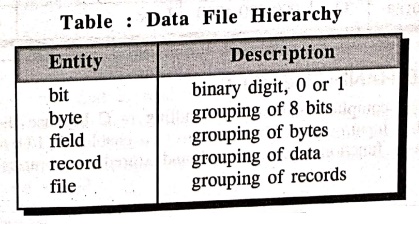
Bits:
Also known as binary digits, bits are the smallest value in a data file. Each
bit value can only be a 0 or 1. Because bits are the smallest unit of
measurement in computer systems, they provide an easy mechanism for electrical
circuits to duplicate 1s and 0s with patterns of off and on electrical states.
When grouped together, bits can build the next unit of data management, known
as bytes.
Bytes:
Bytes provide the next step in the data file. Bytes are most commonly made up
of eight bits and used to store a single character, such as number, a letter,
or any other character found in a character set.
Fields:
In database or data‒file, groupings of characters are most commonly referred to
as fields. Fields are often recognized as placeholders, but are really a data
concept that groups characters in a range of sizes and data social types to
provide meaningful information. Fields could be a person's name, security
number, street address, phone number, and so on.
Records:
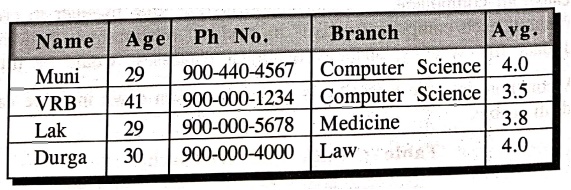
Records are logical groupings of fields that comprise a single row of
information or record. Each field in a record describes the record's
attributes. For example, a student record might be comprised of name, age,
phone no, branch, and average fields. Each field is unique in description but
together describes a single record.
Files:
Files are comprised of one or more records. Each record in a file should
describe a unique collection of fields. Files can be used to store all types of
information, such as student or employee data. Data files are normally
associated with various database processes in which information can be managed
in non‒volatile states, such as a disk drive. An example data file might be
called “students.dat" with the following comma‒delimited records.
2. FILE HANDLING IN C
Turbo
C compiler enables file handling in C because the language does not have built‒in
input/output (I/O) functions. To enable the I/O functions, several standard
built‒in functions were created and stored in libraries.
These
libraries are available as header files, which are divided into three
categories based on their functions: Console Input/Output, Disk Input/Output,
and Port Input/Output.
The
forthcoming topics explains streams and files, file pointers, how to open and
close a file using the fopen() and fclose() functions, and the different types
of I/O operations using file pointers.
2.1. Applications of files.
•
Real life situations involve large volume of data and in such cases, the
console oriented I/O operations pose two major problems.
•
It becomes cumbersome and time consuming to handle large volumes of data
through terminals.
•
The entire data is lost when either the program is terminated or computer is
turned off therefore it is necessary to have more flexible approach where data
can be stored on the disks and read whenever necessary. This method employs the
concept of files to store data.
2.2. Streams and Files in C
To
deal with file I/O in C, two concepts need to be understood. These are Streams
and Files, which help in doing the I/O functions in C.
Streams
are the tools available to work on Files. The Stream is the link that is formed
between the application and the file and is used for data transfer from the
application to the file or from the file to the application.
File
is a structure, which stores all the necessary information about the disk file.
This structure is never modified or changed. A pointer to this structure is
created and the file is identified with the pointer and is worked on.
2.3. Streams
The
C programming language is used with a variety of devices, such as terminals,
disk drives, and floppy drives. Because it is device independent, the same
stream is usable across several devices. The two types of streams are:
• Text:
An organized sequence of characters. A text stream allows certain character
translations, depending on the environment. As a result, there may not be a one‒to‒one
relationship between what is written and what is read.
• Binary: A sequence of
bytes stored as they are written and read as they are stored. These differ from
text streams because there is no translation of characters and these are read
in the same way in which they are stored.
2.4. Files
In
'C', all components are files, each with a different behavior based on the
attached devices. For example, a disk file supports random access. Accessing a
file, associates a stream with it. Each file has several functions attached to
it for reading, writing and modifying.
NOTE: Each file has a different behaviour, while
the behaviour of each associated stream is identical to that of the next
stream. Though all streams are the same, all files are not. This is important
to note as the functions associated with each file are different.
3. I/O FUNCTIONS
I/O
functions perform the reading and writing of data. In 'C', I/O functions are
categorized into three categories depending on their usage - console, port and
disk.
3.1.
Console I/O Functions
Console
functions handle values from the keyboard and display them on the Visual
Display Unit (VDU). The two subdivisions of console functions are:
• Formatted Console I/O Functions:
Accepts a level of formatting. This means that the printf() and scanf()
functions do not display or accept data from the end user randomly. We can
control the way the We can one certain column output appears on the screen. For
example, we can leave certain column spaces while outputting a number instead
of outputting it with a normal character space. Use %xd to format such an
output, for example, print (%xd), where x is the number of columns that you
need to leave from the left of the screen. In addition, use formatting to
indicate the use of a string (%s), the use of a number (%d), or the use of a
character (%c). This works for input and output.
• Unformatted Console I/O Functions:
Take the input of data and display it also. However unlike the formatted
console I/O functions there is no control as how the input is taken and how the
output is displayed. The functions used are putch(), getchar(), and getchar(). The getchar() function takes an input from the user and displays it
when the input is typed. The getchar()
function takes the data, but displays it only when the Enter key is pressed.
The putch() function displays all the information available and displays only
one character at a time.
4. HIGH LEVEL FILE OPERATIONS
We
can perform the following basic operations on Files.
•
Naming a file
•
Opening a file
•
Reading data from a file
•
Writing data to a file
•
Closing a file
There
are large number of standard library functions available for performing disk
files.
i)
High level file I/O functions
ii)
Low level file I/O functions
High
level file I/O functions do their own buffer management, whereas in low level
file I/O functions buffer management has to be done by the programmer.
Some
of the high level file I/O functions
fopen():
Used to create or open a file.
fprintf():
Used to write data to the file.
fscanf():
Used to read data from the file.
fseek():
Used to position the desired point.
ftell():
Used to specify the current position.
fclose():
Used to close an opened file.
feof(): Used to find, if end of file is encountered.
fputc(): Used to write a character to a file.
fgetc():
Used to read a character from file.
rewind():
Used to move control to the beginning of the file.
remove():
Used to erase a file.
fflush(): Used to flush a file.
4.1. Opening a File
A
data file must be opened before it can be created or processed, this associates
the file name with buffer area. Opening a file means, creating a new file with
specified filename and with accessing mode.
Syntax:
FILE *fp;
fp=fopen("filename",
"mode");
The
data structure of the file is defined as FILE in the standard I/O library
function definitions. Therefore, all files should be declared as type FILE
before they are used.
The
first statement declares the variable, 'fp'
as a pointer to the data type FILE. The second statement opens the file named
filename and assigns identifier to the FILE type pointer 'fp'. This pointer which contains all the information about the file
and it is used as a communication link between the system and the program.
The
mode in the second statement
specifies the purpose of accessing the file like read, write etc.
File
accessing modes
r
: Used to open the file for reading purpose.
w
: Used to open the file for writing purpose.
a
: Used to appending data into the file.
r+
: Used to open an existing file for reading and writing.
w
+ : Used to open a new file for both reading and writing.
a+
: Used to open an existing file for both reading and writing.
When
the file is opened in the write mode, if the file does not exist it he file
does is created, and the contents are deleted if that file already exists.
When
the file is opened in the read mode, if the file exists the file is opened with
the current contents safe, otherwise an error occurs.
Example:
fp =
fopen("Imnput", "w");
It
opens the file input in the write mode. If input file already exists its
contents are deleted. If it does not exist, the input file is created.
We
can open and use a number of files at a time. This number however depends on
the system we use.
/* Program to create a file and write some data the file */
#include <stdio.h>
#include <conio.h>
main()
{
FILE *fp;
char stuff[25];
int index;
fp=fopen("FIRST", "w"); /* open for writing
*/
strcpy(stuff, "This is an example line.");
for (index = 1; index <= 5; index++)
fprintf(fp, "%s Line number %d\n", stuff, index);
fclose(fp); /* close the file before ending program
ending_program */
}
OUTPUT
C:\TC\BIN> type
first
This is an example
line. Line number 1
This is an example
line. Line number 2
This is an example
line. Line number 3
This is an example
line. Line number 4
This is an example
line. Line number 5
Explanation:
After executing the program, go to the dos prompt and go to the respective
library, in this case C:\TC\BIN> and type the file name as above. Please
save the above C program as CFEXA.C, since this can be used for next program
4.2. Reading from the file
When
an 'r' mode used, the file is opened for reading, a' w' is used to indicate a
file to be used for writing, and an 'a' indicates that you desire to append
additional data to the data already in an
existing file.
Using
the 'r' indicates that the file is assumed to be a text file. Opening a file
for reading requires that the file already exist. If it does not exist, the
file pointer will be set to NULL and can be checked by the program.
Does
Here is a small program that reads a file and displays its contents on screen.
/* Program to display the contents of a file on screen */
#include <stdio.h>
void main()
{
FILE *fopen(), *fp;
int c;
fp = fopen("CFEXA. C", "r");
c=getc(fp);
while (c!= EOF)
putchar(c);
c = getc(fp);
}
fclose(fp);
}
OUTPUT
#include
<stdio.h>
#include <conio.h>
main()
{
FILE *fp;
char stuff[25];
int index;
fp =
fopen("FIRST", "w"); /* open for writing */
strcpy(stuff,
"This is an example line.");
for (index = 1; index
<= 5; index++)
fprintf(fp, "%s
Line number %d\n", stuff, index);
fclose(fp); /* close the
file before ending program */
}
EXPLANATION:
This program opens the C program (CFEXA. C, previous program) and prints its
contents at the standard output.
4.3. Closing a file
A
file must be closed after all the operation of the file have been completed.
Syntax:
fclose(file‒pointer);
By
doing this all the information associated with the file is flushed out from the
buffers and all links to the file are broken. It also prevents any accidental
measure of the file.
Example: fclose(fp);
In
the above example the statement fclose(fp) is used to close the file, after all
operations on them are completed and used to change the mode of operation. File
pointer can be reused for another file. All files are closed automatically
whenever a program terminates.
Computer Programming C: UNIT V: File Operations : Tag: Computer Science : - File Handling In 'C' Programming
Computer Programming C: UNIT V: File Operations
Under Subject
Computer Programming C
CS25C01 1st Semester | 2025 Regulation | 1st Semester 2025 Regulation
Related Subjects

English Essentials I
EN25C01 1st Semester | 2025 Regulation | 1st Semester 2025 Regulation

தமிழர் மரபு - Heritage of Tamils
UC25H01 1st Semester | 2025 Regulation | 1st Semester 2025 Regulation
Applied Calculus
MA25C01 Maths 1 M1 - 1st Semester | 2025 Regulation | 1st Semester 2025 Regulation

Applied Physics I
PH25C01 1st Semester | 2025 Regulation | 1st Semester 2025 Regulation

Applied Chemistry I
CY25C01 1st Semester | 2025 Regulation | 1st Semester 2025 Regulation
Makerspace
ME25C04 1st Semester | 2025 Regulation | 1st Semester 2025 Regulation
Computer Programming C
CS25C01 1st Semester | 2025 Regulation | 1st Semester 2025 Regulation
Computer Programming Python
CS25C02 1st Semester | 2025 Regulation | 1st Semester 2025 Regulation
Fundamentals of Electrical and Electronics Engineering
EE25C03 1st Semester EEE Depart | 2025 Regulation | 1st Semester 2025 Regulation
Introduction to Mechanical Engineering
ME25C03 1st Semester Mechanical Dept | 2025 Regulation | 1st Semester 2025 Regulation

Introduction to Civil Engineering
CE25C01 1st Semester Civil, Agri Departments | 2025 Regulation | 1st Semester 2025 Regulation
Essentials of Computing
CS25C03 1st Semester - AIDS, CSE, CSE(CY), IT Department | 2025 Regulation | 1st Semester 2025 Regulation

Applied Physics I Laboratory
PH25C01 1st Semester practical Laboratory Manual | 2025 Regulation | 1st Semester Laboratory 2025 Regulation

Applied Chemistry I Laboratory
CY25C01 1st Semester practical Laboratory Manual | 2025 Regulation | 1st Semester Laboratory 2025 Regulation

Computer Programming C Laboratory
CS25C01 1st Semester EEE, ECE, CSE, CSE(CY), AIDS, IT practical Laboratory Manual | 2025 Regulation | 1st Semester Laboratory 2025 Regulation

Computer Programming Python Laboratory
CS25C02 1st Semester practical Laboratory Manual | 2025 Regulation | 1st Semester Laboratory 2025 Regulation
Engineering Drawing
ME25C01 EEE, Mech, Agri, EEE Depts | 2025 Regulation | 2nd Semester 2025 Regulation

Basic Electronics and Electrical Engineering
EE25C04 1st Semester ECE Dept | 2025 Regulation | 1st Semester 2025 Regulation
Essentials of Computing - Laboratory
CS25C03 1st Semester AIDS, CSE, CSE(CY), IT Depts | practical Laboratory Manual | 2025 Regulation | 1st Semester 2025 Regulation