Python for Data Science: Chapter 2: Functions and Files
Python: Creating and using a Class
1. Constructors in Class 2. Returning Instances 3. Public and Private Memebers 4. Printing Object 5. The init Method 6. The_str_Method
Creating
and using a Class
Terminologies used in object oriented programming
1. Class:
Class is a collection of data attributes and the methods that can access or
manipulate the data attributes. For defining the class in Python the keyword class is used.
2. Class variable: This is a kind of variable which is
shared by all instances of class. The class variable are defined within a class
but outside the class method.
3. Data member:
The class variable that holds data associated with a class and its objects.
4. Instantiation:
The creation of instance of a class.
5. Method:
It is a special type of function which is defined inside the class definition.
6. Object:
It is an instance of a class. An object comprises both data members and
methods.
7. Instantiation:
Creating a new object is called instantiation
and the object is called instance of
a class.
How to create a class?
The
keyword class is used to define the class followed by the class name.
For
example
Create
a following simple program that contains class
ClassDemo.py
class Student:
name="AAA" ←Data Member
def display(self): ← Method
print
("The name of the student is ",self.name)
s1=Student() ←Object: an instance
of a class
s1.display()
Output
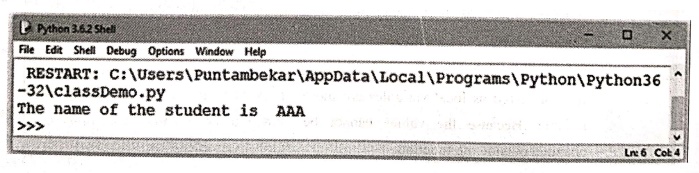
Program explanation:
In
above code, we have defined one class in which there is single data member and
single method.
Note
that by the statement
s1=Student()
the
instance s1 is created.
Then
using the instance of a class followed by dot operator which is followed by the
name of the function, we can call the function defined in the class. The
function display is called using the
instance variable and dot operator.
1. Constructors in Class
The
class functions that begin with double underscore (_) are called special
functions as they have special meaning.
The
constructor of a class is defined by a special function __init__(). This function is called whenever a new object of that
class is instantiated. This type of function is also called as constructor.
For example ‒
ClassDemo.py
class Student:
def _init_(self,name,marks):
self.name=name
self.marks=marks
def display(self):
print("Name:
",self.name)
print("marks:
",self.marks)
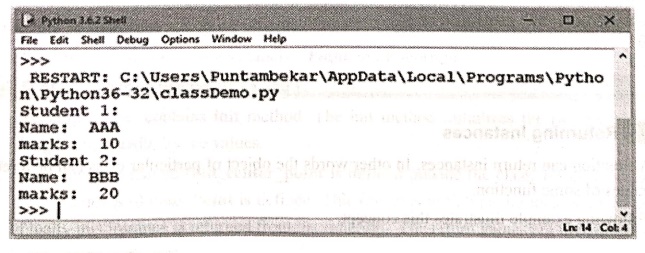
s1=Student("AAA",10)
s2=Student("BBB",20)
print("Student 1:")
s1.display()
print("Student 2:")
s2.display()
Output
Example:1
Write a
Python program to create a class 'Rectangle'. Also find the area and perimeter
of the rectangle when length and breadth values are initiated.
Solution :
Rectangle Demo.py
class Rectangle:
def _init_(self,breadth,length):
self.breadth=breadth
self.length=length
def area(self):
print(self.breadth
*self.length)
def perimeter(self):
print(2*(self.breadth+self.length))
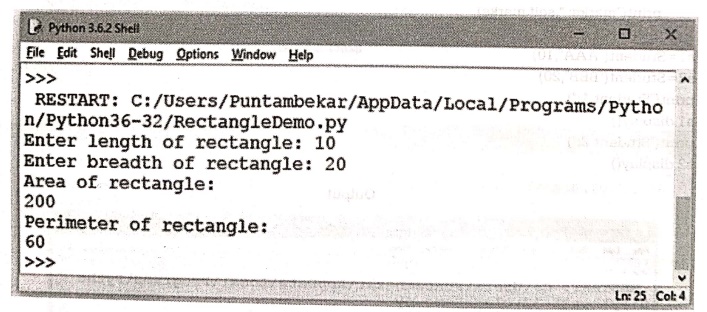
a=int(input("Enter length of rectangle: "))
b=int(input("Enter breadth of rectangle: "))
obj=Rectangle(a,b)
print("Area of rectangle: ")
obj.area()
print("Perimeter of rectangle: ")
obj.perimeter()
Output
2. Returning Instances
•
A function can return instances. In other words the object of particular class
can be a return values of some function.
•
Following example illustrates this concept.
RectanglePoint.py
class Point:
x=0
y=0
class Rectangle:
def _init_(self,length, breadth): #constructor
self.length=length
self.breadth=breadth
def find_center_point(rect): #This method is outside the class
p=Point()
p.x=rect.length/2
p.y=rect.breadth/2
return p #returning
instance of class Point
a=int(input("Enter length of rectangle: "))
b=int(input("Enter breadth of rectangle: "))
obj=Rectangle(a,b)
pt=find_center_point(obj)
print("Point(x,y) =
(",pt.x,",",pt.y.")")
Output
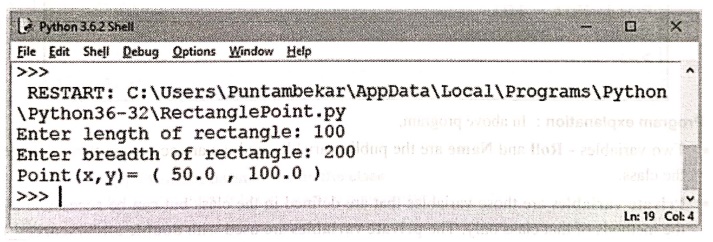
Program explanation:
In above program,
1.
We have defined two classes namely ‒ Point
and Rectangle.
2.
Point class posses two points ‒ x
and y.
3.
Rectangle class contains init
method. The init method initializes the two variables ‒ length and breadth by
the values.
4.
One function named find_center_point
is defined outside the class. Inside this class, the instance p of class Point is defined. This object is initialized by its x and y values. Finally this instance is returned from the function. The
return values are then displayed using print
statement.
3. Public and Private Memebers
•
Public variables are those variables
that are defined in the class and can be accessed from within the class as well
as from outside the class.
•
All members in a Python class are public
by default.
For example
StudentDemo.py
class Student:
def
__init__(self,R,N): //These are the public members
of class Student
self.Roll=R
self.Name=N
obj=Student(101,"Jayashree")
print("Roll No: ",obj.Roll) #Accessing
public variable outside the class
print("Name:",obj.Name)
Output
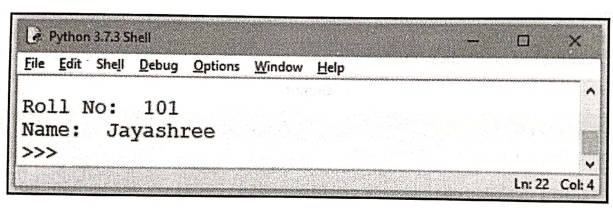
Program explanation:
In above program,
•
Two variables ‒ Roll and Name are the
public variables and we are accessing them outside the class.
•
Private
variables are those variables that are defined in the class but can be
accessible by the methods of that class only. The private variables are used with double underscore(_) prefix.
For example
StudentDemo.py
class Student:
def _init_(self,R,N):
self._Roll=R #private
variable 'Roll'
self.___Name=N #private
variable 'Name'
obj=Student(101,"Jayashree")
print("Roll No: ",obj. Roll) #trying to access private attribute
#outside the class and that will cause
error
Output
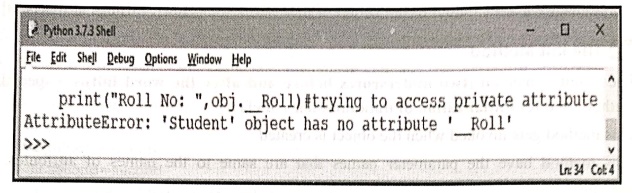
Program explanation:
In above program,
1)
There are two private variables ‒ Roll
and Name. Note that to make these
variables private they are written using the prefix as double underscore.
2)
When we try to access these variables outside the class using the object of
that class, it gives an Attribute error. Refer the screenshot for the output.
4. Printing Objects
•
We can display the object with the help of method. For that purpose we need to
define the appropriate method inside the class.
•
For example ‒
MethodDemo.py
class Time:
hour=0
minute=0
second=0
def display(t): #Method defined inside the class
print('%.2d:%.2d:%.2d'
% (t.hour, t.minute, t.second))
time=Time()
time.hour=11
time.minute=58
time.second=20
Time.display(time)#Method
is called using object of class
Output
11:58:20
Program explanation:
In above program,
1.
We have created a class named Time.
2.
The display method is defined for
this class. Note that this definition is inside the class.
3.
The object or instance of the class Time
is created in variable time.
4.
Using the object time we invoke the method display
with the help of dot operator. Hence we get the output as the values of data
attributes ‒ Hour, minute and second.
5. The init Method
•
The _init_ method (two underscores
before and after the word init) is a specialized method used for initialization of data members of
class.
•
This method gets invoked when the object is created
•
This method have the parameter names that are same to the names of attributes.
For
example
self.name=name
• Example
InitDemo.py
class Time:
hour=0
minute=0
second=0
def
__init__(self,hour, minute,second):
self.hour‒hour
self.minute=minute
self.second=second
def display(t):#Method
defined inside the class
print('%.2d:%.2d:%.2d'
% (t.hour, t.minute, t.second))
time=Time(11,58,20)
#The method___init__ is called
Time.display(time)#Method
is called using object of class
Output
11:58:20
Program explanation:
In above program,
1.
We have defined a class named Time.
2.
The data attributes of this class are hour,
minute and second. The method of
this class is display.
3.
There is one special method defined in the class Time and that is ‒ the_init_
method.
4.
The parameters that are passed to this method are self, hour, minute and second.
5.
The __init __method is not called
explicitly rather it is called implicitly when the object of this class is
created. Thus the hour, minute and second values are i by the values
passed to Time()
6.
Finally using the display method, the values that are assigned to the data
attributes are displayed.
Default arguments
•
The default arguments are those
arguments that are assigned with values
during the function definition. These default arguments may get overridden when
some explicit value is passed to the function during its call. Following
example illustrates this concept –
class Time():
def
__init__(self,hour=0,minute=0,second=0):
self.hour‒hour
self.minute=minute
self.second=second
def display(t):
#Method defined inside the class
print('%.2d:%.2d:%.2d'
% (t.hour, t.minute, t.second))
time=Time(11) #only first
argument is passed explicitly
Time.display(time)#Method is called using object of class
Output
11:00:00
•
In the above program, the value of hour is overridden by the value which is
passed to the Time(). The init method defines the default
arguments as hour‒0, minute=0, second=0.
6. The_str__ Method
•
The __str__ is a special method that returns the string representation of an object.
•
The self is an argument that must be
passed to the __str__ method.
•
Example
StrDemo.py
class Student:
def __init__(self,name,marks):
self.name=name
self.marks=marks
def__str__(self):
#Method defined inside the class
return '(%s,%.2d)'
% (self.name, self.marks)
st=Student("AAA",95) #The method init and str are called
print(st)#The return
value of str method is displayed
Output
(AAA,95)
Program explanation:
In above program,
1.
We have defined a class Student
2.
The data attributes are name and marks.
3.
There are two special methods ‒ init
and str.
4.
The init method initializes the name
and marks with the values.
5.
The str method returns a string
which helps us to display the values of data arguments ‒ name marks.
Example:2
Write a
Python program using the str method for Point class. Create a Point object and
print it.
Solution:
class Point:
def
__init__(self,x,y):
self.x=x
self.y=y
def ___str__(self):
return '(%d,%d)' %
(self.x, self.y)
pt=Point(10,20)
print(pt)
Output
(10,20)
Python for Data Science: Chapter 2: Functions and Files : Tag: Computer Programming, Python, Data Science : - Python: Creating and using a Class
Python for Data Science: Chapter 2: Functions and Files
Under Subject

Python for Data Science
AD25201 2nd Semester AIDS Dept | 2025 Regulation | 2nd Semester 2025 Regulation
Related Subjects

English Essentials II
EN25C02 2nd Semester | 2025 Regulation | 2nd Semester 2025 Regulation

Tamils and Technology தமிழர்களும் தொழில்நுட்பமும்
UC25H02 2nd Semester | 2025 Regulation | 2nd Semester 2025 Regulation

Linear Algebra
MA25C02 2nd Semester | 2025 Regulation

Applied Physics (CSIE) II
PH25C03 2nd Semester AIDS, CSE, IT, CSE(CY) Dept | 2025 Regulation | 2nd Semester 2025 Regulation

Digital Principles and Computer Organization
CS25C06 2nd Semester AIDS, CSE, IT, CSE(CY) Dept | 2025 Regulation | 2nd Semester 2025 Regulation

Basic Electrical and Electronics Engineering
EE25C01 2nd Semester | 2025 Regulation | 2nd Semester 2025 Regulation
Python for Data Science
AD25201 2nd Semester AIDS Dept | 2025 Regulation | 2nd Semester 2025 Regulation

Re-Engineering for Innovation
ME25C05 2nd Semester | 2025 Regulation | 2nd Semester 2025 Regulation

Python for Data Science - Laboratory
AD25201 2nd Semester AIDS Dept | 2025 Regulation | 2nd Semester 2025 Regulation