Python for Data Science: Chapter 2: Functions and Files
Python: Exceptions
Questions: 1. Exceptions - types of errors 2. Python Handling Exceptions 3. Appraise use of try block and except block in Python with syntax. 4. Describe how exceptions are handled in Python with necessary examples. 5. What are exceptions? Explain the methods to handle them with example.
Exceptions
Errors
are normally referred as bugs in the program. They are almost always the fault
of the programmer. The process of finding and eliminating errors is called
debugging.
There
are mainly two types of errors:
1. Syntax
errors: The python finds the syntax errors when
it parses the source program. Once it find a syntax error, the python will exit
the program without running anything. Commonly occurring syntax errors are :
i)
Putting a keyword at wrong place.
ii)
Misspelling the keyword.
iii)
Incorrect indentation.
iv)
Forgetting the symbols such as comma, brackets, quotes.
v)
Empty block.
2. Run
time errors: If a program is syntactically correct ‒
that is, free of syntax errors ‒ it will be run by the python interpreter.
However, the program may exit unexpectedly during execution if it encounters a
runtime error. The run‒time errors are not detected while parsing the source
program, but will occur due to some logical mistake.
Examples
of runtime error are :
i)
Trying to access the a file which does not exists.
ii)
Performing the operation of incompatible type elements.
iii)
Using an identifier which is not defined.
iv)
Division by zero.
Such
type of errors are handled using exception handling mechanism.
1. Handling
Exceptions
Definition of
exception: An exception is an event
which occurs during the execution of a program that interrupts the normal flow
of the program.
•
In general, when a python script encounters a situation that it cannot cope
with, it raises an exception.
•
When a python script raises an exception, it must either handle the exception
immediately otherwise it terminates and quits.
•
The exception handling mechanism using the
try...except...else blocks.
•
The suspicious code is placed in try
block.
•
After
try block place the except block
which handles the exception elegantly.
•
If there is no exception then the else
block statements get executed.
Syntax of
try...except...else
try:
write
the suspicious code here
except Exception
1:
If
Exception 1 occurs then execute this code
except
Exception 2:
If
Exception 2 occurs then execute this code
…
…
else:
If
there is no exception then execute this code.
Example
Suppose
programmer wants some integer value and some character value is entered then
python will raise error. This scenario can be illustrated by following
screenshot
In [1]:
n=int(input("Enter some number"))
Enter some number x
‒‒‒‒‒‒‒‒‒‒‒‒‒‒‒‒‒‒‒‒‒‒‒‒‒‒‒‒‒‒‒‒‒‒‒‒‒‒‒‒‒‒‒‒‒‒‒‒‒‒‒‒‒‒‒‒‒‒‒‒‒‒‒‒‒‒‒‒‒‒‒‒‒‒‒‒‒‒‒‒‒‒‒‒‒‒‒‒‒‒‒‒‒‒‒‒‒‒‒
Traceback (most recent call last)
ValueError
Cell In[1], line 1
‒‒‒‒> 1 n=int(input("Enter some number"))
ValueError: invalid literal for int() with base 10: 'x'
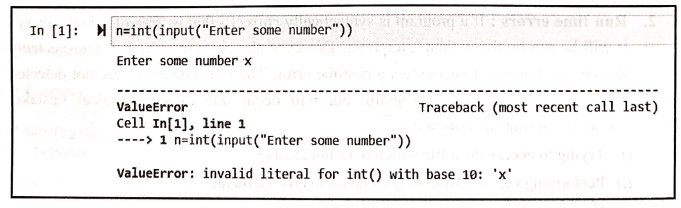
Such
situation can be gracefully handled using exception handling mechanism as
follows :
Step 1:
Create a python script as follows:
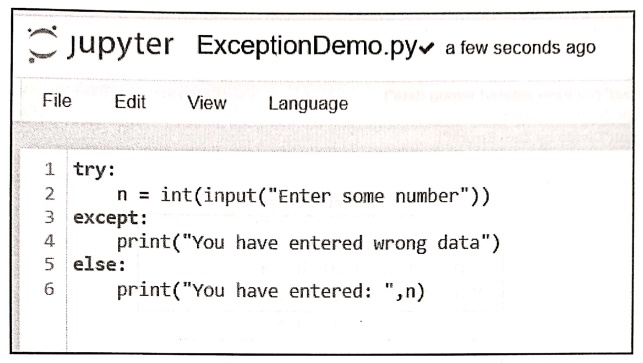
Step 2:
Now run the above code for both valid and invalid inputs.
Output(Run1: Execution
of except block)
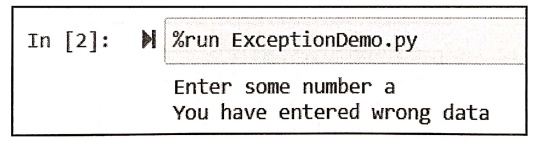
In [2]:
%run ExceptionDemo.py
Enter some number a
You have entered wrong data
Output(Run2: Execution
of else block)
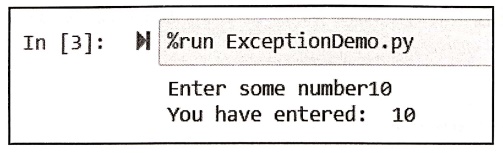
In [3]:
%run ExceptionDemo.py
Enter some number10
You have entered: 10
•
A single try can have multiple except statements. We can specify standard
exception names for handling specific type of exception. For example
Example:1
Write a
Python program to perform division of two numbers. Raise the exception if the
wrong input(other than integer) is entered by the user. Also raise an exception
when divide by zero occurs.
Solution :
try:
a=int(input("Enter
value of a: "))
b=int(input("Enter
value of b: "))
c=a/b
except ValueError:
print("You have entered wrong
data")
except ZeroDivisionError:
print("Divide by
Zero Error!!!")
else:
print("The result: ",c)
Output(Run1)
Enter value of a: 10
Enter value of b: a
You have entered wrong
data
Output(Run2)
Enter value of a: 10
Enter value of b: 0
Divide by Zero
Error!!!
Output(Run3)
Enter value of a: 10
Enter value of b: 5
The result: 2.0
Example: 2
Write a
program to read the contents of the file. If the file does not exist then raise
appropriate exception.
Solution :
try:
inFile=open("myfile.txt","rt")
except IOError:
print("Error:File
Not found")
else:
print(inFile.read())
#displaying contents of file on getting file
Output
Error: File Not found
Example:3
Write a
Python program to open a file having no write permission but trying to write
the data. Handle this situation using exception handling mechanism.
Solution :
try:
FileObj=open("myfile.txt",'rt')
FileObj.write("This
is my data")
except IOError:
print("Error:File
does not have write permission!!!")
else:
print("Contents
are written Successfully!!!")
Output
Error: File does not
have write permission!!!
Standard exceptions in Python
Name and Purpose
Exception
‒ Base class for all exceptions.
ArithmeticError
‒ Base class for all errors that occur for numeric calculation.
OverflowError
‒ Raised when a calculation exceeds maximum limit for a numeric type.
FloatingPointError
‒ Raised when a floating point calculation fails.
ZeroDivisionError
‒ Raised when division or modulo by zero takes place for all numeric types.
EOFError
‒ Raised when there is no input from either the raw_input() or inputO function
and the end of file is reached.
ImportError
‒ Raised when an import statement fails.
KeyboardInterrupt
‒ Raised when the user interrupts program execution, usually by pressing
Ctrl+c.
NameError
‒ Raised when an identifier is not found in the local or global namespace.
IOError
‒ Raised when an input/ output operation fails.
SystemError
‒ Raised when the interpreter finds an internal problem, but when this error is
encountered the python interpreter does not exit.
SystemExit
‒ Raised when python interpreter is quit by using the sys.exit() function. If
not handled in the code, causes the interpreter to exit.
TypeError
‒ Raised when an operation or function is attempted that is invalid for the
specified data type.
ValueError
‒ Raised when the built‒in function for a data type has the valid type of
arguments, but the arguments have invalid values specified.
RuntimeError
‒ Raised when a generated error does not fall into any category.
Use of
finally
The
finally clause will be executed at the end of the try‒except block no matter
what ‒ if there is no exception, if an exception is raised and handled, if an
exception is raised and not handled and even if we exit the block using break,
continue or return. We can use the finally clause for cleanup code that we
always want to be executed.
For example:
try:
age=int(input("Enter
your age"))
except ValueError:
print("Invalid
age")
else:
print("Your age
is: ",age)
finally:
print("Good
Bye")
Output
Enter your age26
Your age is: 26
Good Bye
Output
Enter your age ten
Invalid age
Good Bye
Review Questions
1. Appraise use of try
block and except block in Python with syntax.
2. Describe how
exceptions are handled in Python with necessary examples.
3. What are
exceptions? Explain the methods to handle them with example.
Python for Data Science: Chapter 2: Functions and Files : Tag: Computer Programming, Python, Data Science : - Python: Exceptions
Python for Data Science: Chapter 2: Functions and Files
Under Subject

Python for Data Science
AD25201 2nd Semester AIDS Dept | 2025 Regulation | 2nd Semester 2025 Regulation
Related Subjects

English Essentials II
EN25C02 2nd Semester | 2025 Regulation | 2nd Semester 2025 Regulation

Tamils and Technology தமிழர்களும் தொழில்நுட்பமும்
UC25H02 2nd Semester | 2025 Regulation | 2nd Semester 2025 Regulation

Linear Algebra
MA25C02 2nd Semester | 2025 Regulation

Applied Physics (CSIE) II
PH25C03 2nd Semester AIDS, CSE, IT, CSE(CY) Dept | 2025 Regulation | 2nd Semester 2025 Regulation

Digital Principles and Computer Organization
CS25C06 2nd Semester AIDS, CSE, IT, CSE(CY) Dept | 2025 Regulation | 2nd Semester 2025 Regulation

Basic Electrical and Electronics Engineering
EE25C01 2nd Semester | 2025 Regulation | 2nd Semester 2025 Regulation
Python for Data Science
AD25201 2nd Semester AIDS Dept | 2025 Regulation | 2nd Semester 2025 Regulation

Re-Engineering for Innovation
ME25C05 2nd Semester | 2025 Regulation | 2nd Semester 2025 Regulation

Python for Data Science - Laboratory
AD25201 2nd Semester AIDS Dept | 2025 Regulation | 2nd Semester 2025 Regulation