Python for Data Science: Chapter 2: Functions and Files
Python: Working with Strings
Questions: 1. Analyse the string slicing. Illustrate how it is done in Python with examples, 2. Write a Python code to search a string in the given list. 3. Python strings are immutable, Justify with an example.
Working
with Strings
String
is basically the sequence of characters.
Any
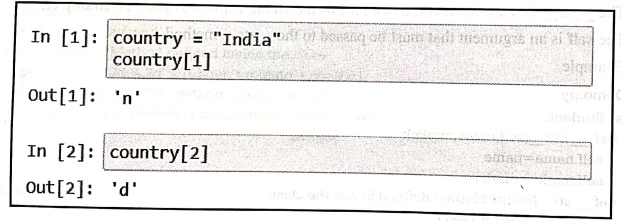
desired character can be accessed using the index. For example ‒
In [1]:
country = "India"
country [1]
Out[1]:
'n'
In [2]:
country[2]
Out[2]:
'd'
The
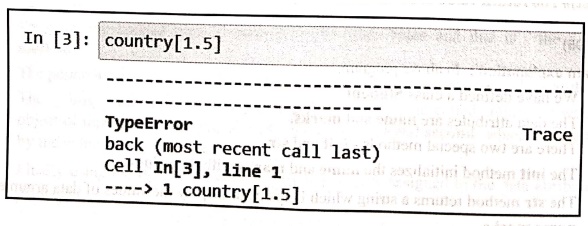
index is an integer value if it is a decimal value, then it will raise an
error.
For
example ‒
In [3]:
country [1.5]
‒‒‒‒‒‒‒‒‒‒‒‒‒‒‒‒‒‒‒‒‒‒‒‒‒‒‒‒‒‒‒‒‒‒‒‒‒‒‒‒‒‒‒‒‒ ‒‒‒‒‒‒‒‒‒‒‒‒‒‒‒‒‒ ‒‒‒‒‒‒‒‒‒‒‒‒‒‒‒‒‒‒‒‒‒‒‒‒‒‒‒‒‒‒‒‒‒‒‒‒
‒‒‒‒‒‒‒‒‒‒‒‒‒‒‒‒‒‒‒‒‒‒‒‒‒‒‒‒‒‒‒‒‒‒‒‒‒‒‒‒‒‒‒‒‒‒‒‒
TypeError
Trace
back (most recent call last)
Cell In[3], line
‒‒‒‒> 1 country[1.5]
The
string can be created using double quotes or single quotes. For example ‒
In[1]: msg="Hello"
Hello
print(msg)
In[2]: msg='Goodbye'
print(msg)
Goodbye
Finding
length of a string
There
is an in‒built function to find length of the string. This is len function.
For
example ‒
In[3]: msg='Goodbye'
print(msg)
Goodbye
In[4]: len(msg)
7
Traversing
the string
We
can traverse the string using the for loop or using while loop.
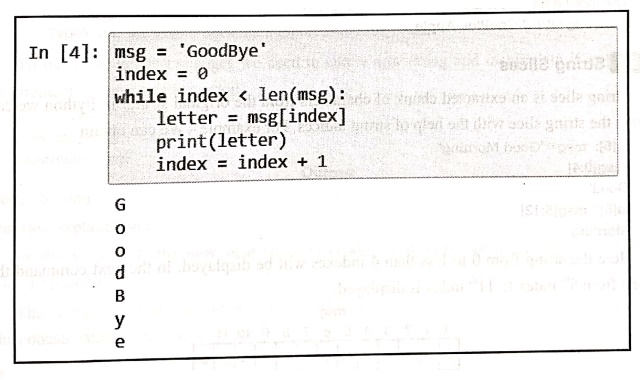
Example 1 ‒ Traversing a string using while string.
In [4]:
msg = 'GoodBye'
index = 0
while index < len(msg):
letter = msg[index]
print(letter)
index = index + 1
G
o
o
d
B
y
e
Example 2 ‒ The string can be traversed using for loop.
msg = 'GoodBye'
for index in range(0, len(msg)):
letter = msg[index]
print(letter)
index index + 1
Output
G
o
o
d
B
y
е
Example:1
Write a
program to display a set of strings using range() function.
Solution :
handsets = ['Samsung', 'OPPO', 'OnePlus', 'Apple']
print("The mobile
handsets are...")
for i in range(len(handsets)):
print(handsets[i], end ="")
Output
The mobile handsets
are...
Samsung OPPO OnePlus
Apple
1. String Slices
String
slice is an extracted chunk of characters from the original string. In Python
we can obtain the string slice with the help of string indices. For example ‒
We can obtain
In[5]: msg="Good Morning"
msg[0:4]
'Good'
In[6]: msg[5:12]
'Morning'
Here
the string from 0 to less than 4 indexes will be displayed. In the next command
the string from 5th index to 11th index is displayed.
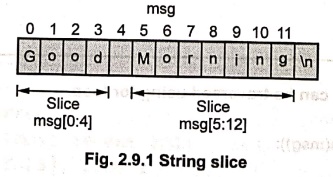
Fig. 2.9.1 String
slice
We can omit the beginning index. In that case,
the beginning index is considered as 0.
For
example ‒
In[7]: msg[:4] ←Here the starting index will be 0
'Good'
Similarly
we can omit ending index. In that case, the string will be displayed upto its
ending
character. For example ‒
msg[5:] ←Here the last
character of the string is the ending index
'Morning'
If
we do not specify any starting index or ending index then the string from
starting index 0 to ending index as last character position will be considered
and the entire string will be displayed. For example ‒
msg[:]
'Good Morning'
2. Immutability
Strings
are immutable i.e. we cannot change the existing strings. For example –
msg="Good Morning"
msg[0]='g'
Output
TypeError: 'str'
object does not support item assignment
To
make the desired changes we need to take a new string and manipulate it as per
our requirement. Here is an illustration
msg = 'Good Morning'
new_msg = 'g'+ msg[1:]
print(new_msg)
Output
Good Morning
Program explanation:
In
above example the new_msg string is
created to display "good morning" instead of "Good
Morning".
The
string slice from character 1 to end of string is concatenated with the
character 'g'. The concatenation is performed using the operator +.
3. String Functions and Methods
In
this section we will discuss various string functions and methods.
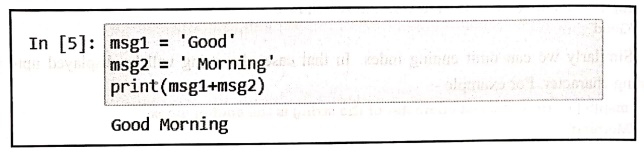
1. String concatenation
Joining
of two or more strings is called concatenation.
In
python we use + operator for concatenation of two strings.
For example ‒
In [5]:
msg1 = 'Good'
msg2 = Morning'
print(msg1+msg2)
Good Morning
2. String comparison
The
string comparison can be done using the relational operators like <,>== .
For
example ‒
In [6]:
msg1 = 'aaa'
msg2 = 'aaa'
msg1 = = msg2
Out[6]: True
In [7]:
msg1 = 'aaa'
msg2 = 'bbb'
print(msg1<msg2)
True
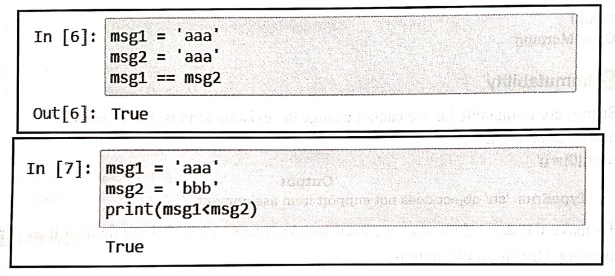
Note
that the string comparison is made based on alphabetical ordering. All the
upper case letters appear before all the lower case letters.
3. String repetition
We
can repeat the string using * operator. For example ‒
msg="Welcome!"
print(msg*3)
Welcome!Welcome!Welcome!
4. Membership test
The
membership of a particular character is determined using the keyword in.
For
example –
msg="Welcome"
'm' in msg
True
't'in msg
False
Methods in string manipulation
Some
commonly used methods are enlisted in the following table.
Method : Purpose
count()
‒ This method searches the substring and returns how many times the substring
is
present
in it.
capitalize()
‒ This function returns a string with first letter capitalized. It doesn't
modify the old string.
find()
‒ The find() method returns the lowest index of the substring (if found). If
not found, it returns ‒1.
Index
‒ This method returns the index of a substring inside the string (if found). If
the substring is not found, it raises an exception.
isalnum()
‒ The isalnum() method returns true if all characters in the string are
alphanumeric.
isdigit()
‒ The isdigit() method returns true if all characters in a string are digits.
If not, it returns false.
islower()
‒ The islower() method returns true if all alphabets in a string are lowercase
alphabets. if the string contains at least one uppercase alphabet, it returns
false.
Python Programming examples based on string
Example:2
Write a
Python program to find the length of a string.
Solution:
def str_length(str):
len=0
for ch in str:
len+=1
return len
print("\t\t Program to find the length of a string")
print("Enter some string: ")
str=input()
print("Length of a string is: ",str_length(str))
Output
Program to find the
length of a string
Enter some string:
python
Length of a string is:
6
Example:3
Write a
Python program to count occurrences of each word in given sentence.
Solution:
def count_occur(str):
data=dict()
words=str.split()
for word in words:
if word in data:
data[word]+=1
else:
data[word]=1
return data
print("Enter some string: ")
str=input()
print(count_occur(str))
Output
Enter some string :
A big black bear sat
on a big black rug
{'A': 1, 'big': 2,
'black': 2, 'bear': 1, 'sat': 1, 'on': 1, 'a': 1, 'rug': 1}
Example:4
Write a
Python program to copy one string to another.
Solution :
print("Enter some string: ")
str1=input()
str2="
for i in range (len(str1)):
str2=str2+str1[i]
print("The copied string is: ",str2)
Output
Enter some string:
Technical
The copied string is:
Technical
Example:5
Write a
Python program to check if a substring is present in the given string or not.
Solution :
print("Enter some string: ")
str1=input()
print("Enter a word: ")
str2=input()
if(str1.find(str2)= = ‒1):
print("The
substring ",str2," is not present in ",str1)
else:
print("The
substring ",str2," is present in ",str1)
Output
Enter some string:
sky blue
Enter a word:
blue
The substring blue is
present in sky blue
Example:6
Write a
Python program to count number of digits and letters in a string.
Solution :
print("Enter some string: ")
str=input()
digit_count = 0
letter_count = 0
for i in str:
if(i.isdigit()):
digit_count+=1
else:
letter count+=1
print("Total number of digits in ",str," are
",digit_count)
print("Total number of letters in ",str," are
",letter_count)
Output
Enter some string :
Python123Program
Total number of digits
in Python123Program are 3
Total number of
letters in Python123Program are 13
Example:7
Write a
Python program to count number of vowels in a string.
Solution :
print("Enter some string: ")
str=input()
vowel_count=0
for i in str:
if((i= ='a' or i= ='e' or i= ='i' or i= ='o' or i= ='u')
or((i= ='A' or i= ='E' or i= ='I' or i= ='0' or i= ='U'))):
vowel_count + =1
print("Total number of vowels in ",str," are
",vowel_count)
Output
Enter some string:
India
Total number of vowels
in India are 3
Example:8
Write a
Python program to check if the string is palindrome or not.
Solution :
print("Enter some string: ")
str=input()
rev_str=reversed(str)
if(list(str)==list(rev_str)):
print("The string
",str," is palindrome")
else:
print("The string
",str," is not palindrome")
Output
Enter some string :
madam
The string madam is
palindrome
Example:9
Write a
Python program to sort the word in a sentence in an alphabetic order.
Solution :
print("Enter some string: ")
str=input()
words_list=str.split()
words_list.sort()
print("The words in sorted order are...")
for word in words_list:
print(word)
Output
Enter some string :
I like python program
very much
The words in sorted
order are...
I
like
much
program
python
very
Review Questions
1. Analyse the string
slicing. Illustrate how it is done in Python with examples,
2. Write a Python code
to search a string in the given list.
3. Python strings are
immutable, Justify with an example.
Python for Data Science: Chapter 2: Functions and Files : Tag: Computer Programming, Python, Data Science : - Python: Working with Strings
Python for Data Science: Chapter 2: Functions and Files
Under Subject

Python for Data Science
AD25201 2nd Semester AIDS Dept | 2025 Regulation | 2nd Semester 2025 Regulation
Related Subjects

English Essentials II
EN25C02 2nd Semester | 2025 Regulation | 2nd Semester 2025 Regulation

Tamils and Technology தமிழர்களும் தொழில்நுட்பமும்
UC25H02 2nd Semester | 2025 Regulation | 2nd Semester 2025 Regulation

Linear Algebra
MA25C02 2nd Semester | 2025 Regulation

Applied Physics (CSIE) II
PH25C03 2nd Semester AIDS, CSE, IT, CSE(CY) Dept | 2025 Regulation | 2nd Semester 2025 Regulation

Digital Principles and Computer Organization
CS25C06 2nd Semester AIDS, CSE, IT, CSE(CY) Dept | 2025 Regulation | 2nd Semester 2025 Regulation

Basic Electrical and Electronics Engineering
EE25C01 2nd Semester | 2025 Regulation | 2nd Semester 2025 Regulation
Python for Data Science
AD25201 2nd Semester AIDS Dept | 2025 Regulation | 2nd Semester 2025 Regulation

Re-Engineering for Innovation
ME25C05 2nd Semester | 2025 Regulation | 2nd Semester 2025 Regulation

Python for Data Science - Laboratory
AD25201 2nd Semester AIDS Dept | 2025 Regulation | 2nd Semester 2025 Regulation