Computer Programming C: UNIT IV: Structures and Unions
Structures and Unions
C Programming
1. Introduction 2. Declaring a structure 3. Accessing Structure Elements 4. Structure assignment 5. Structure of Pointers 6. Nested Structure 7. Passing structure to function 8. Arrays of structure 9. Self referential structure
STRUCTURES AND UNION
1. Introduction
2. Declaring a structure
3. Accessing Structure Elements
4. Structure assignment
5. Structure of Pointers
6. Nested Structure
6.1 Structure within structure in C using normal variable
6.2 Structure within structure in C using pointer variable
7. Passing structure to function
8. Arrays of structure
9. Self referential structure
1. INTRODUCTION
So
far we have discussed that arrays can be used to represent a group of
interrelated data items of the same type under a common name. If we want to
represent a group of data items of different data types under a common name,
then the array is not useful in this case.
For
this purpose, 'C' provides a constructed data type known as structure which
packs the data items of different types.
A
Structure contains one or more data items of different data type in which the
individual elements can differ in type. A simple structure may contain the
integer elements, float elements and character elements etc. The individual
structure elements are called members.
The
C language provides powerful tool for grouping of different data types
together, known as structures. Structures are used, when we want to process
data of multiple data types but we want to refer the data as a single entity.
Eg 1:
You might want to process information on students, in the category of names and
marks. Here we can declare the structure 'student' with the fields names and
marks and we can assign their appropriate data types. These fields are called
members of the structure.
Eg 2:
You want to store a date 13/08/2013 inside a program, perhaps to be used for
the heading of some program result, or even for computational purposes.
A
normal way of storing the date is to simply assign the day to an integer
variable called date, the month to an integer variable called month, and the
year to an integer variable called year like below.
int day = 13, month = 08, year = 2019;
This
is a good approach. But suppose the program requires storing the date of births
of students, You can go about the same procedure of defining them such as Birth
Day, Birth Month and Birth Year, these variable could be explicitly used as and
when required.
Using
this method, you must keep track of three separate variables for each date that
you use in the program. It would be much easier and better if you could group
these sets of three variables together. This is precisely what the structure in
C allows you to do.
The
syntax for such a definition is rather straight forward, as follows:
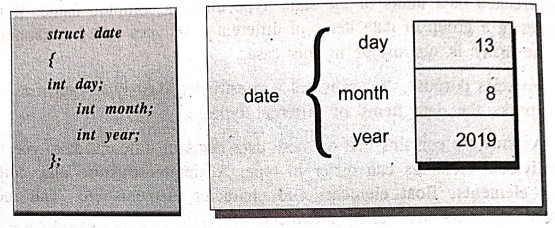
The
date structure just defined contains three integer members called day, month,
and year. The definition of date in a sense defines a new type in the language
in that variables can subsequently be declared to be of type struct date, as in
the declaration
struct date today;
You
can also declare a variable BirthDate to be of the same type by a separate
declaration such as;
struct date Birth Date;
Or,
you can simply include the two declarations on the same line, as in
struct date today, Birth Date;
Unlike
variables of type int, float, or char, a special syntax is needed when dealing
with structure variables. A member of a structure is accessed by specifying the
variable name, followed by a period, and then the member name.
The
below mentioned program is to set the value of the day in the variable today to
13, you can specify today.day=13; to
set the month today.month=08; and to
set the year in today to 2019, today.year=2019;
Example: Illustrating
the date Structure.
/* Program to illustrate a structure */
#include <stdio.h>
int main (void)
{
struct date
{
int day;
int month;
int year;
};
struct date today;
today.day = 13;
today.month = 8;
today.year 2013;
printf ("Today's date is %i/%i/%.2i.\n", today.day,
today.month,today.year % 100);
return 0;
}
OUTPUT
Today's date is
13/8/2013
2. DECLARING A STRUCTURE
The
structure can be declared with the keyword struct
following the name and opening brace with data elements of different type then
closing brace with semicolon, as shown below.
Syntax:
struct structure name
{
structure element 1;
structure_element 2;
….
structure_element n;
};
struct structure_name
v1, v2,...., vn;
Description:
v1, v2,...vn are
Structure variables
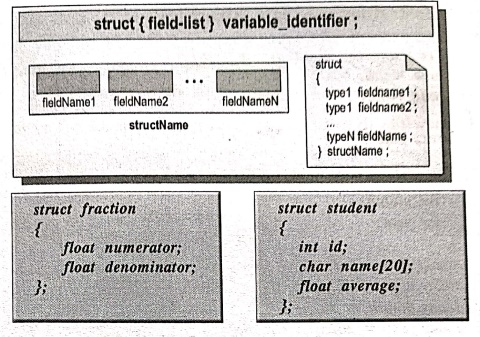
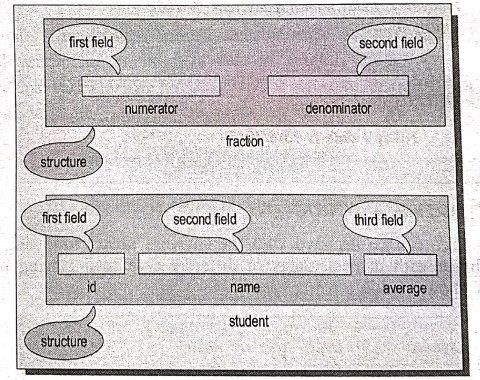
The
above structure declaration described in pictorial format below.
Example:
struct
book
{
char name[10];
float price;
int pages;
};
struct
book b1, b2,b3;
In
the above example book is the structure name, char name, float price, int pages
are structure elements where b1, b2,b3 are called structure variables. Usually
structure type declaration appears at the top of the source code, before any
variables or functions are defined.
i) Rules for declaring a structure
a)
A Structure must end with a semicolon.
b)
Usually a structure appears at the top of the source program.
c)
Each structure element must be terminated.
d)
The structure variable must be accessed with structure variable with dot (.)
operator.
ii) Difference between Array and Structure
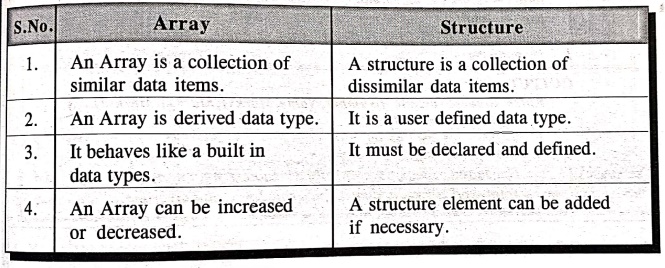
Array
•
An Array is a collection of similar data items.
•
An Array is derived data type.
•
It behaves like a built in data types.
•
An Array can be increased or decreased.
Structure
•
A structure is a collection of dissimilar data items.
•
It is a user defined data type.
•
It must be declared and defined.
•
A structure element can be added if necessary.
3. ACCESSING STRUCTURE ELEMENTS
After
declaring the structure type, variables and members, the member of the
structure can be accessed by using the structure variable along with the dot
(.) operator.
Example:
struct std
{
int no;
char name[10];
int marks;
};
struct std s;
For
accessing the structure members from the above example.
s.no;
s.name;
s.marks;
Where
's' is the structure variable.
Example: Program to
print the student number, name and marks through accessing structure elements.
/* Program to access structure elements */
#include <stdio.h>
struct std /* std is a structure with elements */
{
int no;
char name[10];
int ml, m2, int m3;
};
struct std s;
void main()
{
/* Local definitions */
float total, avg;
printf("Enter Student details (Number, Name,Marks1, Marks2,
Marks3)....\n");
scanf("%d %s %d %d %d", &s.no, &s.name,
&s.ml, &s.m2, &s.m3);
total = s.m1+s.m2+s.m3;
avg = total/3;
printf("%d\t%s\t%.2f%.2f\t%.2f",s.no, s.name, total,
avg);
} /*main */
OUTPUT
Enter Student details
(Number, Name, Marks1, Marks2, Marks3)....
1 mahi 99 95 97
1 mahi 291.00 97.00
EXPLANATION:
The main() reads the structure variable s.no,s.name,s.ml,s.m2, and s.m3
Calculate to total and average then prints the total and average.
4. STRUCTURE ASSIGNMENT
The
one structure information can be assigned to another structure of the same type
using single assignment statement. We do not require to assign the value of
each member separately.
#include <stdio.h>
#include <conio.h>
struct stru1
{
char x;
int y;
double z;
} s1,s2;
void st_assign(void)
{
s1 = s2;
}
int main()
{
st_assign();
return 0;
}
Example: Program to
print a value from structure.
/* Program to print a value from structure */
#include <stdio.h>
#include <conio.h>
void main()
{
/* structure definitions */
struct
{
int a; /* members */
int b;
}x,y; /* structure variable */
x.a=29;
y=x; /* assigns one structure to another */
clrscr();
printf("%d",y.a);
getch();
} /* main */
OUTPUT
29
EXPLANATION:
The structure contains members namely a, b and x, y, where the structure
variable x.a holds same value and the structure variable is assigned to another
variable of same structure,
5. STRUCTURE POINTERS
C
language allows pointers to structures just as it allows pointers to any other
data type. However, Structure pointers are declared by placing * in front of a
structure variable's name.
struct student *pt
There
are two primary advantages of structure pointers:
•
To pass a structure to a function using call by reference and to create linked
lists and other dynamic data structures that rely on dynamic allocation.
There
is one major drawback to passing all but the simplest structures to functions,
the overhead needed to push the structure onto the stack when the function call
is executed. For simple structures with few members, this overhead is not too
great. If the structure contains many members, however, or if some of its
members are arrays, run‒time performance may degrade to unacceptable levels.
The solution to this problem is to pass a pointer to the structure.
When
a pointer to a structure is passed to a function, only the address of the
structure is pushed on the stack. This makes for very fast function calls.
•
The second advantage, in some cases, is that passing a pointer makes it
possible for the function to modify the contents of the structure used as the
argument.
To
find the address of a structure variable, place the & operator before the
structure's name. For example, given the following fragment,
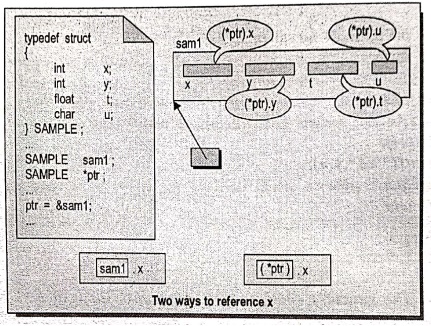
struct student
{
int roll no;
char name[10];
float marks;
} studl;
struct student *p; /*declare a structure pointer*/
This
places the address of the structure stud
into the pointer p:
p = &stud;
To
access the members of a structure using a pointer to that structure, you must
use the ‒> operator
For
example, this references the roll_no field:
p ‒>roll_no
The
‒>, usually called the arrow operator.
The arrow is used in place of the dot operator when you are accessing a structure
member through a pointer to the structure.
Example: Program to
copy a structure in C.
We
can use the below methods to copy one structure to another structure in C
language.
•
We can copy using direct assignment of one structure to another structure or
•
We can use C inbuilt function "memcpy()" or
•
We can copy by individual structure members.
#include <stdio.h>
#include <string.h>
struct student
{
int id;
char name[30];
floatpercentage;
};
int main()
{
int i;
struct student record1={1, "Mahi", 96.5};
struct student record2, *record3, *ptrl, record4;
printf("Records of STUDENT1 record1 structure \n");
printf(" Id: %d\n Name: %s\n Percentage: %f\n",
record1.id, record1.name, record1.percentage);
/* 1sd method to copy whole structure to another
structure */
record2= record1;
printf("\nRecords of STUDENT1‒Direct copy from
""record1 \n");
printf(" Id: %d\n Name: %s\n Percentage: %f\n",
record2.id, record2.name, record2.percentage);
/* 2nd method to copy using memcpy function */
ptrl=&record1;
memcpy(record3, ptrl, sizeof(record1));
printf("\nRecords of STUDENT1‒copied from record1"\"using
memcpy \n");
printf(" Id: %d\n Name: %s\n Percentage: %f\n", record3‒>
id, record3‒>name, record3‒>percentage);
/* 3rd method to copy by
individual members */
printf("\nRecords of STUDENT1‒Coping individual *\ "members
from record1 \n");
record4.id=record1.id;
strcpy(record4.name, record1.name);
record4.percentage record1.percentage;
printf(" Id: %d\n Name: %s\n Percentage: %f\n", record4.id,
record4.name, record4.percentage);
return 0;
}
OUTPUT
Records of STUDENTI ‒
record structure
Id : 1
Name : Mahi
Percentage : 96.500000
Records of STUDENTI - Direct
copy from record1
Id : 1
Name : Mahi
Percentage : 96.500000
Records of STUDENT1 ‒
copied from record1 using memcpy
Id : 1
Name : Mahi
Percentage : 96.500000
Records of STUDENT1‒Coping
individual members from recordl
Id : 1
Name : Mahi
Percentage : 96.500000
6. NESTED STRUCTURE
Nested
structure in C is nothing but structure within structure. One structure can be
declared inside other structure as we declare structure members inside a
structure.
The
structure variables can be a normal structure variable or a pointer variable to
access the data. We will discuss the below.
•
Structure within structure using normal variable.
•
Structure within structure using pointer variable.
1.
Structure within structure in C using normal variable
This
program explains how to use structure within structure using normal variable.
"college_detail' structure is
declared inside "student_detail"
structure in this program. Both structure variables are normal variables.
Please
note that members of "college_detail"
structure are accessed by 2 dot(.) operator and members of "student detail" structure are
accessed by single dot(.) operator.
#include <stdio.h>
#include <string.h>
struct college_detail
{
int college_id;
char college_name[50];
};
struct student_detail
{
intsno;
char name[20];
float percentage;
/*structure within structure*/
struct college_detail_clg_data;
} stu_data;
int main()
{
struct student_detail stu_data = {1, "Mahi", 98.5,
13813, "Anna University"};
printf("Sno is: %d\n", stu_data.sno);
printf("Name is: %s\n", stu_data.name);
printf("Percentage is: %f\n\n", stu_data.percentage);
printf("College Id is: %d\n",
stu_data.clg_data.college_id);
printf("College Name is: %s\n", stu_data.clg_data.college_name);
return 0;
}
OUTPUT
Sno is : 1
Name is : Mahi
Percentage is : 98.500000
College Id is : 13812
College Name is : Anna
University
Sno is : 2
Name is : Karthik
Percentage is : 99.500000
College Id is : 13313
College Name is : Anna
University
Sno is : 3
Name is : Roshan
Percentage is :
96.500000
College Id is: 13413
College Name is: Anna
University
Sno is: 4
Name is : Muni
Percentage is :
98.500000
College Id is : 17776
College Name is: Anna
University
2.
Structure within structure in C using pointer variable
This
program explains how to use structure within structure using pointer variable.
"college_detail' structure is declared inside "student detail"
structure in this program, one normal structure variable and one pointer
structure variable is used in this program.
Please
note that combination of .(dot) and ‒>(arrow) operators are used to access
the structure member which is declared inside the structure.
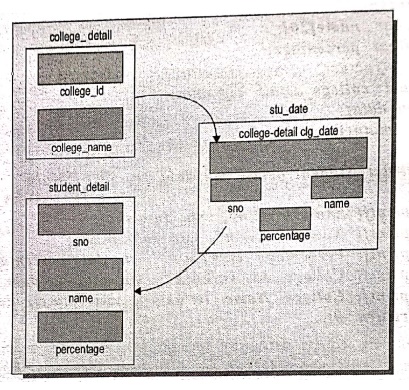
#include <stdio.h>
#include <string.h>
struct college_detail
{ int college_id;
char college_name[50];
};
struct student detail
{ int sno;
char name[20];
float percentage;
/*structure within structure */
struct college_detail_clg_data;
} stu_data, *stu_data_ptr;
int main()
{
struct detail stu_data={1, "Mahi", 98.5, 13813, Anna
University"};
stu_data_ptr=&stu_data;
printf("Sno is: %d\n", stu_data_ptr‒>sno);
printf("Name is: %s\n", stu_data_ptr‒>name);
printf("Percentage is: %f\n\n", stu_data_ptr‒>percentage);
printf("College Id is: %d\n",stu_data_ptr‒>clg_data.college_sno);
printf("College Name is: %s\n", stu_data_ptr‒>clg_data.college_name);
return 0;
}
OUTPUT
Sno is : 1
Name is : Mahi
Percentage is :
98.500000
College Id is : 13813
College Name is : Anna
University
7. PASSING STRUCTURE TO FUNCTION
It
can be done in below 3 ways.
1.
Passing structure to a function by value
2.
Passing structure to a function by address(reference)
3.
No need to pass a structure, declare structure variable as global
Example: Program for
passing structure to function by value
In
this program, the whole structure is passed to another function by value. It
means the whole structure is passed to another function with all members and
their values. So, this structure can be accessed from called function.
#include <stdio.h>
#include <string.h>
struct student
{
int sno;
char name[20];
float percentage;
};
void func(struct student record);
int main()
{
struct student record;
record.sno=1;
strcpy(record.name, "Mahi");
record.percentage = 96.5;
func(record);
return 0;
void func(struct student record)
{
printf(" Sno is: %d \n", record.sno);
printf(" Name is: %s \n", record.name);
printf(" Percentage is: %f \n", record.percentage);
}
OUTPUT
Sno
is : 1
Name
is : Mahi
Percentage
is : 96.50000
Example: Program for
Passing structure to function by address
In
this program, the whole structure is passed to another function by address. It
means only the address of the structure is passed to another function, so, this
structure can be accessed from called function by its address.
#include <stdio.h>
#include <string.h>
struct student
{
int sno;
char name[20];
float percentage;
};
void func(struct student *record);
int main()
{
struct student record;
record.sno=1;
strcpy(record.name, "Mahi");
record.percentage = 96.5;
func(&record);
return 0;
}
void func(struct student record)
{
printf(" Sno is: %d \n", record‒>sno);
printf(" Name is: %s \n", record‒>name);
printf(" Percentage is: %f \n", record‒>percentage);
}
OUTPUT
Sno is : 1
Name is : Mahi
Percentage is :
96.500000
8. ARRAYS OF STRUCTURE
'C'
language permits to declare an array of structure variable. For example: If you
want to handle more records within one structure, we need not specify the
number of structure variable. Use simply the array of structure variable to
store them in one structure variable.
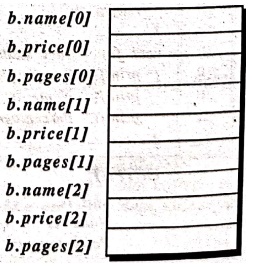
struct book
{
char name [10];
int price;
int pages;
};
struct book b[3];
Example: Program to
store 3 records in one structure.
/* Program to store 3 records in one structure */
#include<stdio.h>
#include <conio.h>
struct book /* book is a structure with elements */.
{
char name[10];
int price;
int pages;
};
struct book b[3];
void main()
{
int i; /*Local definitions */
/* Statements */
clrscr();
for(i=1;i<=3;i++)
{
printf("Enter book name, price and pages: \n");
scanf("%s %d %d", &b[i].name, &b[i].price,
&b[i].pages);
} /* for */
for(i=1;i<=3;i++)
printf("\n%s\t %d\t%d", b[i].name, b[i].price,
b[i].pages);
getch();
} /* main */
OUTPUT:
Enter book name, price
and pages:
English 165 200
Enter book name, price
and pages:
Maths 300 450
Enter book name, price
and pages:
Physics 250 370
English 165 200
Maths 300 450
Physics 250 370
EXPLANATION: Here struct book b[3]
creates space in memory to store 3 structure variables. In an array of
structures all elements of the array are stored in adjacent memory locations.
Since each element of this array is a structure. We can very well visualize the
arrangements of array of structures in memory. In our example b[0]'s name,
price and pages in memory would be immediately followed by b[1]'s name, price
and pages, and so on.
9. SELF REFERENTIAL STRUCTURE
A
structure consists of atleast a pointer member pointing to the same structure
is known as a self‒referential structure. In general it can be expressed as,
Syntax:
struct tag
{
member 1;
member 2;
……
struct tag *name;
};
Where
name refers to the name of a pointer variable. Thus, the structure of type tag
will contain a member that points to another structure of type tag.
Example:
struct emp
{
int code:
struct emp *eptr;
}:
/*eptr
is a member, which is a points to struct emp. */
This
is a structure of type emp. The structure contains two members one is integer
type item code another is a pointer to a structure of the same type (i.e. emp).
Therefore this is a self referencial structure.
It
is illegal to use the same structure itself as a member but the pointer to
itself can be used. The indirect way of creating self‒referential structure is
as follows:
struct teacher
{
……….
……….
struct trans t;
};
struct trans
{
………..
………..
struct teacher
*m;
};
Self‒referential
structures are very useful in applications that involve linked data structures,
such as lists and trees.
Computer Programming C: UNIT IV: Structures and Unions : Tag: Computer Science : C Programming - Structures and Unions
Computer Programming C: UNIT IV: Structures and Unions
Under Subject
Computer Programming C
CS25C01 1st Semester | 2025 Regulation | 1st Semester 2025 Regulation
Related Subjects

English Essentials I
EN25C01 1st Semester | 2025 Regulation | 1st Semester 2025 Regulation

தமிழர் மரபு - Heritage of Tamils
UC25H01 1st Semester | 2025 Regulation | 1st Semester 2025 Regulation
Applied Calculus
MA25C01 Maths 1 M1 - 1st Semester | 2025 Regulation | 1st Semester 2025 Regulation

Applied Physics I
PH25C01 1st Semester | 2025 Regulation | 1st Semester 2025 Regulation

Applied Chemistry I
CY25C01 1st Semester | 2025 Regulation | 1st Semester 2025 Regulation
Makerspace
ME25C04 1st Semester | 2025 Regulation | 1st Semester 2025 Regulation
Computer Programming C
CS25C01 1st Semester | 2025 Regulation | 1st Semester 2025 Regulation
Computer Programming Python
CS25C02 1st Semester | 2025 Regulation | 1st Semester 2025 Regulation
Fundamentals of Electrical and Electronics Engineering
EE25C03 1st Semester EEE Depart | 2025 Regulation | 1st Semester 2025 Regulation

Introduction to Mechanical Engineering
ME25C03 1st Semester Mechanical Dept | 2025 Regulation | 1st Semester 2025 Regulation

Introduction to Civil Engineering
CE25C01 1st Semester Civil, Agri Departments | 2025 Regulation | 1st Semester 2025 Regulation
Essentials of Computing
CS25C03 1st Semester - AIDS, CSE, CSE(CY), IT Department | 2025 Regulation | 1st Semester 2025 Regulation

Applied Physics I Laboratory
PH25C01 1st Semester practical Laboratory Manual | 2025 Regulation | 1st Semester Laboratory 2025 Regulation

Applied Chemistry I Laboratory
CY25C01 1st Semester practical Laboratory Manual | 2025 Regulation | 1st Semester Laboratory 2025 Regulation

Computer Programming C Laboratory
CS25C01 1st Semester EEE, ECE, CSE, CSE(CY), AIDS, IT practical Laboratory Manual | 2025 Regulation | 1st Semester Laboratory 2025 Regulation

Computer Programming Python Laboratory
CS25C02 1st Semester practical Laboratory Manual | 2025 Regulation | 1st Semester Laboratory 2025 Regulation
Engineering Drawing
ME25C01 EEE, Mech, Agri, EEE Depts | 2025 Regulation | 2nd Semester 2025 Regulation

Basic Electronics and Electrical Engineering
EE25C04 1st Semester ECE Dept | 2025 Regulation | 1st Semester 2025 Regulation
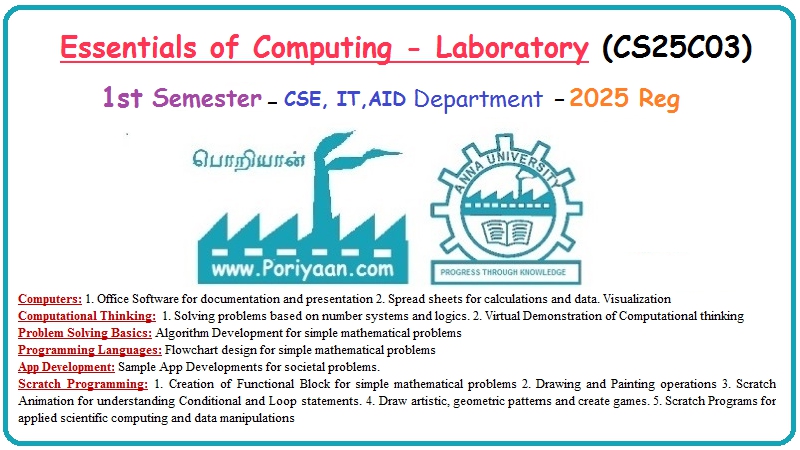
Essentials of Computing - Laboratory
CS25C03 1st Semester AIDS, CSE, CSE(CY), IT Depts | practical Laboratory Manual | 2025 Regulation | 1st Semester 2025 Regulation