Data Structures using C PlusPlus: Chapter 3: Analysis of Algorithms and Arrays
Arrays and its Representations
Data Structures using C++ Program
Data Structures using C++ Program: Analysis of Algorithms and Arrays: Arrays and its Representations
Arrays
and its Representations
•
An array is a collection of elements of similar data type. This collection is
finite. And the elements are stored at adjacent memory locations. Thus array
has to be finite in nature i.e. the size of the array should be predefined.
•
For example : An array of 5 numbers‒means
the array size should not be less than 5 as well as all the elements are
numbers (either all are integer values or floating type values but not both).
•
Thus we can say array of n number of elements. Remember usually array elements
are stored starting from 0th location, hence n number of elements
can be counted from 0 to n‒1. (No doubt, even we can store the elements from
any location !!) The range of array
is between a[0] to a[n‒1]. (Here a is name of array).
•
Range means‒total number of elements
in the array. All these elements are always stored at continuous memory locations.
•
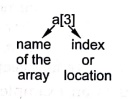
Any element of the array can be represented using index and name of the array.
That means‒a[0] represents the value stored at 0th location of the
array, a[3] represents the value stored at 3rd location of the array
and so on.
•
The syntax of array declaration is,
Data type
array_name[size of array];
•
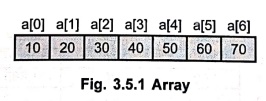
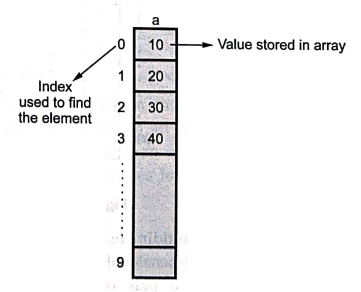
For example: int a[10];
The array a of size 10, has all the elements which are of integer type.
Let
us understand such arrangement elements by following Fig. 3.5.1
Types of array:
1) One dimensional
array :
The
one dimensional array 'a' is declared as int a[10];
2) Two dimensional
array :
If
we declare a two dimensional array as,
int a[10] [3];
Then
it will look like this ‒
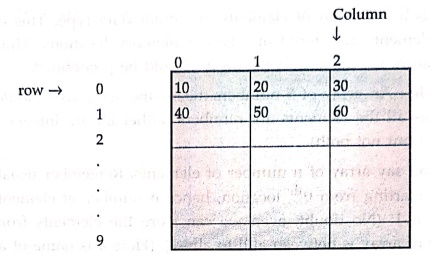
The
two dimensional array should be in row‒column form. We will also see another
form of array using structure.
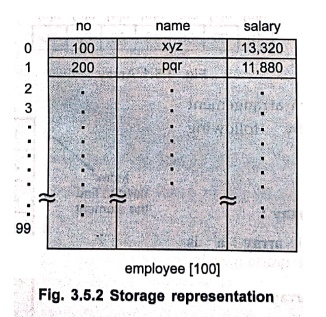
For
examples :
struct emp
{
int no;
char name;
float salary;
}employee[100];
This
is an example of user defined type of array i.e. array of structure. In this
array there are 100 elements having three fields such as no, name and salary.
It will look like this ‒
If
an array is multidimensional, then each dimension is defined using separate
constants. The two dimensional array is defined using the name of the array and
two constants written in a pair of square brackets, one for each dimension. The
first dimension is normally referred to as row and the other dimension is as
column. Thus the elements of a two dimensional array may be arranged either in
rowwise or columnwise. Thus the two dimensional array is the matrix
representation. A representation in which elements are arranged rowwise is called
row major representation and a representation in which elements are arranged
columnwise is termed as column major
representation.
Row Major and Column Major Representation :
When
a two dimensional array gets stored in computer's memory, all the elements of
it get stored at the successive memory locations. And this allocation of
elements in the memory is based on two types of representations ‒ Row major representation and Column major representation.
For example :
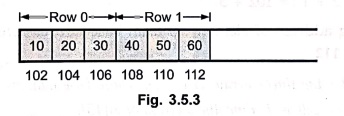
Consider
a 2D array 'a' as
int a[2][3] = {
{10,20,30},
{40,50,60}
};
In
above 2D array there are two rows and three columns in which the elements are
arranged. For the row major representation ‒
For
the column major representation ‒
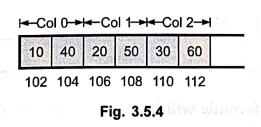
Thus
elements get stored at each successive location in the memory. Now we can
access any element if the base address or starting address of an array is
known. Suppose base address of an array is 102. Then we can find out location
or address of any element based on index. But the method of address calculation
varies for row major and column major representations.
Address Calculation for Row Major Array :
For
calculating the address of any element in the array following formula is used ‒
address
of a[i][j] = base address + i*n + j
Where
the array is declared as a[m][n]. Here m, n represents the size of rows and
columns respectively.
For
example : Consider int a[2] [3] = { {10, 20, 30}
{40, 50, 60}};
If
we want to find out the address of a[1][2] i.e. location of element 60 then
= 102 +
1* 3 + 2 = 102 + 5
That
is, for finding address of element 60 from base address we should move 5 places
ahead i.e. at address 112.
Address
calculation for Column Major Array :
For
calculating the address of any element in the array following formula is used ‒
address
of a[i][j] = base address + j *m + i
For
example : If we want to find out the address of a[1][2] from above given 2D
array i.e. location of element 60 then
=
102 + 2*2+1 = 102 + 5
That
is for finding address of element 60 from base address we should move 5 places
ahead i.e. at address 112.
Example: 1
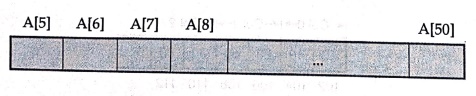
Consider the linear
array, A (5:50), whose base address is 300 and the number of words per memory
cell is 4. Find the address of A[15].
Solution :
The
linear array can be
The
address calculation formula will be
α
+(i‒5)*size in words
Where
a is base address.
As
α = 300 and i = 15,
We
obtain A[15] as
A
[15] = 300+(15‒5) *4
=
300+40
=
340
Hence
A [15] will be at location 340.
Example: 2
Consider integer array
int arr[4][5] declared in 'C' program. If the base address is 1020, find the
address of the element arr[3][4] with row major and column major representation
of array.
Solution :
Row Major Representation
The
element a[i][j] will be at
a[i][j]
= base address+(col_index*total number of rows+row_index)*element_size
=
(base address+( j*row_size+i)*element_size)
when
i = 3 and j=4,element_size=int occupies 2 bytes of memory hence it is 2
total
number of rows = 4
a[3][4]
= 1020+(4*4+3)+2
= 1020+38
a[3][4] = 1058
Column Major Representation
The
element a[i][j] will be at
a[i][j]
= base address+(row_index*total number of columns+col_index)*element_size
= (base
address+(i*col_size+j)*element_size)
when
i=3 and j=4, element_size = int occupies 2 bytes of memory, total number of columns
= 5
a[3][4]
= 1020+(3*5+4)*2
= 1020+38
a[3][4] = 1058
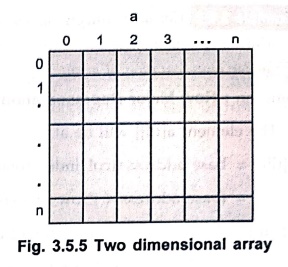
Accessing Two Dimensional Array
The
two dimensional array is something which you can compare with the two storied
building! Extra space which is arranged in rows and columns. Let us draw a
figure which will represent the two dimensional array. (Fig. 3.5.5)
The
syntax of two dimensional array is:
Data_type
Name_Of_array[row_size][column_size];
For example
int
a[10][10];
By
this allocation the memory block of 10 x 10 = 100 is getting created. The
nested for loops can be effectively used to access all the elements of an two
dimensional array. We will take a sample example to explain this idea.
for(i=0;i<=2;i++)
{
for(j=0;j<=2;j++)
{
scanf("%d",&a[i][j]);
}
}
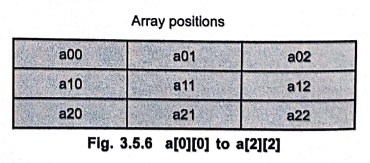
Execution of Nested for Loop
Initially
the value of i=0 at that time
j=0
it will store the element in a[0][0]
j=1
it will store the element in a[0][1]
j=2
it will store the element in a[0][2]
Next
time i will be incremented by 1 and now i=1
Again
j=0
it will store the element in a[1][0]
j=1
it will store the element in a[1][1]
j‒2
it will store the element in a[1][2]
Next
time i will be incremented by 1 and now i=2
j=0
it will store the element in a[2][0]
j=1
it will store the element in a[2][1]
j=2
it will store the element in a[2][2]
Since
now value of i and j has reached to 2 the scanning procedure will get
terminated as condition is i<=2 and j<=2. Thus all the elements from
a[0][0] to a[2][2] get scanned.
Let
us see a sample C++ program which is performing some matrix operations such as
addition of two matrices.
Example: 3
Write a C++ program for
addition of two matrices.
Solution :
#include<iostream>
using namespace std;
#define size 3
int A[size][size], B[size][size], C[size][size], n;
int main()
{
int i, j;
cout<<"\n
Enter The order of the matrix";
cin>>n;
cout<<"\n
Enter The Elements For The First Matrix";
for (i = 0; i<n;
i++)
for (j = 0; j<n;
j++)
cin>>A[i][j];
cout<<"\n
Enter The Elements For The Second Matrix";
for (i=0; i<n;
i++)
for (j = 0;
j<n; j++)
cin>>B[i][j];
for (i=0;
i<n; i++)
for (j = 0;
j<n; j++)
C[i][j]
=A[i][j] + B[i][j];
cout<<"\n
The Addition Is\n";
for (i=0;
i<n; i++)
{
for (j =
0; j<n; j++)
{
cout<<"
"<<C[i][j];
}
cout<<"\n";
}
return 0;
}
Output
Enter The order of the
matrix 3
Enter The Elements For
The First Matrix
1 2 3
4 5 6
7 8 9
Enter The Elements For
The Second Matrix
1 1 1
2 2 2
3 3 3
The Addition Is
2 3 4
6 7 8
10 11 12
Example: 4
Write a C++ program for
multiplication of two matrices.
Solution :
#include<iostream>
using namespace std;
int main()
{
int row1, col1, row2, col2, i, j, k;
int A[10][10], B[10][10];
int C[10][10] = { 0 }; //All elements in C matrix are
initialized to zero
cout<<"Enter Rows and Columns of first
matrix\n";
cin>> row1;
cin>>col1:
/* Input first matrix */
cout << "Enter first Matrix";
for (i = 0; i < rowl; i++)
{
for (j = 0; j <
col1; j++)
{
cin>>A[i][j];
}
}
/* Input second matrix */
cout<<"Enter Rows and Columns of second
matrix\n";
cin >> row2;
cin>>col2;
if (col1 != row2)
{
cout<<"Matrices
cannot be multiplied\n";
}
else
{
cout<<"Enter
second Matrix";
for (i = 0; i <
row2; i++)
{
for (j = 0; j <
col2; j++)
{
cin>>B[i][j];
}
}
/* Multiply both matrices */
for (i=0; i < row1; i++)
{
for (j = 0; j <
row2; j++)
{
for (k = 0; k
< col2; k++)
{
C[i][j] + =A[i][k]
* B[k][j];
}
}
}
/* Print product matrix */
cout << "\n The resultant matrix is ...\n";
for (i = 0; i < row1; i++)
{
for (j = 0; j <
col2; j++)
{
cout<<"
"<<<C[i][j];
}
cout <<
"\n";
}
}
return 0;
}
Output
Enter Rows and Columns
of first matrix
3 3
Enter first Matrix
1 2 3
4 5 6
7 8 9
Enter Rows and Columns
of second matrix
3 3
Enter second Matrix
1 1 1
2 2 2
3 3 3
The resultant matrix
is …
14 14 14
32 32 32
50 50 50
Example: 5
Write an algorithm for
duplicating numbers from a linear array
Solution:
Following
is an algorithm for removing the duplicating numbers from a linear array.
Algorithm RemoveDuplicate()
{
Write("Enter array size: ");
Read(n);
Write("Array Elements")
for (i = 0; i < n; i++) do
{
Read(a[i]);
}
Write("Original array is: ");
for (i=0; i< n; i++) do
{
Write(a[i]);
}
for (i = 0; i < n; i++) do
{
for (j = i + 1; j <
n;)do
{
if (a[j] = = a[i])
{
for (k = j; k <
n; k++)
{
a[k] = a[k + 1];
}
n‒‒;
}
else
{
j++;
}
}
}
Write("After removing Duplicate elements...")
for (i = 0; i < n; i++)
{
Write(a[i]);
}
}
Example: 6
Write a C++ program to
display the lower triangular matrix of square matrix.
Solution :
#include<iostream>
using namespace std;
int main()
{
int a[10][10], i, j,n;
float determinant = 0;
cout << "\n
Enter the Order of Matrix";
cin >> n;
cout <<
"Enter the Elements of Matrix";
for (i=0; i<n; i++)
for (j=0; j<n;
j++)
cin >>
a[i][j];
cout<<"\nYou
have Entered following matrix\n";
for (i=0; i<n;
i++)
{
for (j = 0;
j<n; j++)
{
cout <<
a[i][j];
}
cout <<
"\n";
}
for (i = 0;
i<n;i++)
for (j = 0; j
< n; j++)
if (i > j) //finding the lower triangle elements
a[i][j] = 0; // making lower triangle zero
cout <<
"\n The lower Triangular matrix is ...";
for (i = 0; i<n;
i++)
{
cout<<"\n";
for (j = 0; j<n;
j++)
cout <<
" " << a[i][j]; //displaying
the matrix
}
return 0;
}
Output
Enter the Order of
Matrix
3
Enter the Elements of
Matrix:
1 2 3
4 5 6
7 8 9
You have Entered
following matrix
123
456
789
The lower Triangular
matrix is …
1 2 3
0 5 6
0 0 9
Example: 7
Write a C++ program for
transpose of a matrix
Solution:
#include <iostream>
using namespace std;
int main()
{
int rows, cols, i, j;
int A[50][50], B[50]
[50];
cout <<
"Enter Rows and Columns of Matrix\n";
cin >> rows
>> cols;
cout <<
"Enter Matrix";
for (i=0; i < rows;
i++)
{
for (i=0;j< cols;
j++)
{
cin >>
A[i][j];
}
}
for (i = 0; i <
rows; i++)
{
for (j = 0; j <
cols; j++)
{
B[i][j] = A[i][j];
}
}
cout<<"Transpose
Matrix\n";
for (i=0; i < cols;
i++)
{
for (j = 0; j <
rows; j++)
{
cout <<
" " << B[i][j];
cout <<
"\n".
}
return 0;
}
Output
Enter Rows and Columns
of Matrix
3 3
Enter Matrix
1 2 3
4 5 6
7 8 9
Transpose Matrix
1 4 7
2 5 8
3 6 9
Data Structures using C PlusPlus: Chapter 3: Analysis of Algorithms and Arrays : Tag: Data Structure, C++ Programing : Data Structures using C++ Program - Arrays and its Representations
Data Structures using C PlusPlus: Chapter 3: Analysis of Algorithms and Arrays
Under Subject
Data Structures using CPlusPlus
CS25C05 2nd Semester ECE Dept | 2025 Regulation | 2nd Semester 2025 Regulation
Related Subjects

English Essentials II
EN25C02 2nd Semester | 2025 Regulation | 2nd Semester 2025 Regulation

Tamils and Technology தமிழர்களும் தொழில்நுட்பமும்
UC25H02 2nd Semester | 2025 Regulation | 2nd Semester 2025 Regulation

Linear Algebra
MA25C02 2nd Semester | 2025 Regulation

Electron Devices
EC25C01 2nd Semester ECE Dept | 2025 Regulation | 2nd Semester 2025 Regulation
Data Structures using CPlusPlus
CS25C05 2nd Semester ECE Dept | 2025 Regulation | 2nd Semester 2025 Regulation

Circuits and Network Analysis
EC25C02 2nd Semester ECE Dept | 2025 Regulation | 2nd Semester 2025 Regulation

Re-Engineering for Innovation
ME25C05 2nd Semester | 2025 Regulation | 2nd Semester 2025 Regulation
Engineering Drawing - Laboratory
ME25C01 2nd Semester | 2025 Regulation | 2nd Semester 2025 Regulation
Data Structures using CPlusPlus - Laboratory
CS25C05 2nd Semester ECE Dept | 2025 Regulation | 2nd Semester 2025 Regulation
Devices and Circuits Laboratory
EC25C03 2nd Semester ECE Dept | 2025 Regulation | 2nd Semester 2025 Regulation