Python for Data Science: Chapter 5: NumPy and Pandas Libraries
NumPy: Arrays Shape Manipulation
Python library
The shape of the array tells us how many elements the array has along each dimension. 1) Reshape 2) Flatten 3) Resize
Arrays
Shape Manipulation
•
The shape of the array tells us how
many elements the array has along each dimension. It is represented as tuple of integers. For example ‒
■
A one D array has a shape (n, )
■
A two D array has a shape(rows, columns)
■
A three D array has a shape(depth, rows, columns)
•
For example ‒ Following Python program tells us the shape of the array
import numpy as np
arr = np.array([[1,2,3],
[4,5,6]])
print(arr.shape)
Output
(2, 3)
This
means that array has 2 rows and 3 columns.
no
testosrael Ajaying
•
Manipulating the shape of the array
means converting one D array into 2D format or combining or splitting the array
data properly.
•
Following are some important functions
that are used in arrays shape manipulation –
1) Reshape :
This
function changes the shape of the array. For example ‒
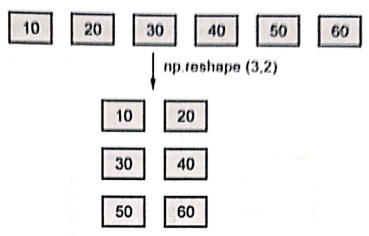
For
example ‒
In [11]:
import numpy as np
a = np.array([10, 20, 30, 40, 50, 60])
b = a.reshape(3,2)
print("Original Array: \n",a)
print("Reshaped Array: \n",b)
Original Array:
[10 20 30 40 50 60]
Reshaped Array:
[[10 20]
[30 40]
[50 60]]
2) Flatten:
This
function converts the array to 1D. It always returns a copy. For example ‒
Python program
import numpy as np
arr = np.array([[10,20],
[30,40],
[50,60]])
result = arr.flatten()
print(result)
Output
[10 20 30 40 50 60]
Note
that the flatten function always returns a copy, so changes in resultant array
do not affect the original.
3) Resize :
This
function changes the shape and size of array. For example ‒
Python program
import numpy as np
arr = np.array([10,20,30,40])
arr.resize((2,3))
print(arr)
Output
[[10 20 30]
[40 0 0]]
When
called as a method (arr.resize()), it modifies the array in place.
If
the new shape has more elements than the original, NumPy fills the extra space
with zeros.
Example:1
Write a
Python program to demonstrate the exponentiation operation on arrays using
NumPy.
Solution:
In [2]:
import numpy as np
a = np.array([1,2,3,4,5])
b = a ** 2
print("Exponentiation using ** operator ",b)
c = np.power(a,2)
print("Exponentiation using power() function ",c)
Exponentiation using ** operator [ 1 4 9 16 25]
Exponentiation using power() function [ 1 4 9 16 25]
Example:2
Write a
Python program to demonstrate the modulus operation on arrays using NumPy.
Solution:
In [4]:
import numpy as np
a = np.array([10,20,30,40])
b = np.array([2,3,7,9])
c = a % b
print("Modulus using % operator ",c)
d = np.mod(a,b)
print("Modulus using mod function",d)
Modulus using % operator [0 2 2 4]
Modulus using mod function [0 2 2 4]
Python for Data Science: Chapter 5: NumPy and Pandas Libraries : Tag: Computer Programming, Python, Data Science : Python library - NumPy: Arrays Shape Manipulation
Python for Data Science: Chapter 5: NumPy and Pandas Libraries
Under Subject

Python for Data Science
AD25201 2nd Semester AIDS Dept | 2025 Regulation | 2nd Semester 2025 Regulation
Related Subjects

English Essentials II
EN25C02 2nd Semester | 2025 Regulation | 2nd Semester 2025 Regulation

Tamils and Technology தமிழர்களும் தொழில்நுட்பமும்
UC25H02 2nd Semester | 2025 Regulation | 2nd Semester 2025 Regulation

Linear Algebra
MA25C02 2nd Semester | 2025 Regulation

Applied Physics (CSIE) II
PH25C03 2nd Semester AIDS, CSE, IT, CSE(CY) Dept | 2025 Regulation | 2nd Semester 2025 Regulation

Digital Principles and Computer Organization
CS25C06 2nd Semester AIDS, CSE, IT, CSE(CY) Dept | 2025 Regulation | 2nd Semester 2025 Regulation

Basic Electrical and Electronics Engineering
EE25C01 2nd Semester | 2025 Regulation | 2nd Semester 2025 Regulation
Python for Data Science
AD25201 2nd Semester AIDS Dept | 2025 Regulation | 2nd Semester 2025 Regulation

Re-Engineering for Innovation
ME25C05 2nd Semester | 2025 Regulation | 2nd Semester 2025 Regulation

Python for Data Science - Laboratory
AD25201 2nd Semester AIDS Dept | 2025 Regulation | 2nd Semester 2025 Regulation