Python for Data Science: Chapter 5: NumPy and Pandas Libraries
Pandas: Selecting Entries
Python library
Following examples illustrate the indexing and selection of elements.
Selecting
Entries
•
Following examples illustrate the indexing and selection of elements ‒
Python program
import pandas as pd
data = [10,20,30,40,50]
x = pd.Series(data,
index=["a","b","c","d","e"],
dtype = float)
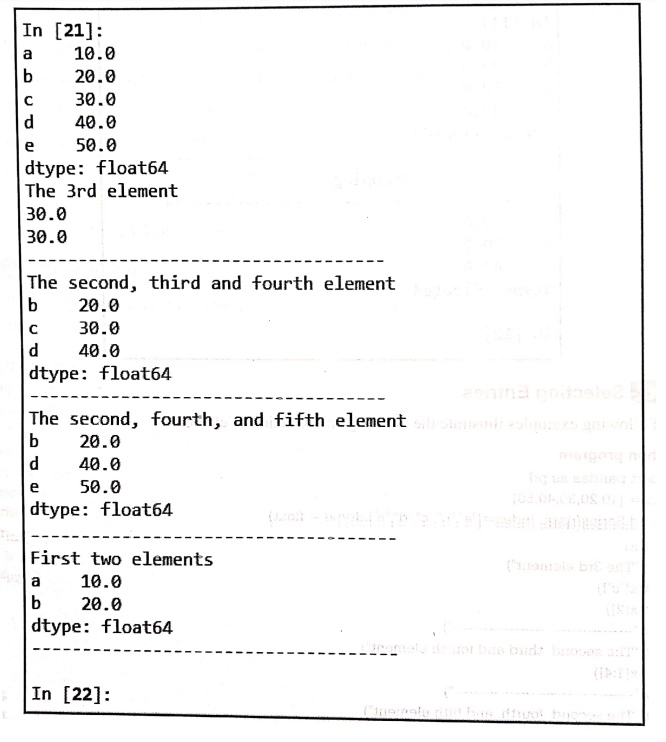
print(x)
print("The 3rd element")
print(x["c"])
print(x[2])
print("‒‒‒‒‒‒‒‒‒‒‒‒‒‒‒‒‒‒‒‒‒‒‒‒‒‒‒‒‒‒‒‒‒‒‒")
print("The second, third and fourth element")
print(x[1:4])
print("‒‒‒‒‒‒‒‒‒‒‒‒‒‒‒‒‒‒‒‒‒‒‒‒‒‒‒‒‒‒‒‒‒‒‒")
print("The second, fourth, and fifth element")
print(x[[1,3,4]])
print("‒‒‒‒‒‒‒‒‒‒‒‒‒‒‒‒‒‒‒‒‒‒‒‒‒‒‒‒‒‒‒‒‒‒‒")
print("First two elements")
print(x[:2])
print("‒‒‒‒‒‒‒‒‒‒‒‒‒‒‒‒‒‒‒‒‒‒‒‒‒‒‒‒‒‒‒‒‒‒‒‒‒‒")
Output
Selection with loc and iloc
The
loc and iloc are two functions in Pandas that are used to slice a data set
in a Pandas DataFrame.
The loc and iloc functions are commonly used to select certain groups of rows
(and columns) of a pandas DataFrame.
The
loc method is used to select the
data from the dataframe. Using this function we can pass the condition for
selection of data.
Demo example
Consider
a students data frame created using Pandas. It is as follows‒
students ={
'Names':["Vedant","Mayuresh","Ishwari","Himani","Varad","Aakash"],
'Courses':["Python","Java", "DevOps",
"Hadoop","FullStack","Blockchain"],
'Fees':[20000,10000,15000,14000,15000,21000],
'Duration': ['40days',
'60days', '60days','40days', '90days','80days']
}
index_labels =
['s1','s2','s3','s4','s5','s6']
df = pd.DataFrame(students,index=index_labels)
Now
we will apply loc methods to select the desired data from the data set.
1) Selecting a single row
We
can select a single row using the index label.
print(df.loc['s4'])
With
.loc[], you specify the column label directly, while with .iloc[ ], we use the
column index.
print(df.iloc[3])
2) Selection multiple rows
For
selecting multiple rows, we can specify multiple labels. To select multiple
values using loc[ ] and iloc[ ], we can specify the rows and columns you want
to select. For instance ‒ print(df.loc[['s3','s5']])
or
we can specify the column names
print(df.loc[:,["Names", "Courses"]])
3) Selection based on condition
We
can specify the condition to loc
function and based on that condition desired data can
be
selected.
print(df.loc[df['Fees'] >=20000])
or
print(df.loc[df['Fees']>=20000])
The
complete Python code is as follows
Python code
import pandas as pd
students ={
'Names': ["Vedant", "Mayuresh",
"Ishwari","Himani","Varad","Aakash"],
'Courses':["Python","Java","DevOps","Hadoop","FullStack","Blockchain"],
'Fees':[20000,10000,15000, 14000,15000,21000],
'Duration': ['40days', '60days', '60days', '40days','90days',
'80days']
}
index_labels = ['s1','s2','s3','s4','s5','s6']
df = pd.DataFrame(students, index=index_labels)
print(df)
print("‒‒‒‒‒‒‒‒‒‒‒‒‒‒‒‒‒‒‒‒‒‒‒‒‒‒‒‒‒‒‒‒‒‒‒‒‒‒‒‒‒‒‒‒‒‒‒‒‒‒‒‒‒")
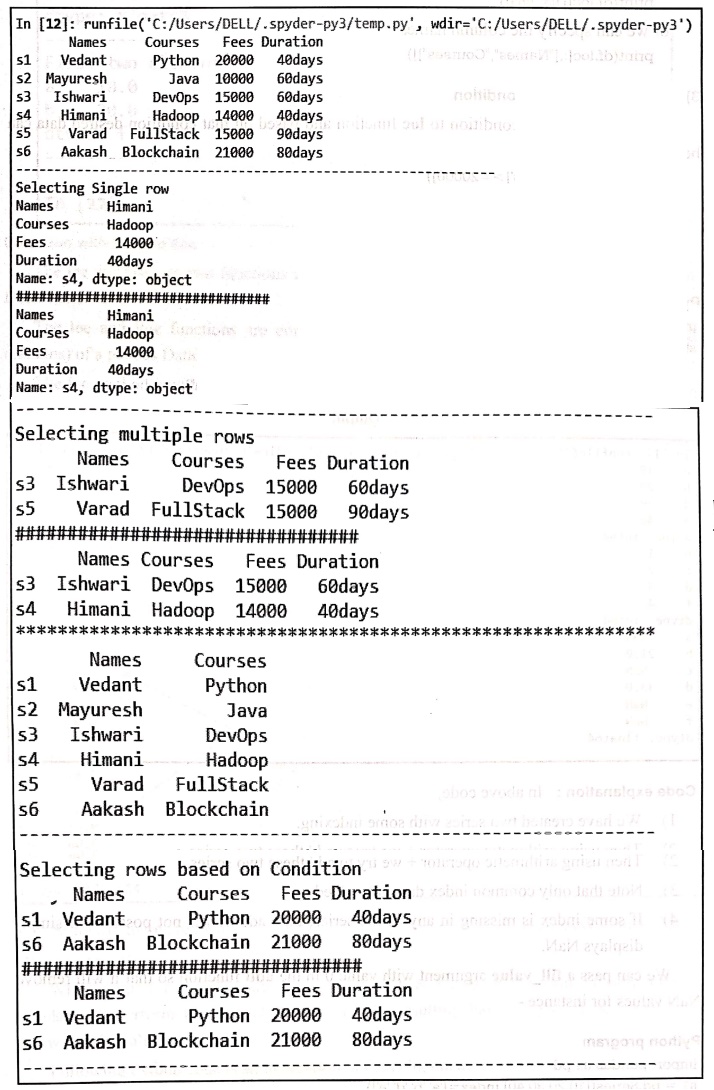
print("Selecting Single row")
print(df.loc['s4'])
print("#################################")
print(df.iloc[3])
print("‒‒‒‒‒‒‒‒‒‒‒‒‒‒‒‒‒‒‒‒‒‒‒‒‒‒‒‒‒‒‒‒‒‒‒‒‒‒‒‒‒‒")
print("Selecting multiple rows")
print(df.loc[['s3','s5']])
print("#################################")
print(df.iloc[[2,3]])
print("************************************************")
print(df.loc[:,["Names","Courses"]])
print("‒‒‒‒‒‒‒‒‒‒‒‒‒‒‒‒‒‒‒‒‒‒‒‒‒‒‒‒‒‒‒‒‒‒‒‒‒‒‒‒‒‒‒‒‒‒")
print("Selecting rows based on Condition")
print(df.loc[df['Fees']>=20000])
print("#################################")
print(df.loc[list(df['Fees']>=20000)])
print("‒‒‒‒‒‒‒‒‒‒‒‒‒‒‒‒‒‒‒‒‒‒‒‒‒‒‒‒‒‒‒‒‒‒‒‒‒‒‒‒‒‒‒‒‒‒‒‒")
Output
Python for Data Science: Chapter 5: NumPy and Pandas Libraries : Tag: Computer Programming, Python, Data Science : Python library - Pandas: Selecting Entries
Python for Data Science: Chapter 5: NumPy and Pandas Libraries
Under Subject

Python for Data Science
AD25201 2nd Semester AIDS Dept | 2025 Regulation | 2nd Semester 2025 Regulation
Related Subjects

English Essentials II
EN25C02 2nd Semester | 2025 Regulation | 2nd Semester 2025 Regulation

Tamils and Technology தமிழர்களும் தொழில்நுட்பமும்
UC25H02 2nd Semester | 2025 Regulation | 2nd Semester 2025 Regulation

Linear Algebra
MA25C02 2nd Semester | 2025 Regulation

Applied Physics (CSIE) II
PH25C03 2nd Semester AIDS, CSE, IT, CSE(CY) Dept | 2025 Regulation | 2nd Semester 2025 Regulation

Digital Principles and Computer Organization
CS25C06 2nd Semester AIDS, CSE, IT, CSE(CY) Dept | 2025 Regulation | 2nd Semester 2025 Regulation

Basic Electrical and Electronics Engineering
EE25C01 2nd Semester | 2025 Regulation | 2nd Semester 2025 Regulation
Python for Data Science
AD25201 2nd Semester AIDS Dept | 2025 Regulation | 2nd Semester 2025 Regulation

Re-Engineering for Innovation
ME25C05 2nd Semester | 2025 Regulation | 2nd Semester 2025 Regulation

Python for Data Science - Laboratory
AD25201 2nd Semester AIDS Dept | 2025 Regulation | 2nd Semester 2025 Regulation