Python for Data Science: Chapter 5: NumPy and Pandas Libraries
NumPy: Creating Arrays
Python library
Creating array using built‒in function: Using np.zeros(), Using np.ones(), Using np.arange(), Using np.linspace(). Creating Multi‒dimensional Arrays: create of two‒D arrays, Creation of three‒D array, Creation of n‒dimensional array
Creating
Arrays
•
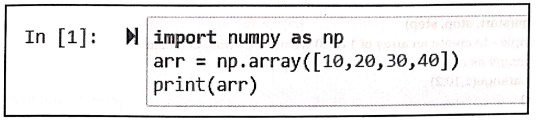
Array is a collection of elements. The array can be created using the function np.array ().
For
example
In [1]:
import numpy as np
arr = np.array([10,20,30,40])
print(arr)
Output
[10 20 30 40]
Creating array using built‒in function
We
can create arrays using built‒in functions –
1) Using np.zeros()
The
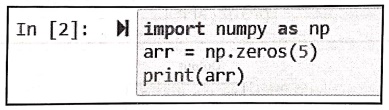
np.zeros function creates an array which is filled with zeros. For example ‒
In [2]:
import numpy as np
arr = np.zeros(5)
print(arr)
Output
[0.0.0.0.0.]
2) Using np.ones()
The
np.ones() function creates array of all ones. For example
import numpy as np
arr = np.ones(5)
print(arr)
Output
[1. 1. 1. 1. 1.]
3) Using np.arange()
Using
np.arange() function we can create an array with the values of specific
interval.
Syntax
np.arange(start, stop,
step)
For example ‒ to create an array of 1 to 10 we use following command
import numpy as np
arr = np.arange(1,10,2)
print(arr)
Output
[1 3 5 7 9]
4) Using np.linspace()
This
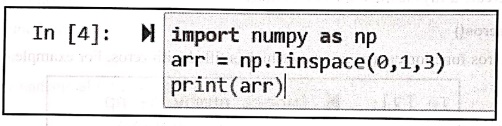
function divides range into equal parts
In [4]:
import numpy as np
arr = np.linspace(0,1,3)
print(arr)
Output
[0. 0.5 1. ]
Creating Multi‒dimensional Arrays
•
Using NumPy we can create n‒dimensional arrays.
create of two‒D arrays
We
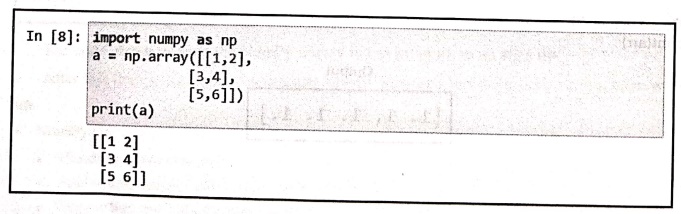
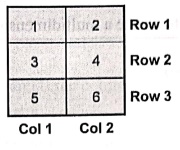
can create a two‒dimensional array using the function np.array( ) For example ‒ In order to create 3 by 2 array (i.e. 3
rows and 2 columns) we use lists as follows ‒
In [8]:
import numpy as np
a = np.array([[1,2],
[3,4],
[5,6]])
print(a)
[[12]
[34]
[5 6]]
Note
that we have created an array of three rows and two columns using above numpy
code.
Creation of three‒D array
We
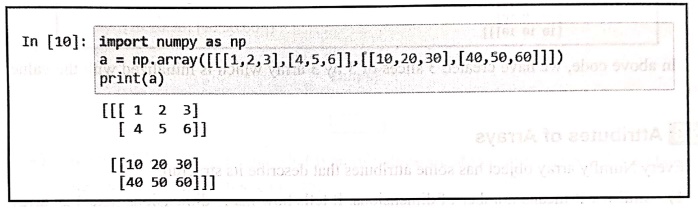
can create three dimensional array using the slices of a two dimensional array.
For example ‒ In the following illustration we have created two slices of 2 by
3 array.
In [10]:
import numpy as np
a = np.array([[[1,2,3], [4,5,6]], [[10,20,30],[40,50,60]]])
print(a)
[[[ 1 2 3]
[ 4 5 6]]
[[10 20 30]
[40 50 60]]]
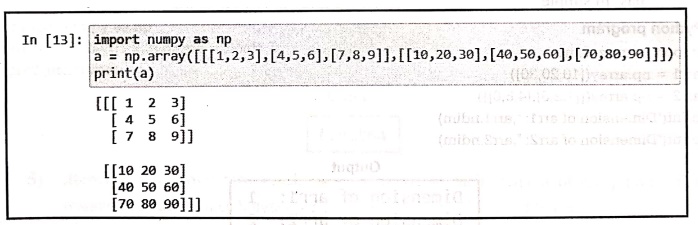
Similarly
we can create an array of two slices of 3 by 3 matrix.
In [13]:
import numpy as np
a = np.array([[[1,2,3],[4,5,6], [7,8,9]], [[10,20,30], [40, 50,
60], [70,80,90]]])
print(a)
[[[ 1 2 3]
[ 4 5 61
[ 7 8 9]]
[[10 20 30]
[40 50 60]
[70 80 90]]]
We
can find the array dimensions using the command ndim. The illustration is as follows‒

In [14]: print(a.ndim)
3
Creation of n‒dimensional array
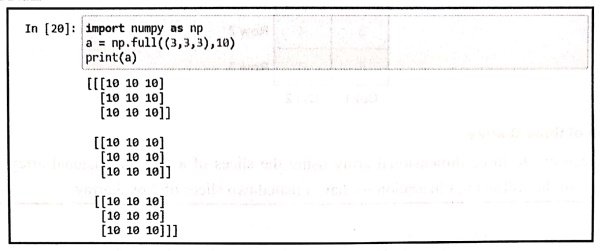
In
NumPy we can use np.full() to create
a multidimensional array with a specified value.
In [20]:
import numpy as np
a = np.full((3,3,3),10)
print(a)
[[[10 10 10]
[10 10 10]
[10 10 10]]
[[10 10 10]
[10 10 10]
[10 10 10]]
[[10 10 10]
[10 10 10]
[10 10 10]]]
In
above code, we have created 3 slices of 3 by 3 array which is initialized with
the value 10.
Python for Data Science: Chapter 5: NumPy and Pandas Libraries : Tag: Computer Programming, Python, Data Science : Python library - NumPy: Creating Arrays
Python for Data Science: Chapter 5: NumPy and Pandas Libraries
Under Subject

Python for Data Science
AD25201 2nd Semester AIDS Dept | 2025 Regulation | 2nd Semester 2025 Regulation
Related Subjects

English Essentials II
EN25C02 2nd Semester | 2025 Regulation | 2nd Semester 2025 Regulation

Tamils and Technology தமிழர்களும் தொழில்நுட்பமும்
UC25H02 2nd Semester | 2025 Regulation | 2nd Semester 2025 Regulation

Linear Algebra
MA25C02 2nd Semester | 2025 Regulation

Applied Physics (CSIE) II
PH25C03 2nd Semester AIDS, CSE, IT, CSE(CY) Dept | 2025 Regulation | 2nd Semester 2025 Regulation

Digital Principles and Computer Organization
CS25C06 2nd Semester AIDS, CSE, IT, CSE(CY) Dept | 2025 Regulation | 2nd Semester 2025 Regulation

Basic Electrical and Electronics Engineering
EE25C01 2nd Semester | 2025 Regulation | 2nd Semester 2025 Regulation
Python for Data Science
AD25201 2nd Semester AIDS Dept | 2025 Regulation | 2nd Semester 2025 Regulation

Re-Engineering for Innovation
ME25C05 2nd Semester | 2025 Regulation | 2nd Semester 2025 Regulation

Python for Data Science - Laboratory
AD25201 2nd Semester AIDS Dept | 2025 Regulation | 2nd Semester 2025 Regulation