Data Structures using C PlusPlus: Chapter 1: Data Abstraction and Overloading
C++ Programming Structure
There are four sections in the structure of C++ program. 1. Include file section 2. Class declaration section 3. Function definition section 4. Main function definition
C++ Programming
Structure
Structure of C++
•
There are four sections in the structure of C++ program. These sections are as
shown in Fig. 1.2.1.
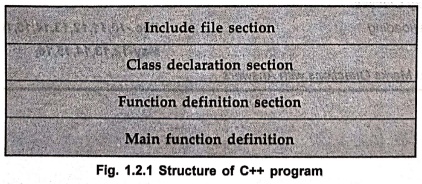
Include file section
Class declaration
section
Function definition
section
Main function
definition
The
sample C++ program is as follows ‒
C++ Program
FirstProg.cpp
//This is my first C++ program
//This program simply prints the message Hello World
#include <iostream>
using namespace std;
int main()
{
cout<<"Hello World\n";
}
Execute
above program using the g++ command on Linux platform. Note that the gcc
package must be installed on your machine to use this command. Following
commands must be executed on terminal window.
1)
g++ ‒ O First Prog FirstProg.cpp
2)
./FirstProg
program Explanation
The
first two lines are the comments. It is a non executable portion.
Then
the next line statement begins with the sign #. It is a pre‒processor
directive. It tells the pre‒processor to include the header file iostream.h. This specific file
iostream.h includes the declarations of the basic standard input‒output library
in C++, and it is included because its functionality is going to be used later
in the program. In Linux platform # include<iostream> is used.
Next
line is
using namespace std;
This
statement is used to define scope of the identifiers that are used in the
program. std is a namespace where
the standard class libraries are defined. By this statement we can bring all
the identifiers in the current global scope. The keyword namespace is used to define the scope of identifiers. If namespace
is not used then cout statement, must be written as std : : cout.
The
void main() is a function from where
the execution of C++ program starts. Then { indicates the beginning of the
function definition.
The
next line starts with cout. The cout
represents the standard output stream in C++. By this statement we will get the
"Hello world" message printed on the output screen. The cout is declared in standard iostream file. The cout should be
followed by << and then by some message in double quotes.
Then
the program ends by }.
1. Comments in Program
Comments
are those statements in the program which are non executable in nature. They provide simply the information about
the programming statements.
There
are two ways by which we can give
the comments in C++. The First way is similar to the comments in C. The start
of the comment is /* and end of the comment is */. This comment statement is a
multiline comment statement that means you can comment many lines together
using /* and */. Another way is // at the start of the line which is to be
commented. This is a single line comment statement .The comment statements are
useful in documenting the program.
2. Input and Output Operators
In
C++ the input operation is called extraction
because data is extracted from keyboard and the operator >> is called
extractor.
The
C++ statement input operation will be ‒
cin
>> a
This
input statement on execution will wait for the user to type in a number using
keyboard, the value entered by user will then be saved in a variable.
The
C++ uses an output operation called
insertion because data is inserted or sent from the variable. The operator
<< is called insertion operator.
The
C++ statement for output operation will be ‒
cout
<< a:
The
data contained in variable a will be displayed on the screen.
Example: 1
Write a C++ program to
convert the polar co‒ordinates into rectangular co‒ordinates. (Hint: Polar co‒ordinates(radius,
angle) and rectangular co‒ordinates(x, y) where x = r*cos(angle) and y =
r*sin(angle)).
Solution :
/**************************************************************************
Program to convert the Polar co‒ordinates into rectangular co‒ordinates
**************************************************************************/
#include<iostream>
#include<cmath>
#define PI 3.14159265
using namespace std;
int main()
{
double r,angle;
void
PolarToRect(double,double);
cout<<"Enter
the value of radius: ":
cin>>r;
cout<<"Enter
the value of angle(in degree): ";
cin>>angle;
PolarToRect(r,angle);
return 0;
}
void PolarToRect(double r,double angle)
{
double x,y;
x=r*cos(angle
*PI/180);
y=r*sin(angle*PI/180);
cout<<"\nx:
"<<<<x;
cout<<"\ny:
"<<y;
cout<<endl;
}
Output
Enter the value of
radius: 5
Enter the value of
angle (in degree): 30
x : 4.33013
y : 2.5
Data Structures using C PlusPlus: Chapter 1: Data Abstraction and Overloading : Tag: : - C++ Programming Structure
Data Structures using C PlusPlus: Chapter 1: Data Abstraction and Overloading
Under Subject
Data Structures using CPlusPlus
CS25C05 2nd Semester ECE Dept | 2025 Regulation | 2nd Semester 2025 Regulation
Related Subjects

English Essentials II
EN25C02 2nd Semester | 2025 Regulation | 2nd Semester 2025 Regulation

Tamils and Technology தமிழர்களும் தொழில்நுட்பமும்
UC25H02 2nd Semester | 2025 Regulation | 2nd Semester 2025 Regulation

Linear Algebra
MA25C02 2nd Semester | 2025 Regulation

Electron Devices
EC25C01 2nd Semester ECE Dept | 2025 Regulation | 2nd Semester 2025 Regulation
Data Structures using CPlusPlus
CS25C05 2nd Semester ECE Dept | 2025 Regulation | 2nd Semester 2025 Regulation

Circuits and Network Analysis
EC25C02 2nd Semester ECE Dept | 2025 Regulation | 2nd Semester 2025 Regulation

Re-Engineering for Innovation
ME25C05 2nd Semester | 2025 Regulation | 2nd Semester 2025 Regulation
Engineering Drawing - Laboratory
ME25C01 2nd Semester | 2025 Regulation | 2nd Semester 2025 Regulation
Data Structures using CPlusPlus - Laboratory
CS25C05 2nd Semester ECE Dept | 2025 Regulation | 2nd Semester 2025 Regulation
Devices and Circuits Laboratory
EC25C03 2nd Semester ECE Dept | 2025 Regulation | 2nd Semester 2025 Regulation