Data Structures using C PlusPlus: Chapter 1: Data Abstraction and Overloading
Operator Overloading
Data Structures using C ++ Program
Operator overloading is confusing even for excellent programmer but it is a strong feature of C++ if you could master it.
Overloading
The
overloading is a most important feature of object oriented programming. This
feature enhances the capability of the method by allowing it to define it for
different types of data.
Normally
there are two types of overloading used in C++ ‒
1.
Operator overloading
2.
Function overloading
Operator
Overloading
•
Operator overloading is confusing even for excellent programmer but it is a
strong feature of C++ if you could master it. The operators are used in
mathematical expressions like
c=a+b;
area=3.14*r*r;
•
It would be very nice if we could use these operators in our own objects. That
means the string class can use to concatenate two strings. That also means
operators can be programmed to whatever we wish to do with them.
• Definition :
Operator overloading in C++ is a feature that allows you to redefine the
behavior of built‒in operators (such as +, ‒, = =, <<, etc.) so that they
can work with user‒defined data types (objects) just like they work with basic
types.
•
Various types of operators are ‒
о
Mathematical operators such as + ‒ * / ++
о
Relational operators such as < > =
=
о
Logical operators such as && | |
о
Access operators [ ] ‒>
о
Assignment operator =
о
Stream I/O operators << >>
о
Type conversion operators and several others.
•
All of these operators have a predefined and unchangeable meaning for the built‒in
types. All of these operators can be given a specific interpretation for
different classes or combination of classes. C++ provides the flexibility to
the programmers in extending these built‒in operators.
How to
overload operator ?
Define
a function with keyword operator. Then write the operator (such as +, [ ] or
any other valid operator) as a function name. That means we can program that
specific operator.
Restrictions
on use of operators
•
It's not possible to change an operator's precedence.
•
It's not possible to create new
operators, For example ^ which is used in some languages for
exponentiation,
•
You can not redefine ::, sizeof, ?:, or. (dot).
•
=, [ ], and ‒> must be member functions if they are overloaded.
•
++ and ‒ ‒ need special treatment because they are prefix or postfix operators.
•
Assignment ( = ) should always be overloaded if an object dynamically allocates
memory.
It
can not change the number of required operands(unary, binary, ternary).
•
Overloaded operator must be either,
о
Non static
member function of class or
о At least one parameter should be class
or enumeration.
Makes
no assumptions about similar operators. For example, the fact that you
overloaded + does not mean that you have also defined += for your class type.
1. Need of Operator Overloading
•
There are predefined operators such as +, ‒ , *, / and so on
which operate on the fundamental data types such as integer, double, char and
so on. In order to make the user defined data type as natural as fundamental
data type, the user defined data types can be associated with the set of
predefined operators the concept
called operator overloading is used.
Note that the fundamental meaning of these operators is not at all changed by
operator overloading. Rather, with this meaning these operators are associated
with the user defined data types. For instance ‒ If we want to perform the
operations on two complex numbers then with the help of operator overloading
the operations such as addition, multiplication and so on can be carried out.
In this case the class for Complex
number is created.
2. Rules for Operator Overloading
1.
Only existing operators can be overloaded.
2.
The basic meaning of the operator
can not be changed.
3.
Overloaded operators must follow the syntax
of original operator. For example for binary operator operand1 operator
operand2 is the syntax and this can not be changed during overloading.
4.
Overloaded operators must have at least
one operand that is of user defined type.
5.
Binary arithmetic operators(+, ‒, * and
/) must return a value.
6.
When binary operators overloaded
through a member function, the left hand
operand must be an object of
relevant class.
7.
Binary operators overloaded through
a member function must take one explicit
argument.
8.
Binary operators overloaded through
friend function takes two arguments.
9.
Unary operators overloaded through a
member function must take no
explicit argument and no return value.
10.
Unary operators overloaded through
friend function takes one explicit
argument.
11.
There are some operators that can not be overloaded.
3. Overloading Unary Operator
•
The unary operators require only one operand. In C++ the unary operators are ‒,
+, !, ~, & and *.
•
It can be declared as member functions
taking no arguments. That means for any operator ‒, ‒ obj is interpreted
as obj.operator‒()
•
It can be declared as non member
functions taking one argument that must be the variable of class type (i.e.
Object) or reference. That means, for any operator the ‒ obj is interpreted as operator‒(obj).
If
both types of definitions are present then, the function declared as member
takes the precedence.
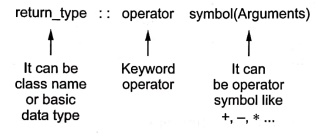
Syntax:
The function definition for operator function is as follows ‒
Example :
Point:
operator ‒ ()
{
}
Following
program illustrates the operator overloading of an unary operator !.
/***************************************************************************
Program for overloading! operator. The overloading function can
be a member or a non member function.
***************************************************************************/
#include <iostream>
using namespace std;
class X
{
};
void
operatorl(X) //Defined operator overloading function as a non‒member function
{
cout<<"We
are using operator!(X)" << endl;
}
class Y
{
public:
void operatorl() //
Defined operator overloading function as a
member function
{
cout<<"we
are using Y::operator!()"<<endl;
}
};
int main()
{
X obj_x;
Y obj_y;
lobj_x; //invoking the non member function
lobj_y;
//invoking the member function
return 0;
}
Output
We are using
operator!(X)
we are using
Y::operator!()
Program
explanation:
In
above example the operator function is ‒
•
A non‒member function with only one argument or
•
A member function with no argument.
•
When there is an argument passed to a non‒member function (like for class X)
this argument is usually object of a class or reference to object of a class.
The operator function call !obj_x
will be interpreted as operator!(x)
and call to !obj_y will be
interpreted as Y.operator!()
Example: 2
Write a C++ program for
overloading a unary minus operator.
Solution:
/***************************************************************************
Program for overloading an unary minus operator
**************************************************************************/
#include <iostream>
using namespace std;
class point
{
private:
int x, y;
// co‒ordinate values
public:
point( )
{ x = 0; y = 0; }//constructor
point(int
i, int j) { x = i; y = j; } //constructor
void
get_xy(int &i, int &j) { i = x; j = y; }
point
operator‒(); // operator overload for unary
// minus
};
point point::operator‒( )
{
x = ‒ x;
y = ‒ y;
return
*this; // Use of this pointer
}
int main()
{
point
obj(10, 10);
int x, y;
clrscr();
obj.get
xy(x, y);
obj = ‒ obj; Negation calls operator ‒ ()
obj.get xy(x, y);
cout<<"\n
The use of unary operator is ..."<endl;
cout
<< "X:"<< x << ", Y: " << y;
return 0;
}
Output
The use of unary
operator is ...
X: ‒10 , Y:‒10
Program
explanation:
Note
that in above code the unary minus operator function is overloaded by passing
no argument to it.
obj
= ‒ obj;
When
this statement occurs the call to operator ‒() function is given. Thereby
negated values of x and y are obtained.
Example: 3
Write a C++ program for
overloading a increment operator ++.
Solution :
#include <iostream>
using namespace std;
class coord
{
private:
int x, y,
// co‒ordinate values
public:
coord() {
x = 0; y = 0; }//constructor for obj
coord(int
i, int j) { x = i; y = j; }//constructor with param
void
get_xy(int &i, int &j) { i = x; j = y; }
coord
operator++();//unary operator overloading
};
// Overload ++ operator for coord class
coord coord::operator++()
{
x++;
return
*this; //returning the current instance
}
int main()
{
int x, y;
cout<<"\n
Enter the co‒ordinates x and y ";
cin>>x>>y;
coord
obj(x,y);
++obj; // Calls coord operator++()
obj.get_xy(x,
y);
cout<<"The
increment operator increments the co‒ordinates as..."<<endl;
cout
<< "X: " << x << ", Y: " << y;
getch();
return 0;
}
Output
Enter the co‒ordinates
x and y 10 20
The increment operator
increments the co‒ordinates as...
X: 11, Y: 21
4. Overloading Binary Operator
•
It can be declared as member functions taking one argument. That is, for any
operator +, x + y is interpreted as x.operator+( y ).
•
It can be declared as non‒member functions taking two arguments; one of these
must be a variable of the class type or a reference to one. That is, for any
operator @ except the assignment operator =, x @ y is interpreted
as operator @(x, y). For example x+y is interpreted as operator +(x, y).
•
If both kinds of definitions are present, the function declared as member takes
precedence.
Examples :
Binary plus and & ("bitwise and")
class A {
A
operator+( A&)
A
operator&( A&)
};
C++
Program
#include <iostream>
using namespace std;
class vector {
public:
int p,q;
vector()
{p=0;q=0;}// constructor without parameters
vector
(int,int);//constructor with parameters
vector
operator + (vector);//definition of operator +
};
vector::vector (int a, int b) {
p = a;
q = b;
}
vector vector::operator+ (vector obj)
{
vector
temp;
temp.p =
p + obj.p;
temp.q =
q + obj.q;
return
(temp);
}
int main()
{
vector a
(10,20);
vector b
(1,2);
vector c;
c=a+b;
cout<<"\n
The Addition of Two vectors is...";
cout
<< c.p<<" and "<<c.q;
retrun 0;
}
Output
The Addition of Two
vectors is...11 and 22
•
The vector class is created to store two vectors a(10,20) and b(1,2). The
operator + is overloaded and now it will perform (10+1, 20+2) and thereby c.p
will hold 11 and c.q will hold 22.
In
above example, a constructor with parameters is defined
vector
::vector(int a,int b)
We
have also defined another constructor
vector::vector(
)
{
p=0;
q=0;
}
•
We have to explicitly define this initializing constructor because we have
already defined one constructor with parameter. Now to create the objects of
the class vector we need some initializing constructor.
c=a+b
•
As we perform addition the function operator + will be invoked and the addition
of one vector (10+1) will be stored in c.p and (20+2) will be stored in c.q. We
can replace c=a+b by c=a.operator+(b) because it is one and the same.
Example: 4
Consider fruit basket
with number of apples and number of mangoes as data of apples and members. Overload the '+' operator to add the
two objects of this class.
Solution :
#include<iostream>
using namespace std;
class FruitBasket
{
public:
int
NoOfApples;
int
NoOfMangoes;
FruitBasket()
{
NoOfApples=0;NoOfMangoes=0;
}
FruitBasket(int,int);
Fruit Basket operator+ (FruitBasket);
};
FruitBasket::FruitBasket(int a,int b)
{
NoOfApples=a;
NoOfMangoes=b;
}
Fruit Basket FruitBasket::operator +(FruitBasket obj)
{
Fruit
Basket temp;
temp.NoOfApples=NoOfApples+obj.NoOfApples;
temp.NoOfMangoes=NoOfMangoes+obj.NoOfMangoes;
return
temp;
}
int main()
{
Fruit
Basket Basket1(100,200);
Fruit
Basket Basket2(400,300);
FruitBasket
Total;
Total=Basket1+Basket2;
cout<<"The
total Apples are: "<<Total.NoOfApples<<endl;
cout<<"The
total Mangoes are: "<<Total.NoOfMangoes<<endl;
retrun 0;
}
Output
The total Apples are:
500
The total Mangoes are:
500
5. Overloading using Friend
•
The friend functions are not the members of a class, similarly they do not have this pointer. Hence all the operands
of the operator must be passed explicitly to the friend operator function.
Example :5
Write a C++ program for
overloading the greater than operator using the friend function.
Solution :
/**************************************************************************
Program for overloading the operator > for comparing two
values
**************************************************************************/
#include <iostream>
#include <cstring>
using namespace std;
class GreaterOp
{
int a;
public:
GreaterOp(){}
GreaterOp(int
x)
{a=x;}
friend
int operator >(GreaterOp obj1,GreaterOp obj2);
};
int operator >(GreaterOp obj1,GreaterOp obj2)
{
if(obj1.a>obj2.a)
return 1;
else
return 0;
}
int main()
{
GreaterOp
val1(1);
GreaterOp
val2(10);
if(val1>val2)
cout<<"\n The first value is greater than the
second";
else
cout<<"\n
The second value is greater than the first";
return 0;
}
Output
The second value is
greater than the first
6. Overloading of Input Operators << and >>
•
In C++ the output operation called insertion makes use of the operator
<<. This operator is called insertion
operator. Similarly the input operation is called extraction because the
data is extracted from the keyboard. It makes use of the operator >>.
This operator is called extraction
operator.
•
These operators can be overloaded to read or print certain object. Following
example illustrates this kind of operator overloading.
Example: 6
Define a class with
three variables for day, month and year. Overload the operator <<,
>> to read and print date object.
Solution :
/************************************************************************
Program for overloading the operators << and >> to
read and print date
************************************************************************/
#include <iostream>
#include <cstring>
using namespace std;
class DATE
{
//three
variables for reading day, month and year
int
dd,mm,yy;
public:
DATE(){}
friend
istream& operator >>(istream &is,DATE &obj);
friend
ostream& operator <<(ostream &os,const DATE &obj);
};
istream& operator >>(istream &is,DATE &obj)
{
is>>obj.dd;
is>>obj.mm;
is>>obj.yy;
return
is;
}
ostream& operator <<(ostream &os,const DATE &obj)
{
os<<"\nDay:
"<<obj.dd<<"\nMonth:
"<<obj.mm<<"\nYear: "<<obj.yy;
return
os;
}
int main()
{
DATE
date;
cout<<"Enter
Date as dd mm yyyy: ";
cin>>date:
cout<<date;
return 0;
}
Output
Enter Date as dd mm
yyyy: 1 1 2012
Day: 1
Month: 1
Year: 2012
7. Overloading Assignment
•
The assignment operator is used for assigning value to a variable. Following
C++ program illustrates how to overload an assignment operator.
/***************************************************************************
Program for overloading the assignment Operator
**************************************************************************/
#include <iostream>
using namespace std;
class EqualOp
{
int a;
int b;
public:
EqualOp(int,
int);//constructor declared
void
show();
EqualOp
operator= (EqualOp);
};
EqualOp: Equal Op(int x, int y)//constructor defined
{
a=x;
b=y;
}
EqualOp EqualOp::operator= (EqualOp ob)//overloading = operator
{
a=ob.a;
b=ob.b;
return
*this;//returning object with new values
};
void EqualOp::show()
{
cout<<"a=
"<<<<endl;
cout<<"b=
"<<b<<endl;
}
int main()
{
cout<<"\tProgram
for overloading Assignment operator"<<endl;
EqualOp
obj1(10,20);
cout<<"The
values before ="<<endl;
obj1.show();
EqualOp
obj2(100,200);
obj1=obj2;
cout<<"The
values after ="<<endl;
objl.show();
return 0;
}
Output
Program for
overloading Assignment operator
The values before =
a=10
b= 20
The values after =
a= 100
b= 200
8. Overloading Pointer to Member and Subscript
Overloading
‒> operator
•
The ‒> is a pointer operator for accessing the member of the pointer
variable. The ‒> returns the pointer to the object of the class on which
operator ‒>() depends upon. Following is a simple program which illustrates
the overloading of ‒> operator.
#include <iostream>
using namespace std;
class POINTER
{
public:
int val;
POINTER
*operator‒>()
{
return
this;
}
};
int main()
{
POINTER
obj;
obj‒>val=99;
cout<<"Value
assigned to the object is "<<obj‒>val;
return 0;
}
Overloading &
operator
#include<iostream>
using namespace std;
class TEST {
int
ar[4];
public:
TEST(int
a,int b,int c,int d){
ar[0]=a;
ar[1]=b;
ar[2]=c:
ar[3]=d;
}
int &operator[](int i)
{
return
ar[i];
}
int main()
{
TEST obj(10,20,30,40);
clrscr();
cout<<"\nFirst
element is: "<<obj[0];
cout<<"\n
Second element is: "<<obj[2];
cout<<"\n
Storing new element in an array";
obj[1]=77;
cout<<"\n
New element at index 1 is: "<<obj[1];
return 0;
}
9. Overloading new and delete Operators
•
The new operator is used to allocate
the memory whereas the delete operator
is used to deallocate the memory.
For
example
int *a;
a=new
int[5];
This
will create a dynamic array of size 5. The five elements which we can enter in
this array are of integer type.
The
memory allocated dynamically can be deallocated using the delete operator.
For
example ‒
delete []
pointer;
Following
program shows the overloading of new and delete operators ‒
/*******************************************************************
This program is for operator overloading of new and delete
operators
/********************************************************************/
#include<iostream>
using namespace std;
class DynamicClass
{
int x, y
public:
DynamicClass()
{
x = y =
0;
}
void Read Data()
{
cout<<"\n
x: ";
cin>>x;
cout<<"
y: ";
cin>>y;
}
void Display_Data()
{
cout
<< x << " ";
cout
<< y << endl;
}
void *operator new[](size_t size);
void operator delete[](void *p);
};
// new operator overloaded for arrays.
void *DynamicClass::operator new[](size_t size)
{
void *p;
cout<<"Allocating
memory using overload new[].\n";
p = new
int[size];
return p;
}
// delete operator overloaded for arrays.
void DynamicClass::operator delete[](void *p)
{
cout
<< "Freeing array using overloaded delete[]\n";
delete(p);
}
void main()
{
DynamicClass
*obj;
int i;
obj new
DynamicClass[3]; //
allocate an array using new
cout<<"\nEnter
the three pairs of values"<<endl;
for(i = 0; i < 3; i++)
{
obj[i].Read_Data();
}
cout<<"\n You have entered following
values..."<<endl;
for(i = 0; i < 3; i++)
obj[i].Display_Data();
delete [] obj;
// delete an array using delete
getch(),
}
Output
Allocating memory
using overload new[].
Enter the three pairs
of values
x: 10
y: 20
x: 30
y: 40
x: 50
y: 60
You have entered
following values...
10 20
30 40
50 60
Freeing array using
overloaded delete[]
10. More Examples on Operator Overloading
Example :7
Write a C++ program as
follows to perform arithmetic operations on rational numbers of type a/b, where
a and b are integers?
i) Define a class by
'Rational Number'.
ii) Use operator
overloaded methods for additions and subtraction.
iii) Write a main
program to demonstrate the use of this class and its methods.
iv) Give sample output.
Solution :
#include<iostream>
#include<cstdlib>
using namesapce std;
class RationalNumber
{
int p,q
public:
RationalNumber
(//constructor1
{
p=0;
q=0;
}
RationalNumber
(int n,int d)
{
p=n,
q=d;
}
void
getdata()
{
cout<<"\nEnter
the numerator":
cin>>p;
cout<<"\nEnter the denomenator";
cin>>q;
}
void
display()
{
cout<<"The
result = "<<p<<"/"<<q;
}
friend
RationalNumber operator+(RationalNumber &ob1, RationalNumber &ob2);
friend
RationalNumber operator ‒ (RationalNumber &ob1, RationalNumber &ob2);
};
RationalNumber operator +(RationalNumber &ob1,
RationalNumber &ob2)
{
RationalNumber
temp;
temp.p=(ob1.p*ob2.q)+(ob1.q*ob2.p);
temp.q=(ob1.q*ob2.q);
retum
temp;
}
RationalNumber operator ‒ (RationalNumber &ob1, RationalNumber
&ob2)
{
RationalNumber
temp;
temp.p=(ob1.p*ob2.q)
‒ (ob1.q*ob2.p);
temp.q=(ob1.q*ob2.q);
return
temp;
}
void main()
{
RationalNumber
ob1,ob2,ob3;
int
choice;
char ans,
do
{
cout<<"\n
Main Menu";
cout<<"\n
1.Addition \n 2.Subtraction";
cout<<"\n
Enter Your Choice":
cin>>choice;
switch(choice)
case 1:
cout<<"\nAddition of Two numbers\n";
cout<<"\n Enter First Rational number";
ob1.getdata();
cout<<"\n
Enter Second Rational number";
ob2.getdata();
ob3‒ob1+ob2;
ob3.display();
break;
case 2:
cout<<"\nSubtraction of Two numbers\n";
cout<<"\n
Enter First Rational number"; ob1.getdata();
cout<<"\n
Enter Second Rational number";
ob2.getdata();
ob3‒ob1‒ob2;
ob3.display();
break;
}
cout<<"\nDo
You Want To Continue?";
ans=getche();
while(ans=
='y' || ans = ='Y');
}
Output
Main Menu
1.Addition
2.Subtraction
Enter Your Choice1
Addition of Two
numbers
Enter First Rational
number
Enter the numerator1
Enter the denomenator2
Enter Second Rational
number
Enter the numerator2
Enter the denomenator5
The result= 9/10
Do You Want To
Continue?
Example: 8
Write a C++ program to
implement C = A + B, C = A B and C = A*B where A, B and C are objects
containing a int value (vector).
OR
Write a C++ program to
add two vectors using + operator overloading.
Solution:
#include<iostream>
using namespace std;
class vector
{
public:
int p
vector()
(p=0;}// constructor without parameters
vector
(int);//constructor with parameters
swap(&p,&q);
cout<<"\n
After swapping...";
cout<<"\n
a= "<<p<<" b= "<<q;
}
Output
Enter the first
number: 10
Enter the second
number: 20
Before swapping...
a= 10 b=20
After swapping...
a= 20 b= 10
Data Structures using C PlusPlus: Chapter 1: Data Abstraction and Overloading : Tag: Data Structure, C++, C Programing : Data Structures using C ++ Program - Operator Overloading
Data Structures using C PlusPlus: Chapter 1: Data Abstraction and Overloading
Under Subject
Data Structures using CPlusPlus
CS25C05 2nd Semester ECE Dept | 2025 Regulation | 2nd Semester 2025 Regulation
Related Subjects

English Essentials II
EN25C02 2nd Semester | 2025 Regulation | 2nd Semester 2025 Regulation

Tamils and Technology தமிழர்களும் தொழில்நுட்பமும்
UC25H02 2nd Semester | 2025 Regulation | 2nd Semester 2025 Regulation

Linear Algebra
MA25C02 2nd Semester | 2025 Regulation

Electron Devices
EC25C01 2nd Semester ECE Dept | 2025 Regulation | 2nd Semester 2025 Regulation
Data Structures using CPlusPlus
CS25C05 2nd Semester ECE Dept | 2025 Regulation | 2nd Semester 2025 Regulation

Circuits and Network Analysis
EC25C02 2nd Semester ECE Dept | 2025 Regulation | 2nd Semester 2025 Regulation

Re-Engineering for Innovation
ME25C05 2nd Semester | 2025 Regulation | 2nd Semester 2025 Regulation
Engineering Drawing - Laboratory
ME25C01 2nd Semester | 2025 Regulation | 2nd Semester 2025 Regulation
Data Structures using CPlusPlus - Laboratory
CS25C05 2nd Semester ECE Dept | 2025 Regulation | 2nd Semester 2025 Regulation
Devices and Circuits Laboratory
EC25C03 2nd Semester ECE Dept | 2025 Regulation | 2nd Semester 2025 Regulation