Computer Programming C: UNIT III: Functions and Pointers
Modular Programming
C Programming
1. Introduction to functions 2. Declaring, defining and accessing functions 3. Elements of User‒defined functions 4. Parameters 5. The return statement 6. Function calling
MODULAR PROGRAMMING
1. Introduction to functions
2. Declaring, defining and accessing functions
2.1 User Defined function
2.2 Need for User‒defined functions
2.3 Advantages of user‒defined functions
2.4 How function works
3. Elements of User‒defined functions
4. Parameters
5. The return statement
6. Function calling
1. INTRODUCTION TO FUNCTIONS
We
already know that, C language supports wide range of built in function, which
are useful for performing specified tasks. However C language allows us to
define our own functions to carryout different individual tasks. This topic
elaborates such user defined functions.
A
function is a set of instructions that are used to perform specified tasks
which repeatedly occurs in the main program.
Function
is used to provide modularity to the software. By using function we can divide
complex tasks into manageable tasks. The function can also help to avoid
duplication of work.
Functions
are classified into two type as shown below.
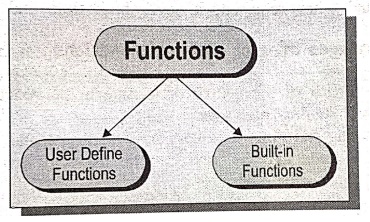
The
difference between these two categories of functions is that pre‒defined or
library functions are not required to be written by the programmer, whereas the
user defined function has to be written by the programmer at the time of
programming.
2. DECLARING, DEFINING AND ACCESSING FUNCTIONS
1. User Defined function
The
function defined by the users according to their requirements is called user‒defined
functions. The users can modify the function according to their requirement.
The
users have full scope to implement their own ideas in the function. Thus the
set of such user‒defined functions can be useful to another programmer.
These
are written by the programmer to perform a particular task, that is repeatedly
used in main program. These functions are helpful to break down a large program
in to a number of smaller functions.
2. Need for User‒defined functions
While
it is possible to write any complex program under the main() function and it
leads to a number of problems, such as
i)
The program becomes too large and complex.
ii)
The users can not go through at a glance.
ii)
The task of debugging, testing and maintenance becomes difficult.
If
a program is divided into parts, then each part may be independently coded and
later combined into a single program. These sub‒programs are called functions
and much easier to understand, debug and test.
There
is a situation, when some type of operations or calculation are repeated at
many places throughout the program. In such a case, we may repeat the program
statements wherever needed, but it makes the program code very big and complex.
Another approach is to design a function that can be called and used as and
when required, it saves both time and memory.
3. Advantages of user‒defined functions
a)
The length of the source program can be reduced by dividing it into smaller
functions.
b)
By using functions it is very easy to locate and debug an error.
c)
The user‒defined function can be used in many other source programs whenever
necessary.
d)
Functions avoid coding of repeated programming of the similar instructions.
e)
Functions enable a programmer to build a customised library of repeatedly used
routines.
f)
Functions facilitate top‒down programming approach
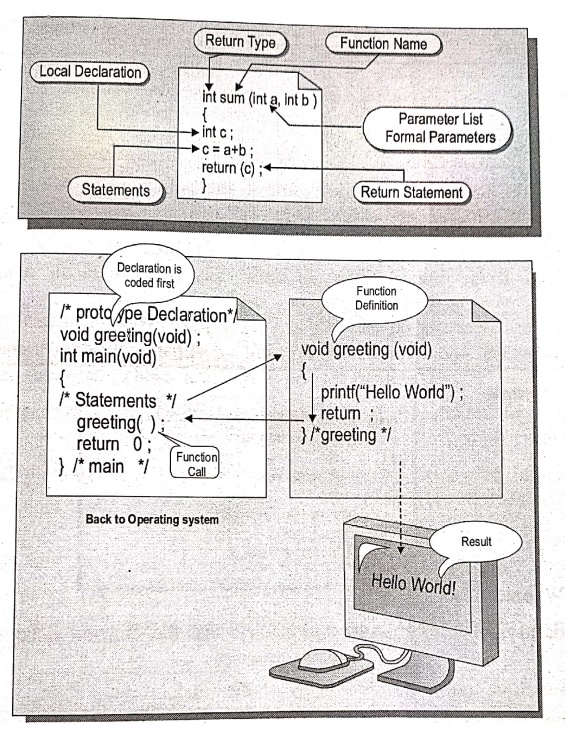
4. How function works
•
Once a function is called, it takes some data from the calling function and
return back some value to the called function.
•
Whenever function is called, control passes to the called function and working
of the calling function is temporarily stopped, when the execution of the
called function is completed then control returns back to the calling functions
and executes the next statement.
•
The function operates on formal and actual arguments and send back the result
to the calling function using return() statement.
3. ELEMENTS OF USER‒DEFINED FUNCTIONS
In
order to write an efficient user defined function, the programmer must be
familiar with the following three elements.
a) Function definition
b) Function declaration
c) Function call
a)
Function definition: It is the process of specifying
and establishing the user defined function by specifying all of its elements
and characteristics.
b)
Function declaration: Like the normal variables in a
program, the function can also be declared before they are defined and invoked.
Syntax:
return_type
function name (parameters list);
Description:
return_type is the
return type of function.
function_name is the
name of the function.
parameters list the
list of parameters that in the function
Example:
int add
(int x, int y, int z);
While
declaring a function, follow the points given below:
i)
The list of parameter must be separated by comma.
ii)
The names of the parameters are optional but data type is must.
iii)
If the function does not return any value, then the return type void is must.
iv)
If there is no parameters simply place void in braces.
v)
The data type of actual and formal parameters must match.
Syntax:
datatype
function_name(parameters list)
parameters
declaration;
{
local variables
declaration;
……….
body of the function;
…………
return(expression);
}
Where,
datatype:
Is the type of data that the function is going to return to its main program.
function_name:
Is the name of the function.
parameters list
: These are the list of parameters that are transferred to the function from
the main program are called the arguments. These list must be separated by
commas and has no termination after the parenthesis.
c)
Function Call: The function can be called by simply
specifying the name of the function, return value and parameters if present.
Syntax:
function_name();
function_name(parameter);
return
value = function_name(parameter);
Example
fun();
/*function without arguments and return values */
fun(a,
b); /* function with argument*/
c=fun(a,b)
/ function with arguments and return values */
Points
to Remember
i)
A function provides modularity and readability to the program.
ii)
To define the function, we have to define the function_name, return data type
and the parameters if any.
iii)
If the function does not return any value, then we have to set the return data
type as void.
iv)
If the function requires any return value, then we have to set the return data
type:
v)
A call to a function should be compatible with the function definition.
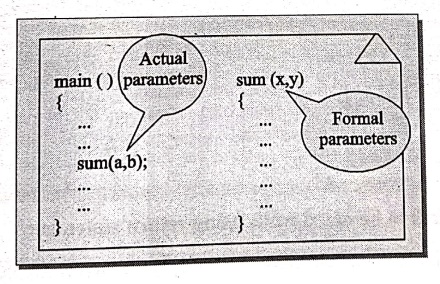
4. PARAMETERS
Parameters
provide the data communication between the calling function and called
function. There are two types of parameters,
i) Actual
parameters: These are the parameters transferred
from the calling program (main program) to the called program (function).
ii) Formal
parameters: These are the parameters, transferred
into the calling function (main program) from the called program (function).
Example:
All
the parameters are declared in parameters declaration.
i)
If there is more actual parameters than the formal parameters, the extra actual
parameter will be discarded.
ii)
If there is less actual parameter than the formal parameters, the unmatched
formal parameters will hold the garbage values.
iii)
If there is any mismatch of data types, they also hold the garbage values.
5. THE RETURN STATEMENT
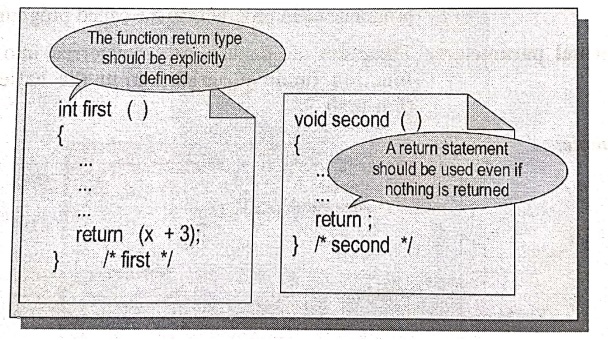
The
return statement may or may not send back any values to the main program
(calling program). If it does, it can be done using the return statement.
Syntax:
return; or
return(exp);
Description:
return; does not
return any values.
return(exp); returns
the specified exp value to main program.
Example:
if (a>0)
return(1);
else
return(0);
A
function can contain more than one return statements, when the return value can
return values based on certain conditions. If a function can return some values
other than int type, then we must specify the data type to be return.
NOTE:
By default, all functions return int data type
Important points to be noted while
using return statement
•
The return statement can return only one value from the called function to the
calling function.
•
The return statement can be present anywhere in the function.
•
The return statement not necessary at the end of the function.
•
If the called function does not return any value, then the keyword void must be
used as the return type specifier.
•
Number of return statements used in a function are not restricted.
•
Parenthesis used around the expression in a return statement is optional.
6. FUNCTION CALLING
A
function can be called by specifying the function name in the source program
with parameters if presence within parentheses.
Example 1: Function
call without parameters.
/* Program to call
function without parameters */
#include <stdio.h>
main()
{
/* Statements */
message(); /* message is a function call without parameters */
printf("Main_Message");
} /* main */
message()
{
printf("Function Message\n");
} /* message */ 1*
OUTPUT
Function Message
Main Message
EXPLANATION:
When the function message() is called the control passes to the function
message(). The activity of main() is temporarily suspended. The message()
function runs, the statements are executed and the control returns next line
from where the function is called in main program.
NOTE:
main() function becomes calling function, where as message() function becomes
the called function.
Example 2: Function
call with parameter.
/* Program to call function with parameter */
#include <stdio.h>
#include <conio.h>
void main()
{
int k; /* Local definitions */
/* Statements */
clrscr();
k = add(10, 20); /* Function call */
printf ("The value of k is %d\n", k);
getch();
} /* main */
int add (int x, int y)
{
int z;
z = x + y;
return (z);
} /* add */
OUTPUT
The value of k is 30
EXPLANATION:
The compiler automatically transfers the control to the function add(), then
the function add() is executed after that, the add() function returns some
value to the calling function.
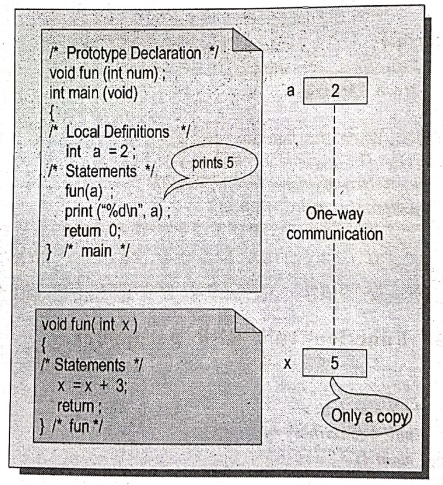
There
may be various ways to call a function.
Example:
add
(3,9);
add
(K,9);
add
(3,l);
add
(1+K,9);
Whenever
the function is written before the main, it can be called in the body of main.
If it is written after main then in the declaration of main we have to write
the prototype of the function. The prototype can also be written as a global
declaration.
Computer Programming C: UNIT III: Functions and Pointers : Tag: Computer Science : C Programming - Modular Programming
Computer Programming C: UNIT III: Functions and Pointers
Under Subject
Computer Programming C
CS25C01 1st Semester | 2025 Regulation | 1st Semester 2025 Regulation
Related Subjects

English Essentials I
EN25C01 1st Semester | 2025 Regulation | 1st Semester 2025 Regulation

தமிழர் மரபு - Heritage of Tamils
UC25H01 1st Semester | 2025 Regulation | 1st Semester 2025 Regulation
Applied Calculus
MA25C01 Maths 1 M1 - 1st Semester | 2025 Regulation | 1st Semester 2025 Regulation
Applied Physics I
PH25C01 1st Semester | 2025 Regulation | 1st Semester 2025 Regulation

Applied Chemistry I
CY25C01 1st Semester | 2025 Regulation | 1st Semester 2025 Regulation
Makerspace
ME25C04 1st Semester | 2025 Regulation | 1st Semester 2025 Regulation
Computer Programming C
CS25C01 1st Semester | 2025 Regulation | 1st Semester 2025 Regulation
Computer Programming Python
CS25C02 1st Semester | 2025 Regulation | 1st Semester 2025 Regulation
Fundamentals of Electrical and Electronics Engineering
EE25C03 1st Semester EEE Depart | 2025 Regulation | 1st Semester 2025 Regulation
Introduction to Mechanical Engineering
ME25C03 1st Semester Mechanical Dept | 2025 Regulation | 1st Semester 2025 Regulation

Introduction to Civil Engineering
CE25C01 1st Semester Civil, Agri Departments | 2025 Regulation | 1st Semester 2025 Regulation
Essentials of Computing
CS25C03 1st Semester - AIDS, CSE, CSE(CY), IT Department | 2025 Regulation | 1st Semester 2025 Regulation

Applied Physics I Laboratory
PH25C01 1st Semester practical Laboratory Manual | 2025 Regulation | 1st Semester Laboratory 2025 Regulation

Applied Chemistry I Laboratory
CY25C01 1st Semester practical Laboratory Manual | 2025 Regulation | 1st Semester Laboratory 2025 Regulation

Computer Programming C Laboratory
CS25C01 1st Semester EEE, ECE, CSE, CSE(CY), AIDS, IT practical Laboratory Manual | 2025 Regulation | 1st Semester Laboratory 2025 Regulation

Computer Programming Python Laboratory
CS25C02 1st Semester practical Laboratory Manual | 2025 Regulation | 1st Semester Laboratory 2025 Regulation
Engineering Drawing
ME25C01 EEE, Mech, Agri, EEE Depts | 2025 Regulation | 2nd Semester 2025 Regulation

Basic Electronics and Electrical Engineering
EE25C04 1st Semester ECE Dept | 2025 Regulation | 1st Semester 2025 Regulation
Essentials of Computing - Laboratory
CS25C03 1st Semester AIDS, CSE, CSE(CY), IT Depts | practical Laboratory Manual | 2025 Regulation | 1st Semester 2025 Regulation