Computer Programming C: UNIT III: Functions and Pointers
Pointers
C Programming
Generally, computer uses memory for storing instruction and values of the variables with in the program, but the pointers has memory address as their values.
POINTERS
INTRODUCTION
Generally,
computer uses memory for storing instruction and values of the variables with
in the program, but the pointers has memory address as their values. The memory
address is the location where program instructions and data are stored,
pointers can be used to access and manipulate data stored in the memory.
The
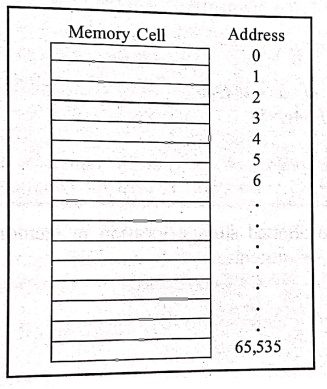
computer's memory is a sequential collection of storage cells as shown below:
In
computer's memory each cell is 1 byte, and it has a number called address, this
address is numbered consecutively starting from zero to last address (depends
upon the memory size, in 64K memory having the last address as 65,535).
While
declaring variable, the computer allocates appropriate memory to hold the value
of the variable. Since every memory has a unique address, this address location
will have its own address number somewhere in the memory area.
Example:
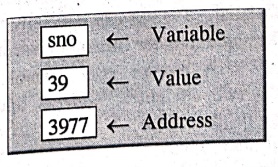
int sno=39;
The
above statement instructs the system to specify a location for the integer
variable ‘sno' and put the value 39 in that location. Assume that the system
has chosen the address location 3977 for 'sno' this may be represented as
During
the execution of the program, the system always associates the variable 'sno'
with the address 3977. We may have access to the value 39 by using either the
name of the variable 'sno' or the address 3977.
Example: Program to print address
and value of variable.
/* Program to
print address of variable sno and value of variable sno */
#include <stdio.h>
main()
{
int sno=39;
printf ("Address of sno=%u", &sno);
printf ("Value of sno= %d", sno);
} /* main */
OUTPUT
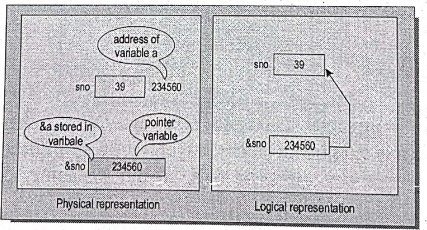
Address of sno=234560
Value of sno=39
EXPLANATION:
'&' is 'address of operator. The
expression &sno returns the address of the variable sno (i.e.) 39. The '%u'
is used for obtaining the address.
Pointers
are also allotted storage location in memory, where the addresses of other
variable will be stored.
1. Pointer Concept
One
of the most important and powerful features in C language is pointer. It has
added power and flexibility to the language.
"A
pointer is a variable; it may contain the memory address of another variable.”
Pointer can have any name that is legal for other variable. It is declared in
the same manner like other variables. It is always denoted by '*' operator.
A
pointer is a variable whose value is also an address. Each variable has two
attributes: address and value. A variable can take any value specified by its
data type. A pointer to an integer is a variable that can store the address of
that integer.
Assigning
values directly to variables, we can indirectly manipulate a variable by
creating a variable called a pointer, which contains the memory address of
another variable.

The
second variable contains the address of the first variable. 39 is the value at
the address, 3977 is the address of the first variable.
Simply
we can define pointers in two ways.
•
First a pointer is a variable and assigns different values to a pointer
variable.
•
Second the value contained by a pointer must be an address which indicates the
location of another variable in the memory.
So,
pointer is called as "address variable".
Pointer
seems to be complex but it is simple when compared to its advantages. Pointer
is more difficult to understand initially, but when we start working once and
understood, it will be easy.
2. Features of Pointers
The
benefits of using pointers are
a)
Pointers are efficient in handling data and associated with array.
b)
Pointers are used for saving memory space.
c)
Pointers reduce length and complexity of the program.
d)
Use of pointer assigns the memory space and also releases it. It helps to make
better use of the available memory (dynamic memory allocation).
e)
Since the pointer data manipulation is done with address, the execution time is
faster.
f)
The two‒dimensional and multi‒dimensional array representation is easy in
pointers.
g)
Pointer allows for references to function, this may facilitate passing of
function as arguments to other functions.
3. Advantages of Using Pointers
Pointers
provide the following benefits or advantages.
a)
Pointers are more compact and efficient code.
b)
Pointers can be used to achieve clarity and simplicity.
c)
Pointers are used to pass information between function and its reference point.
d)
Pointers provide a way to return multiple data items from a function using its
function arguments.
e)
Pointers also provide an alternate way to access an array element.
f)
Pointers enable us to access the memory directly.
4. Pointer Declaration
Pointer
is a variable that contains the address of another variable. Like normal
variable declared in 'C', pointers can also be declared.
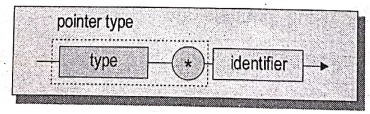
Syntax:
data‒type
*pointer‒name;
Description:
data‒type Specifies
the type of data to which the pointer points.
Pointer‒name Specifies
the name of the pointer. (It must preceded with an (*) asterisk.
Example:
int *a;
char *b;
float *c;
Accessing variable through pointers
Once
the pointer is declared and assigned to the address of another variable, the
variable can be accessed through its pointers. This is done by using another
unary operator * (asterisk), usually known as the indirection operator. Another
name for the indirection operator is the dereferencing operator.
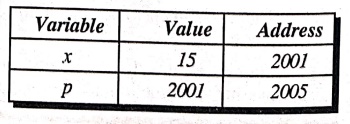
Example:
int
*p;
x
= 15;
p
= &x;
Example 1: Program to accessing through
variable pointer.
/* Program for accessing variable through pointer */
#include <stdio.h>
main. ( )
{
int a=22, *a; /* *a, "b is a pointer variables */
float b=2.25, *b;
a = &a; /* & is a
address of letter and it represents the address of the variable */
b = &b;
printf ("\n Value of a=%d", *a);
printf("\n Value of b=%d", *b);
} /* main */
OUTPUT
Value of a=22
Value of b=2.25
EXPLANATION:
Variable 'a' is assigned values as 22, again 'a' and 'b' declared as pointer
variable. The statement a=&a assigns address of a to variable a and the
statement b=&b assigns address of b to variable b. Then finally print the
value of a and b.
Example 2: Program to
print address and value of variable.
/* Program to accessing
variable through pointer */
#include <stdio.h>
main ( )
{
int a=22; /* Local
definition */
int *a; a=&a;
printf ("\n Value of a=%d", *a);
printf ("\n Address of a=%u", &a);
printf ("\n Value at address %u=%d", &a,
*(&a));
} /* main */
OUTPUT
Value of a=22
Address of a=4000
value at address
4000=22.
EXPLANATION:
Assign a to 22, Address of variable a is assigned to pointer a. Print the value
of a using pointer variable and print the address of a variable by using
address operator &.
NOTE:
(&a)=('a' means the value at address) of the variables.
i. Null Pointer
A
pointer is said to be a null pointer when its right value is 0. A null pointer
can never point to a valid data. For checking a pointer, if it is assigned to
0, then it is a null pointer and is not valid.
Example:
int *a;
int *b;
b=a=0;
Hence
band a become null pointers after the integer value of 0 is assigned to them.
ii. Pointer to Pointer
Pointer
is a variable that contains the address of another variable. Similarly another
pointer variable can store the address of this pointer variable. So we can say,
this is a pointer to pointer variable.
Example: Program to
illustrate pointer to pointer concept.
/* Program using pointer to pointer */
#include<stdio.h>
main ()
{
int a=22; /* Local definitions */
int *b; /* *b is a pointer variable */
int **c; /* **c is a pointer to another pointer */
b=&a; /* '&a' is a address variable */
c=&b;
printf ("\n Value of a is %d", a);
printf ("\n Value of a is %d", *(&a));
printf ("\n Value of a is %d", *b);
printf ("\n Value of a is %d", **c);
printf ("\n Value of b and address of a=%u", b);
printf("\n Value of c and address of b = %u", c);
printf ("\n Address of a=%u", &a);
printf ("\n Address of b=%u", &b);
printf ("\n Address of a=%u", *c);
printf ("\n Address of b=%u", &b);
printf ("\n Address of b=%u", c);
printf ("\n Address of c=%u", &c);
} /* main */
OUTPUT
Value of a is 22 Value of a=22
Value of a is 22 Value of a=22
Value of b and address
of a=2000
Value of c and address
of b=4000
Address of a=2000 Address of b=4000
Address of a=2000 Address of b=4000
Address of b=4000 Address of c=6000
iii. Pointer Expressions
Pointer
variables can be used in expressions. Here, the pointers are preceded by the
*(indirection operator) symbol.
Example:
i)
c=*a+*b; can be written as c=(*a)+(*b);
ii)
s=10*‒*a*b; can be written as s=(10*(‒(a)))/(*b);
iii)
*p=*a**b; can be written as*p=(*a)**b;
iv)
*a=*a+5; can be written as(*a)+=5;
'C'
allows us to add or subtract integers from one pointer to another pointer. In addition
to that, the pointer can also be compared using relational operators. But
comparisons can be used mainly in handling arrays and strings.
Computer Programming C: UNIT III: Functions and Pointers : Tag: Computer Science : C Programming - Pointers
Computer Programming C: UNIT III: Functions and Pointers
Under Subject
Computer Programming C
CS25C01 1st Semester | 2025 Regulation | 1st Semester 2025 Regulation
Related Subjects

English Essentials I
EN25C01 1st Semester | 2025 Regulation | 1st Semester 2025 Regulation

தமிழர் மரபு - Heritage of Tamils
UC25H01 1st Semester | 2025 Regulation | 1st Semester 2025 Regulation
Applied Calculus
MA25C01 Maths 1 M1 - 1st Semester | 2025 Regulation | 1st Semester 2025 Regulation

Applied Physics I
PH25C01 1st Semester | 2025 Regulation | 1st Semester 2025 Regulation

Applied Chemistry I
CY25C01 1st Semester | 2025 Regulation | 1st Semester 2025 Regulation

Makerspace
ME25C04 1st Semester | 2025 Regulation | 1st Semester 2025 Regulation
Computer Programming C
CS25C01 1st Semester | 2025 Regulation | 1st Semester 2025 Regulation
Computer Programming Python
CS25C02 1st Semester | 2025 Regulation | 1st Semester 2025 Regulation

Fundamentals of Electrical and Electronics Engineering
EE25C03 1st Semester EEE Depart | 2025 Regulation | 1st Semester 2025 Regulation

Introduction to Mechanical Engineering
ME25C03 1st Semester Mechanical Dept | 2025 Regulation | 1st Semester 2025 Regulation

Introduction to Civil Engineering
CE25C01 1st Semester Civil, Agri Departments | 2025 Regulation | 1st Semester 2025 Regulation
Essentials of Computing
CS25C03 1st Semester - AIDS, CSE, CSE(CY), IT Department | 2025 Regulation | 1st Semester 2025 Regulation

Applied Physics I Laboratory
PH25C01 1st Semester practical Laboratory Manual | 2025 Regulation | 1st Semester Laboratory 2025 Regulation

Applied Chemistry I Laboratory
CY25C01 1st Semester practical Laboratory Manual | 2025 Regulation | 1st Semester Laboratory 2025 Regulation

Computer Programming C Laboratory
CS25C01 1st Semester EEE, ECE, CSE, CSE(CY), AIDS, IT practical Laboratory Manual | 2025 Regulation | 1st Semester Laboratory 2025 Regulation

Computer Programming Python Laboratory
CS25C02 1st Semester practical Laboratory Manual | 2025 Regulation | 1st Semester Laboratory 2025 Regulation
Engineering Drawing
ME25C01 EEE, Mech, Agri, EEE Depts | 2025 Regulation | 2nd Semester 2025 Regulation

Basic Electronics and Electrical Engineering
EE25C04 1st Semester ECE Dept | 2025 Regulation | 1st Semester 2025 Regulation
Essentials of Computing - Laboratory
CS25C03 1st Semester AIDS, CSE, CSE(CY), IT Depts | practical Laboratory Manual | 2025 Regulation | 1st Semester 2025 Regulation