Python for Data Science: Chapter 5: NumPy and Pandas Libraries
Pandas: Merging and Joining Datasets
Python library
Questions: 1. Explain how merging of datasets is done using multiple keys? 2.What are different types of join operations in data wrangling process?
Merging
and Joining Datasets
•
Merging and joining the datasets is a core process to start with data analysis
and machine learning task. The merging and joining operation brings all the
datasets at one place based on certain logic and then start data analysis.
Syntax of merge
pd.merge(left, right,
how='inner', on=None, left_on=None, right_on=None, left_index=False,
right_index=False, sort=True)
Parameters:
• left ‒ A DataFrame object.
• right ‒ Another DataFrame
object.
• on‒
Columns (names) to join on. Must be found in both the left and right DataFrame
objects.
• left_on ‒
Columns from the left DataFrame to use as keys. Can either be column names or
arrays with length equal to the length of the DataFrame.
• right_on ‒
Columns from the right DataFrame to use as keys. Can either be column names or
arrays with length equal to the length of the DataFrame.
• left_index ‒ If True, use
the index (row labels) from the left DataFrame as its join key(s). In case of a
DataFrame with a MultiIndex (hierarchical), the number of levels must match the
number of join keys from the right DataFrame.
•
right_index
‒
Same usage as left_index for the right DataFrame.
• how ‒ One of 'left', 'right', 'outer',
'inner'. Defaults to inner. Each method has been described below.
• sort ‒
Sort the result DataFrame by the join keys in lexicographical order. Defaults
to True, setting to False will improve the performance substantially in many
cases.
Demo example
•
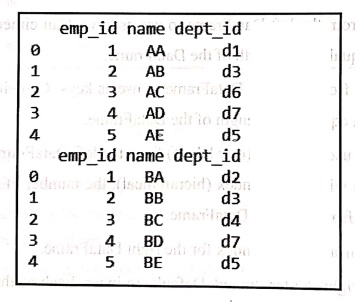
We will consider two datasets of employee information. We will first display
these two data sets
import pandas as pd
data1 = pd.DataFrame({
'emp_id':[1,2,3,4,5],
'name':['AA', 'AB', 'AC',
'AD', 'AE'].
'dept_id': ['d1', 'd3',
'd6', 'd7', 'd5']}).
data2 = pd.DataFrame({
'emp_id':[1,2,3,4,5],
'name': ['BA', 'BB', 'BC', 'BD', 'BE'],
'dept_id': ['d2', 'd3', 'd4', 'd7', 'd5']})
print(data1)
print(data2)
Output
Now
using the merge function we will
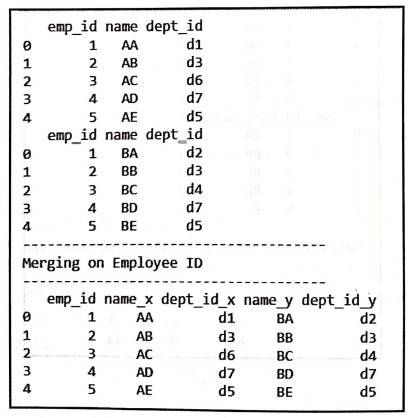
merge two datasets. This merging is based on emp_id. The code for this will be as follows‒
import pandas as pd
data1 = pd.DataFrame({
'emp_id':[1,2,3,4,5],
'name': ['AA', 'Ab', 'Ac', 'AD', 'AE'],
'dept_id':['d1', 'd3', 'd6', 'd7','d5']})
data2 = pd.DataFrame({
'emp_id':[1,2,3,4,5],
'name': ['BA', 'BB', 'BC', 'BD', 'BE'],
'dept_id': ['d2', 'd3', 'd4', 'd7', 'd5']})
print(data1)
print(data2) print("
print("-----------------------------")
print("Merging on Employee ID")
print("-----------------------------")
print(pd.merge(data1, data2,on='emp_id'))
Output
•
In above code we have used merge
function. The first two parameters to this function are the two datasets. The
third parameter is on which is
assigned with the name of the column based on which the merging should take
place. We have assigned the emp_id
to on parameter. Hence merging of
two data sets take place based on emp_id
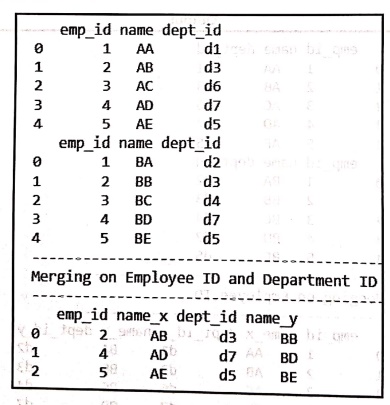
Merging of datasets using multiple keys
import pandas as pd
data1 = pd.DataFrame({
'emp_id':[1,2,3,4,5],
'name': ['AA', 'AB', 'AC', 'AD', 'AE'],
'dept_id': ['d1', 'd3', 'd6', 'dz', 'd5']})
data2 = pd.DataFrame({
'emp_id':[1,2,3,4,5],
'name':['BA', 'BB', 'BC', 'BD', 'BE'],
dept id': ['d2', 'd3', 'd4', 'd7', 'd5']})
print(data1)
print(data2)
print("-----------------------------")
print("Merging on Employee ID and Department _ID")
print("-----------------------------")
print(pd.merge(data1,data2,on=['emp_id', 'dept_id']))
Output
Types of join
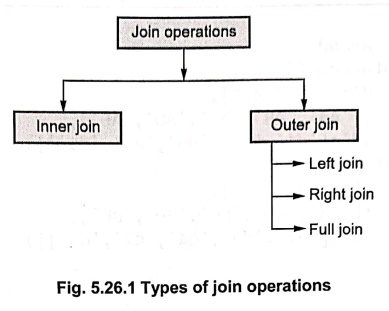
Fig. 5.26.1 Types of
join operations
There
are four types of joins. These are described as follows ‒
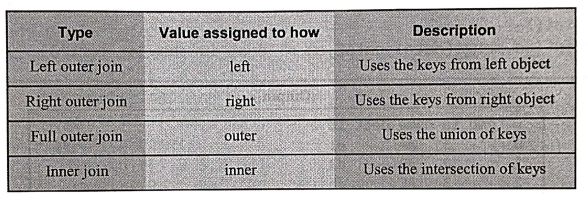
•
For displaying the merged datasets we
assign the values to parameter how
based on which the join can be left, right, inner or outer.
•
Following are the code samples
demonstrating each type of Join
Left outer join
•
The LEFT OUTER JOIN returns all rows from the left dataset, even if there are
no matches in the right table. This means that if it matches 0 (zero) records
in the right table; the join will still return a row in the result, but with
NaN in each column from the right table.
This
means that a left join returns all the values from the left data set, plus
matched values from the right data set or NaN in case of no matching join
predicate.
•
It can be represented as
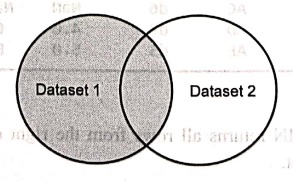
The
sample code is for implementing the left outer join is as follows ‒
import pandas as pd
data1 = pd.DataFrame({
'emp_id':[1,2,3,4,5],
'name': ['AA', 'AB', 'AC', 'AD', 'AE'],
'dept_id': ['d1', 'd3', 'd6', 'd7', 'd5']})
data2 = pd.DataFrame({
'emp_id':[1,2,3,4,5],
'name': ['BA', 'BB', 'BC', 'BD', 'BE'],
'dept_id': ['d2', 'd3', 'd4', 'd7', 'd5']})
print(data1)
print(data2)
print("----------------")
print(" Left Outer Join")
print("----------------")
print(pd.merge(data1, data2, on = 'dept_id', how = 'left'))
Output
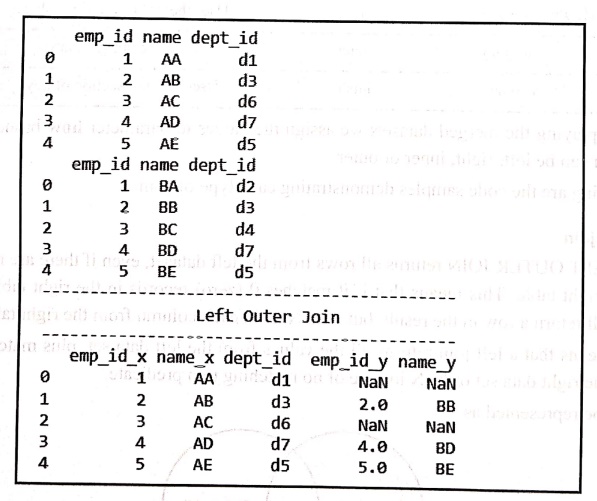
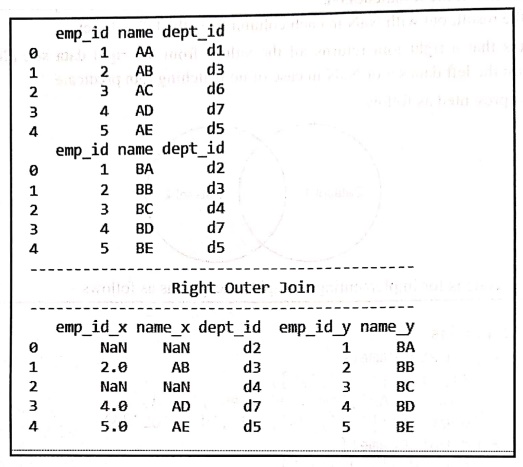
Right outer join
•
The RIGHT OUTER JOIN returns all rows
from the right data set, even if there are no matches in the left data set.
•
This means that if the it matches 0 (zero) records in the left data set; the
join will still return a row in the result, but with NaN in each column from
the left data set.
•
This means that a right join returns all the values from the right data set,
plus matched values from the left data set or NaN in case of no matching join
predicate.
•
It can be represented as follows:
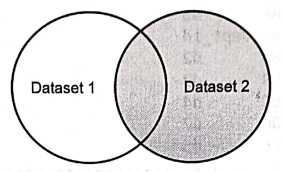
The
sample code is for implementing the right outer join is as follows ‒
import pandas as pd
data1 = pd.DataFrame({
'emp_id':[1,2,3,4,5],
'name': ['AA', 'AB', 'AC', 'AD', 'AE'],
'dept_id': ['d1', 'dз', 'd6', 'd7', 'd5']})
data2 = pd.DataFrame({
emp_id':[1,2,3,4,5],
name': ['BA', 'BB', 'BC', 'BD', 'BE'],
'dept_id': ['d2', 'd3', 'd4', 'd7', 'd5']})
print(data1)
print(data2)
print("-------------------------------")
print("
Right Outer Join")
print("-------------------------------")
print (pd.merge(data1, data2,on = 'dept_id', how = 'right'))
Output
Full outer join
•
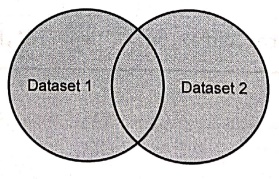
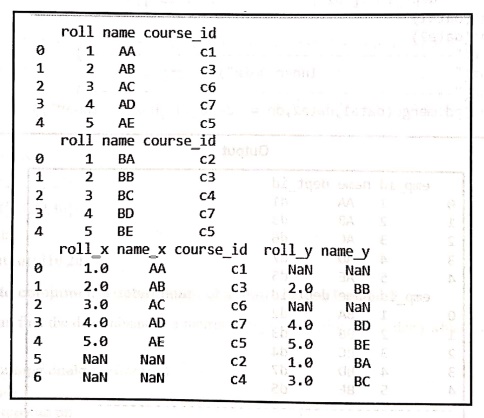
The FULL OUTER JOIN combines the results
of both left and right outer joins.
•
The joined table will contain all
records from both the datasets and fill in NaN for missing matches on either
side.
•
It can be represented as,
The
sample code is for implementing the full outer join is as follows ‒
import pandas as pd
data1 = pd.DataFrame({
'emp_id':[1,2,3,4,5],
'name': ['AA', 'AB', 'AC', 'AD', 'AE'],
'dept_id': ['d1', 'dз', 'd6', 'd7', 'd5']})
data2 = pd.DataFrame({
'emp_id':[1,2,3,4,5],
'name': ['BA', 'BB',
'BC', 'BD', 'BE'],
'dept_id': ['d2', 'd3',
'd4', 'd7', 'd5']})
print(data1)
print(data2)
print("-----------------------------")
print(" Full Outer Join")
print("-----------------------------")
print(pd.merge(data1, data2, on = 'dept id', how = 'outer'))
Output
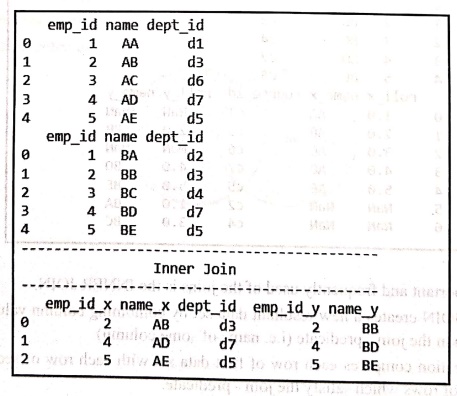
Inner join
•
The most important and frequently used
of the joins is the INNER JOIN.
•
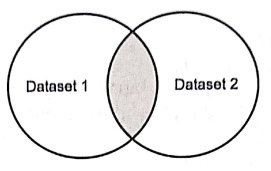
The INNER JOIN creates a new resultant
data set by combining column values of two data sets based upon the join ‒
predicate (i.e. name of some column).
•
The join operation compares each row of first data set with each row of second
dataset to find all pairs of rows which satisfy the join ‒ predicate.
•
When the join ‒ predicate is satisfied, column values for each matched pair of
rows of dataset1 and dataset2 are combined into a result row. It can be
represented as :
The
sample code is for implementing the inner join is as follows ‒
import pandas as pd
datal = pd.DataFrame({
'emp_id':[1,2,3,4,5],
'name': ['AA', 'AB', 'Ac', 'AD','ÁE'],
'dept_id': ['d1', 'd3', 'd6', 'd7', 'd5']})
data2 = pd.DataFrame({
emp_id':[1,2,3,4,5],
'name': ['BA', 'BB', 'BC', 'BD','BE'],
'dept_id': ['d2', 'd3', d4', 'd7', 'd5']})
print(data1)
print(data2)
print("-------------------")
print(" Inner
Join")
print("-------------------")
print(pd.merge(data1, data2,on = 'dept_id',how = 'inner'))
Output
Review Questions
1. Explain how merging
of datasets is done using multiple keys?
2.What are different
types of join operations in data wrangling process?
Python for Data Science: Chapter 5: NumPy and Pandas Libraries : Tag: Computer Programming, Python, Data Science : Python library - Pandas: Merging and Joining Datasets
Python for Data Science: Chapter 5: NumPy and Pandas Libraries
Under Subject

Python for Data Science
AD25201 2nd Semester AIDS Dept | 2025 Regulation | 2nd Semester 2025 Regulation
Related Subjects

English Essentials II
EN25C02 2nd Semester | 2025 Regulation | 2nd Semester 2025 Regulation

Tamils and Technology தமிழர்களும் தொழில்நுட்பமும்
UC25H02 2nd Semester | 2025 Regulation | 2nd Semester 2025 Regulation

Linear Algebra
MA25C02 2nd Semester | 2025 Regulation

Applied Physics (CSIE) II
PH25C03 2nd Semester AIDS, CSE, IT, CSE(CY) Dept | 2025 Regulation | 2nd Semester 2025 Regulation

Digital Principles and Computer Organization
CS25C06 2nd Semester AIDS, CSE, IT, CSE(CY) Dept | 2025 Regulation | 2nd Semester 2025 Regulation

Basic Electrical and Electronics Engineering
EE25C01 2nd Semester | 2025 Regulation | 2nd Semester 2025 Regulation
Python for Data Science
AD25201 2nd Semester AIDS Dept | 2025 Regulation | 2nd Semester 2025 Regulation

Re-Engineering for Innovation
ME25C05 2nd Semester | 2025 Regulation | 2nd Semester 2025 Regulation

Python for Data Science - Laboratory
AD25201 2nd Semester AIDS Dept | 2025 Regulation | 2nd Semester 2025 Regulation