Python for Data Science: Laboratory Programs in Python
Array Indexing and Slicing operations
Laboratory Programs in Python
Python for Data Science: Laboratory Programs in Python : Numpy and Pandas Libraries : Array Slicing and Indexing operations
Indexing
Ex1. Python program for indexing one D array
import numpy as np
arr = np.array([10,20,30,40,50])
print("Element at index 0: ",arr[0])
print("Element at last position: ",arr[‒1])
Output
Element at index 0: 10
Element at last position: 50
Ex 2. Python program for indexing two D array
import numpy as np
arr = np.array([[1,2,3],
[4,5,6],
[7,8,9]])
print(arr[0,2])
print(arr[2,1])
Output
3
8
Code explanation: In above code,
Using first print statement, we can access the element 3 which is at position 0th row and 2nd column.
Using second print statement, we can access element 8 which is at position at position 2nd row and first column.
Slicing
Syntax
array[start: end: step]
where
start: Index where slice begins.
end: Index where slice ends.
step: How many elements to skip
Following python programs illustrate the use of slicing in NumPy.
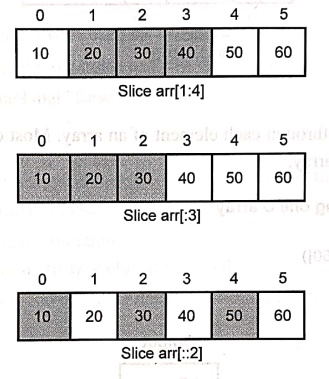
Ex 3. Python program for slicing a one D array
import numpy as np
arr = np.array([10,20,30,40,50,60])
print("Displaying slice(elements from 1 to 3)")
print(arr[1:4])
print("Displaying first three elements as slice")
print(arr[:3])
print("Displaying every alternate element as slice")
print(arr[::2])
Output
Displaying slice (elements from 1 to 3)
[20 30 40]
Displaying first three elements as slice
[10 20 30]
Displaying every alternate element as slice
[10 30 50]
The working of above code can be illustrated by following figure ‒
Ex 4. Python program for slicing a two D array
import numpy as np
arr = np.array([[1,2,3,4],
[5,6,7,8],
[9,10,11,12],
[13,14,15,16]])
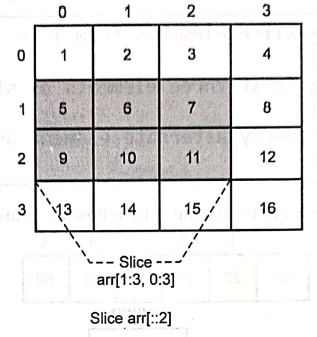
print("Slice second and third rows and first three columns")
print(arr[1:3,0:3])
Output
slice second and third rows and first three columns
[[ 5 6 7]
[ 9 10 11]]
Following figure illustrates how to slice a two dimensional array ‒
Iterating
Ex 5. Python program for iterating one D array
import numpy as np
arr = np.array([10,20,30,40,50])
for x in arr:
print(x)
Output
10
20
30
40
50
Code explanation: In above code,
There is a for loop that iterates over each element in the arr array. For each element x, it prints the value to the console,
Ex 6. Python program for iterating two D array
import numpy as np
arr = np.array([[1,2,3],
[4,5,6],
[7,8,9]])
for row in arr:
print("Row: ",row)
Output
Row: [1 2 3]
Row: [4 5 6]
Row: [7 8 9]
In above code, the code
for row in arr:
print("Row: ", row)
• This is a for loop that iterates over each row of the 2D array.
• In each iteration, the variable row holds one row of the matrix.
• It prints each row with the label "Row: ".
Python for Data Science: Laboratory Programs in Python : Tag: Computer Programming, Python, Data Science : Laboratory Programs in Python - Array Indexing and Slicing operations
Python for Data Science: Laboratory Programs in Python
Under Subject

Python for Data Science
AD25201 2nd Semester AIDS Dept | 2025 Regulation | 2nd Semester 2025 Regulation

Python for Data Science - Laboratory
AD25201 2nd Semester AIDS Dept | 2025 Regulation | 2nd Semester 2025 Regulation
Related Subjects

English Essentials II
EN25C02 2nd Semester | 2025 Regulation | 2nd Semester 2025 Regulation

Tamils and Technology தமிழர்களும் தொழில்நுட்பமும்
UC25H02 2nd Semester | 2025 Regulation | 2nd Semester 2025 Regulation

Linear Algebra
MA25C02 2nd Semester | 2025 Regulation

Applied Physics (CSIE) II
PH25C03 2nd Semester AIDS, CSE, IT, CSE(CY) Dept | 2025 Regulation | 2nd Semester 2025 Regulation

Digital Principles and Computer Organization
CS25C06 2nd Semester AIDS, CSE, IT, CSE(CY) Dept | 2025 Regulation | 2nd Semester 2025 Regulation

Basic Electrical and Electronics Engineering
EE25C01 2nd Semester | 2025 Regulation | 2nd Semester 2025 Regulation
Python for Data Science
AD25201 2nd Semester AIDS Dept | 2025 Regulation | 2nd Semester 2025 Regulation

Re-Engineering for Innovation
ME25C05 2nd Semester | 2025 Regulation | 2nd Semester 2025 Regulation
Python for Data Science - Laboratory
AD25201 2nd Semester AIDS Dept | 2025 Regulation | 2nd Semester 2025 Regulation