Python for Data Science: Laboratory Programs in Python
Creation of 1D, 2D, and 3D NumPy arrays
Laboratory Programs in Python
Python for Data Science: Laboratory Programs in Python: Numpy and Pandas Libraries: Creation of 1D, 2D, and 3D NumPy arrays
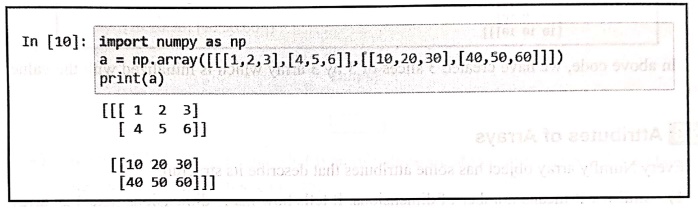
Ex. 1: Create of two‒D arrays
In [10]: import numpy as np
a = np.array([[[1,2,3], [4,5,6]], [[10,20,30],[40,50,60]]])
print(a)
[[[ 1 2 3]
[ 4 5 6]]
[[10 20 30]
[40 50 60]]]
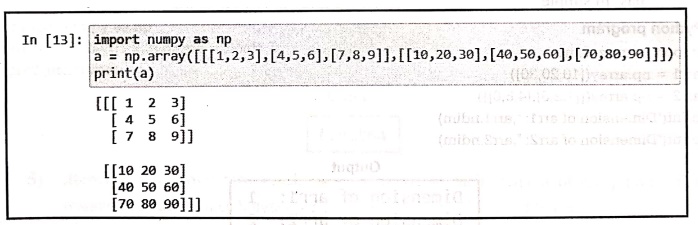
Ex. 2: Creation of three‒D array
In [13]: import numpy as np
a = np.array([[[1,2,3],[4,5,6], [7,8,9]], [[10,20,30], [40, 50, 60], [70,80,90]]])
print(a)
[[[ 1 2 3]
[ 4 5 61
[ 7 8 9]]
[[10 20 30]
[40 50 60]
[70 80 90]]]
In [14]: print(a.ndim)
3
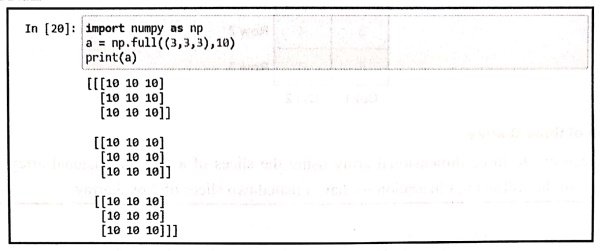
Ex. 3: Creation of n‒dimensional array
In [20]: import numpy as np
a = np.full((3,3,3),10)
print(a)
[[[10 10 10]
[10 10 10]
[10 10 10]]
[[10 10 10]
[10 10 10]
[10 10 10]]
[[10 10 10]
[10 10 10]
[10 10 10]]]
Ex. 4) .ndim
Python program
import numpy as np
arr1 = np.array([10,20,30])
arr2 = np.array([[1,2,3],[4,5,6]])
print("Dimension of arr1: ",arr1.ndim)
print("Dimension of arr2: ",arr2.ndim)
Output
Dimension of arr1: 1
Dimension of arr2: 2
Ex. 5) .shape
Python program
import numpy as np
arr = np.array([[10,20,30],[40,50,60]])
print(arr.shape)
Output
(2, 3)
Here the array is created as follows
10 20 30
40 50 60
That means there are two rows and three columns.
Ex. 6) .size
Python program
import numpy as np
ап = np.array([[10,20,30],[40,50,60]])
print(arr.size)
Output
6
Ex. 7) .dtype
Python program
import numpy as np
arr = np.array([1,2,3], dtype = float)
print(arr.dtype)
Output
float64
Ex. 8) .itemsize
Python program
import numpy as np
arr1 = np.array([1,2,3], dtype=np.int32)
arr2= np.array([1.0,2.0,3.0], dtype=np.float64)
print(arr1.itemsize)
print(arr2.itemsize) do
Output
4
8
Python program for creation of NumPy array object
import numpy as np
arr = np.array([10,20,30,40,50])
print(arr)
print(type(arr))
Output.
[10 20 30 40 50]
<class 'numpy.ndarray'>
Code explanation: In above code,
We have created an array object arr. It stores 5 integers. The values are stored in continuous memory allowing fast mathematical operations. Note that in the output we get the type of array as <class 'numpy.ndarray"> which indicates that it is an object,
Ex 10. Python program for creating 2D array object
import numpy as np
arr = np.array([[10,20,30],[40,50,60]])
print(arr)
print(type(arr))
Output
[[10 20 30]
[40 50 60]]
<class 'numpy.ndarray'>
Code explanation: In above code,
The 2D Numpy array object is created in variable arr. It has 2 rows and 3 columns. The type returns the datatype of variable arr and it is ndarray. This is nothing but the array object.
Ex 11. Join - Basic Operations - NumPy (Python library)
In [20]: import numpy as np
a = np.array([[1,2,3],[4,5,6]])
print('First array:')
print(a)
b = np.array([[10,20,30], [40, 50, 60]])
print('Second array:')
print(b)
# both the arrays are of same dimensions
print("Joining the two arrays along axis 0:')
print(np.concatenate((a,b)))
print('Joining the two arrays along axis 1:')
print(np.concatenate ((a,b), axis = 1))
First array:
[[1 2 3]
[4 5 6]]
second array:
[[10 20 30]
[40 50 60]]
Joining the two arrays along axis 0 :
[[1 2 3]
[ 4 5 6]
[10 20 30]
[40 50 60]]
Joining the two arrays along axis 1:
[[ 1 2 3 10 20 30]
[ 4 5 6 40 50 60]]
Ex 12. Join - Basic Operations - NumPy (Python library)
Python program for vertical join of two dimensional arrays
import numpy as np
arr1 = np.array([[10,20], [30,40]])
arr2 = np.array([[50,60],[70,80]])
result = = np.vstack((arr1,arr2))
print("Vertical Join: ",result)
Output
Vertical Join: [[10 20]
[30 40]
[50 60]
[70 80]]
Ex 13. Join - Basic Operations Python program - NumPy (Python library)
Python program for horizontal join of two dimensional arrays
import numpy as np
arr1 = np.array([[10,20],[30,40]])
arr2 = np.array([[50,60],[70,80]])
result = np.hstack((arr1, arr2))
print("Horizontal Join: ",result)
Output
Horizontal Join: [[10 20 50 60]
[30 40 70 80]]
14. Split - Basic Operations Python program - NumPy (Python library)
Python program
import numpy as np
arr = np.array([10,20,30,40,50,60])
result = np.split(arr,3)
print(result)
Output
[array([10, 20]), array([30, 40]), array([50, 60])]
The above code splits the array into 3 equal parts and each part gets 2 elements.
• np.array_split() : The array_split() allows uneven splitting when the array length isn't divisible by the number of parts. For an array that causes uneven split, the np.split( ) raises error but the np.array.split() works fine.
For example ‒
Ex 15. np.split(): Split - Basic Operations Python program - NumPy (Python library)
Python program
import numpy as np
am = np.array([10,20,30,40,50])
result = np.array_split(arr,3)
print(result)
Output
[array([10, 20]), array([30, 40]), array([50])]
Ex 16. np.array_split(): Split - Basic Operations Python program - NumPy (Python library)
Python program
import numpy as np
am = np.array([10,20,30,40,50])
result = np.array_split(arr,3)
print(result)
Output
[array([10, 20]), array([30, 40]), array([50])]
Ex 17. np.hsplit(): Split - Basic Operations Python program - NumPy (Python library)
Python program
import numpy as np
arr = np.array([[1,2,3,4],
[5,6,7,8],
[9,10,11,12],
[13,14,15,16]])
print(arr,"\n")
h_parts = np.hsplit(arr, 2)
count = 1
for part in h_parts:
print("Part", count, ":\n", part, "\n")
count += 1
Output
[[ 1 2 3 4]
[ 5 6 7 8]
[ 9 10 11 12]
[13 14 15 16]]
Part 1:
[[ 1 2 ]
[ 5 6 ]
[ 9 10]
[13 14]]
Part 2 :
[[ 3 4]
[ 7 8]
[11 12]
[15 16]]
Ex 18. np.vsplit(): Split - Basic Operations Python program - NumPy (Python library)
Python program
import numpy as np
arr = np.array([[1,2,3,4],
[5,6,7,8],
[9,10,11,12],
[13,14,15,16]])
print(arr, "\n")
v_parts = np.vsplit(arr, 2)
count = 1
for part in v_parts:
print("Part", count, ":\n", part, "\n")
count += 1
Output
[[ 1 2 3 4]
[ 5 6 7 8]
[ 9 10 11 12]
[13 14 15 16]]
Part 1:
[[1 2 3 4]
[5 6 7 8]]
Part 2:
[[ 9 10 11 12]
[13 14 15 16]]
19. Search - Basic Operations Python program - NumPy (Python library)
Python program
import numpy as np
arr = np.array([10,20,30,40,20,50,20])
result = np.where(arr==20)
print("Index position of 20:",result)
Output
Index position of 20: (array([1, 4, 6], dtype=int64),)
It means, position of element 20 in the array is at index 1,4 and 6. Hence is the output.
20. Sort - Basic Operations Python program - NumPy (Python library)
import numpy as np
arr = np.array([30,40,10,20,50])
result = np.sort(arr)
print(result)
Output
[10 20 30 40 50]
Python program
import numpy as np
arr1 = np.array([100,200,300])
arr2 = arr1.copy()
print("After copy operation...")
print("arr1: ",arr1)
print("arr2: ",arr2)
arr2[0]=500
print("After modification...")
print("arr1: ",arr1)
print("arr2: ",arr2)
Output
After copy operation...
arr1: [100 200 300]
arr2: [100 200 300]
After modification...
arr1: [100 200 300]
arr2: [500 200 300]
Ex 22.
Write a Python program to demonstrate the exponentiation operation on arrays using NumPy.
Solution:
In [2]: import numpy as np
a = np.array([1,2,3,4,5])
b = a ** 2
print("Exponentiation using ** operator ",b)
c = np.power(a,2)
print("Exponentiation using power() function ",c)
Exponentiation using ** operator [ 1 4 9 16 25]
Exponentiation using power() function [ 1 4 9 16 25]
Ex 23.
Write a Python program to demonstrate the modulus operation on arrays using NumPy.
Solution:
In [4]: import numpy as np
a = np.array([10,20,30,40])
b = np.array([2,3,7,9])
c = a % b
print("Modulus using % operator ",c)
d = np.mod(a,b)
print("Modulus using mod function",d)
Modulus using % operator [0 2 2 4]
Modulus using mod function [0 2 2 4]
In [10]: import numpy as np
np.eye(4, 4, k=0)
Out[10]: array([[1., 0., 0., 0.],
[0., 1., 0., 0.],
[0., 0., 1., 0.],
[0., 0., 0., 1.]])
In [11]: import numpy as np
np.eye(4, 4, k=1)
Out[11]: array([[0., 1., 0., 0.],
[0., 0., 1., 0.1],
[0., 0., 0., 1.],
[0., 0., 0., 0.]])
In [12]: import numpy as np
np.eye(4, 4, k= ‒1)
Out[12]: array([[0., 0., 0., 0.],
[1., 0., 0., 0.],
[0., 1., 0., 0.],
[0., 0., 1., 0.]])
Python for Data Science: Laboratory Programs in Python : Tag: Computer Programming, Python, Data Science : Laboratory Programs in Python - Creation of 1D, 2D, and 3D NumPy arrays
Python for Data Science: Laboratory Programs in Python
Under Subject

Python for Data Science
AD25201 2nd Semester AIDS Dept | 2025 Regulation | 2nd Semester 2025 Regulation

Python for Data Science - Laboratory
AD25201 2nd Semester AIDS Dept | 2025 Regulation | 2nd Semester 2025 Regulation
Related Subjects

English Essentials II
EN25C02 2nd Semester | 2025 Regulation | 2nd Semester 2025 Regulation

Tamils and Technology தமிழர்களும் தொழில்நுட்பமும்
UC25H02 2nd Semester | 2025 Regulation | 2nd Semester 2025 Regulation

Linear Algebra
MA25C02 2nd Semester | 2025 Regulation

Applied Physics (CSIE) II
PH25C03 2nd Semester AIDS, CSE, IT, CSE(CY) Dept | 2025 Regulation | 2nd Semester 2025 Regulation

Digital Principles and Computer Organization
CS25C06 2nd Semester AIDS, CSE, IT, CSE(CY) Dept | 2025 Regulation | 2nd Semester 2025 Regulation

Basic Electrical and Electronics Engineering
EE25C01 2nd Semester | 2025 Regulation | 2nd Semester 2025 Regulation
Python for Data Science
AD25201 2nd Semester AIDS Dept | 2025 Regulation | 2nd Semester 2025 Regulation

Re-Engineering for Innovation
ME25C05 2nd Semester | 2025 Regulation | 2nd Semester 2025 Regulation
Python for Data Science - Laboratory
AD25201 2nd Semester AIDS Dept | 2025 Regulation | 2nd Semester 2025 Regulation