Object Oriented Programming: Chapter 1: Principles of Object Oriented Programming
Flow Control and Decision Making Statements
C++ Programming
Various control structures are 1. if statement 2. while statement 3. do‒while statement 4. switch case statement 5. for loop. Let us discuss these control structures with the help of simple examples.
Flow
Control and Decision Making Statements
Various
control structures are ‒
1.
if statement
2.
while statement
3.
do‒while statement
4.
switch case statement
5.
for loop
Let
us discuss these control structures with the help of simple examples.
1. If statement
•
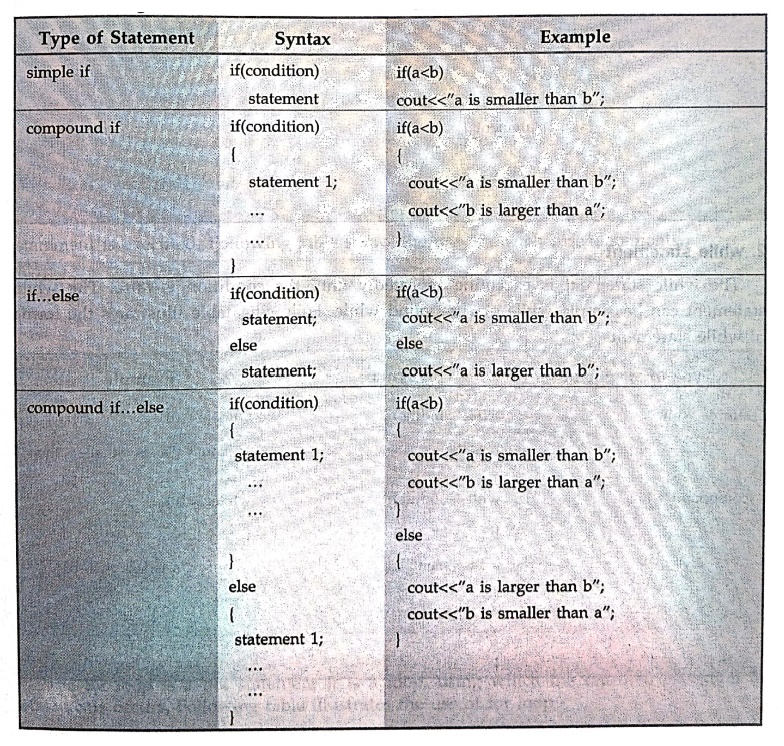
There are two types of if statements ‒simple
if statement and compound if
statement. The simple if statement
is a kind of if statement which is followed by single statement. The compound if statement is a kind of if
statement for which a group of statements are followed. These group of
statements are enclosed within the curly brackets.
•
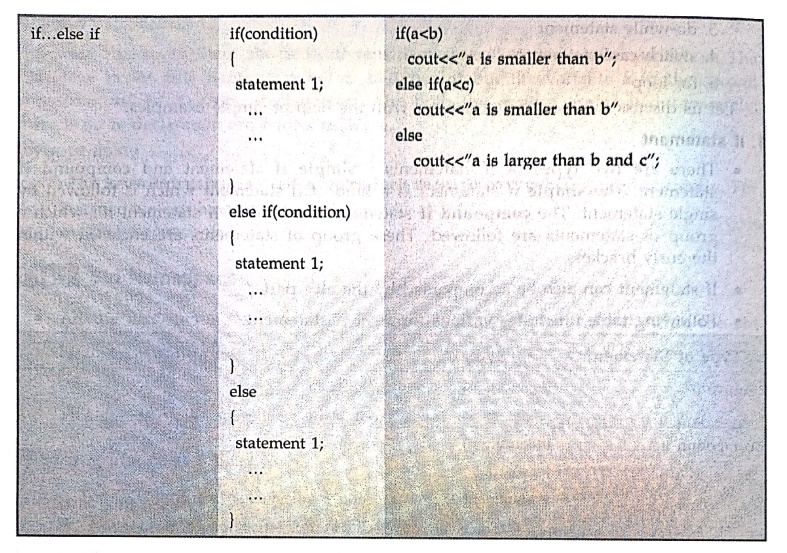
If statement can also be accompanied by the else part.
•
Following table illustrates various forms of if statement.
2. while statement
The
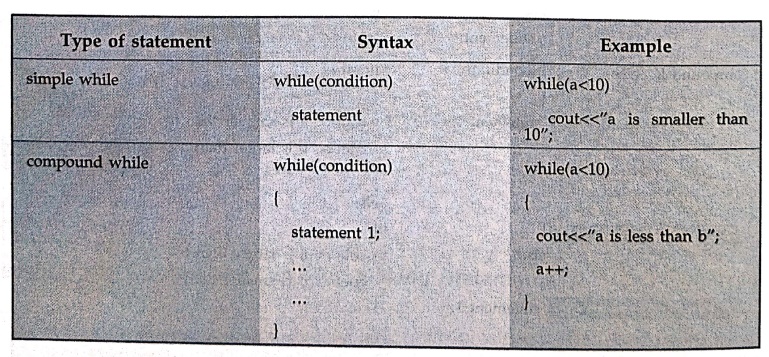
while statement is executing repeatedly until the condition is false. The while
statement can be simple while or compound while. Following table illustrates
the forms of while statements –
3. do..while
The
do...while statement is used for repeated execution. The difference between do
while and while statement is that, in while statement the condition is checked
before executing any statement whereas in do while statements the statement is
executed first and then the condition is tested. There is at least one
execution of statements in case of do...while. Following table shows the use of
do while statement.
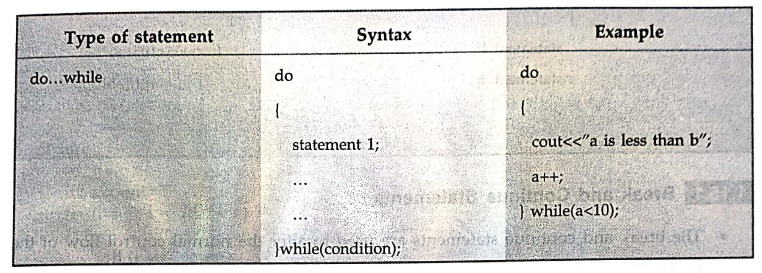
Note
that the while condition is terminated by a semicolon.
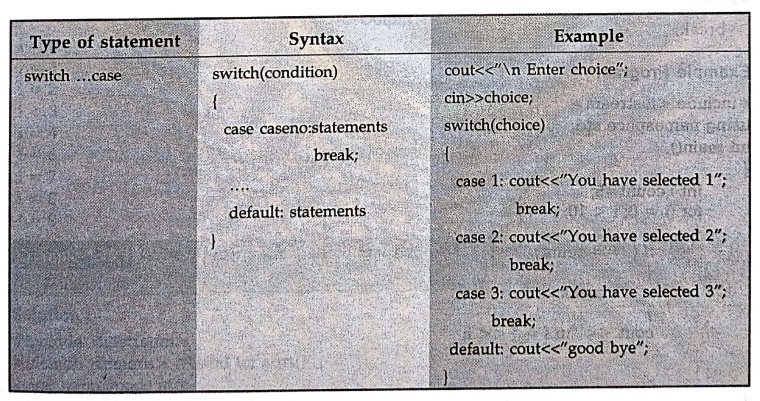
4. switch case statement
From
multiple cases if only one case is to be executed at a time then switch case statement
is executed. Following table shows the use of switch case statements.
5. for loop
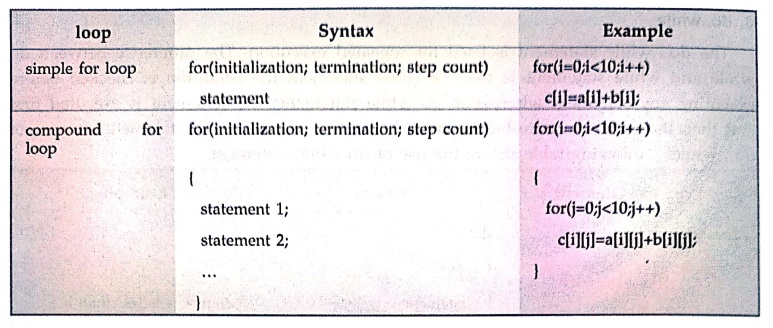
The
for loop is a not statement it is a loop, using which the repeated execution of
statements occurs. Following table illustrates the use of for loop –
1.Break and Continue Statements
•
The break and continue statements are used to alter the normal control flow of
the program.
Break Statement
•
The break statement is used to terminate the loops such as for, while,
do...while and switch.
Syntax
break;
Example Program
#include <iostream>
using namespace std;
int main()
{
int i,count=5;
for (i = 0; i < 10;
i++)
{
if (i = = count)
{
break;
}
cout <<
"\n i = " << i;
}
}
Output
i = 0
i = 1
i = 2
i = 3
i = 4
Continue Statement
•
Sometime we need to skip certain test condition within a loop. At that time
continue statement is used.
Syntax
continue;
Programming Example
#include <iostream>
using namespace std;
int main()
{
int i,count=5;
for (i = 0; i < 10;
i++)
{
if (i= = count)
{
continue;
}
cout <<
"\n i = " << i;
}
}
Output
i = 0
i = 1
i=2
i = 3
i = 4
i = 6
i = 7
i= 8
i =9
Example :1
Write a
program in C++ to find the roots of quadratic equation ax2+bx+c = 0.
Use switch.
Solution :
#include <iostream>
#include <cmath> //Used for sqrt()
using namespace std;
int main()
{
float a, b, c;
float root1, root2,
imaginary;
float discriminant;
cout<<"Enter
values of a, b, c of quadratic equation (ax^2 + bx + c): ";
cin>>a>>b>>c;
// Calculate
discriminant
discriminant = (b*b) ‒
(4*a*c);
switch(discriminant
> 0)
{
case 1:
//If discriminant
is positive
root1= (‒b+
sqrt(discriminant)) / (2*a);
root2 = (‒b‒ sqrt(discriminant)) / (2*a);
cout<<"Two
distinct and real roots exists:
\n root1=
"<<<root1<<"\n root2 = "<<root2;
break;
case 0:
//If discriminant
is not positive
switch(discriminant
< 0)
{
case 1:
//If
discriminant is negative
root1 = root2 =
‒b/(2*a);
imaginary = sqrt(‒discriminant) / (2*a);
cout<<"Two
distinct complex roots exists:
\n root1=
"<<root1<<"\n root2 = "<<<root2;
break;
case 0:
//If
discriminant is zero
root1 = root2
root2 = ‒b / (2*a);
cout<<"Two
equal and real roots exists:
\n root1=
"<<root1<<"\n root2 = "<<root2;
break;
}
}
return 0;
}
Output
Enter values of a, b,
c of quadratic equation
(ax^2 + bx + c): 4 5 1
Two distinct and real
roots exists:
root1=‒0.25
root2 = ‒1
Example :2
Write a
C++ program to find whether given number is prime or not?
Solution :
#include <iostream>
using namespace std;
int main()
{
int n, i;
bool isPrime = true;
cout <<
"Enter some number: ";
cin >> n;
for(i = 2; i <= n /
2; ++i)
{
if(n % i = = 0)
{
isPrime = false;
break;
}
}
if (isPrime)
cout <<
"This is a prime number";
else
cout <<
"This is not a prime number";
return 0;
}
Review Question
1.Explain Do‒while
with an example.
Object Oriented Programming: Chapter 1: Principles of Object Oriented Programming : Tag: Oops, Computer Programming : C++ Programming - Flow Control and Decision Making Statements
Object Oriented Programming: Chapter 1: Principles of Object Oriented Programming
Under Subject
Object Oriented Programming (OOPs)
CS25C07 2nd Semester CSE, CSE(CY) Depts | 2025 Regulation | 2nd Semester 2025 Regulation
Related Subjects

English Essentials II
EN25C02 2nd Semester | 2025 Regulation | 2nd Semester 2025 Regulation

Tamils and Technology தமிழர்களும் தொழில்நுட்பமும்
UC25H02 2nd Semester | 2025 Regulation | 2nd Semester 2025 Regulation

Linear Algebra
MA25C02 2nd Semester | 2025 Regulation

Applied Physics (CSIE) II
PH25C03 2nd Semester AIDS, CSE, IT, CSE(CY) Dept | 2025 Regulation | 2nd Semester 2025 Regulation

Digital Principles and Computer Organization
CS25C06 2nd Semester AIDS, CSE, IT, CSE(CY) Dept | 2025 Regulation | 2nd Semester 2025 Regulation

Basic Electrical and Electronics Engineering
EE25C01 2nd Semester | 2025 Regulation | 2nd Semester 2025 Regulation
Object Oriented Programming (OOPs)
CS25C07 2nd Semester CSE, CSE(CY) Depts | 2025 Regulation | 2nd Semester 2025 Regulation

Re-Engineering for Innovation
ME25C05 2nd Semester | 2025 Regulation | 2nd Semester 2025 Regulation
Object Oriented Programming (OOPs) - Laboratory
CS25C07 2nd Semester CSE, CSE(CY) Depts | 2025 Regulation | 2nd Semester 2025 Regulation