Object Oriented Programming: Chapter 1: Principles of Object Oriented Programming
Operators and Expressions
C++ Programming
Question: 1. Explain various operators that are available in C++ with neat illustrations for each of it.
Operators
and Expressions
•
Expressions are some mathematical logical units which are mainly used to
perform some arithmetic calculations. Generally the expressions are used along
with the operators.
•
For example: a + b is a sample
expression in which the plus operator is used to perform addition of two
numbers. And this addition if you want to store in the variable c then in C++
language we will write it as c = a + b.
•
Note that the assignment of the value is
from right to left. Irrespective of the data types of a and b the data type of
c variable will be considered for storing the final result.
What is Hierarchy of Operations?
Priority : Operators
1 : *,/,%
2
: ‒,+
3 : =
•
In the hierarchy of operations, based on the priority of the operators the
operations are performed. And scanning of the expression will be from left to
right.
For example:
20‒2+3*5/3
Step 1:
Scanning from left to right we come across ‒,+ and * operators the highest
priority is to * so perform 3*5 first.
Step 2: In
the expression 20‒2+15/3 now the division will take place.
Step 3:
In the expression 20 ‒ 2 + 5 the subtraction will be performed, since + and
have the same priority the operator coming first from left side will be
considered.
Step 4: In the expression 18
+5, the evaluation will result to 23.
•
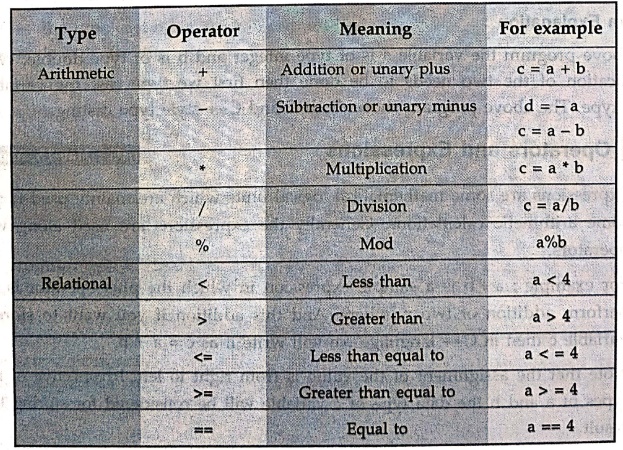
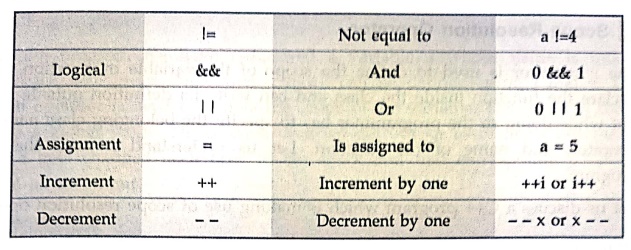
To learn the expressions it is very much
necessary to get introduced with the operators.
Conditional Operator:
The
conditional operator is "?". The syntax of using conditional operator
is
condition?expression
1:expression2
For example:
a>b?true:false
This
means if a is greater than b, if yes then the value will be true otherwise it
will be false.
C++ Program
#include<iostream>
using namespace std;
void main()
{
int a,b,c;
a=3;
b=7;
cout<<"\nThe
value of a= "<<a;
cout<<"\nThe
value of b= "<<b;
cout<<"\nThe
addition of a+b= "<<a+b;
cout<<"\nThe
subtraction of b‒a= "<<b‒a;
cout<<"\nThe
multiplication of a*b= "<<a*b;
cout<<"\nUse
of conditional operator...";
c = (a>b)? a: b;
cout << c;
}
Output
The value of a= 3
The value of b= 7
The addition of a+b=
10
The subtraction of b‒a=
4
The multiplication of a*b= 21
Use of conditional operator...7
1.Scope Resolution Operator
•
The ::operator is used to define the scope of the variable or function. One can
declare the function inside the class and can write its definition outside the
class. But while doing so the programmer has to specify the belonging class
name, scope operator, and name of the function. Let us understand it with the
help of program.
•
Let us discuss a C++ program which is making use of scope resolution operator
C++ Program
#include<iostream>
using namespace std;
int a=5;
int main()
{
int a=15;
{
int a=20;
cout<<"INNER
BLOCK\n";
cout<<"Value
of a= "<<a<<endl;
cout<<"The
scope of a= "<<::a<<endl;
{
int a=25;
cout<<"INNER‒INNER
BLOCK\n";
cout<<"Value
of a= "<<a<<endl;
cout<<"The
scope of a= "<<::a<<endl;
}
}
cout<<"OUTER
BLOCK\n";
cout<<"Value
of a = "<<a<<endl;
cout<<"The
scope of a= "<<::a<<endl;
return 0;
}
Output
INNER BLOCK
Value of a= 20
The scope of a= 5
INNER‒INNER BLOCK
Value of a= 25
The scope of a= 5
OUTER BLOCK
Value of a = 15
The scope of a= 5
Program Explanation
In
above program we have redeclared a variable a whose value is modified on entering
each new block. Note that a block can be defined using { and }. The scope
resolution operator is used to denote the scope of the variable. The scope of
the variable is always a global scope. Hence each time we get output as 5 for ::a
but the value of variable a gets changed each time in the block and that
corresponding value can be displayed as an output.
Review Question
1. Explain various
operators that are available in C++ with neat illustrations for each of it.
Object Oriented Programming: Chapter 1: Principles of Object Oriented Programming : Tag: Oops, Computer Programming : C++ Programming - Operators and Expressions
Object Oriented Programming: Chapter 1: Principles of Object Oriented Programming
Under Subject
Object Oriented Programming (OOPs)
CS25C07 2nd Semester CSE, CSE(CY) Depts | 2025 Regulation | 2nd Semester 2025 Regulation
Related Subjects

English Essentials II
EN25C02 2nd Semester | 2025 Regulation | 2nd Semester 2025 Regulation

Tamils and Technology தமிழர்களும் தொழில்நுட்பமும்
UC25H02 2nd Semester | 2025 Regulation | 2nd Semester 2025 Regulation

Linear Algebra
MA25C02 2nd Semester | 2025 Regulation

Applied Physics (CSIE) II
PH25C03 2nd Semester AIDS, CSE, IT, CSE(CY) Dept | 2025 Regulation | 2nd Semester 2025 Regulation

Digital Principles and Computer Organization
CS25C06 2nd Semester AIDS, CSE, IT, CSE(CY) Dept | 2025 Regulation | 2nd Semester 2025 Regulation

Basic Electrical and Electronics Engineering
EE25C01 2nd Semester | 2025 Regulation | 2nd Semester 2025 Regulation
Object Oriented Programming (OOPs)
CS25C07 2nd Semester CSE, CSE(CY) Depts | 2025 Regulation | 2nd Semester 2025 Regulation

Re-Engineering for Innovation
ME25C05 2nd Semester | 2025 Regulation | 2nd Semester 2025 Regulation
Object Oriented Programming (OOPs) - Laboratory
CS25C07 2nd Semester CSE, CSE(CY) Depts | 2025 Regulation | 2nd Semester 2025 Regulation