Digital Principles and Computer Organization: Chapter 12: IO Systems
IO Systems: Two Marks Important Questions and Answers
Digital Principles and Computer Organization
Digital Principles and Computer Organization: Chapter 12: IO Systems: Anna University Part A Two Marks Important Questions and Answers
Digital Principles and Computer Organization:
Chapter 12: IO Systems
Two
Marks Questions with Answers
1. Define
interface.
Answer: The word interface
refers to the boundary between two circuits or devices.
2. What
is the necessity of an interface? OR What are the functions of a typical I/O
interface ?
Answer: An interface is
necessary to coordinate the transfer of data between the CPU and external
devices. The functions performed by an I/O interface are :
1.
Handle data transfer between much slower peripherals and CPU or memory.
2.
Handle data transfer between CPU or memory and peripherals having different
data formats and word lengths.
3.
Match signal levels of different I/O protocols with computer signal levels.
4.
Provides necessary driving capabilities – sinking and sourcing currents.
3. What
is an I/O channel ?
Answer: An I/O channel is
actually a special purpose processor, also called peripheral processor. The
main processor initiates a transfer by passing the required information in the
input output channel. The channel then takes over and controls the actual
transfer of data.
4. Name
the two interfacing techniques.
Answer: I/O devices can be
interfaced to a computer system I/O in two ways :
•
Memory mapped I/O
•
I/O mapped I/O
5. What
is memory mapped I/O ?
Answer: The technique in which
the total memory address space is partitioned and part of this space is devoted
to I/O addressing is called memory mapped I/O technique.
6. What
is I/O mapped I/O ?
Answer: The technique in which
separate I/O address space, apart from total memory space is used to access I/O
is called I/O mapped I/O technique.
7. What
are the components of an I/O interface ?
Answer:
The
components of an I/O interface are :
1.
Data register
2.
Status / control register
3.
Address decoder and
4.
External devices interface logic
8. Specify
the different I/O transfer mechanisms available.
Answer: Different I/O transfer
mechanisms available are :
1.
Polling I/O transfer
2.
Interrupt driven I/O transfer
3.
DMA transfer
4.
Serial I/O transfer
9. Distinguish
between isolated and memory–mapped I/O.
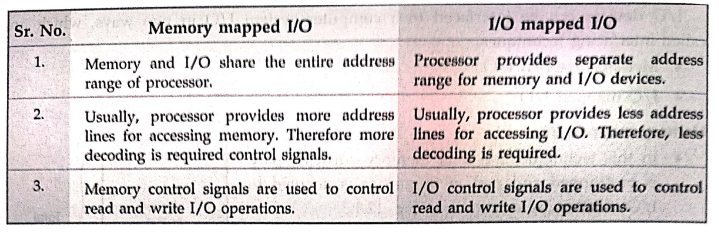
Memory mapped I/O
1.
Memory and I/O share the entire address range of processor.
2.
Usually, processor provides more address lines for accessing memory. Therefore
more decoding is required control signals.
3.
Memory control signals are used to control read and write I/O operations.
I/0 mapped I/O
1.
Processor provides separate address range for memory and I/O devices.
2.
Usually, processor provides less address lines for accessing I/O. Therefore,
less decoding is required.
3.
I/O control signals are used to control read and write I/O operations.
10. Why
program controlled I/O is unsuitable for high–speed data transfer ?
Answer: In program controlled
I/O, several program instructions have to be executed for each data word
transferred between the external devices and memory and hence program
controlled I/O is unsuitable for high–speed data transfer.
11. What
is programmed I/O ?
Answer:
I/O
operations will mean a data transfer between an I/O device and memory or
between an I/O device and the processor. If in any computer system I/O
operations are completely controlled by the processor, then that system is said
to be using programmed I/O.
12. What
is an interrupt?
Answer: An interrupt is an
event that causes the execution of one program to be suspended and another
program to be executed.
13. How
does the processor handle an interrupt request?
Answer:
Processor
identifies source of interrupt. Processor obtains memory address of interrupt
handler. PC and other processor status information are saved. PC is loaded with
address of interrupt handler and program control is transferred to interrupt
handler.
14. Why
are interrupt masks provided in any processor ?
Answer: In the processor those
interrupts which can be masked under software control are called maskable interrupts. Once the interrupt
is masked, the processor is not interrupted even though interrupt is activated.
This facility is necessary when processor is executing critical program which
should not be interrupted or it may be executing time related function.
15. What
is an non–maskable interrupt? What is the action performed on receipt of a NMI
?
Answer: The interrupts which
can not be masked under software control are called non–maskable interrupts.
Following action is performed on receipt of a NMI.
•
Processor obtains memory address of interrupt handler of NMI.
•
PC and other processor status information are saved.
•
PC is loaded with address of interrupt handler of NMI and program control is
transferred to interrupt handler.
16. What
are vectored interrupts ?
Answer: If the processor has
predefined starting address for interrupt service routine of an interrupt then
that address is called vector address
and such interrupts are called vector
interrupts.
17. What
do you mean by interrupt nesting ?
Answer: An interrupt which
interrupts the currently executing interrupt service routine for another
interrupt is called nested interrupt. A system of interrupts that allows an
interrupt service routine to be interrupted is known as interrupts nesting
system.
18. What
is the advantage of using interrupt initiated data transfer over transfer under
program control without interrupt?
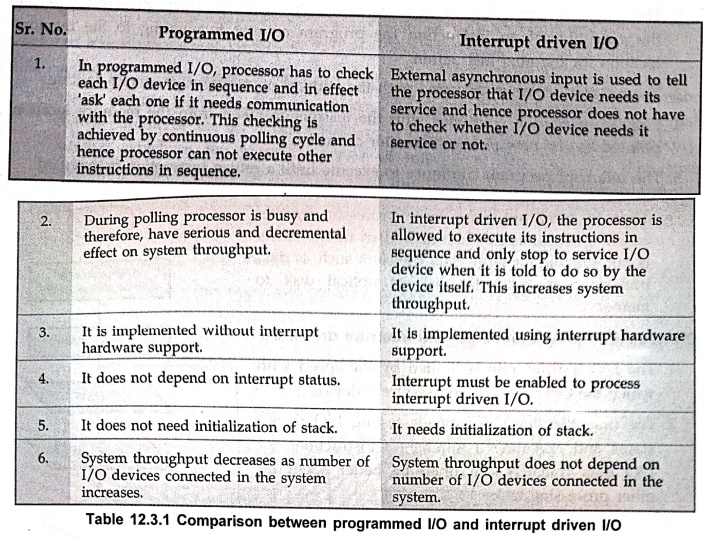
Programmed I/O
1.
In programmed I/O, processor has to check each I/O device in sequence and in
effect 'ask' each one if it needs communication with the processor. This
checking is achieved by continuous polling cycle and hence processor can not
execute other instructions in sequence.
2.
During polling processor is busy and therefore, have serious and decremental
effect on system throughput.
3.
It is implemented without interrupt hardware support.
4.
It does not depend on interrupt status.
5.
It does not need initialization of stack.
6.
System throughput decreases as number of I/O devices connected in the system
increases.
Interrupt driven I/O
1.
External asynchronous input is used to tell the processor that I/O device needs
its service and hence processor does not have to check whether I/O device needs
it service or not.
2.
In interrupt driven I/O, the processor is allowed to execute its instructions
in sequence and only stop to service I/O device when it is told to do so by the
device itself. This increases system throughput.
3.
It is implemented using interrupt hardware support.
4.
Interrupt must be enabled to process interrupt driven I/O.
5.
It needs initialization of stack.
6.
System throughput does not depend on number of I/O devices connected in the
system.
19. What
is an exception ?
Answer: The term exception is
often used to refer to any event that causes an interruption.
20. How
does the processor handle an interrupt request ?
OR
Summarize
the sequence of events involved in handling an interrupt request from a single
device.
Answer:
1.
Processor identifies source of interrupt.
2.
Processor obtains memory address of interrupt handler.
3.
PC and other Processor status information are saved.
4.
PC is loaded with address of interrupt handler and program control is
transferred to interrupt handler.
21. What
do you mean by an interrupt acknowledge signal ?
Answer: The processor must
inform the device that its request has been recognized so that it may remove
its interrupt–request signal. This may be accomplished by an interrupt acknowledge
signal.
22. What
is interrupt latency?
Answer:
Interrupt
latency is the delay between an interrupt request is received and the start of
execution of the interrupt–service routine.
23. What
is DMA ? or What is DMA operation? State its advantages or Why do we need DMA.
Answer: A special control unit
may be provided to enable transfer a block of data directly between an external
device and memory without contiguous intervention by the CPU. This approach is
called DMA (Direct Memory Access). The data transfer using such approach is
called DMA operation.
The
two main advantages of DMA operation are:
•
The data transfer is very fast.
•
Processor is not involved in the data transfer operation and hence it is free
to execute other tasks.
24. Point
out how DMA can improve I/O speed.
Answer:
•
DMA is a hardware controlled data transfer. It does not spend testing I/O
device status and executing a number of instructions for I/O data transfer.
•
In DMA transfer, data is transferred directly from the disk controller to the
memory location without passing through the processor or the DMA controller.
•
Because of above two reasons DMA considerably improves I/O speed.
25. Specify
the different types of the DMA transfer techniques.
Answer:
The
different types of the DMA transfer techniques are :
•
Single transfer mode (cycle–stealing mode)
•
Block transfer mode (burst mode)
•
Demand transfer mode
26. What
are the three types of channels are usually found in large computers ?
Answer:
•
DMA channel
•
Selector I/O channel
•
Multiplexer I/O channel
27. What
are the necessary operations needed to start an I/O operation using DMA ?
Answer:
When
the CPU wishes to read or write a block of data, it issues a command to the DMA
module or DMA channel by sending the following information to the DMA
channel/controller :
1.
A read or write operation.
2.
The address of I/O device involved.
3.
The starting address in memory to read from or write to.
4.
The number of words to be read or written.
28.
Explain the use of DMA controllers in a computer system with a neat diagram.
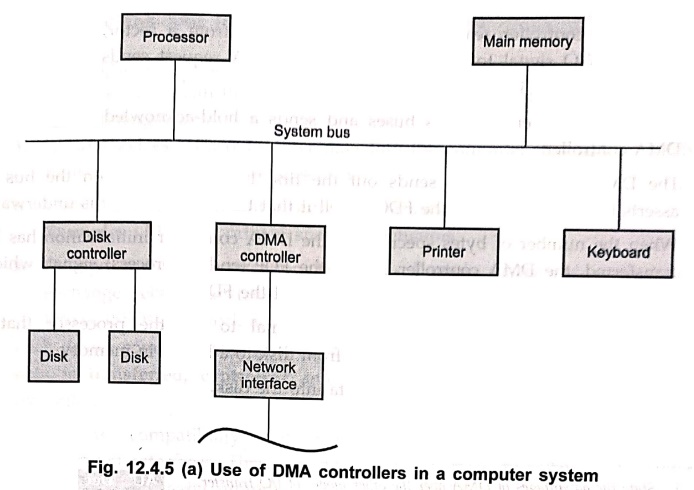
•
The DMA is used to connect a high–speed network to the computer bus. The DMA
control handles the data transfer between high–speed network and the computer
system.
•
It is also used to transfer data between processor and floppy disk with the
help of floppy disk controller.
•
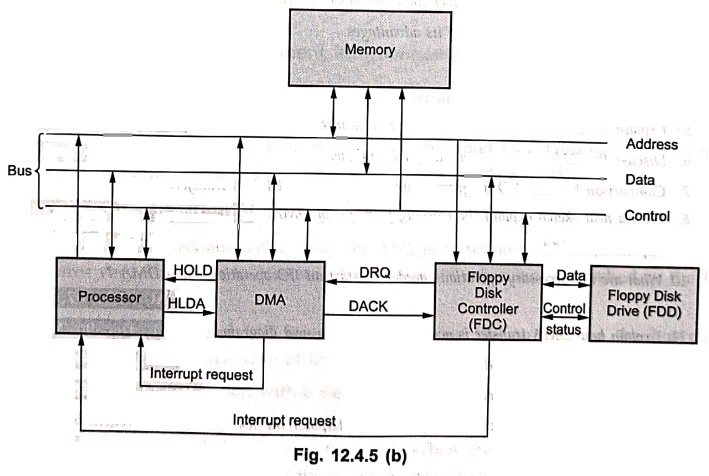
Let us see how DMA controller does the data transfer between floppy disk and
the processor. The Fig. 8.10.5 (b) shows the interface required for such
transfer.
•
The sequence of events that takes place during the data transfer are as follows
:
•
When processor needs some data from the disk, it sends a series of command
words to registers inside the floppy disk controller.
•
The floppy disk controller then proceeds to find the specified track and sector
on the disk.
29. What
are the two important mechanisms for implementing I/O operations ?
Answer: There are two commonly
used mechanisms for implementing I/O operations. They are interrupts and direct
memory access.
30. What
is known as cycle–stealing?
Answer: The processor
originates most memory access cycles, the DMA controller can be said to
"steal" memory cycles from the processor. Hence, this interweaving
technique is usually called cycle stealing.
31. What
is known as block/burst mode ?
Answer: The DMA controller may
be given exclusive access to the main memory to transfer a block of data
without interrupt. This is known as block/burst mode.
32. What
is the PCI bus ?
Answer: The Peripheral
Component Interconnect (PCI) bus is a high–speed parallel bus standard used to
connect peripheral devices such as network cards, sound cards and graphics
cards to the CPU.
33. What
is PCI configuration space? Why is it needed ?
Answer: PCI Configuration
Space is a dedicated set of registers used to identify, configure and manage
PCI devices. It is needed to automatically assign I/O addresses, memory addresses, interrupts (IRQs) and DMA channels to
devices. This enables Plug–and–Play,
allowing the system to initialize hardware without manual jumper settings.
34. What
is the role of the IDSEL signal in PCI ?
Answer: The IDSEL (Initialization Device Select)
signal uniquely identifies each PCI device during configuration cycles. When
the system performs a configuration read/write, the corresponding device
asserts IDSEL to respond. This avoids conflicts and ensures only the selected
device is configured.
35.
Explain the function of C/BE[3:0]# lines in PCI.
Answer: The C/BE[3:0]# lines serve dual purposes :
•
During address phase, they carry bus
commands such as Configuration
Read/Write.
•
During data phase, they act as byte enable signals to specify which
bytes on datava the data bus are valid.
Thus,
they control both command signaling and data transfer granularity.
36. What
are FRAME#, IRDY#, and TRDY# signals in PCI ?
Answer: These are PCI control signals used to manage bus
transactions :
•
FRAME# : Indicates the start and
duration of a transaction.
• IRDY# (Initiator
Ready) : Shows the initiator is ready for data transfer.
•
TRDY# (Target Ready) : Indicates the
target device is ready to transfer/receive data.
They
synchronize communication between initiator and target during configuration and
data cycles.
37. List
any four features of USB.
1.
It is designed to economically meet the I/O requirements of modern systems. It
requires very few chips to implement and support other buses attached to the
PCI bus.
2.
It bypasses the standard I/O bus, uses the system bus to increase the bus clock
speed and take full advantage of the CPU's data path.
3.
It has an ability to function with a 64–bit data bus,
4.
It has high bandwidth. The information is transferred across the PCI bus at 33
MHz, at the full data width of the CPU. When the bus is used in conjunction
with a 32–bit CPU, the bandwidth is 132 Mbytes/sec. It is calculated as follows
:
33
MHz × 32–bit = 1,056 Mbits/sec
1,056
Mbits/sec + 8 = 132 Mbytes/sec
5.
PCI bus is designed to support a variety of microprocessor based configurations
including both single and multiprocessor systems.
6.
The PCI bus can operate concurrently with the processor bus. The CPU can be
processing data in a external cache while the PCI bus is busy transferring
information between other parts of the system.
7.
The PCI bus is processor – independent bus that can function as a mezzanine or
peripheral bus.
8.
It makes use of synchronous timings and centralized arbitration scheme.
9.
It delivers better system performance for high – speed I/O subsystems (e.g.
graphic display adapters, network interface controllers, disk controllers and
so on).
10.
The PCI interface contains a 256 bytes configuration memory which allows the
computer to interrogate the PCI interface. This feature allows the system to automatically
configure itself for the PCI plug–board and hence it is referred to as plug–and–play.
38. What
is called a hub ?
Answer: Each node of the tree
has a device called a hub which acts as an intermediate control point between
the host and the I/O devices.
39. What
is a root hub ?
Answer: At the root of a tree,
a root hub connects the entire tree to the host computer.
40. What
are called functions in USB terminology?
Answer: The leaves of the tree
are the I/O devices being served which are called functions of the USB
terminology.
41. What
are called pipes ?
Answer: The purpose of the USB
software is to provide bi–directional communication links between application
software and I/O devices. These links are called pipes.
42. What
are called endpoints ?
Answer:
Locations
in the device to or from which data transfer can take place, such as status,
control, and data registers are called endpoints.
43. What
is a frame ?
Answer:
Devices
that generate or receive isochronous data require a time reference to control
the sampling process. To provide this reference, transmission over the USB is
divided into frames of equal length.
44. What
is the length of a frame ?
Answer: A frame is 1 ms long
for low–and full–speed data.
45. What
is plug–and–play technology?
Answer: The plug–and–play technology
means that a new device, such as an additional speaker or mouse or printer,
etc. can be connected at any time while the system is operating.
46. What
are the components of an I/O interface?
Answer: The components of an
I/O interface are :
1.
Data register
2.
Status/control register
3.
Address decoder and
4.
External devices interface logic
47. What
does isochronous data stream means?
Answer: The sampling process
yields a continuous stream of digitized samples that arrived at regular
intervals, synchronized with the sampling clock. Such a data stream called
isochronous data stream, meaning that successive events are separated by equal
periods of time.
48. What
is SATA ?
Answer: A serial advanced
technology attachment (serial ATA, SATA or S–ATA) is a computer bus interface
that connects host bus adapters with mass storage devices like optical drives
and hard drives. As its name implies, SATA is based on serial signaling
technology, where data is transferred as a sequence of individual bits.
49. What
is native command queuing ?
Answer: Usually, the commands
reach a disk for reading or writing from different locations on the disk. When
the commands are carried out based on the order in which they appear, a
substantial amount of mechanical overhead is generated because of the constant
repositioning of the read/write head. SATA II drives use an algorithm to
identify the most effective order to carry out commands. This helps to reduce
mechanical overhead and improve performance.
50. List
operating modes of SATA.
Answer: SATA operates on two
modes:
• IDE mode :
IDE stands for Integrated Drive Electronics. This mode is used to provide
backward compatibility with older hardware, which runs on PATA, at low
performance.
• AHCI mode :
AHCI is an abbreviation for Advanced Host Controller Interface. AHCI is a high–performance
mode that also provides support for hot–swapping.
51. What
is the difference between maskable and non–maskable interrupts ?
Answer:
• Maskable Interrupts
(IRQ) : These interrupts can be enabled or disabled
(masked) by the CPU. They are used for normal I/O operations such as keyboard
or timers.
• Non–Maskable
Interrupts (NMI) : These interrupts cannot be disabled and
are used only for critical situations like hardware failure, memory errors, or
power faults. NMIs always have higher priority than maskable interrupts.
52. What
are software interrupts ? Give one example.
Answer: Software interrupts
are interrupts generated by executing a special instruction within a program.
They are mainly used to request operating system services (system calls).
53.
Explain internal interrupts with two examples.
Answer: Internal interrupts
(also called exceptions or traps)
are generated by the CPU when it encounters abnormal conditions during
instruction execution. Examples include :
• Divide–by–zero
exception
• Invalid opcode
exception
They
are used for error detection, fault handling and debugging support.
54.
Differentiate between vectored and non–vectored interrupts.
Answer:
• Vectored interrupts :
The device gives the CPU the exact address of the Interrupt Service Routine
(ISR). This makes interrupt handling faster.
• Non–Vectored
interrupts : The CPU must determine the ISR address
from a fixed location or by polling devices, leading to slower handling.
55. What
is interrupt priority handling ?
Answer: Interrupt priority
handling refers to the mechanism used by the CPU to decide which interrupt
should be serviced first when multiple interrupts occur simultaneously. High–priority
interrupts (e.g., NMI, critical hardware signals) are handled before low–priority
ones. This ensures a timely response to urgent events and prevents data loss or
system failure.
56. What
is a bus ?
Answer: A collection of wires
that connects several devices is called a bus.
57. What
is interconnection structure ?
Answer: Computer modules such
as central processing unit, memory unit and I/O unit work together with
communicating each other and have paths for connecting the modules together.
The collection of paths connecting the various modules is called the interconnection structure.
58. What
is meant by a multiple bus? Where it is organised ?
Answer: The need of high speed
shared bus is impractical to satisfy with a single bus. Thus, most computer
systems use the multiple buses. These buses have the hierarchical structure.
59. What
are the different types of buses?
Answer:
• Synchronous
bus
•
Asynchronous bus
60.
Define synchronous bus.
Answer: The bus in which all
devices connected to the bus derive timing information from a common clock
signal called synchronous bus.
61.
Define asynchronous bus.
Answer: The bus in which the
common clock is eliminated and data transfer on the system bus is achieved by
the use of a hand shake between the processor and the device being addressed is
called asynchronous bus.
62. What
is meant by bus arbitration ?
Answer: Bus arbitration is the
process by which the next device to become the bus master is selected and bus
mastership is transferred to it. The selection of bus master is usually done on
the priority basis.
63. State
the approaches used for bus arbitration.
Answer: There are two
approaches used for bus arbitration : Centralized and distributed.
64. State
different arbitration schemes that use the centralized bus arbitration approach.
Answer: There are three
different arbitration schemes that use the centralized bus arbitration
approach. These schemes are :
a.
Daisy chaining
b.
Polling method
c.
Independent request
65. What
are tri–state gates ?
Answer: The gates having three
output states: logic 0, logic 1 and high–impedance are called tri–state gates.
66. What
is called a bus master ?
Answer: The device that is
allowed to initiate data transfers on the bus at any given time is called the
bus master.
67. What
is known as distributed arbitration ?
Answer: Distributed
arbitration means that all devices waiting to use the bus have equal
responsibility in carrying out the arbitration process, without using a central
arbiter.
68. What
is the significance of handshaking signals in peripheral communication?
Answer: Handshaking signals
are used to coordinate and control data transfers between the CPU and
peripheral devices. Signals such as request/acknowledge,
ready/busy, or strobe pulses ensure that both the sender and receiver are
prepared for data transfer. This is important because peripherals operate at
different speeds and handshaking prevents data loss or timing errors by
synchronizing communication.
69. Differentiate
between synchronous and asynchronous communication in peripheral systems.
Answer:
• Synchronous communication : Transfers
occur based on a shared clock signal. Data is sent at fixed intervals, making
communication fast and reliable when devices operate at similar speeds.
•
Asynchronous communication : No
common clock is used. Data is transferred using start/stop bits or handshake
signals, allowing devices with different speeds to communicate effectively.
Asynchronous methods are more flexible for diverse peripherals.
Digital Principles and Computer Organization: Chapter 12: IO Systems : Tag: : Digital Principles and Computer Organization - IO Systems: Two Marks Important Questions and Answers
Digital Principles and Computer Organization: Chapter 12: IO Systems
Under Subject

Digital Principles and Computer Organization
CS25C06 2nd Semester AIDS, CSE, IT, CSE(CY) Dept | 2025 Regulation | 2nd Semester 2025 Regulation
Related Subjects

English Essentials II
EN25C02 2nd Semester | 2025 Regulation | 2nd Semester 2025 Regulation

Tamils and Technology தமிழர்களும் தொழில்நுட்பமும்
UC25H02 2nd Semester | 2025 Regulation | 2nd Semester 2025 Regulation

Linear Algebra
MA25C02 2nd Semester | 2025 Regulation

Applied Physics (CSIE) II
PH25C03 2nd Semester AIDS, CSE, IT, CSE(CY) Dept | 2025 Regulation | 2nd Semester 2025 Regulation
Digital Principles and Computer Organization
CS25C06 2nd Semester AIDS, CSE, IT, CSE(CY) Dept | 2025 Regulation | 2nd Semester 2025 Regulation

Basic Electrical and Electronics Engineering
EE25C01 2nd Semester | 2025 Regulation | 2nd Semester 2025 Regulation

Python for Data Science
AD25201 2nd Semester AIDS Dept | 2025 Regulation | 2nd Semester 2025 Regulation

Re-Engineering for Innovation
ME25C05 2nd Semester | 2025 Regulation | 2nd Semester 2025 Regulation

Python for Data Science - Laboratory
AD25201 2nd Semester AIDS Dept | 2025 Regulation | 2nd Semester 2025 Regulation