Digital Principles and Computer Organization: Chapter 11: Memory
NUMA (Non-Uniform Memory Access)
Architecture, Working Principle, Advantages, Limitations, Applications
1. NUMA Architecture, 2. Implications for System Performance, 3. Working of NUMA, 4. Advantages of NUMA, 5. Limitations of NUMA, 6. Applications of NUMA, 7. Comparison of Non-Uniform Memory Access and Uniform Memory Access (UMA). Questions: 1. Define NUMA. 2. Explain the memory bottleneck problem in UMA and why NUMA was developed. 3. What is the main difference between UMA and NUMA? 4. Describe the NUMA architecture, including local and remote memory access, with a labeled diagram. 5. What is a NUMA Node ? 6. Define local memory access in NUMA. 7. Define remote memory access in NUMA. 8. Explain the working of NUMA in detail. 9. What is the role of interconnects in a NUMA system? 10. Discuss the implications of NUMA for system performance. 11. Why is memory access non-uniform in NUMA? 12. What does "NUMA-aware" mean in modern operating systems ? 13. Explain the advantages and limitations of NUMA. 14. Compare NUMA with UMA.
NUMA
• Non–Uniform Memory
Access (NUMA) is a computer memory design used in
multiprocessor systems, where the memory access time depends on the memory's
AMU location relative to the processor. In simpler terms, a CPU can access its own local memory faster than it can
access memory attached to another CPU.
• In older architectures (called Uniform Memory Access or UMA), all
processors shared a single common memory space, and all access times were
equal. However, as systems started incorporating many CPUs (sometimes dozens or
hundreds), the shared memory bus became a severe bottleneck. As more processors tried to communicate with the same
memory controller at the same time, the system performance wouldn't scale
linearly, sometimes even decreasing due to contention.
• NUMA was developed to solve this memory bottleneck by dividing the
system into smaller, more efficient groups.
1. NUMA Architecture
•
A NUMA system is divided into multiple NUMA
Nodes.
• NUMA Node :
This is a group consisting of one or more
CPUs (or processor cores) and their directly attached local memory.
• Local Access :
When a processor accesses memory within its own NUMA Node, the access is fast beca the access is fast because
the data travels directly.
• Remote Access :
When a processor needs to access memory in a different NUMA Node, the request
must travel across an interconnects (like Intel's QuickPath Interconnect or
AMD's Infinity Fabric). This remote
access is slower and introduces latency.
• Interconnects :
Processors are connected via a high–speed interconnect that allows access to
remote nodes.
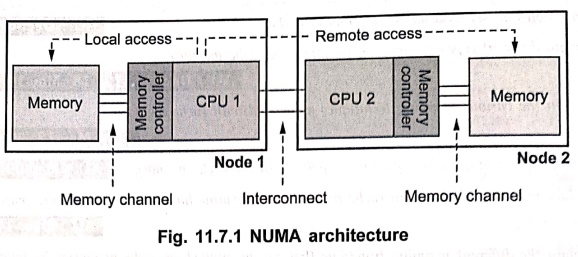
• The difference in access time is what makes the memory access non–uniform.
2. Implications for System Performance
•
The efficiency of a NUMA system is heavily dependent on how software manages
data placement.
Performance impact :
For an application to achieve maximum speed on a NUMA system, it must maintain
data locality.
■
If a process runs on CPU–1 and the
data it constantly uses is stored in CPU–1's local memory, performance is high.
■
If the process runs on CPU–1 but the
data is stored in CPU–2's memory,
the constant remote access will slow the process down considerably.
NUMA awareness :
Modern operating systems and hypervisors (like Linux, Windows Server, and
VMware) are NUMA–aware. They employ
specialized scheduling and memory allocation techniques to ensure re the
following :
■ Process affinity :
When a new process starts, the OS tries to keep it running on the same NUMA
node to maximize the benefit of local data.
■
Memory affinity : When a process
requests memory, the OS attempts to allocate that memory from the same NUMA
node where the process is currently running.
3. Working of NUMA
•
The Non–Uniform Memory Access (NUMA)
system manages memory access in multiprocessor environments with both local and remote memory. Its operation
can be described as follows :
1. Local memory access :
■
When a processor needs data, it first checks its local memory, which is directly attached to that processor.
■
Accessing local memory is fast due
to low latency and high bandwidth.
2. Remote memory access :
■
If the required data is not available in local memory, the processor fetches it
from the remote memory attached to another processor node.
■
This access occurs via a high–speed
interconnect, which introduces higher latency than local memory access.
3. Memory controllers and cache coherence :
■ Memory controllers
on each node manage both local and remote memory access.
■
They ensure cache coherence across
nodes, meaning that if multiple processors access the same data, they see consistent and up–to–date values.
■
Techniques such as directory–based coherence
or snooping protocols may be used
depending on the NUMA implementation.
4. Data locality optimization :
■
Performance is maximized when data is mostly in local memory, minimizing remote accesses.
■
Software and operating systems often attempt to allocate memory close to the processor that will use it to reduce
latency.
4. Advantages of NUMA
1. High memory
bandwidth : Each processor accesses its local
memory directly, reducing contention.
2. Scalability :
Can efficiently scale to systems with many processors.
3. Improved performance
:
Programs with good memory locality
(data mostly in local memory) achieve high performance.
5. Limitations of NUMA
1. Non–uniform latency : Accessing remote memory is slower than local
memory.
2. Programming
complexity : Developers must optimize software to
exploit memory locality.
3. Hardware cost :
Requires specialized memory controllers
and interconnects.
6. Applications of NUMA
•
High–performance servers and workstations.
•
Database servers with large memory requirements.
•
Scientific computing and simulation systems.
•
Cloud computing and virtualization platforms with multiple CPU sockets.
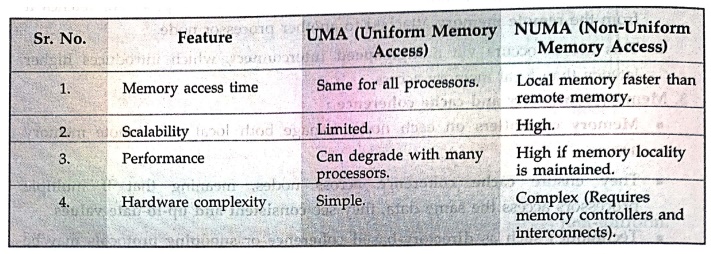
7. Comparison of Non–Uniform Memory Access (NUMA) and Uniform Memory Access (UMA)
Review Questions
1. Define NUMA.
2. Explain the memory
bottleneck problem in UMA and why NUMA was developed.
3. What is the main
difference between UMA and NUMA?
4. Describe the NUMA
architecture, including local and remote memory access, with a labeled diagram.
5. What is a NUMA Node
?
6. Define local memory
access in NUMA.
7. Define remote
memory access in NUMA.
8. Explain the working
of NUMA in detail.
9. What is the role of
interconnects in a NUMA system?
10. Discuss the
implications of NUMA for system performance.
11. Why is memory
access non–uniform in NUMA?
12. What does
"NUMA–aware" mean in modern operating systems ?
13. Explain the
advantages and limitations of NUMA.
14. Compare NUMA with
UMA.
Digital Principles and Computer Organization: Chapter 11: Memory : Tag: : Architecture, Working Principle, Advantages, Limitations, Applications - NUMA (Non-Uniform Memory Access)
Digital Principles and Computer Organization: Chapter 11: Memory
Under Subject

Digital Principles and Computer Organization
CS25C06 2nd Semester AIDS, CSE, IT, CSE(CY) Dept | 2025 Regulation | 2nd Semester 2025 Regulation
Related Subjects

English Essentials II
EN25C02 2nd Semester | 2025 Regulation | 2nd Semester 2025 Regulation

Tamils and Technology தமிழர்களும் தொழில்நுட்பமும்
UC25H02 2nd Semester | 2025 Regulation | 2nd Semester 2025 Regulation

Linear Algebra
MA25C02 2nd Semester | 2025 Regulation

Applied Physics (CSIE) II
PH25C03 2nd Semester AIDS, CSE, IT, CSE(CY) Dept | 2025 Regulation | 2nd Semester 2025 Regulation
Digital Principles and Computer Organization
CS25C06 2nd Semester AIDS, CSE, IT, CSE(CY) Dept | 2025 Regulation | 2nd Semester 2025 Regulation

Basic Electrical and Electronics Engineering
EE25C01 2nd Semester | 2025 Regulation | 2nd Semester 2025 Regulation

Python for Data Science
AD25201 2nd Semester AIDS Dept | 2025 Regulation | 2nd Semester 2025 Regulation

Re-Engineering for Innovation
ME25C05 2nd Semester | 2025 Regulation | 2nd Semester 2025 Regulation

Python for Data Science - Laboratory
AD25201 2nd Semester AIDS Dept | 2025 Regulation | 2nd Semester 2025 Regulation