Digital Principles and Computer Organization: Chapter 11: Memory
Secondary Storage
Characteristics, Types, Structure, Working, Advantages, Limitations, Applications
1. Characteristics of Secondary Storage 2. Types of Secondary Storage 3. Hard Disk Drives (HDDs): Structure of an HDD, Working of a Hard Disk Drive (HDD), Advantages of HDDs, Limitations of HDDs, Applications of HDDs 4. Solid State Drives (SSDs): Structure of an SSD, Working of an SSD, Advantages of SSDs, Limitations of SSDs, Applications of SSDs 5. Comparison between SSD and HDD. Questions: 1. Define secondary storage and give two examples. 2. Mention two characteristics of secondary storage. 3. Explain the structure of a Hard Disk Drive (HDD) with a labeled diagram. 4. Describe the working of an HDD, including the concepts of seek time and rotational latency. 5. What are tracks and sectors in a hard disk ? 6. What is rotational latency in an HDD ? 7. Discuss the advantages and limitations of HDDs. 8. Explain the structure of an SSD and the role of its main components. 9. What type of memory is used in SSDs ? 10. Explain how data is written, read, and erased in an SSD. 11. Name two types of interface ports used in SSDs. 12. Discuss the advantages and limitations of SSDs. 13. Compare HDD and SSD under the following features: Speed, durability, noise, and cost. 14. Describe the applications of HDDs and SSDs in modern computing systems.
Secondary Storage
•
Primary memory such as registers, cache, and RAM is fast but limited in
capacity and volatile, meaning its contents are lost when power is switched
off. To overcome these limitations, computer systems use secondary storage, which provides large, permanent, and cost–effective
storage for programs and data.
1. Characteristics of Secondary Storage
1. Non–volatile :
Retains data even when the computer is turned off.
2. High capacity :
Can store terabytes (TB) or even petabytes (PB) of data.
3. Slower than primary
memory : Access times are in milliseconds (HDD) or
microseconds (SSD), much slower than RAM.
4. Cost–effective :
Much cheaper per bit compared to registers, cache, or RAM.
2. Types of Secondary Storage
1. Hard Disk Drives
(HDDs) :
■
Use magnetic disks (Platters) to store data.
■
Data is read/written using read/write heads.
■
High capacity and low cost but relatively slow and prone to mechanical wear.
2. Solid State Drives
(SSDs) :
■
Use flash memory (No moving parts).
■
Faster, more reliable, and energy efficient compared to HDDs.
■
More expensive per GB, though prices
continue to decrease.
3. Optical storage :
■
Includes CDs, DVDs, and Blu–ray discs.
■
Data stored using laser technology.
■
Mostly used for media distribution and backup.
4. Magnetic tapes :
■
Used for archival storage and backups.
■
High capacity but sequential access makes them slower than disks.
3. Hard Disk Drives (HDDs)
•
A Hard Disk Drive (HDD) is one of
the most of the most common forms of secondary storage used in computer
systems. It is a non–volatile device,
meaning data is retained even when power is switched off. HDDs are widely used
because they offer large storage
capacity at a relatively low cost
per bit, making them suitable for storing operating systems, applications,
and user data.
1. Structure of an HDD
•
A hard disk drive is made up of several mechanical and electronic components
that work together to store and retrieve data. The main parts are described
below :
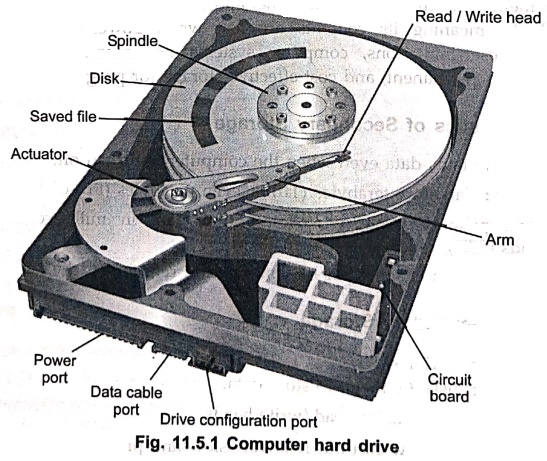
1. Disks
(Platters)
■
These are circular disks coated with magnetic material.
■
Data is stored magnetically on the disk surface in the form of tracks and sectors.
■
Multiple platters can be stacked to increase storage capacity.
2.
Spindle
■
The spindle is the rotating axis that holds the platters (Disks) in place.
■
It spins the platters at high speeds (e.g., 5400, 7200, or 10,000 revolutions
per minute).
■
Continuous rotation allows the read/write heads to access any part of the disk
surface quickly.
3.
Read/Write heads
■
Tiny magnetic heads that float just above the platter surface.
■
They read data by detecting magnetic
patterns and write data by changing
the magnetic orientation of platter regions.
■
Each platter surface has its own read / write head.
4.
Actuator arm
■
Holds the read / write heads and moves them across the platter surface.
■
Enables access to different tracks on the disk.
5.
Actuator
■
A motor that controls the movement of the actuator arm.
■
Positions the read/write heads accurately over the correct track.
6.
Tracks, sectors, and files
■
Platters are divided into concentric circles called tracks. A track is a
circular path on the surface of a disk platter where data is magnetically
recorded. All tracks on a platter are numbered for identification (e.g., Track
0, Track 1, Track 2, etc.).
■
Tracks are further divided into sectors,
which are the smallest storage units. Traditionally, one sector stores 512 bytes of data, though modern drives
often use 4096 bytes (4 KB) per sector
to increase efficiency. Each sector has an identifier and additional
information such as error detection codes, which help ensure data integrity.
■
Files are stored across these sectors.
7.
Circuit Board (Controller)
■
An electronic board located at the base of the drive.
■
Manages all operations of the hard drive such as controlling the actuator,
spindle motor, and data transfer.
■
Acts as an interface between the HDD and the computer's motherboard.
8. Ports
■ Power port : Supplies
electrical power to run the drive.
■ Data port :
Connects the HDD to the computer for data transfer (Commonly SATA or SAS).
■ Configuration port :
Used in older drives for jumper settings to configure master/slave operation.
2. Working of a Hard Disk Drive (HDD)
•
The working of an HDD is based on magnetic
recording and precise mechanical movement to read and write data. Once the
structure of the drive is in place, the following operations take place during
use:
1. Disk
rotation and access time :
When
the computer sends a request to access data, the spindle motor keeps the
platters rotating at a fixed speed (e.g., 5400 or 7200 RPM). The time to reach
the desired data depends on two main factors :
• Seek time – The time required for the actuator arm to move
the read/write head to the correct track.
•
Rotational latency – The delay while
waiting for the desired sector to rotate under the head.
Together,
these determine how quickly data can be located.
2.
Writing process :
•
The write head generates a controlled magnetic field.
•
This field changes the magnetic polarity of tiny spots on the platter surface.
•
These changes correspond to binary values 0 and 1.
•
As the platter spins, data is written sequentially in sectors along the tracks.
3.
Reading process :
•
The read head passes over the same magnetic spots.
•
Variations in magnetic polarity induce small electrical signals.
•
These signals are amplified, converted into binary data, and then sent to the computer
system.
4. Data
organization : Data is stored in :
• Tracks – Concentric
circles on the platter.
• Sectors –
Fixed–size portions of each track, typically 512 bytes or 4 KB.
•
Cylinders – A set of tracks aligned
vertically across platters.
This
organization allows the drive to locate data precisely.
5.
Controller and error checking
The
controller circuitry coordinates head movement, platter rotation, and data
transfer. It also performs error
detection and correction (ECC) to ensure data accuracy, as even small
magnetic disturbances could cause errors.
3. Advantages of HDDs
•
High storage capacity.
•
Lower cost compared to SSDs.
•
Suitable for long–term storage of large files.
4. Limitations of HDDs
•
Slower data access compared to SSDs.
•
Generates
noise and heat due to moving parts.
•Less
reliable in portable devices because of mechanical sensitivity.
5. Applications of HDDs
•
Desktop and laptop computers.
•
Data centers for large–scale storage.
•
Backup systems and external storage drives.
4. Solid State Drives (SSDs)
•
A Solid State Drive (SSD) is a modern form of secondary storage device that
stores data electronically using flash
memory chips instead of magnetic platters.
•
Unlike HDDs, SSDs have no moving parts, which makes them much faster, more 20
durable, and quieter. SSDs are non–volatile, meaning data is retained even when
power is switched off.
1. Structure of an SSD
•
A typical SSD consists of the following components : (See Fig. 11.5.2 on next
page)
1. NAND flash memory
■
The primary storage medium of SSDs.
■
Stores data as electrical charges in memory cells.
■
Organized into pages (usually 4–16 KB each) and blocks (a group of pages).
■
Can be Single–Level Cell (SLC), Multi–Level Cell (MLC), Triple–Level Cell (TLC)
or Quad–Level Cell (QLC), depending on how many bits each cell stores.
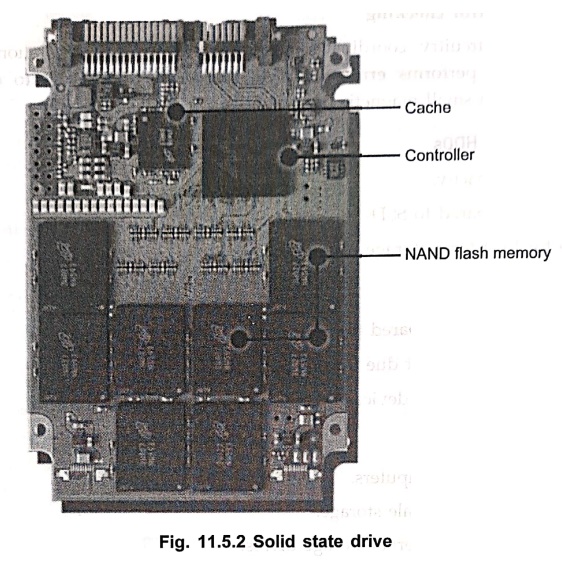
2. Controller
■
The "brain" of the SSD that manages all operations.
■
A Handles tasks such as wear leveling, garbage collection, error correction,
and mapping of logical addresses to physical memory locations.
■
Ensures high–speed communication between the NAND flash and the host system.
3. DRAM cache (in some SSDs)
■
Temporary storage that speeds up read / write (on frequently accessed data or
mapping tables.
■
Improves overall performance, especially for random access tasks.
4. Interface ports
■
SATA (Serial ATA) : Used in 2.5–inch
SSDs, similar to HDDs, with speeds up to 600 MB/s.
■
NVMe (Non–Volatile Memory Express) via PCIe : A
newer, faster interface used in M.2 and U.2 SSDs, delivering speeds in
gigabytes per second.
■
USB or Thunderbolt : For external
SSDs.
5. Power management circuitry
■
Ensures stable power supply to memory cells and controller.
■
Some SSDs include capacitors to prevent data loss during sudden power failures.
2. Working of an SSD
1. Data writing
■
Data is written to NAND flash memory cells as electrical charges.
■
A page is the smallest writable unit, but data must often be erased at the
block level before rewriting.
■
The controller ensures that data is evenly distributed across cells (Wear
leveling) to prolong lifespan.
2. Data reading
■
The controller accesses the appropriate memory cells and detects the stored
charge levels.
■
These charge states are interpreted as binary values (Os and 1s) and returned
to the host system at very high speed.
3. Data erasing
■
Unlike HDDs, SSDs cannot overwrite existing data directly.
■
An entire block of memory must be erased before new data is written.
■
The controller handles this process in the background using garbage collection.
4. Error correction and management
■
SSD controllers use ECC (Error
Correction Codes) to maintain data integrity.
■
Features like TRIM commands and over–provisioning improve efficiency and
longevity.
3. Advantages of SSDs
1.
Very fast data access and transfer speeds (Much faster than HDDs).
2.
No moving parts → Silent operation and higher durability.
3.
Lower power consumption, ideal for portable devices.
4.
Better resistance to shock and vibration.
4. Limitations of SSDs
1.
Higher cost per gigabyte compared to HDDs.
2.
Limited write cycles due to NAND flash wear (Though modern SSDs last many years
in typical use).
3.
Smaller storage capacity at lower price ranges compared to HDDs.
5. Applications of SSDs
•
High–performance laptops and desktops.
•
Gaming systems for fast loading times.
•
Data centers requiring high–speed storage.
•
Portable external drives.
•
Servers handling large–scale, high–speed data transactions.
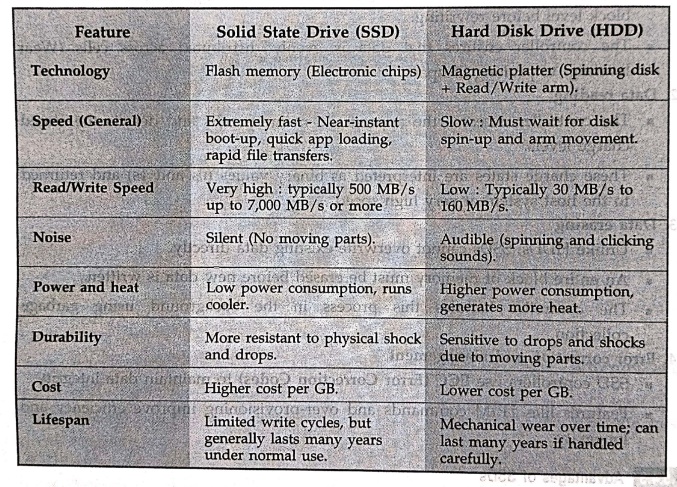
5. Comparison between SSD and HDD
Review Questions
1. Define secondary
storage and give two examples.
2. Mention two
characteristics of secondary storage.
3. Explain the
structure of a Hard Disk Drive (HDD) with a labeled diagram.
4. Describe the
working of an HDD, including the concepts of seek time and rotational latency.
5. What are tracks and
sectors in a hard disk ?
6. What is rotational
latency in an HDD ?
7. Discuss the
advantages and limitations of HDDs.
8. Explain the
structure of an SSD and the role of its main components.
9. What type of memory
is used in SSDs ?
10. Explain how data
is written, read, and erased in an SSD.
11. Name two types of
interface ports used in SSDs.
12. Discuss the
advantages and limitations of SSDs.
13. Compare HDD and
SSD under the following features: Speed, durability, noise, and cost.
14. Describe the
applications of HDDs and SSDs in modern computing systems.
Digital Principles and Computer Organization: Chapter 11: Memory : Tag: : Characteristics, Types, Structure, Working, Advantages, Limitations, Applications - Secondary Storage
Digital Principles and Computer Organization: Chapter 11: Memory
Under Subject

Digital Principles and Computer Organization
CS25C06 2nd Semester AIDS, CSE, IT, CSE(CY) Dept | 2025 Regulation | 2nd Semester 2025 Regulation
Related Subjects

English Essentials II
EN25C02 2nd Semester | 2025 Regulation | 2nd Semester 2025 Regulation

Tamils and Technology தமிழர்களும் தொழில்நுட்பமும்
UC25H02 2nd Semester | 2025 Regulation | 2nd Semester 2025 Regulation

Linear Algebra
MA25C02 2nd Semester | 2025 Regulation

Applied Physics (CSIE) II
PH25C03 2nd Semester AIDS, CSE, IT, CSE(CY) Dept | 2025 Regulation | 2nd Semester 2025 Regulation
Digital Principles and Computer Organization
CS25C06 2nd Semester AIDS, CSE, IT, CSE(CY) Dept | 2025 Regulation | 2nd Semester 2025 Regulation

Basic Electrical and Electronics Engineering
EE25C01 2nd Semester | 2025 Regulation | 2nd Semester 2025 Regulation

Python for Data Science
AD25201 2nd Semester AIDS Dept | 2025 Regulation | 2nd Semester 2025 Regulation

Re-Engineering for Innovation
ME25C05 2nd Semester | 2025 Regulation | 2nd Semester 2025 Regulation

Python for Data Science - Laboratory
AD25201 2nd Semester AIDS Dept | 2025 Regulation | 2nd Semester 2025 Regulation