Computer Programming C: UNIT II: Arrays and Strings
One Dimensional arrays
C Programming
The collection of data items can be stored under a one variable name using only one subscript, such a variable is called the one‒dimensional array.
Arrays
can be classified into
•
One‒Dimensional arrays
•
Two‒Dimensional arrays
•
Multi‒Dimensional arrays
ONE‒DIMENSIONAL ARRAYS
The
collection of data items can be stored under a one variable name using only one
subscript, such a variable is called the one‒dimensional array.
A
one dimensional array or single dimensional array is a type of linear array,
whose elements are accessed with a single subscript, which can either represent
a row or column.
1. Array Declaration
Arrays
are declared in the same manner as an ordinary variables except that each array
name must have the size of the array i.e., number of elements accommodated in
that array.
Like
variables, the array must be declared before they are used.
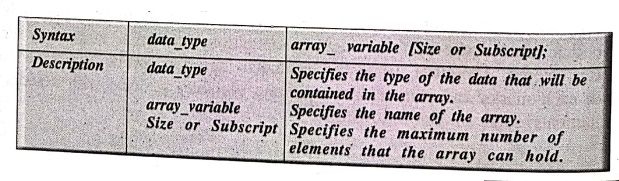
The
subscript of an array can be integer constant, integer variable or an
expression that yields an integer value.
Example:
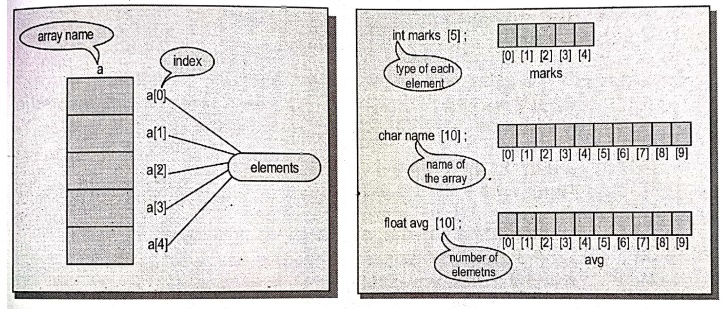
int a[5];
int marks [5];
char name [10];
float avg [10];
Where,
'a'
is the name of the array with 5 subscripts of integer data types and the
computer reserves five storage locations, name is character array of 10 and avg
is floating variable.
NOTE:
When working with arrays, remember that the first element of an array is
indexed by zero, and the last element is. indexed by the number of elements in
the array minus one.
2. Features of Arrays
•
An array is a derived data type. It is used to represent a collection of
elements of the same data type.
•
The elements can be accessed with base address (index) and the subscripts
define the position of the element.
•
In array, the elements are stored in continuous memory location. The starting
memory location is represented by the array name and it is known as the base
address of the array.
•
It is easier to refer the array elements by simply incrementing the value of
the subscript.
3. Processing of an Array
The
entire array cannot be accessed with single operation. So, the array elements
must be accessed on an element‒by‒element basis. This can be usually done with
the help of the loop, when each pass of the loop is used to access an array element,
thus the number of passes through the loop will therefore equal the number of
array elements to be processed.
Example 1: Program to read 5 data
items from input and store them in an array and display their sum.
/*Program to read 5 data and store them in an array and display
their sum *
#include <stdio.h>
#include <conio.h>
void main()
{
/* Local
definitions */
int a[5], sum=0,i; /* 'a' is the array with 5 subscripts of
integer* /
/* Statements */
clrscr();
printf("Enter
5 integer numbers\n");
for(i=1;i<=5;i++)
{
scanf("%d",
&a[i]);
sum=sum+a[i];
} /* for */
printf("The
sum of given numbers is: %d\n", sum);
getch();
} /* main */
OUTPUT:
Enter 5 integer numbers
120 45 69 390
The sum of given
numbers is : 669
EXPLANATION:
This has an array which is ready to hold 5 integer elements, the loop
established to accept 5 numbers, while reading from input each time the
subscript of an array varies depending upon loop variable and calculating their
sum.
4. Array Initialisation
The
values can be initialised to an array, when they are declared like ordinary
variables, otherwise they hold garbage values.
The
array can be initialized in the following two ways:
i)
At compile time
ii)
At run time
i) At compile time
Syntax:
data type array_name[size] ={ List of values };
Description:
The list of values must be separated by commas.
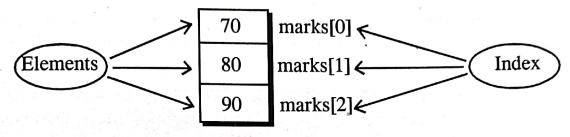
Example: int
marks[3]= {70,80,90};
This
statement declares the variable marks
as an array of 3 elements and will be assigned to values specified in list as
shown below.
Like
ordinary variables, the values to the array can be initialised as follows.
marks[0]=70;
marks[1]=80;
marks[2]=90;
These
elements can be used like ordinary variables.
Character
array can also be initialised in similar fashion.
Example:
char name[ ] = { 'L', 'A', 'K'}; = { 'Ĺ‚'A','K'};
The
above statement declares the name variable as an array of character initialised
with the string 'LAK'.
ii) At Run time
The
array can be explicitly initialized at run time.
Example:
while (i<=10)
{
if (i<5)
sum[i]=0;
else
sum[i]=sum[i]+i;
}
EXPLANATION:
The while loop checks the condition i<=10. If condition is true then if
statement checks the condition i<5, if condition is true then sum[i] the
assigned to zero else sum[i] assigned as sum[i]+i.
Like,
the array can also be initialized by reading data item from the input.
Example:
int n[2];
scanf("%d %d", &n[0], &n[1]);
Here
array n is declared as integer type variable. n[0], n[1] it reads through the scanf() function.
We
can assign initial values to the elements of an array like just as you can
assign initial values to variables when they are declared. This is done by
simply listing the initial values of the array, starting from the first
element. Values in the list are separated by commas and the entire list is
enclosed in a pair of braces.
The
statement int A[5] = { 0, 0, 0, 0, 0 }; declares an array called A to contain
five integer values and initializes each of these elements to zero. In a
similar fashion, the statement int B[5] = {1, 2, 3, 4, 5} sets the value of
B[0] to 1, B[1] to 2, B[2] to 3, and so on.
Arrays
of characters are initialized in a similar manner; thus the statement char
characters[5] = { 'a', 'b', 'c', 'd', 'e' }; defines the character array
letters and initializes the five elements to the characters ‘a', 'b', 'c', 'd',
and 'e' respectively.
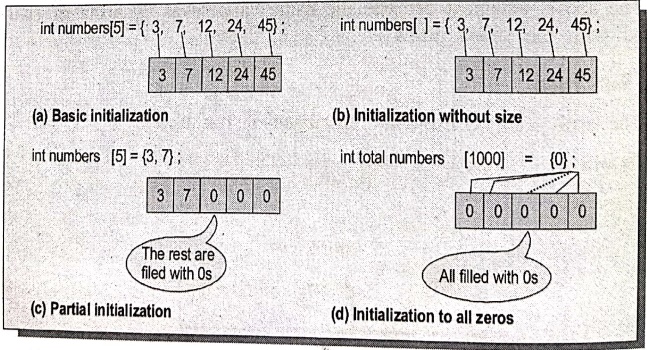
It
is not necessary, to completely initialize an entire array. If fewer initial
values are specified, only an equal number of elements are initialized. The
remaining values in the array are set to zero. The figure below shows, how the
arrays can be initialised.
Example:
float data[100] = {10,
20, 30};
The
above initializes the first three values of data to 10, 20, and 30, and sets the remaining 97 elements to zero.
Example: Initializing
Arrays
#include <stdio.h>
int main(void)
{
int values[10] = {1,
2, 3, 4, 5 };
int i;
for (i = 5; i <
10; ++i)
values[i] =
i * i;
for (i = 0; i <
10; ++i)
printf
("array values[%i] = %i\n", i, values[i]);
return 0;
}
5. Entering data into the array
The
data can be entered into an array using the input statement as well as loop
statements.
Example 1: Program to
accept 5 numbers and print whether the number is even or odd.
/* Program to print whether the number is odd or even */
#include <stdio.h>
#include <conio.h>
void main()
{
int a[5],i; /* Local definitions */
for(i=0;i<5;i++)
{
printf("Enter
the %d number: ",i+1);
scanf("%d",
&a[i]);
} /* for */
for(i=0;i<5;i++)
{
if(a[i]%2==0)
printf("%d
Number is even. \n",a[i]);
else
printf("%d
Number is odd. \n",a[i]);
} /* for */
getch();
} /* main */
INPUT:
Enter
the 1 number: 17
Enter
the 2 number: 38
Enter
the 3 number: 79
Enter
the 4 number: 80
Enter
the 5 number: 76
OUTPUT:
17
Number is odd
38
Number is even
79
Number is odd
80
Number is even
76
Number is even
EXPLANATION:
This program reads 5 integers into an array, then read array values one by one
and evaluate whether the number is even or odd number and print them.
Example 2: Program to
sort the given strings alphabetically.
/* Program to sort the given strings alphabetically */
#include <stdio.h>
#include <conio.h>
#include <ctype.h>
void main()
{
int i,j;
char b[20];
printf("Enter
the text to sort : ");
gets (b);
printf("Sorted
Text are: ");
for(i=65;i<=90;i++)
{
for(j=0;j<30;j++)
{
if(b[j]==toupper(i) || b[j]==tolower(i))
printf("%c",
b[j]);
} /* for
*/
} /* for */
getch();
} /* main */
OUTPUT:
Enter the text to
sort: VRBPublishers
Sorted Text are :
BbehilPRrssuV
EXPLANATION:
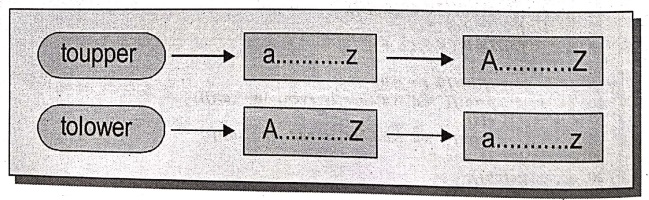
The above program gets the string characters from the keyboard. ASCII
equivalents of alphabets are used to sort out the given string. The toupper() and tolower() string functions in if statement used to ignore the
priority of characters i.e., capital or small letters are treated the same. If
the character value given by for loop i and string b[] value denoted by for
loop j are same that value gets printed. Because the value of a character
supplied by the outer for loop are taken alphabetically.
Computer Programming C: UNIT II: Arrays and Strings : Tag: Computer Science : C Programming - One Dimensional arrays
Computer Programming C: UNIT II: Arrays and Strings
Under Subject
Computer Programming C
CS25C01 1st Semester | 2025 Regulation | 1st Semester 2025 Regulation
Related Subjects

English Essentials I
EN25C01 1st Semester | 2025 Regulation | 1st Semester 2025 Regulation

தமிழர் மரபு - Heritage of Tamils
UC25H01 1st Semester | 2025 Regulation | 1st Semester 2025 Regulation
Applied Calculus
MA25C01 Maths 1 M1 - 1st Semester | 2025 Regulation | 1st Semester 2025 Regulation

Applied Physics I
PH25C01 1st Semester | 2025 Regulation | 1st Semester 2025 Regulation

Applied Chemistry I
CY25C01 1st Semester | 2025 Regulation | 1st Semester 2025 Regulation
Makerspace
ME25C04 1st Semester | 2025 Regulation | 1st Semester 2025 Regulation
Computer Programming C
CS25C01 1st Semester | 2025 Regulation | 1st Semester 2025 Regulation
Computer Programming Python
CS25C02 1st Semester | 2025 Regulation | 1st Semester 2025 Regulation
Fundamentals of Electrical and Electronics Engineering
EE25C03 1st Semester EEE Depart | 2025 Regulation | 1st Semester 2025 Regulation

Introduction to Mechanical Engineering
ME25C03 1st Semester Mechanical Dept | 2025 Regulation | 1st Semester 2025 Regulation

Introduction to Civil Engineering
CE25C01 1st Semester Civil, Agri Departments | 2025 Regulation | 1st Semester 2025 Regulation
Essentials of Computing
CS25C03 1st Semester - AIDS, CSE, CSE(CY), IT Department | 2025 Regulation | 1st Semester 2025 Regulation

Applied Physics I Laboratory
PH25C01 1st Semester practical Laboratory Manual | 2025 Regulation | 1st Semester Laboratory 2025 Regulation

Applied Chemistry I Laboratory
CY25C01 1st Semester practical Laboratory Manual | 2025 Regulation | 1st Semester Laboratory 2025 Regulation

Computer Programming C Laboratory
CS25C01 1st Semester EEE, ECE, CSE, CSE(CY), AIDS, IT practical Laboratory Manual | 2025 Regulation | 1st Semester Laboratory 2025 Regulation

Computer Programming Python Laboratory
CS25C02 1st Semester practical Laboratory Manual | 2025 Regulation | 1st Semester Laboratory 2025 Regulation
Engineering Drawing
ME25C01 EEE, Mech, Agri, EEE Depts | 2025 Regulation | 2nd Semester 2025 Regulation

Basic Electronics and Electrical Engineering
EE25C04 1st Semester ECE Dept | 2025 Regulation | 1st Semester 2025 Regulation
Essentials of Computing - Laboratory
CS25C03 1st Semester AIDS, CSE, CSE(CY), IT Depts | practical Laboratory Manual | 2025 Regulation | 1st Semester 2025 Regulation