Computer Organization and Architecture: Chapter 1: Introduction
Assembly Language Programming
Assembly Language Programming: 1. Logical Operations 2. Decision Making 3. Structure of a MIPS Program 4. Pseudo‒Instructions 5. Programming Examples
Assembly Language
Programming
•
Computers understand only machine
language, which consists of binary numbers (0s and 1s). These binary
instructions control the hardware directly. However, it is very difficult for
humans to write or understand long strings of binary digits.
•
To make programming easier, a symbolic
form of machine language was developed ‒ called assembly language.
•
Assembly language uses mnemonics
(symbols) for operations and labels
for memory locations. For example, instead of writing binary patterns, a
programmer can write instructions such as:
add
$t1, $t2, $t3
•
This tells the computer to add the contents of registers $t2 and $t3 and store
the result in $t1.
•
A program called an assembler
translates this assembly code into binary instructions that of the computer can
execute.
•
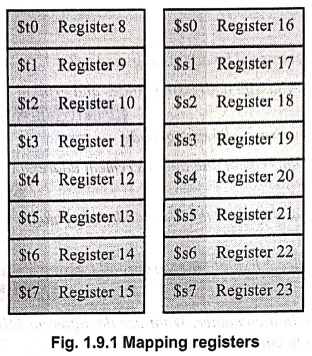
In MIPS assembly language, registers $s0 to $s7 map onto registers 16 to 23 and
registers $t0 to $t7 map onto registers 8 to 15 as shown Fig. 1.9.1.
Translating a MIPS Assembly Instruction into a Machine Instruction
R‒Format Instruction
•
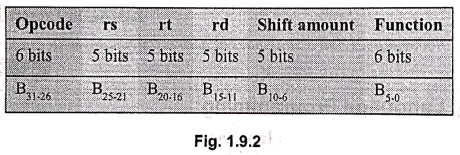
MIP instruction is divided into segments called fields. Fig. 1.9.2 shows instruction format for register type (R‒
Type) instruction.
•
The opcode in MIPS instruction set architecture is only 6 bits. This means
there are only 64 possible instructions. For R‒type instructions, an additional
6 bits are used called the function Thus, the 6 bits of the opcode and the 6
bits of the function specify the kind of instruction for R‒type instructions.
rd (B15‒11):
This is the destination register.
The destination register is the register where on register. The destination the
result of the operation is stored.
rs (B25‒11):
This is the first source register.
The source register is the register that holds one of the arguments of the
operation.
rt (B20‒16):
This is the second source register.
Shift amount (B10‒6):
The amount of bits to shift. Used in shift instructions.
Function (B5‒0):
An additional 6 bits used to specify the operation, in addition to the opcode.
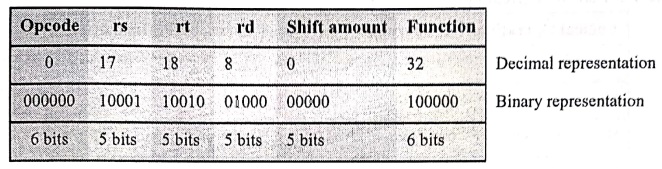
Let
us translate the instruction add $t0, $s1, $s2 into a machine instruction.
•
The first and last fields (containing 0 and 32 in this case) in combination
tell the MIPS computer that this instruction performs addition. The second
field gives the number of the register that is the first source operand of the
addition operation (17 = $s1) and third field gives the other source operand
for the addition (18 = $s2). The fourth field contains the number of the
register that is to receive the sum (8 = $t0). The fifth field is unused in
this instruction, so it is set to 0. Thus, this instruction adds register $s1
to register $s2 and places the sum in register $t0.
I‒Format Instruction
•
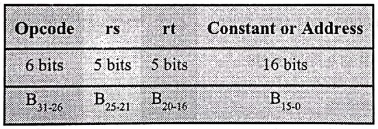
A second type of instruction format is called I‒type (for immediate) or I‒format
and is used by the immediate and data transfer instructions. The fields of
I‒format are :
•
The 16‒bit address means a load word instruction can load any word within a
region of ±215 or 32,768 bytes (±213 or 8192 words) of
the address in the base register rs. Similarly, add immediate is limited to
constants no larger than ± 215.
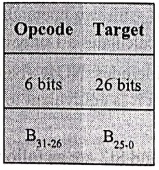
J‒Format Instructions
J‒type
is short for "jump type". The format of an J‒type instruction looks
like:
lw
$t0,32($s3) # Temporary reg $t0 gets A[8]
Example:
addi $s1,$s2, 20 // $s1 = $s2+ 20 Used to add constants
1. Logical Operations
•
Table 1.9.1 shows logical operations in C, Java and MIPS.
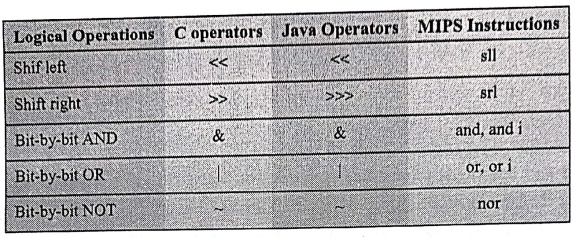
Note:
MIPS implements NOT using a NOR with one operand being zero.
Shift Left and Shift Right Operations
sll
$t2,$s0,4 // reg $t2 = reg $s0 < 4 bits
if
register $s0 contained
0000
0000 0000 0000 0000 0000 0001 10012 = 2510
and
the instruction to shift left by 4 was executed, the new value would be:
0000
0000 0000 0000 0000 0001 1001 00002 = 40010 This value is
stored in $t2.
The
dual of a shift left is a shift right.
AND, OR and NOT Operations
AND:
A logical bit‒by bit operation with two operands that calculates a 1 only if
there is a 1 in both operands.
OR:
A logical bit‒by bit operation with two operands that calculates a 1 if there
is a 1 in either operand.
NOT:
A logical bit‒by bit operation with one operand that inverts the bits; that is,
it replaces every 1 with a 0 and every 0 with a 1.
NOR:
A logical bit‒by bit operation with two operands that calculates the NOT of the
OR of the two operands. That is, it calculates a 1 only if there is a 0 in both
operands.
Note
that MIPS instruction set includes NOR (NOT
OR) instruction instead of NOT instruction. If one operand is zero, then it is
equivalent to NOT : A NOR 0 = NOT (A OR 0) = NOT (A).
Let
us assume the contents of $t1 and St2 are as follows:
$t1: 0000 0000 0000 0000 0011 1100 0000 and
$t2: 0000 0000 0000 0000 0000 1111 1101 and
$t3: 0000 0000 0000 0000 0000 0000 0000
and $t0,$t1,$t2
$t0: 0000 0000 0000 0000 0000 1100 0000 // $t0 = $t1 & $t2
or $t0,$t1,$t2 $t0 : 0000 0000 0000 0000 0011
1111 1101 // $t0 = $t1 | $t2
nor $t0,$t1,$t3
$t0: 1111 1111 1111 1111 1100 0011 1111 // $t0 = ~ ($t1 | $t3)
2. Decision Making
• MIPS
assembly language includes two decision‒ making instructions, similar to an if
statement with a go to.
• beq register1, register2, L1: This
instruction means go to the statement labeled L1 if the value in register1
equals the value in register2. The mnemonic beq stands for branch if equal.
• bne register1, register2, L1:
It means go to the statement labeled L1 if the value in register1 does not
equal the value in register2. The mnemonic bne stands for branch if not equal.
These two instructions are called conditional
branches.
Example : 1
In the following code segment, a, b, c, d and
e are variables. If the five variables f through j correspond to the five
registers $s0 through $s4, what is the compiled MIPS code for C code. if (a = =
b) c = d+e; else c = d ‒ e;
Solution :
bne
$s0, $s1, Else // go to Else if a # b
add
$s2,$3,$s4 // c=d+e (skipped if a # b)
j
Exit // go to Exit
Else:
sub $s2,$s3,$s4 // c = d‒e (skipped if a = b)
Exit:
Example : 2
Translate the following C code to
MIPS assembly code. Use a minimum number of instructions. Assume that i and k
correspond to registers $s3 and $s5 and the base of the array save is in $s6.
What is the MIPS assembly code corresponding to this C segment?
while (save [i] = = k)
Solution :
// The first step is to load
save[i] into a temporary register
Loop:
sll $t1, $s3, 2
// Temp reg $t1 = i * 4 i.e. multiply the
index i by 4 using
// addressing problem
add $t1, $t1, $s6 // $t1 = address of save[i] ‒ To get the
address of save[i],
// we need to add
// $t1 and the base of save in $s6
lw $t0,0($t1) // Temp reg $t0 = save[i] ‒ using address
load save[i] into a
// temporary register: $t0
bne
$t0,$85, Exit // go to Exit if save[i]?
k
addi $s3,$s3,1 //i=i+1
j Loop // repeat Loop
Exit
3. Structure of a MIPS Program
•
A MIPS assembly program consists of two main sections:
1. Data Section
■
Declares variables and data storage.
■
Begins with the directive .data
■
Example:
.data
message:
.asciiz "Hello, World!"
num:
.word 10
2. Text Section
■
Contains the actual instructions (the program code).
■
Begins with .text and usually includes a label main :
■
Example :
.text
main:
li
$v0, 4 # System call for print string
la
$a0, message # Load address of message
syscall #
Print message
li
$v0, 10 #Exit program
syscall
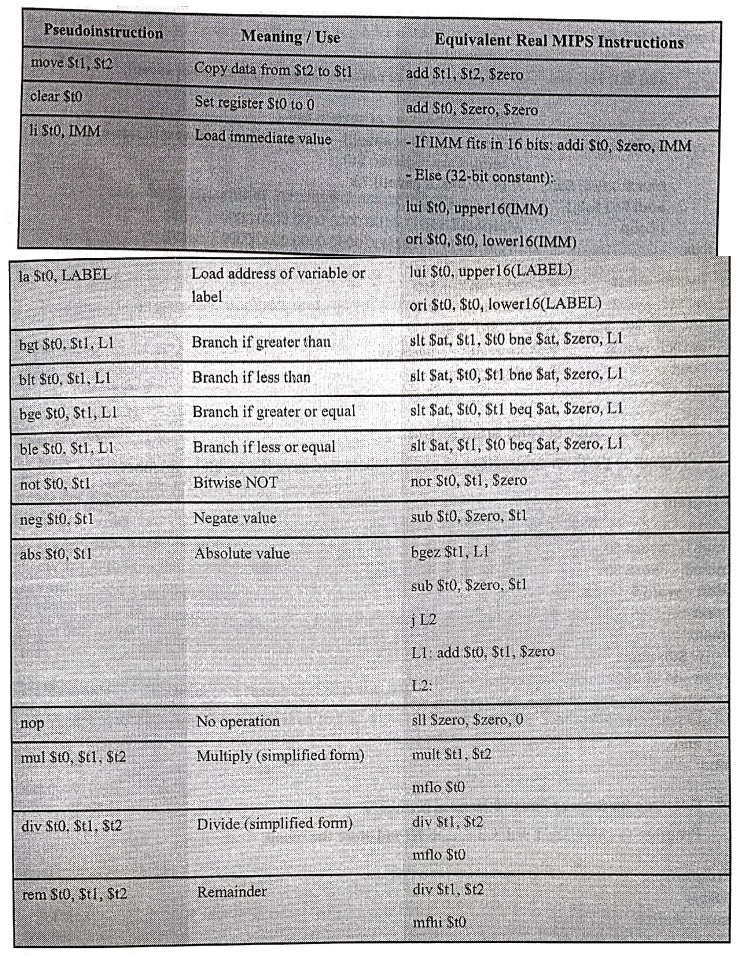
4. Pseudo‒Instructions
•
In MIPS assembly, pseudoinstructions
are not real hardware instructions. They are provided by the assembler to make
programming easier and more readable.
•
When the assembler encounters a pseudoinstruction, it automatically translates it into one or more real MIPS
instructions that the hardware can execute.
5. Programming Examples
Example 1: Add Two Numbers
Program to add two numbers stored
in memory and store the result back in memory.
Program:
.data
num1:
.word 10
num2:
.word 20
result:
.word 0.
.text
main:
lw
$t0, num1 # Load num1 → $t0
lw
$t1, num2 # Load num2 → $t1
add
$t2, $to, $t1 # $t2 = $t0 + $t1
sw
$t2, result #Store result→ memory
j
end #End program
end:
Example 2 : Subtract and Store Result
Program to perform subtraction of
two numbers and save the result in memory.
Program:
.data
num1:
.word 50
num2:
.word 30
diff:
.word 0
.text
main:
lw $t0, num1
lw $t1, num2
sub $t2, $t0, $t1 # $t2 = $t0 ‒ $t1
sw $t2, diff
j end
end:
Example 3 : Sum of First 10 Natural Numbers
Program to calculate 1+2+3+ ... +
10 and store the result.
Program:
.data
sum:
.word 0
.text
main:
li $t0, 1 #i=1
li $t1, 0 # sum = 0
loop:
add $t1, $t1, $t0 #sum= sum + i
addi
$t0, $t0, 1 #sum #i = i+1
ble $t0, 10, loop # continue until i < = 10
sw $t1, sum # store result
j end
end:
Example 4 : Find the Larger of Two Numbers
Program to compare two numbers and
store the larger one.
Program:
.data
num1:
.word 45
num2:
.word 78
larger:
.word 0
.text
main:
lw
$t0, num1
lw $t1, num2
bgt $t0, $t1, num1_is_larger
sw $t1, larger # if num2 > num1
j end
num1_is_larger:
sw $t0, larger
end:
Example 5 : Factorial of a Number (Loop‒Based)
Program to calculate the factorial
of 5 (i.e., 5!= 120) and store the result in memory.
Program:
.data
num:
.word 5
fact:
.word 1
.text
main:
lw $t0, num #n = 5
li $t1, 1 # fact = 1
loop:
mul $t1, $t1, $t0 # fact fact* n
addi $to, $t0, ‒1 # n=n‒1
bgtz $t0, loop # loop
until n > 0
sw $t1, fact #store
factorial
j end
end:
Example 6 : Array Sum
Program to sum the elements of an
array,
Program:
.data
array:
.word 1, 2, 3, 4, 5
sum:
.word 0
n:
.word 5
.text
main:
la $t0, array # address of array
lw $t3, n # number of elements (5)
li $t1, 0 # sum
= 0
li $t2, 0 # i =
0
loop:
lw $t4, 0($t0) # load
array[i]
add $t1, $t1, $t4 # sum += array[i]
addi $t0, $t0, 4 # move to next element
addi $t2, $t2, 1 #i++
blt $t2, $t3, loop # loop if i < n
sw $t1, sum # store result
j end
end:
Review Questions
1. Explain in brief
the issues involved in the design of an instruction format.
2. Explain the shift
instructions supported by MIP with the help of suitable examples.
3. Explain the logical
instructions supported by MIP with the help of suitable examples.
4. Explain the
conditional branch instructions supported by MIP with the help of suitable
examples.
5. Write a MIPS
assembly language program to add two numbers and store the result in a
register.
6. Write a program to
subtract one number from another and store the result in memory.
7. Write a program to
multiply two numbers using the mult and mflo instructions.
8. Write a program to
find the sum of the first 10 natural numbers using a loop.
9. Write a program to
calculate the factorial of a given number using iterative multiplication.
10. Write a MIPS
program to compute X raised to the power N (Xn) using repeated
multiplication.
11. Write a program to
find the largest of three numbers stored in registers $s0, $s1, and $s2.
12. Write a MIPS
program to check whether a number is even or odd using bitwise operations.
13. Write a program to
find the absolute value of a number stored in $s0.
14. Write a program to
compare two numbers and set a register to 1 if the first is greater, otherwise
0.
15. Write a program to
find the largest element in an array.
16. Write a MIPS
program to count the number of positive elements in an array.
17. Write a program to
copy 10 elements from one array to another.
18. Write a MIPS
program to reverse the elements of an array using a loop.
19. Write a program to
count the number of even numbers in an array of integers.
Computer Organization and Architecture: Chapter 1: Introduction : Tag: Computer : - Assembly Language Programming
Computer Organization and Architecture: Chapter 1: Introduction
Under Subject
Computer Organization and Architecture
CW25201 3rd Semester IT department. | 2025 Regulation | 3rd Semester 2025 Regulation
Related Subjects
Discrete Mathematics
MA25C14 3rd Semester CSE,IT,CY,AIDS departments. | 2025 Regulation | 3rd Semester 2025 Regulation
Data Structures
CS25C08 3rd Semester CSE,IT,CY,AIDS departments. | 2025 Regulation | 3rd Semester 2025 Regulation
Computer Organization and Architecture
CW25201 3rd Semester IT department. | 2025 Regulation | 3rd Semester 2025 Regulation
Object Oriented Programming
CS25C07 3rd Semester IT department. | 2025 Regulation | 3rd Semester 2025 Regulation
Web Technologies
IT25301 3rd Semester IT department. | 2025 Regulation | 3rd Semester 2025 Regulation
English Communication Skills Laboratory I
EN25C03 3rd Semester all department. | 2025 Regulation | 3rd Semester 2025 Regulation
Skill Development Course I
3rd Semester all department. | 2025 Regulation | 3rd Semester 2025 Regulation