Computer Organization and Architecture: Chapter 6: Next Generation Computer Architecture
CUDA Architecture (Compute Unified Device Architecture)
Features, Architecture, Components
Questions: 1. What is CUDA, and how does it enable general‒purpose computing on GPUs (GPGPU)? 2. State various features of CUDA. 3. How does CUDA organize threads into a hierarchical structure for efficient parallel execution? 4. What are the different memory types in CUDA, and how do they impact performance? 5. What are the main components of CUDA architecture, and what are their roles? 6. How does CUDA optimize memory access through shared memory, texture memory, and load/store units? 7. Compare the key features of NVIDIA G80 and GT200 architectures in terms of CUDA capabilities.
CUDA
Architecture
•
CUDA (Compute Unified Device Architecture) is a parallel computing platform and
programming model developed by NVIDIA. It enables developers to use NVIDIA GPUs
(Graphics Processing Units) for general‒purpose processing, a paradigm known as
GPGPU (General‒Purpose computing on Graphics Processing Units).
•
CUDA extends programming languages like C, C++ and Fortran with additional
constructs, allowing developers to write programs that leverage the massive
parallel processing power of GPUs.
1. Features of CUDA
1. Parallel computing capabilities
■
CUDA enables massive parallelism by
dividing tasks into thousands of threads, which execute simultaneously on GPU
cores.
■
Uses Single Instruction Multiple Thread
(SIMT) architecture to efficiently execute parallel operations.
2. Thread hierarchy (Grids, Blocks, Threads, and Warps)
■
CUDA organizes computations into a hierarchical
structure for efficient execution :
♦ Threads : Smallest unit of execution.
♦
Blocks : A group of threads that
execute together.
♦
Grids : A collection of blocks that
make up a complete computation.
♦
Warps : Groups of 32 threads that
execute instructions in lockstep.
3. Unified memory model
■
CUDA supports a Unified Memory Model,
allowing both CPU and GPU to share
memory without explicit data transfer, simplifying memory management.
■
Supports NVIDIA NVLink for high‒bandwidth
GPU‒GPU communication.
4. CUDA memory types for optimization
■
CUDA provides different memory types to optimize performance :
♦
Global memory : Large but high‒latency,
accessible by all threads.
♦
Shared memory : Faster, shared among
threads in a block.
♦
Constant memory : Read‒only memory
optimized for frequently used values.
♦
Texture and surface memory : Used for
2D spatially localized data, like images.
5. CPU‒GPU
collaboration
■
CUDA enables heterogeneous computing,
where the CPU and GPU work together to solve problems. The CPU handles
sequential tasks, while the GPU accelerates parallel tasks.
6.
Scalability and multi‒GPU support
■
CUDA supports multi‒GPU systems, allowing developers to scale applications
across multiple GPUs for even greater performance.
7. CUDA
C/C++ programming support
■
CUDA extends C and C++, allowing
developers to write GPU‒accelerated code without learning a new language.
■
It also supports Fortran, Python, and
Java via libraries like PyCUDA
and CUDA Fortran.
8. Highly optimized CUDA libraries
■
NVIDIA provides optimized libraries for various applications:
♦ cuBLAS
(Linear Algebra)
♦ cuDNN
(Deep Learning)
♦ Thrust
(Parallel Algorithms)
♦ cuFFT
(Fast Fourier Transforms)
♦ cuRAND
(Random Number Generation)
9. Dynamic parallelism
■
CUDA allows kernels to launch other
kernels, enabling recursive parallel execution.
■
Useful for adaptive algorithms, tree‒based
computations, and simulations.
10. CUDA streams and asynchronous execution
■
CUDA supports multiple concurrent
streams to overlap memory transfers and kernel execution.
■
CUDA supports asynchronous executions,
allowing overlap of computation and data transfer for improved performance.
11. Portability
■ Cross‒platform
support : CUDA is supported on multiple operating systems,
including Windows, Linux, and macOS.
■ Backward
compatibility : CUDA programs are compatible with a
wide range of NVIDIA GPUs, ensuring portability across different hardware
generations.
2. Architecture of CUDA
•
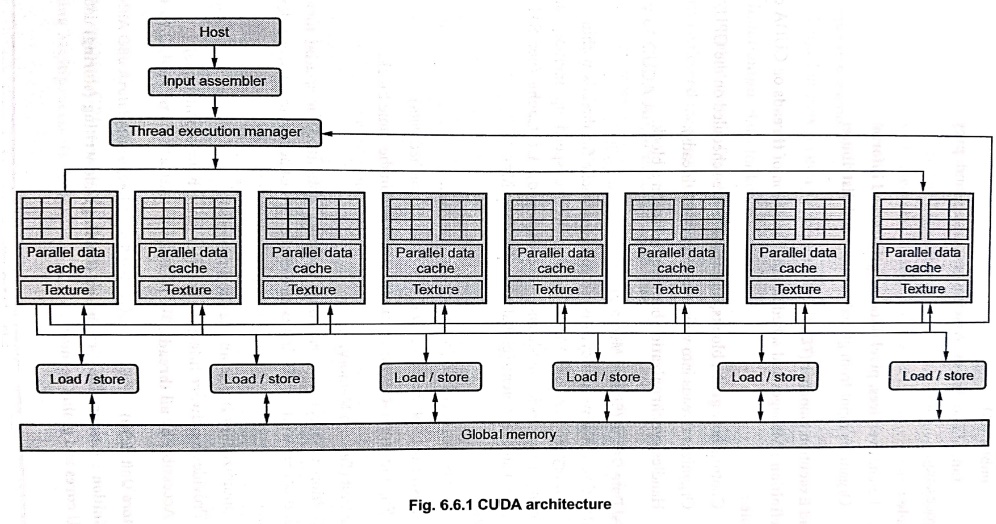
Fig. 6.6.1 shows CUDA architecture. The core
components of CUDA architecture include:
1.
Host (CPU)
2.
Input Assembler (IA)
3.
Thread Execution Manager (TEM)
4.
Parallel Data Cache (Shared Memory)
5.
Texture Unit (Texture Memory)
6.
Load / Store Unit (LSU)
7.
Global Memory (Device Memory)
1. Host (CPU)
■
Definition : The Host refers to the CPU and the system memory (RAM) where your program runs.
■
Role:
♦
Manages program control flow.
♦
Allocates memory on both the CPU and GPU.
♦
Launches kernels (functions executed
on the GPU).
♦ Transfers data between CPU memory (Host memory) and GPU memory (Device memory).
2. Input Assembler (IA)
■ Definition :
The Input Assembler gathers and prepares input data for parallel processing.
■ Role :
♦
Fetches vertices, pixel data, or
grid/thread information.
♦
Organizes input from global memory and distributes
it to CUDA cores.
3. Thread Execution Manager (TEM)
■
Definition : Manages and schedules
the execution of threads on CUDA cores.
■
Role :
♦
Controls how grids, blocks, and threads are scheduled on the GPU.
♦
Organizes threads into warps (groups of 32 threads).
♦
Handles synchronization between threads in a block.
4. Parallel Data Cache (Shared Memory)
■
Definition : A low‒latency, shared memory cache for threads within a block to
speed up memory access. CUDA provides caches
to speed up memory access: Shared
Memory (per block, low‒latency, user‒managed), L1 Cache (per SM, automatically managed) and L2 Cache (global, shared across SMs).
■
Role:
♦
Accelerates access to frequently used data.
♦
Faster than global memory (100x
faster for cached data).
♦
Supports inter‒thread communication
within the same block.
5. Texture Unit (Texture Memory)
■
Definition : Specialized read‒only memory optimized for spatial locality in 2D/3D data. It comes with a built‒in texture cache for fast access to
adjacent elements.
■
Role :
♦
Optimized for image and texture
processing.
♦
Provides hardware interpolation (for
smooth transformations).
♦
Accessible by all threads.
6. Load/Store Unit (LSU)
■
Definition : Responsible for reading (loading) and writing (storing) data between the GPU cores and global memory.
■
Role:
♦
Handles data transfer between registers,
shared memory and global memory.
♦
Global memory is large but has high‒latency, so CUDA optimizes access
patterns by supporting coalesced memory
access (where consecutive threads access. adjacent memory addresses).
7. Global Memory (Device Memory)
■
Definition : Large but slow memory accessible by all GPU
threads.
■
Role :
♦
Stores input/output data for
kernels.
♦
Requires explicit transfer from the Host
(CPU).
♦
Supports coalesced memory access for
better performance.
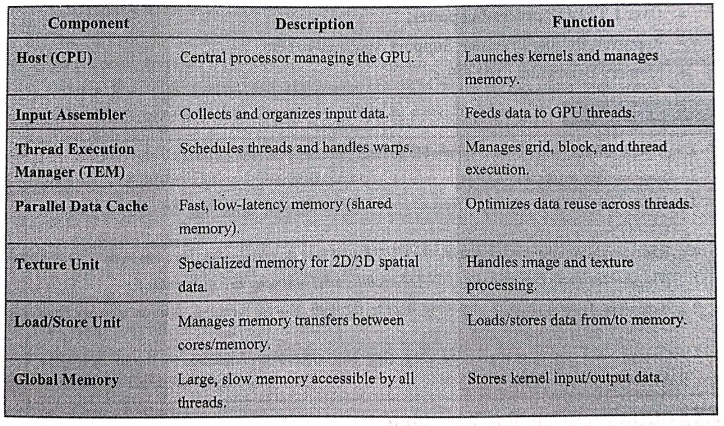
3. Summary of CUDA Architecture Components
4. Example of CUDA Architecture in Real GPUs
1. Example: NVIDIA G80 Architecture (GeForce 8800 GTX)
■
First CUDA‒enabled GPU architecture
(introduced in 2006).
■
16 Streaming Multiprocessors (SMs).
■
Each SM has 8 Streaming Processors (SPs)
(also called CUDA cores).
■
Total 128 SPs (16 SMs x 8 SPs).
■
Each SM can support 768 threads.
■
Each SP executes one instruction per
clock cycle.
■
Memory Bandwidth : 86.4 GB/s.
■
Total Threads that can run = 128 SPs × 96 threads per SP = 12,228
threads.
2. Example: NVIDIA GT200 Architecture (Tesla C1060)
■
Introduced in 2008 with Compute Capability 1.3.
■
30 Streaming Multiprocessors (SMs).
■
Each SM has 8 Streaming Processors
(SPs).
■
Total 240 SPs (30 SMs x 8 SPs).
■
Supports thousands of threads per
application.
■
Over 1 TFLOP processing power.
■
Improved Double Precision Support
compared to G80.
■
Memory Bandwidth: 102 GB/s.
Review Questions
1. What is CUDA, and
how does it enable general‒purpose computing on GPUs (GPGPU)?
2. State various
features of CUDA.
3. How does CUDA
organize threads into a hierarchical structure for efficient parallel
execution?
4. What are the
different memory types in CUDA, and how do they impact performance?
5. What are the main
components of CUDA architecture, and what are their roles?
6. How does CUDA
optimize memory access through shared memory, texture memory, and load/store
units?
7. Compare the key
features of NVIDIA G80 and GT200 architectures in terms of CUDA capabilities.
Computer Organization and Architecture: Chapter 6: Next Generation Computer Architecture : Tag: Computer : Features, Architecture, Components - CUDA Architecture (Compute Unified Device Architecture)
Computer Organization and Architecture: Chapter 6: Next Generation Computer Architecture
Under Subject
Computer Organization and Architecture
CW25201 3rd Semester IT department. | 2025 Regulation | 3rd Semester 2025 Regulation
Related Subjects
Discrete Mathematics
MA25C14 3rd Semester CSE,IT,CY,AIDS departments. | 2025 Regulation | 3rd Semester 2025 Regulation
Data Structures
CS25C08 3rd Semester CSE,IT,CY,AIDS departments. | 2025 Regulation | 3rd Semester 2025 Regulation
Computer Organization and Architecture
CW25201 3rd Semester IT department. | 2025 Regulation | 3rd Semester 2025 Regulation
Object Oriented Programming
CS25C07 3rd Semester IT department. | 2025 Regulation | 3rd Semester 2025 Regulation
Web Technologies
IT25301 3rd Semester IT department. | 2025 Regulation | 3rd Semester 2025 Regulation
English Communication Skills Laboratory I
EN25C03 3rd Semester all department. | 2025 Regulation | 3rd Semester 2025 Regulation
Skill Development Course I
3rd Semester all department. | 2025 Regulation | 3rd Semester 2025 Regulation