Computer Organization and Architecture: Chapter 6: Next Generation Computer Architecture
CUDA Programming Paradigm
Steps in Running Program, Kernel Execution, Applications, Benefits, Limitations
Questions: 1. What is the role of the CUDA programming model in bridging the gap between applications and GPU hardware? 2. How does CUDA handle memory management between the host (CPU) and the device (GPU)? 3. What are the three main steps involved in running a CUDA program? 4. How is a CUDA kernel different from a regular C/C++ function in terms of execution? 5. What is the hierarchical thread organization in CUDA, and how does it optimize parallel processing? 6. What are the different types of CUDA memory? 7. How does CUDA handle thread cooperation and memory sharing within blocks? 8. Explain the process of kernel execution. 9. What are some real‒world applications of CUDA in high‒performance computing? 10. Lists the benefits of CUDA. 11. What are the primary limitations of CUDA?
CUDA
Programming Paradigm
•
The CUDA programming model abstracts the GPU architecture, bridging the gap
between an application and its implementation on GPU hardware.
•
Two fundamental terms in CUDA programming are "host" and
"device."
■
The CPU is called the host and its memory is called host memory.
■
The GPU is called the device and its memory is called device memory.
•
Since CPU and GPU have separate
memories, data needs to be copied between them.
1. Steps in Running a CUDA Program
•
To run a CUDA program, three main steps are involved:
1. Copy Data from CPU
to GPU → (Host‒to‒Device transfer)
2. Run the Program on
GPU
→ GPU executes many calculations at once
3. Copy Results Back to
CPU
→ (Device‒to‒Host transfer)
2. CUDA Kernel
•
A CUDA kernel is a special function
written in C/C++ (with some CUDA extensions) that defines the operation you
want to perform in parallel. The CPU
launches the Kernel, and the GPU executes it in parallel across multiple
threads.
•
The key difference between a regular C/C++ function and a CUDA kernel is how
they are executed. A regular function runs once
on the CPU. A CUDA kernel, however, is designed to run many times concurrently on the GPU.
•
The "K" mentioned earlier represents the number of times the kernel
is executed. Each execution is handled by a separate CUDA thread. So, if you launch a kernel with 1024 threads, the
kernel's code will effectively run 1024 times at the same time, each thread
working on a small part of the overall task (e.g., each thread might add a pair
of numbers from the arrays).
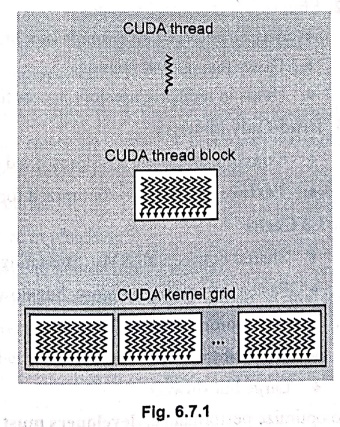
3. Hierarchical Thread Organization
•
CUDA threads are structured into :
■
Thread : A single execution unit.
■
Block : A collection (group) of
threads.
■
Grid : A collection (group) of
blocks.
•
Example : If a kernel launches 1024 threads, it can be arranged as:
■ Grid: 4 Blocks
■ Block: 256 Threads (4
× 256 = 1024 threads total)
4. CUDA Memory Hierachy
•
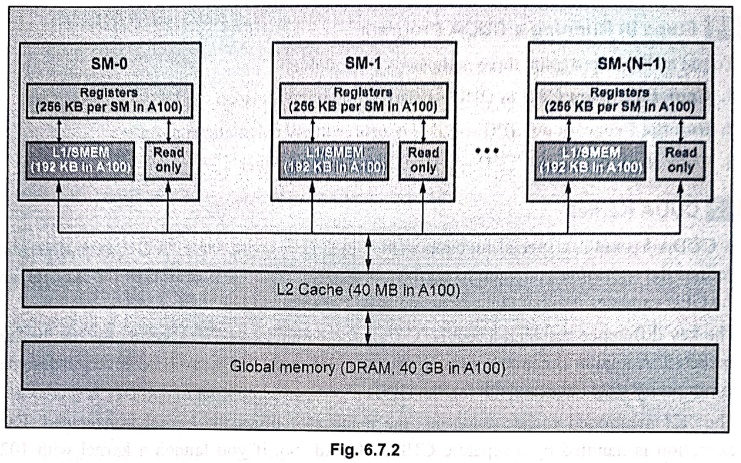
CUDA provides different types of memory to optimize performance :
1.
Registers (Fastest)
♦
Used for each thread's private data
♦
Very fast but limited in size
2. Shared
Memory (L1 Cache)
♦
Shared between all threads in a block
♦
Faster than global memory
♦
Helps in reducing memory access time
3. Read‒Only
Memory
♦
Constant Memory → Stores fixed
values shared across all threads
♦
Texture Memory → Optimized for 2D
operations like image processing
4. L2
Cache
♦
Shared between all SMS (Streaming
Multiprocessors)
♦
Faster than global memory, but slower than shared memory
5. Global
Memory (Slowest)
♦
Accessible by all threads
♦
Large but slowest
•
To optimize performance, developers must
efficiently manage memory usage.
5. Thread Cooperation and Memory Sharing
•
Threads within the same block can
share data using Shared Memory.
•
Threads across different blocks do
not share memory directly.
•
Global Memory is accessible to all
threads but slower.
• Local Memory
(registers) is the fastest, used for per‒thread variables.
6. Kernel Execution on GPU
•
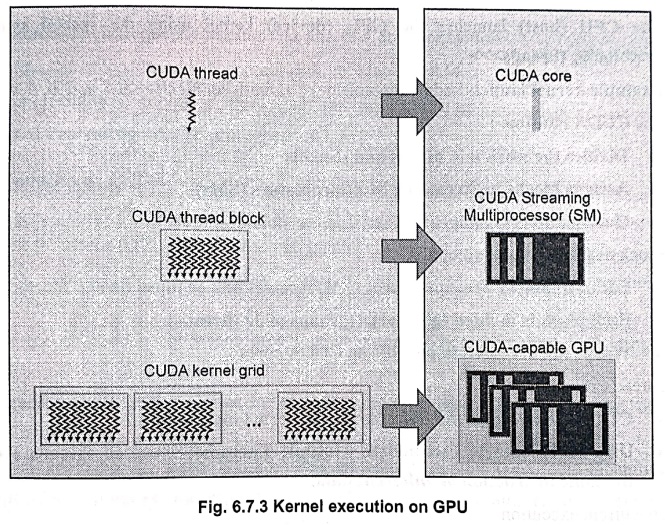
CUDA blocks are the basic units of execution on a GPU. Each CUDA block is
assigned to a single Streaming
Multiprocessor (SM) and stays there until it completes execution. Once
assigned, it cannot migrate to another
SM, except in special cases like:
■
Preemption (interrupting and
resuming execution)
■
Debugging (stepping through
execution for error checking)
■
CUDA Dynamic Parallelism (where
kernels can launch other kernels)
•
One Streaming Multiprocessor (SM)
can handle multiple CUDA blocks at
the same time, depending on available resources
(such as registers and shared memory).
•
More efficient resource utilization
allows higher parallelism and better
performance.
•
Let us see a step‒by‒step breakdown
of how a CUDA kernel runs on the
GPU:
1.
A CUDA kernel is defined in CUDA C/C++ using the __global__keyword.
Example :
_global__
void add(int *a, int *b, int *c)
{
int
index = threadIdx.x;
c[index]
= a[index] + b[index];
}
2.
The CPU (host) launches the GPU (device) kernel using the special syntax :
<<<blocks,
threads>>>
Example kernel launch :
add<<<numBlocks, threadsPerBlock>>>(d_a, d_b, d_c);
The
CUDA runtime :
♦
Divides the work into blocks and threads
♦
Assigns blocks to Streaming Multiprocessors (SMs)
♦
Handles memory allocation and data
transfers
3.
Block distribution and execution
♦
Each Streaming Multiprocessor (SM)
receives one or more thread blocks.
♦
Each block is divided into warps (groups
of 32 threads).
♦ Warps are executed in
parallel on CUDA cores.
4.
Thread execution
♦ CUDA cores within the
SM execute the kernel instructions.
♦
Uses SIMT (Single Instruction, Multiple
Threads), where all threads execute the same instruction on different data.
5.
Concurrent execution
♦ Multiple blocks run
simultaneously on different SMs.
♦ Multiple kernels can
also run concurrently on the same GPU.
6.
Synchronization
♦
Threads within a block can synchronize
using _ syncthreads().
♦
Ensures that all threads complete a step
before moving forward.
7.
Completion and Memory transfer 
♦
Once all threads finish, results can be transferred
from GPU to CPU (device → host).
♦
Example : cudaMemcpy(h_c, d_c, size, cudaMemcpyDeviceToHost);
♦
The program then continues execution on the CPU.
7. CUDA Applications
•
CUDA is widely used for high‒performance computing in various fields:
1. Scientific Computing
‒
Simulations, weather forecasting, molecular dynamics
2. AI & Machine
Learning ‒ Deep learning, NLP, image recognition
3. Medical Imaging ‒
CT/MRI processing, DNA sequencing, drug discovery
4. Computer Vision ‒
Object detection, video processing, AR/VR
5. Gaming and Graphics ‒
Real‒time rendering, physics simulations
6. Finance ‒
High‒frequency trading, risk analysis, fraud detection
7. Autonomous Systems ‒
Self‒driving cars, robotics, SLAM
8. Cybersecurity ‒
Encryption, blockchain, password cracking
9. Signal Processing ‒
Audio processing, 5G, IoT
8. Benefits of CUDA
•
There are several advantages that give CUDA an edge over traditional general‒purpose
graphics processor (GPU) computers with graphics APIs:
1. High performance ‒
Enables massive parallelism, accelerating computations significantly.
2. Energy efficient
‒ Optimizes power consumption while delivering high processing speed.
3. Versatile
applications ‒Used in AI, scientific computing,
medical imaging, finance, and more.
4. Developer‒friendly ‒
Extends C/C++ with easy‒to‒use parallel computing capabilities.
5.
Optimized memory handling ‒ Supports
shared, global and texture memory for efficient data access.
6. Scalability
‒ Works across various NVIDIA GPUs, from consumer‒grade to data center‒ level
hardware.
7. Real‒Time processing
‒
Enhances graphics, gaming, video processing and autonomous systems.
9. Limitations of CUDA
1. Hardware dependency ‒
Works only on NVIDIA GPUs, limiting cross‒platform compatibility.
2. Steep learning curve
‒
Requires knowledge of parallel programming and memory management.
3. Memory constraints ‒
Shared and global memory limits can impact large‒scale computations.
4. CPU‒GPU data
transfer overhead ‒ Frequent memory transfers between host
and device can slow execution.
5. Debugging complexity
‒
Identifying and fixing parallel execution issues can be challenging.
6.
CUDA supports only NVIDIA hardware.
Review Questions
1. What is the role of
the CUDA programming model in bridging the gap between applications and GPU
hardware?
2. How does CUDA
handle memory management between the host (CPU) and the device (GPU)?
3. What are the three
main steps involved in running a CUDA program?
4. How is a CUDA
kernel different from a regular C/C++ function in terms of execution?
5. What is the
hierarchical thread organization in CUDA, and how does it optimize parallel
processing?
6. What are the
different types of CUDA memory?
7. How does CUDA
handle thread cooperation and memory sharing within blocks?
8. Explain the process
of kernel execution.
9. What are some real‒world
applications of CUDA in high‒performance computing?
10. Lists the benefits
of CUDA.
11. What are the
primary limitations of CUDA?
Computer Organization and Architecture: Chapter 6: Next Generation Computer Architecture : Tag: Computer : Steps in Running Program, Kernel Execution, Applications, Benefits, Limitations - CUDA Programming Paradigm
Computer Organization and Architecture: Chapter 6: Next Generation Computer Architecture
Under Subject
Computer Organization and Architecture
CW25201 3rd Semester IT department. | 2025 Regulation | 3rd Semester 2025 Regulation
Related Subjects
Discrete Mathematics
MA25C14 3rd Semester CSE,IT,CY,AIDS departments. | 2025 Regulation | 3rd Semester 2025 Regulation
Data Structures
CS25C08 3rd Semester CSE,IT,CY,AIDS departments. | 2025 Regulation | 3rd Semester 2025 Regulation
Computer Organization and Architecture
CW25201 3rd Semester IT department. | 2025 Regulation | 3rd Semester 2025 Regulation
Object Oriented Programming
CS25C07 3rd Semester IT department. | 2025 Regulation | 3rd Semester 2025 Regulation
Web Technologies
IT25301 3rd Semester IT department. | 2025 Regulation | 3rd Semester 2025 Regulation
English Communication Skills Laboratory I
EN25C03 3rd Semester all department. | 2025 Regulation | 3rd Semester 2025 Regulation
Skill Development Course I
3rd Semester all department. | 2025 Regulation | 3rd Semester 2025 Regulation