Python for Data Science: Chapter 1: Basics of Python
Python: Dictionaries
Introduction to Dictionary: Accessing Values in Dictionary, Deleting Values in Dictionary, Updating Values in Dictionary 2. Basic Dictionary Operations, 3. Built in Dictionary Functions
Dictionaries
1. Introduction to Dictionary
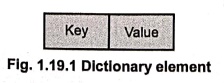
Definition: In python, dictionary is unordered collection of items. These items are in the form key‒value pairs.
•
The dictionary contains the collection of indices called keys and
collection of values.
•
Each key is associated with a single value.
The
association of keys with values is called
key‒value pair or item.
•
Dictionary always represent the mappings of keys with values. Thus each key
maps to a value.
How to create dictionary ?
•
Items of the dictionary are written within the {} brackets and are separated by
commas.
•
The key value pair is represented using: operator. That is key: value.
• For example
my_dictionary={1:'AAA',2:'BBB',3:'CCC'}
•
The keys are unique and are of immutable types ‒ such as string, number, tuple.
•
Here is a screenshot that shows how to create a dictionary
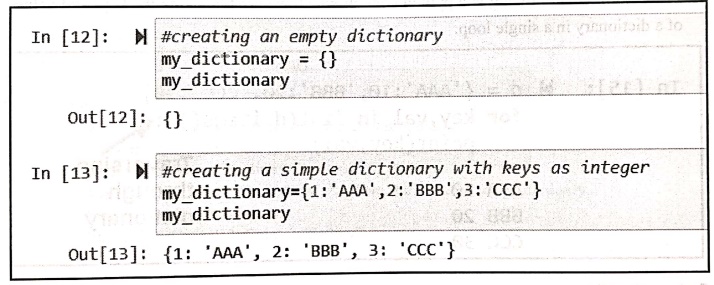
In [12]:
#creating an empty dictionary
my_dictionary = {}
my_dictionary
Out[12]: {}
In [13]:
#creating a simple dictionary with keys as integer
my_dictionary={1:'AAA',2: 'BBB',3: 'CCC'}
my_dictionary
Out[13]: {1: 'AAA', 2: 'BBB', 3:
'CCC'}
•
We can also create a dictionary with mixed data type as
>>> my_dictionary= {'name':'AAA',2:89}
•
We can also create a dictionary using the word dict().
For example ‒
>>> my_dictionary= dict({0:'Red', 1:'Green',2:'Blue'})
1. Accessing Values in Dictionary
We
can access the element in the dictionary using the keys. Following script
illustrates it
DictionaryDemo.py
student_dict={'name': 'AAA', 'roll':10}
print(student_dict['name'])
print(student_dict['roll'])
Output
AAA
10
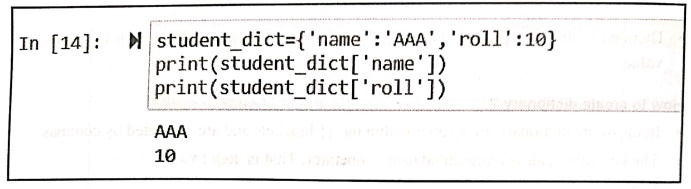
In [14]:
student_dict={'name':
'AAA', 'roll':10}
print(student_dict['name'])
print(student_dict['roll'])
AAA
10
•
Now to traverse the dictionary items we need to consider two values at a time
and these are the values for both key
and value.
•
At a time we can assign both of these values. This is called multiple assignment.
For example ‒
Following is a python code in which we are traversing the keys and values of a
dictionary in a single loop.
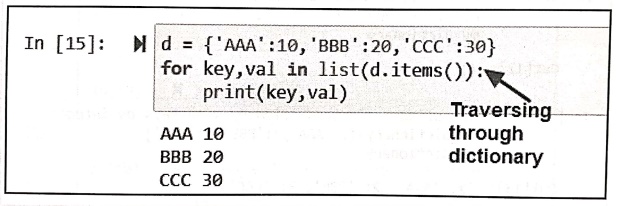
In [15]:
d = {'AAA':10, 'BBB':20, 'CCC':30}
for key, val in list(d.items()): ←Traversing through dictionary
print(key, val)
AAA 10
BBB 20
CCC 30
Code explanation:
•
Note that, the above loop has two iteration variables because items returns a
list of tuples.
The
key‒value is a tuple assignment that successively iterates through each of key
value pairs in the dictionary.
2. Deleting Values in Dictionary
For
removing an item from the dictionary we use the keyword del.
For example
>>> del my_dictionary[2] #deleting the item from
dictionary
>>> print(my_dictionary) #display of dictionary
{0: 'Red', 1: 'Green', 3: 'Yellow'}
>>>
3. Updating Values in Dictionary
We
can update the value of the dictionary by directly assigning the value to
corresponding key position.
For example ‒
>>> my dictionary = dict((0:'Red', 1:'Green',2:
'Blue')) #creation of dictionary
>>> print(my_dictionary) #display of dictionary
{0: 'Red', 1: 'Green', 2: 'Blue'}
>>> my dictionary[1]='Yellow' #updating the value at
particular index
>>> print(my_dictionary) #display of dictionary
{0: 'Red', 1: 'Yellow', 2: 'Blue'} #updation of value can be
verified.
>>>
2. Basic Dictionary Operations
Various
operations that can be performed on dictionary are :
1. Adding item to dictionary
We
can add the item to the dictionary.
For example ‒
>>> my_dictionary= dict({0:'Red', 1:'Green', 2:'Blue'})
>>> print(my_dictionary)
{0: 'Red', 1: 'Green', 2: 'Blue'}
>>> my_dictionary [3]='Yellow' #adding the element to
the dictioary
>>> print(my_dictionary)
{0: 'Red', 1: 'Green', 2: 'Blue', 3: 'Yellow'}
>>>
2. Checking length
The
len function gives the number of pairs in the dictionary.
For example‒
>>> my_dictionary=dict({0:'Red', 1:'Green', 2:
'Blue'})#creation of dictionary
>>> len(my_dictionary) # finding the length of
dictionary
3 #meaning ‒ that there are 3
items in dictionary
>>>
3. Iterating through dictionary
For
iterating through the dictionary we can use the for loop.
The
corresponding key and values present in the dictionary can be displayed using
this for loop.
The
illustrative program is as follows ‒
LoopDemo.py
d={'Red':10, 'Blue':42, 'Orange':21}
for i in d:
print(i,d[i])
Output
Red 10
Blue 42
Orange 21
3. Built in Dictionary Functions
Following
are some commonly used methods in dictionary.
method : Purpose
clear:
Removes all items from dictionary.
copy()
:
Returns a copy of dictionary.
fromkeys(
):
Creates a new dictionary from given sequence of elements and values provided by
user.
get(key[,d]):
Return the value of key. If key doesnot exit, return d (defaults to None).
items()
: Return a new view of the dictionary's items (key, value).
Keys
: Return a new view of the dictionary's keys.
pop(key[,d])
: Remove the item with key and return its value or d if key is not found. If d
is not provided and key is not found, raises KeyError.
popitem()
: Remove and return an arbitary item (key, value). Raises KeyError if the
dictionary is empty.
setdefault(key[,d])
: If key is in the dictionary, return its value. If not, insert key with a
value of d and return d (defaults to none).
update([other])
: Update the dictionary with the key/value pairs from other, overwriting
existing keys.
values()
: Return a new view of the dictionary's values.
1. The clear method
This
method removed all the items from the dictionary. This method does not take any
parameter and does not return anything.
For example
>>> my_dictionary={1:'AAA',2: 'BBB',3:'CCC') # creation of dictionary
>>> print(my_dictionary) #display
{1: 'AAA', 2: 'BBB', 3: 'CCC'}
>>> my_dictionary.clear() #using clear method
>>> print(my_dictionary) #display
{}
>>>
2. The copy method
The
copy method returns the copy of the dictionary. It does not take any parameter
and returns a shallow copy of dictionary.
For example
>>> my_dictionary={1:'AAA',2:'BBB', 3:'CCC'}
>>> print(my_dictionary)
{1: 'AAA', 2: 'BBB', 3: 'CCC'}
>>> new_dictionary=my_dictionary.copy()
>>> print(new_dictionary)
{1: 'AAA', 2: 'BBB', 3: 'CCC'}
>>>
3. The fromkey method
The
fromkeys() method creates a new
dictionary from the given sequence of elements with a value provided by the
user.
Syntax
dictionary.fromkeys(sequence[,
value])
The
fromkeys() method returns a new
dictionary with the given sequence of elements as the keys of the dictionary.
If the value argument is set, each element of the newly created dictionary is
set to the provided value.
For example
>>> keys={10,20,30}
>>> values = 'Number'
>>> new_dict=dict.fromkeys(keys, values)
>>> print(new_dict)
{10: 'Number', 20: 'Number', 30: 'Number'}
>>>
4. The get method
The
get() method returns the value for
the specified key if key is in dictionary. This method takes two parameters key
and value. The get method can return either key or value or nothing.
Syntax
dictionary.get(key,
value])
For example
>>> student={'name':'AAA', 'roll':10,'marks':98} #creation of dictionary
>>> print("Name: ",student.get('name'))
Name: AAA
>>> print("roll: ",student.get('roll'))
roll: 10
>>> print("marks: ",student.get('marks'))
marks: 98
>>> print("Address: ",student.get('address'))
#this key is 'address' is not specified
#in the list
Address: None #Hence it
returns none
>>>
5. The value method
This
method returns the value object that
returns view object that displays the list of values present in the dictionary.
For example
>>> my_dictionary
={'marks1':99,'marks2':96,'marks3':97}#creating
dictionary
>>> print(my_dictionary.values()) #displaying values
dict_values([99, 96, 97])
>>>
6. The pop method
The
pop() method removes and returns an element from a dictionary having the given
key.
Syntax
pop(key), default])
where
key is the key which is searched for
removing the value. And default is
the value which is to be returned when the key is not in the dictionary,
For example
my_dictionary={1:'Red', 2:'Blue', 3:'Green'} #creation of dictionary
>>> val=my_dictionary.pop(1) #removing the element with key 1
>>> print("The popped element is: ",val)
The popped element is: Red
>>> val=my_dictionary.pop(5,3)
#specifying
default value. When the specified key is not present in the list, then the
#default value is returned.
>>> print("The popped element using default value
is: ",val)
The popped element using default value is: 3 #default value is returned
>>>
Example:1
Write a
python program to sort the elements of dictionary.
Solution :
Sort.py
d={'Red':10, 'Blue':42, 'Yellow':32,'Orange':21}
myList=list(d.keys())
print(myList)
myList.sort()
print("Sorted list based on Keys")
for i in myList:
print(i)
Output
Sorted list based in
Keys
Blue
Orange
Red
Yellow
Example:2
Write a
python program to create a tuple from given dictionary elements.
Solution:
Using the method named item of dictionary, the list of tuples can be returned.
For example ‒
>>> d={'AAA':10,'BBB':20, 'CCC':30}
>>> t1=list(d.items())
>>> print(t1)
[('AAA', 10), ('BBB',
20), ('CCC', 30)]
>>>
Python for Data Science: Chapter 1: Basics of Python : Tag: Computer Programming, Python, Data Science : - Python: Dictionaries
Python for Data Science: Chapter 1: Basics of Python
Under Subject

Python for Data Science
AD25201 2nd Semester AIDS Dept | 2025 Regulation | 2nd Semester 2025 Regulation
Related Subjects

English Essentials II
EN25C02 2nd Semester | 2025 Regulation | 2nd Semester 2025 Regulation

Tamils and Technology தமிழர்களும் தொழில்நுட்பமும்
UC25H02 2nd Semester | 2025 Regulation | 2nd Semester 2025 Regulation

Linear Algebra
MA25C02 2nd Semester | 2025 Regulation

Applied Physics (CSIE) II
PH25C03 2nd Semester AIDS, CSE, IT, CSE(CY) Dept | 2025 Regulation | 2nd Semester 2025 Regulation

Digital Principles and Computer Organization
CS25C06 2nd Semester AIDS, CSE, IT, CSE(CY) Dept | 2025 Regulation | 2nd Semester 2025 Regulation

Basic Electrical and Electronics Engineering
EE25C01 2nd Semester | 2025 Regulation | 2nd Semester 2025 Regulation
Python for Data Science
AD25201 2nd Semester AIDS Dept | 2025 Regulation | 2nd Semester 2025 Regulation

Re-Engineering for Innovation
ME25C05 2nd Semester | 2025 Regulation | 2nd Semester 2025 Regulation

Python for Data Science - Laboratory
AD25201 2nd Semester AIDS Dept | 2025 Regulation | 2nd Semester 2025 Regulation