Python for Data Science: Chapter 1: Basics of Python
Python: Input and Output
1. How to Input the Data through Keyboard? 2. How to Display Output on Console using Format?
Input and
Output
1. How to Input the Data through Keyboard?
In
python it is possible to input the data using a keyboard.
For
that purpose, the function input()
is used.
Syntax
input([prompt])
Where
prompt is the string we wish to display on the screen. It is optional.
In
the following screenshot, the input method is used to get the data.
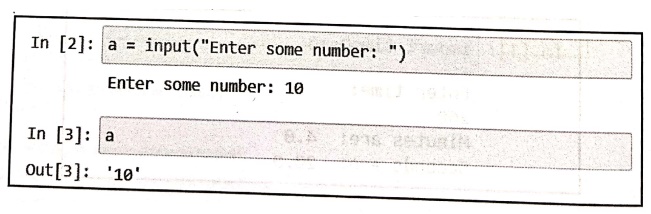
In [2]: a = input("Enter some number: ")
Enter some number: 10
In [3]: a
Out [3]: '10'
Enter
the hot key Shift+Enter key to get
the output.
Example: 1
Write a
python program to perform addition of two numbers. Accept the two numbers using
the keyboard.
Solution:
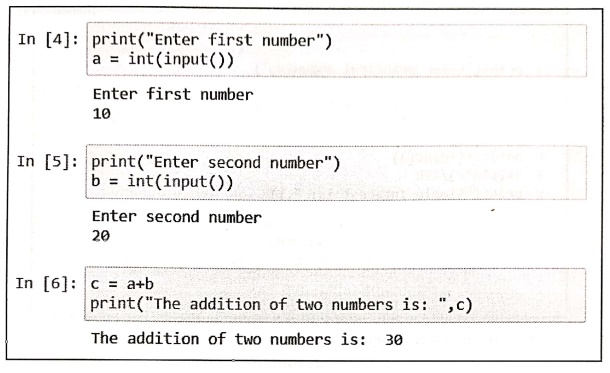
In [4]: print("Enter first
number")
a = int(input())
Enter first number
10
In [5]: print("Enter second number")
b = int(input())
Enter second number
20
In [6]: c = a+b
print("The addition of two numbers is: ",c)
The addition of two numbers is: 30
Program explanation:
•
In above program, we have used input() function to get the input through
keyboard. But this input will be accepted in the form of string.
•
For performing addition of two numbers
we need numerical values and not the strings. Hence we use int() function to which the input() function is passed as
parameter. Due to which whatever we accept through keyboard will be converted
to integer.
•
Finally the addition of two numbers as a result will be displayed.
Example:2
Write a
python program to find the square root of a given number.
Solution:
print("Enter the number:")
num=float(input())
result=num**0.5
print("The square root of ",num," is
",result)
Example:3
Write a
program in python to obtain principle amount, rate of interest and time from
user and compute simple interest.
Solution :
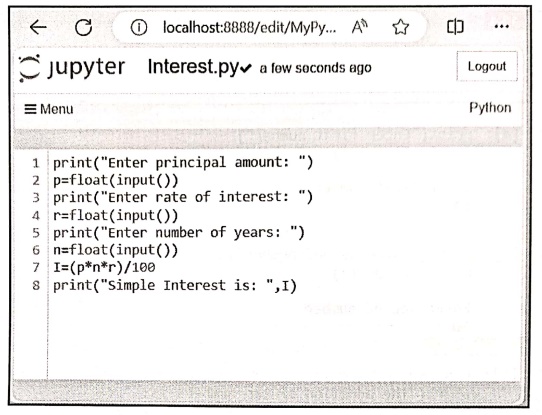
Create
a python file using Jupyter Notebook as follows
Save
the above file as Interest.py
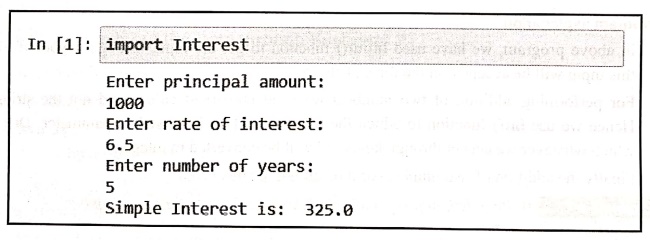
Output
In [1]: import
Interest
Enter principal
amount:
1000
Enter rate of
interest:
6.5
Enter number of years:
5
Simple Interest is:
325.0
2. How to Display Output on Console using Format?
Using .format
the data can be displayed on the console. For that purpose { } and .format is used. For example
Example 1 :
n=10
print("There are {} numbers".format(n))
Output
There are 10 numbers
We
can also display the data along with some space. For that purpose, we have to
use {:n}.
For
example ‒
Example 2:
n=10
print("There are {:10d} numbers".format(n))
Output
There are 10 numbers
Example:3
a=10
b=20
c=30
print("There are three numbers and those are {} {} {}
numbers".format(a,b,c))
Output
There are three
numbers and those are 10 20 30 numbers
Example: 4
Write a
program to swap two numbers.
Solution:
a= input('Enter value of a:')
b = input('Enter value of b: ')
temp = a
a= b
b = temp
print('After swapping a: {}'.format(a))
print('After swapping b: {}'.format(b))
Python for Data Science: Chapter 1: Basics of Python : Tag: Computer Programming, Python, Data Science : - Python: Input and Output
Python for Data Science: Chapter 1: Basics of Python
Under Subject

Python for Data Science
AD25201 2nd Semester AIDS Dept | 2025 Regulation | 2nd Semester 2025 Regulation
Related Subjects

English Essentials II
EN25C02 2nd Semester | 2025 Regulation | 2nd Semester 2025 Regulation

Tamils and Technology தமிழர்களும் தொழில்நுட்பமும்
UC25H02 2nd Semester | 2025 Regulation | 2nd Semester 2025 Regulation

Linear Algebra
MA25C02 2nd Semester | 2025 Regulation

Applied Physics (CSIE) II
PH25C03 2nd Semester AIDS, CSE, IT, CSE(CY) Dept | 2025 Regulation | 2nd Semester 2025 Regulation

Digital Principles and Computer Organization
CS25C06 2nd Semester AIDS, CSE, IT, CSE(CY) Dept | 2025 Regulation | 2nd Semester 2025 Regulation

Basic Electrical and Electronics Engineering
EE25C01 2nd Semester | 2025 Regulation | 2nd Semester 2025 Regulation
Python for Data Science
AD25201 2nd Semester AIDS Dept | 2025 Regulation | 2nd Semester 2025 Regulation

Re-Engineering for Innovation
ME25C05 2nd Semester | 2025 Regulation | 2nd Semester 2025 Regulation

Python for Data Science - Laboratory
AD25201 2nd Semester AIDS Dept | 2025 Regulation | 2nd Semester 2025 Regulation