Python for Data Science: Chapter 1: Basics of Python
Python: Lists
Questions: 1.What is list? Explain how to access the list elements. 2.Write a python program to delete and update list elements. Index: 1. Introduction to Lists i. Definition of List ii. Accessing Values in List iii. Deleting Values in List iv. Updating List 2. Use for and while Loops along with Useful Built‒In Functions to Iterate over and Manipulate Lists 3. Built In List Functions
Lists
1. Introduction to Lists
i. Definition of List
List
is a sequence of values written in a square bracket and separated by commas.
For
example
How to create list?
>>>a=['AAA','BBB','CCC']
>>>b=[10,20,30,40]
>>>
Here
a and b are the lists data structures. Following screenshot illustrate this.
ii. Accessing Values in List
Individual
element of the list can be accessed using index of the list. For example ‒
>>> rollNo = [1,2,3,4,5]
>>> name=['Shilpa', 'Chinmaya', 'Akash', 'Aditya',
'Swati']
>>> print(rollNo[0],name[0])
1 Shilpa
>>> print(rollNo[1],name[1])
2 Chinmaya
>>> print(rollNo[1:4])
[2, 3, 4]
>>>
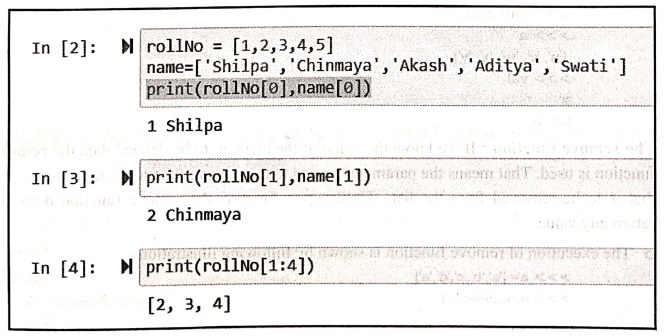
The
above code can be illustrated on IDE as follows ‒
In [2]: rollNo = [1,2,3,4,5]
name=['Shilpa', 'Chinmaya', 'Akash', 'Aditya','Swati']
print (rollNo[0], name[0])
1 Shilpa
In [3]: print(rollNo[1], name[1])
2 Chinmaya
In [4]: print(rollNo
[1:4])
[2, 3, 4]
Using
the in operator we can check whether particular element belongs to the list or
not. If the given element is present in the list it returns true otherwise
false. For example
>>> a = ['AAA', 'XXX', 'CCC']
>>> 'XXX' in a
True
>>> 'BBB' in a
False
iii. Deleting Values in List
•
The deletion of any element from the list is carried out using various
functions like pop, remove, del.
• The pop function: If we know the index of the
element to be deleted then just pass that index as an argument to pop function.
o
For example
>>> a=['u', 'v', 'w','x','y','z']
>>> val=a.pop(1) #the element at index 1 is v, it is deleted
>>> a
['u', 'w', 'x', 'y', 'z']
#list after deletion
>>> val #deleted element is present
in variable val
'v'
>>>
•
If we do not provide any argument to the pop
function then the last element of
the list will be deleted.
。 For example
>>> a =['u', 'v', 'w', 'x','y','z']
>>> val=a.pop()
>>> a
['u', 'v', 'w', 'x', 'y'l
>>> val
'z'
>>>
The remove function:
If we know the value of the element to be deleted then the remove function is used. That means the parameter passed to the
remove function is the actual value that is to be removed from the list.
Unlike, pop function the remove function does not return any value.
o
The execution of remove function is shown by following illustration ‒
>>> a=['a','b','c','d','e']
>>> a.remove('c')
>>> a
['a', 'b', 'd', 'e']
>>>
•
The del function: In python, it is
possible to remove more than one element at a time using del function.
o
For example
>>> a=['a','b','c','d','e']
>>> del a[2:4]
>>> a
['a', 'b', 'e']
>>>
iv. Updating List
•
Lists are mutable. That means it is
possible to change the values of list.
•
If the bracket operator is present on the left hand side, then that element is
identified and the list element is modified accordingly.
•
For example
>>> a=['AAA', 'BBB','CCC']
>>> a[1]='XXX'
>>> a
['AAA', 'XXX', 'CCC']
>>>
•
Using the in operator we can check whether particular element belongs to the
list or not. If the given element is present in the list it returns true
otherwise false.
•
For example
a = ['AAA', 'XXX', 'CCC']
>>> 'XXX' in a
True
>>> 'BBB' in a
False
>>>
2. Use for and while Loops along with Useful Built‒In Functions to Iterate over and Manipulate Lists
1) Traversing a List
The
loop is used in list for traversing purpose. The for loop is used to traverse the list elements.
Syntax
for VARIABLE in LIST:
BODY
Example
>>> a=['a','b','c', 'd','e'] # List a is created
>>> for i in a:
print(i)
will result into
a
b
C
d
e
>>>
There
are some useful functions using which the we can traverse the list. These are
discussed below ‒
i) Using the range() function
Using
range() function we can access each
element of the list using index of a list.
If
we want to increment each element of the list by one, then we must pass index
as argument to for loop. This can be done using range() function as follows ‒
>>> a=[10,20,30,40]
>>> for i in range(len(a)):
a[i]=a[i]+1 #incremented each number by one
>>> a
[11, 21, 31, 41]
>>>
(ii) Using enumerate() function
Using
enumerate() function we can print
both index and item of the list.
Example:1
Write a
program to iterate through list using enumerate() function.
Solution:
myList =[10,20,30]
for item in enumerate(myList):
print(item)
Output
(0, 10)
(1,20)
(2, 30)
2) Concatenation using +
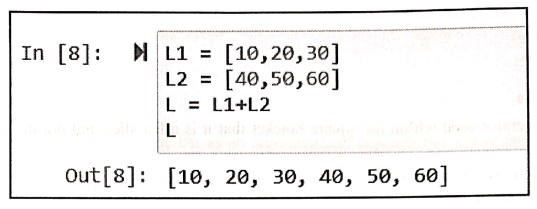
The
two lists can be created and can be joined using + operator. Following
screenshot illustrates it
In [8]:
L1 = [10,20,30]
L2 = [40,50,60]
L = L1+L2
L
Out[8]:
[10, 20, 30, 40, 50, 60]
3) Repetition using
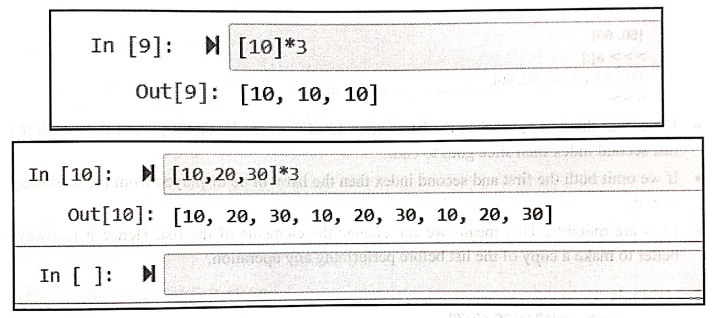
The
* is used to repeat the list for number of times. Following screenshot
illustrates it.
In [9]: [10]*3
Out[9]: [10, 10, 10]
In [10]:
[10,20,30]*3
Out[10]: [10, 20, 30, 10, 20, 30, 10, 20, 30]
In [ ]:
4) Finding length of a list
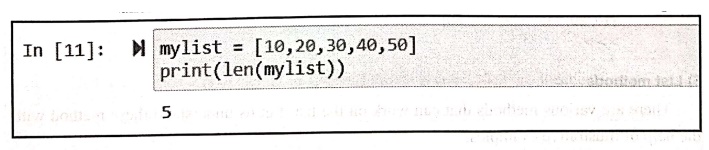
The
len() function is used to find the
number of elements present in the list. For example
In [11]:
mylist = [10, 20, 30, 40, 50]
print(len(mylist))
5
5) Membership
•
Using the in operator we can check whether particular element belongs to the
list or not. If the given element is present in the list it returns true
otherwise false.
•
For example
>>> a = ['AAA', 'XXX', 'CCC']
>>> 'XXX' in a
True
>>> 'BBB' in a
False
>>>
6) List slices
•
The operator used within the square bracket that it is a list slice and not the
index of the list.
>>> a=[10,20,30,40,50,60]
>>> a[1:4]
[20, 30, 40]
>>> a[:5]
[10, 20, 30, 40, 50]
>>> a[4:]
[50, 60]
>>> a[:]
[10, 20, 30, 40, 50, 60]
>>>
•
If we omit the first index then the list is considered from the beginning. And
if we omit the last second index then slice goes to end.
If
we omit both the first and second index then the list will be displayed from the
beginning to end.
Lists
are mutable. That means we can change the elements of the list. Hence it is
always better to make a copy of the list before performing any operation.
For
example
>>> a=[10,20,30,40,50]
>> a[2:4]=[111,222,333]
>> a
[10, 20, 111, 222, 333, 50] >>>
6) List methods
There
are various methods that can work on the list. Let us understand these method
with the help of illustrative examples.
i) append
The
append method adds the element at the end of the list. For example
>>> a=[10,20,30]
>>> a.append(40) #adding element 40 at the end
>>> a
[10, 20, 30, 40]
>>> b=['A','B','C']
>>>b.append('D') #adding
element D at the end
>>> b
['A', 'B', 'C', 'D']
>>>
ii) extend
The
extend function takes the list as an argument and appends this list at the end
of old list. For example
>>> a=[10,20,30]
>>> b=['a','b','c']
>>> a.extend(b)
>>> a
[10, 20, 30, 'a', 'b', 'c']
>>>
iii) sort
The
sort method arranges the elements in increasing order. For example
>>> a=['x','z','u', 'v','y','w']
>>> a.sort()
>>> a
['u', 'v', 'w', 'x', 'y', 'z']
>>>
The
methods append, extend and sort does not return any value. These methods simply
modify the list. These are void methods.
3. Built In List Functions
There
are various built in functions in python for supporting the list operations.
Following table shows these functions:
Function ‒ Purpose
all() ‒ If all the elements of the list are true or
if the list is empty then this function returns true.
any() ‒ If the
list contains any element true or if the list is empty then this function
returns true.
len() ‒ This function returns the length of the
string.
max() ‒ This function returns maximum element present
in the list.
min() ‒ This function returns minimum element present
in the list.
sum() ‒ This function returns the sum of all the
elements in the list.
sorted() ‒ This
function returns a list which is sorted one.
Following
screenshot illustrates the use of some built‒in functions of list
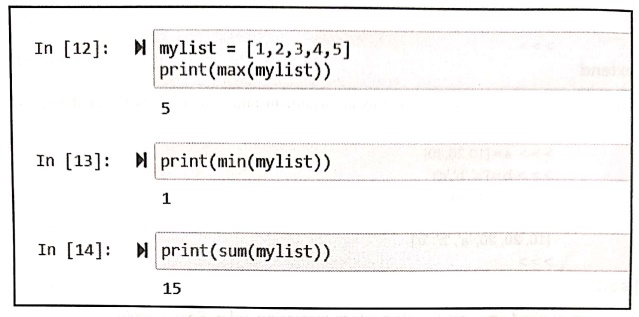
In [12]:
mylist [1,2,3,4,5]
print(max(mylist))
5
In [13]:
print(min(mylist))
1
In [14]:
print(sum(mylist))
15
Functions related to strings
1) List function
•
String is a sequence of characters and list is sequence of values.
•
But list of characters is not the string.
•
We can convert the string to list of characters.
For example ‒
>>> str='hello'
anivo:>>> myList=list(str)
>>> print(myList)
['h', 'e', '1', '1', 'o']
>>>
•
Note that we have used list function
to split the characters of the string which ultimately forms the list. The list is a built in function.
2) Split function
•
If the string contains multiple words then we need to use the built in function
split to split the words into the list.
For example
>>> msg="I love Python Programming very much"
>>> myList=msg.split()
>>> print(myList)
['I', 'love', 'Python', 'Programming', 'very', 'much']
>>>
•
We can pass argument to the split
function as some delimiter. For instance: If we have following string.
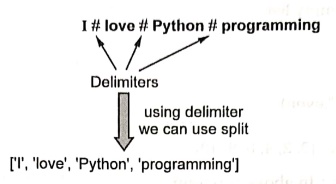
For example ‒
>>> msg="I#love#Python#programming"
>>> myList=msg.split('#')
>>> print(myList)
['I', 'love', 'Python', 'programming']
>>>
3) Join function
•
The join function is exactly reverse
to the split function. That means
the join function takes the list of
strings and concatenate to form a string.
•
The join is basically a string
method.
•
The use of join method is as shown
below ‒
>>> msg=['I', 'love', 'Python', 'programming']
>>> ch='#'
>>> ch.join(msg)
'I#love#Python#programming'
>>>
Note
that the string is joined, used the delimiting character #
List
comprehensions
•
List comprehension is an elegant way to create and define new lists using
existing lists.
•
This is mainly useful to make new list where each element is obtained by applying some operations to each member
of another sequence.
Syntax
List=[expression for
item in the list]
Example:2
Write a
python program to create a list of even numbers from 0 to 10.
Solution :
even = [] #creating empty list
for i in range(11):
if i%2= = 0:
even.append(i)
print("Even Numbers List: ",even)
even = [] #creating
empty list
for i in range(11):
if i%2= = 0:
even.append(i)
print("Even Numbers List: ",even)
Output
Even Numbers List: [0,
2, 4, 6, 8, 10]
Program explanation:
In above program,
1)
We have created an empty list first.
2)
Then using the range of numbers from 0 to 11 we append the empty list with even
numbers. The even number is test using the if condition. i.e. if I %2==0. If so
then that even number is appended in the list.
3)
Finally the comprehended list will be displayed using print statement.
Example:3
Write a
python program to combine and print two lists using list comprehension.
Solution :
print([(x,y)for x in['a','b'] for y in ['b','d'] if x!=y])
Output
[('a', 'b'), ('a',
'd'), ('b', 'd')]
Example:4
To accept
N numbers from user. Compute and display maximum in list, minimum in list, sum
and average of numbers.
Solution :
mylist = [] # start an empty list
print("Enter the value of N: ")
N = int(input()) # read number of element in the list
for i in range(N):
print("Enter the
element: ")
new_element =
int(input()) # read next element
mylist.append(new_element)
# add it to the list
print("The list is: ")
print(mylist)
print("The maximum element from list is: ")
max_element=mylist[0]
for i in range(N): #iterating throu list
if(mylist[i]>max_element):
max_element=mylist
[i] #finding the maximum element
print(max_element)#printing the maximum element
print("The minimum element from list is: ")
min_element=mylist[0]
for i in range(N): #iterating throu list
if(mylist[i]<min_element):
min_element=mylist
[i] #finding the minimum element
print(min_element)#printing the minimum element
print("The sum of all the numbers in the list is: ")
sum=0
for i in range(N): #iterating throu list
sum sum+mylist[i] #
finding the sum
print(sum)
avg=sum/N # computing the average
print("The Average of all the numbers in the list is:
",avg)
Output
Enter the value of N:
5
Enter the element:
33
Enter the element:
22
Enter the element:
55
Enter the element:
11
Enter the element:
44
The list is:
[33, 22, 55, 11, 44]
The maximum element
from list is:
55
The minimum element
from list is:
11
The sum of all the
numbers in the list is:
165
The Average of all the
numbers in the list is: 33.0
>>>
Review Questions
1.What is list?
Explain how to access the list elements.
2.Write a python program
to delete and update list elements.
Python for Data Science: Chapter 1: Basics of Python : Tag: Computer Programming, Python, Data Science : - Python: Lists
Python for Data Science: Chapter 1: Basics of Python
Under Subject

Python for Data Science
AD25201 2nd Semester AIDS Dept | 2025 Regulation | 2nd Semester 2025 Regulation
Related Subjects

English Essentials II
EN25C02 2nd Semester | 2025 Regulation | 2nd Semester 2025 Regulation

Tamils and Technology தமிழர்களும் தொழில்நுட்பமும்
UC25H02 2nd Semester | 2025 Regulation | 2nd Semester 2025 Regulation

Linear Algebra
MA25C02 2nd Semester | 2025 Regulation

Applied Physics (CSIE) II
PH25C03 2nd Semester AIDS, CSE, IT, CSE(CY) Dept | 2025 Regulation | 2nd Semester 2025 Regulation

Digital Principles and Computer Organization
CS25C06 2nd Semester AIDS, CSE, IT, CSE(CY) Dept | 2025 Regulation | 2nd Semester 2025 Regulation

Basic Electrical and Electronics Engineering
EE25C01 2nd Semester | 2025 Regulation | 2nd Semester 2025 Regulation
Python for Data Science
AD25201 2nd Semester AIDS Dept | 2025 Regulation | 2nd Semester 2025 Regulation

Re-Engineering for Innovation
ME25C05 2nd Semester | 2025 Regulation | 2nd Semester 2025 Regulation

Python for Data Science - Laboratory
AD25201 2nd Semester AIDS Dept | 2025 Regulation | 2nd Semester 2025 Regulation