Python for Data Science: Chapter 1: Basics of Python
Python: Operators
1. Arithmetic Operators 2. Comparison Operators 3. Logical Operators 4. Bitwise Operators 5. Assignment Operator 6. Membership Operator 7. Identity Operator 8. Modulus Operator 9. String Operators
Operators
•
Operands are special symbols that are
used in computations. For example +,‒,* and / are used for performing
arithmetic operations.
•
The values that the operator uses for
performing computation are called operands.
•
Various operators used in python are
described as follows.
1. Arithmetic Operators
2. Comparison Operators
3. Logical Operators
4. Bitwise Operators
5. Assignment Operator
6. Membership Operator
7. Identity Operator
8. Modulus Operator
9. String Operators
1. Arithmetic Operators
These
operators are used for performing arithmetic operations.
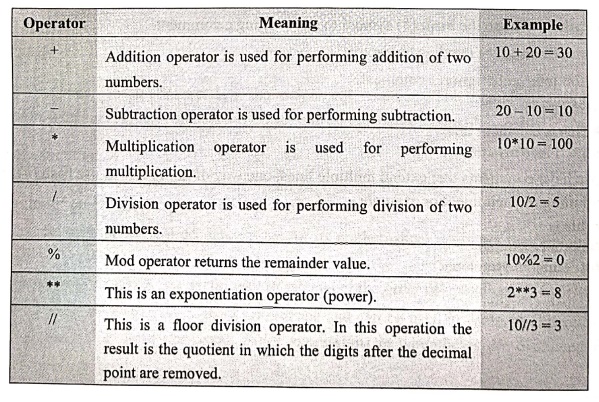
For example
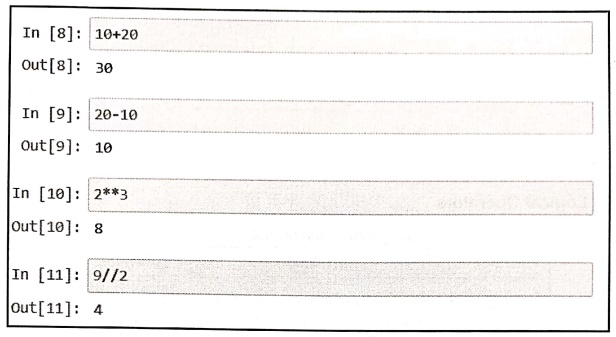
In [8]: 10+20
Out [8]: 30
In [9]: 20‒10
Out [9]: 10
In [10]: 2**3
Out[10]: 8
In [11]: 9//2
Out[11]: 4
2. Comparison Operators
The
operators compare the values and establish the relationship among them.
Operators
==
: If two values are equal then the condition becomes true.
!=
: If two operands are not equal then the
condition becomes true.
<>
: This is similar to !=. That means if two values are not equal then it returns
true.
<
: This is less than operator. If left operand is less than the right operator
then the return value is true.
>
: This is greater than operator. If left operand is greater than the right
operator then the return value is true.
<= : This is less than
equal to operator. If left operand is less than the right operator or equal to
the right operator then the return value is true.
>=
: This is greater than equal to operator. If left operand is less than the
right operator or equal to the right operator then the return value is true.
For
example ‒
In
[1]: 10<20
True
In
[2]: 10<=10
True
In
[3]: 20>10
True
In
[4]: 20>=10
True
3. Logical Operators
There
are three types of logical operators and or, not.
Operators
and: If both the operands are true then the entire expression is true. Example: a and b
or: If either the first or second operand is true. Example: a or b
not: If the operand is false then the entire expression is true. Example: not a
For
example
In
[1]: a=True
b=False
a
and b
False
In
[2]: a or b
True
In
[3]: not a
False
4. Bitwise Operators
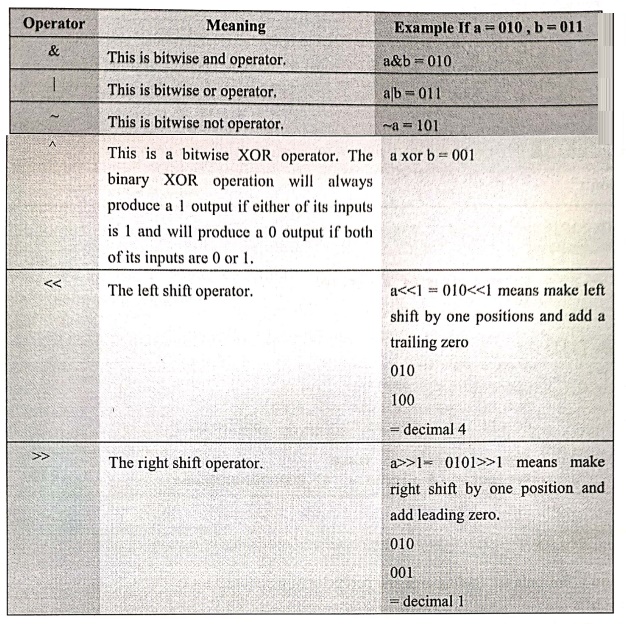
Bitwise
operators work on the bits of the given value. These bits are binary numbers
i.e. 0
or1.
For
example: The number 2 is 010, 3 is 011.
5. Assignment Operator
The
assignment operator is used to assign the values to variables. Following is a
list of assignment operators.
Operators ‒ Example and
meaning
=
:
This is an operator using which values is assigned to a variable.a = 5
+=
:
a+ 5 means a = a+5
‒=
:
a‒ = 5 means a = a‒5
Similarly
*=, /= operators are used for performing arithmetic multiplication and division
operation.
Example:1
Write a
program in python to print area and perimeter of a circle.
Solution :
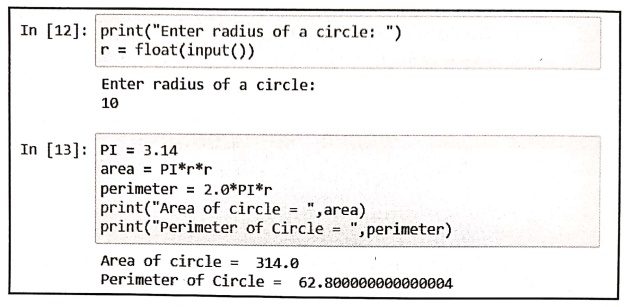
In [12]: print("Enter radius of a circle: ")
r = float(input())
Enter radius of a circle:
10
In [13]: PI = 3.14
area PI* r *r
perimeter = 2.0*PI*r
print("Area of circle = ", area)
print("Perimeter of Circle = ",perimeter)
Area of circle = 314.0
Perimeter of Circle = 62.800000000000004
Example:2
Write a
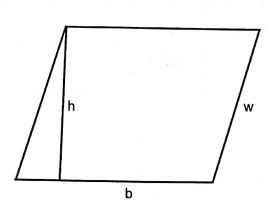
program to find area and perimeter of parallelogram.
Solution:
Formula
for finding area and perimeter of parallelogram is
Area=
b*h
Perimeter
= 2*b+2*w
We
can write the python program using above formula
areaDemo1.py
print("Enter height(h): ")
h=float(input())
print("Enter base(b): ")
b=float(input())
print("Enter width(w): ")
w=float(input())
area= b*h
perimeter= (2.0*b)+(2.0*w)
print("Area of Parallelogram = ",area);
print("Perimeter Parallelogram = ",perimeter)
Output
Enter height (h):
10
Enter base(b):
20
Enter width(w):
15
Area of Parallelogram
= 200.0
Perimeter
Parallelogram = 70.0
Example:3
Write a
program to convert fahrenheit to celsius.
Solution:
We
will use the following formula for conversion
Celsius
= (Fahrenheit ‒ 32)/1.8
Temp.py
print("Enter Fahrenheit")
f=float(input())
c= (f‒32)/1.8
print("Celsius = ",c)
Output
Enter Fahrenheit
95.5
Celsius = 35.2777
6. Membership Operator
There
are two types of membership operators ‒ in and not in.
These
operators are used to find out whether a value is a member of a sequence such
as string or list.
Operators
in
‒ It returns true if a sequence with specified value is present in the object.
not
in
‒ It returns true if a sequence with specified value is not present in the
object.
Following
screenshot shows the use of in and non in operators.
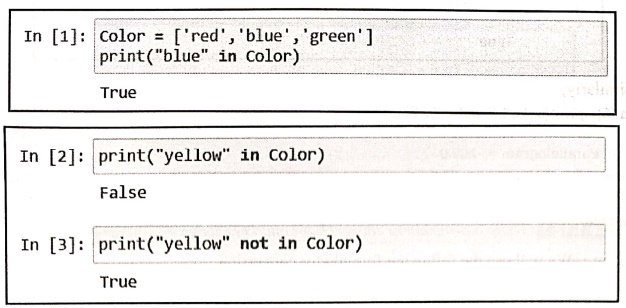
In [1]: Color = ['red', 'blue', 'green']
print("blue" in Color)
True
In [2]: print("yellow" in Color)
False
In [3]: print("yellow" not in Color)
True
Explanation:
1)
In example, we have created a list of colors.
2)
The members of color list are "red","blue" and
"green".
3)
As "blue" is member of color list, it returns true for while testing
with membership operator in operator.
4)
As "yellow" is not a member of color list, it returns false for in
operator and true for not
in
operator.
7. Identity Operator
The
'is' operator returns true if both
the operands point to same memory location. Similarly 'is not' operator returns true if both the operands point to different
memory locations.
In [4]:
color1 = ["red", "blue", "green"]
color2 = ["red", "blue", "green"]
color3 = color1
print(color1 is color2)
False
In [5]:
print(color1 is color3)
True
Similarly,
In
[6]: print(color1 is not color2)
True
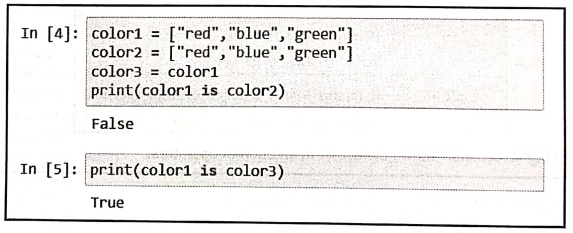
Explanation: In above
demonstration,
1)
We have created two lists color1 and
color2.
2)
Although the contents of the lists are exactly the same, their memory locations
are different. Hence color1 is color2 becomes false,
3)
As color3 is a new variable to which we assign color1, then they point to the
same memory location. Hence color1
is color3 returns true.
8. Modulus Operator
The
% operator is a modulo operator that gives the remainder from the division of
the first argument by the second.
For example ‒
In[1]:
10%3
1
In[2]:
10.10%3.3
0.20000000000000018
The operator // is used
for floor division. This division returns the integral
part of the quotient.
For
example ‒
In[1]:
10//3.5
2.0
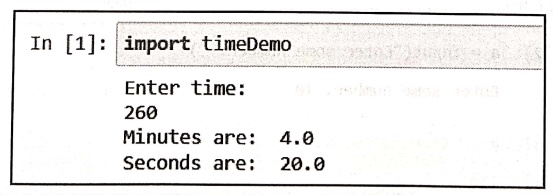
Example:4
Write a
program in python to convert given time into minutes and seconds.
For example ‒ if user inputs 260 seconds then the output should
be 4 minute and 20 seconds.
[Use // and % operators].
Solution :
timeDemo.py
print("Enter
time: ")
time‒float(input())
minutes
= time//60
seconds
time % 60
print("Minutes
are: ",minutes)
print("Seconds
are: ",seconds)
Output
In [1]:
import timeDemo
Enter time:
260
Minutes are: 4.0
Seconds are: 20.0
9. String Operators
String
is a collection of characters.
In
python it is possible to perform the concatenation and repetition operations on
strings using the operators like + and *.
For example ‒
In[1]:
str1="Hello"
str2="friend"
str1+str2
'Hellofriend'
In[2]: "welcome"*2
'welcomewelcome'
Review Questions
1. Appraise the
arithmetic operators in python with an example.
2. State about logical
operators available in python language with example.
3. Summarize the
precedence of mathematical operators in python.
Python for Data Science: Chapter 1: Basics of Python : Tag: Computer Programming, Python, Data Science : - Python: Operators
Python for Data Science: Chapter 1: Basics of Python
Under Subject

Python for Data Science
AD25201 2nd Semester AIDS Dept | 2025 Regulation | 2nd Semester 2025 Regulation
Related Subjects

English Essentials II
EN25C02 2nd Semester | 2025 Regulation | 2nd Semester 2025 Regulation

Tamils and Technology தமிழர்களும் தொழில்நுட்பமும்
UC25H02 2nd Semester | 2025 Regulation | 2nd Semester 2025 Regulation

Linear Algebra
MA25C02 2nd Semester | 2025 Regulation

Applied Physics (CSIE) II
PH25C03 2nd Semester AIDS, CSE, IT, CSE(CY) Dept | 2025 Regulation | 2nd Semester 2025 Regulation

Digital Principles and Computer Organization
CS25C06 2nd Semester AIDS, CSE, IT, CSE(CY) Dept | 2025 Regulation | 2nd Semester 2025 Regulation

Basic Electrical and Electronics Engineering
EE25C01 2nd Semester | 2025 Regulation | 2nd Semester 2025 Regulation
Python for Data Science
AD25201 2nd Semester AIDS Dept | 2025 Regulation | 2nd Semester 2025 Regulation

Re-Engineering for Innovation
ME25C05 2nd Semester | 2025 Regulation | 2nd Semester 2025 Regulation

Python for Data Science - Laboratory
AD25201 2nd Semester AIDS Dept | 2025 Regulation | 2nd Semester 2025 Regulation