Python for Data Science: Chapter 1: Basics of Python
Python: Looping
Mention the different types of iterative structure allowed in python. Explain the use of continue and break statements with an example. 1. while Loop 2. for Loop 3. The break 4. The continue 5. The pass
Looping
•
Looping is a technique that allows to execute a block of statements repeatedly.
•
Definition : Repeated execution of a
set of statements is called loop or iteration.
•
The programming constructs used for iteration are while, for, break, continue
and so on.
•
Let us discuss the iteration techniques with the help of illustrative examples.
1. while Loop
2. for Loop
3. The break
4. The continue
5. The pass
1. while Loop
The
while statement is popularly used
for representing iteration.
Syntax
while test_condition:
body of while
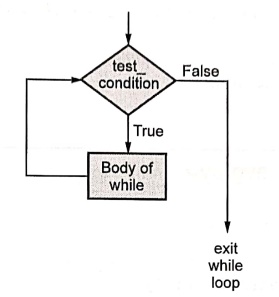
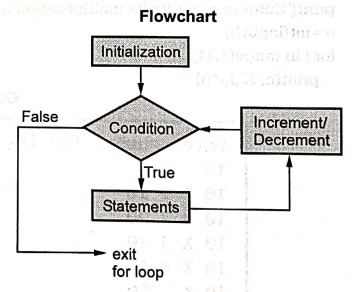
Flowchart
for while statement is as given below
The
flow of execution is specified as follows ‒
1.
Using the condition determine if the given expression is true or false.
2.
If the expression is false then exit the while statement.
3.
If the expression is true then execute the body of the while and go back to
step 1 in which again the condition is checked.
For example
while i<= 10:
i=i+1
The
body of a while contains the statement which will change the value of the
variable used in the test condition. Hence finally after performing a definite
number of iterations, the test condition gets false and the control exits the
while loop.
If
the condition never gets false, then the while body executes for infinite
times. Then in this case, such while loop is called infinite loop.
There
is another version of while statement in which else is used.
Syntax
while test_condition:
body of while
else:
statement
Example
while i<=10:
i=i+1
else:
print("Invalid
value of i")
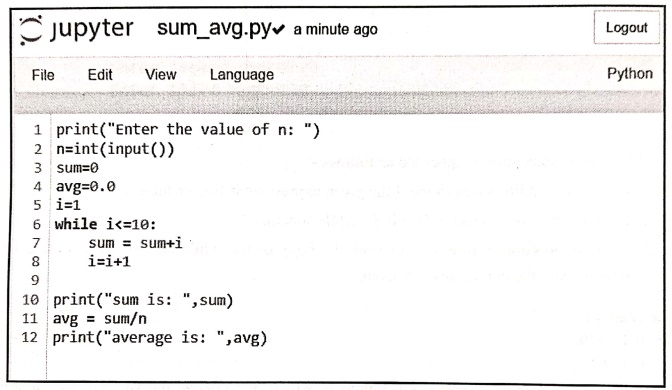
Example:1
Write a
python program for computing the sum of n natural numbers and finding out the
average of it.
Solution:
The
python script is as given
sum_avg.py
Output
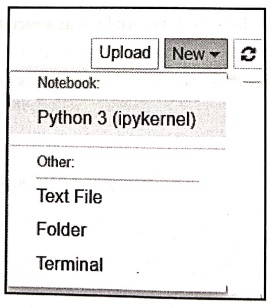
Click
on New‒>Python 3(ipykernel)
inorder to get the prompt window
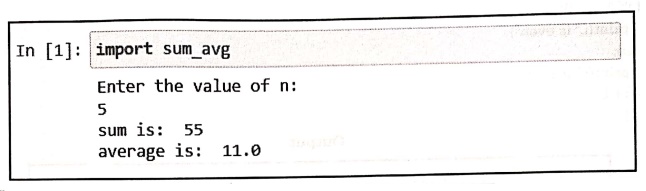
Issue
the import command as follows ‒
In [1]:
import sum_avg
Enter the value of n:
5
sum is: 55
average is: 11.0
Example:2
Write a
python program to display square of n numbers using while loop.
Solution:
print("Enter the value of n")
n int(input())
i=1
print("The sqaure table is as given below...")
while i<=n:
print(i,i+1)
i=i+1
Output
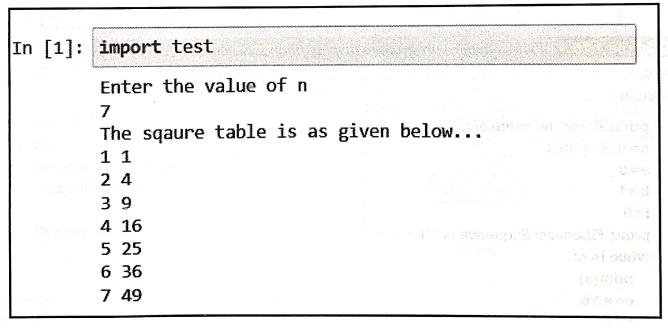
In [1]: import test
Enter the value of n
7
The sqaure table is as
given below...ordered
1 1
2 4
3 9
4 16
5 25
6 36
7 49
Example:3
Write a
python program for displaying even or odd numbers between 1 to n.
Solution :
print("Enter the value of n")
n = int(input())
i=1
j=i
while j<=n:
if i%2== 0:
print(i,"
is even")
else:
print(i," is
odd")
j=j+1
i=j
Output
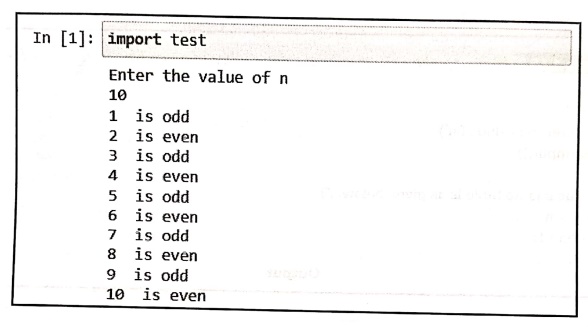
In [1]:
import
test
Enter the value of n
10
1 is odd
2 is even
3 is odd
4 is even
5 is odd
6 is even
7 is odd
8 is even
9 is odd
10 is even
Example:4
Write a
python program to display fibonacci numbers for the sequence of length.
Solution :
print("Enter the value of n")
n=int(input())
a=0
b=1
i=0
print("Fibonacci Sequence is...")
while i<n;
print(a)
c=a+b
a=b
b=c
i=i+1
Output
Enter the value of n
10
Fibonacci Sequence
is...
0
1
1
2
3
5
8
13
21
34
2. for Loop
The
for loop is another popular way of using iteration. The syntax of for loop is ‒
Syntax
for variable in
sequence:
Body of for loop
The
variable takes the value of the item inside the sequence on each iteration.
Loop
continues until we reach the last item in the sequence. The body of for loop is
separated from the rest of the code using indentation.
Example
for
val in numbers:
val=val+1
Similarly,
we can have for loop with
else
statement
Syntax
for variable in
sequence:
Body of for loop
else:
Statement
Example
for i in myList:
print(i)
else:
print("The
number is not present in your list")
Example:5
Write a
python program to find the sum of 1 to 10 numbers.
Solution :
print("Enter the value of n")
n = int(input())
sum = 0
for i in range(1,n+1):
sum = sum+i
print("The sum of ",n,"numbers is ",sum)
Output
Enter the value of n
5
The sum of 5 numbers
is
15
Example:6
Write a
python program to display the multiplication table.
Solution:
print("Enter number for its multiplication table")
n=int(input())
for i in range(1,11):
print(n,"X",i,i*n)
Output
Enter number for its
multiplication table
10
10 X 1 10
10 X 2 20
10 X 3 30
10 X 4 40
10 X 5 50
10 X 6 60
10 X 7 70
10 X 8 80
10 X 9 90
10 X 10 100
Example:7
Write a
program to print 1+1/2+1/3+1/4+......... +1/N series.
Solution :
print("Enter value of N")
n=int(input())
sum=0
for i in range(1,n+1):
sum=sum+1/i
print("The Sum is ",sum)
Output
Enter value of N
5
The Sum is
2.283333333333333
Example:8
Write a
python program to check whether a given number is prime or not.
Solution :
# User can enter the value thru keyboard
print("Enter the number");
num = int(input())
# prime numbers are greater than 1
if num > 1:
# check for factors
for i in range(2,num):
if (num % i) = = 0:
print(num,"is not a prime number")
break
else:
print(num,"is
a prime number")
# if input number is less than
# or equal to 1, it is not prime
else:
print(num,"is
not a prime number")
Output
Enter the number
3
3 is a prime number
Example:9
Write a
python program to find the prime numbers between given intervals.
Solution :
lower = int(input("Enter lower range: "))
upper = int(input("Enter upper range: "))
print("Prime numbers between", lower,
"and",upper, "are:")
for num in range(lower,upper + 1):
prime numbers are greater than 1
if num > 1:
for i in range(2,num):
if (num % i) = = 0:
break
else:
print(num)
Output
Enter lower range: 1
Enter upper range: 10
Prime numbers between
1 and 10 are:
2
3
5
7
Example:10
Write a
python program to display the star pattern as
*
**
***
****
*****
…
…
Users should enter the value of N
Solution :
print("Enter value of n")
n=int(input())
for i in range(0,n):
for j in range(0,i+1):
print('* ',end=""")
print("")
Output
Enter value of n
10
*
* *
* * *
* * * *
* * * * *
* * * * * *
* * * * * * *
* * * * * * * *
* * * * * * * * *
* * * * * * * * * *
Example:11
Write a
python program to display the number pattern as follows
1 2 3 4 5
2 3 4 5
3 4 5
4 5
5
Solution:
for i in range (1,6):
for k in range(1,i):
print(end="")
for j in range(i,6):
print(" ",j,end="")
print();
Output
1 2 3 4 5
2 3 4 5
3 4 5
4 5
5
Example:12
Write a
python program to print the pattern as given below
A
A B
A B C
A B C D
A B C D E
Solution :
for i in range(1, 6):
for j in range(65,
65+i):
a = chr(j)
print(a,"
",end=""")
print()
Output
A
A B
A B C
A B C D
A B C D E
Example:13
Write a
python program to print the pattern for alphabets
A A A A A
B B B B
C C C
D D
E
Solution :
num=65 #ASCII Value for A
for i in range(0,5):
for j in range(i,5):
ch=chr(num+i) # Converting ASCII to character
print(ch," ",end=""")
print();
Output
A A A A A
B B B B
C C C
D D
E
3. The break
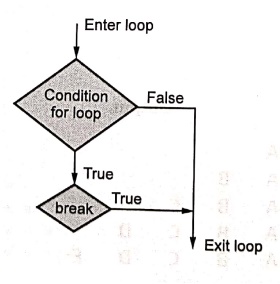
The
break statement is used to transfer the control to the end of the loop.
When
break statement is applied then loop gets terminates and the control goes to
the next line pointing after loop body.
Syntax
break
Flowchart
For example
for i in range(1,11):
if i==5:
print("Element
{} Found!!!".format(i))
break
print(i)
Output
1
2
3
4
Element 5 Found!!!
4. The continue
The
continue statement is used to skip some statements inside the loop. The
continue statement is used with decision making statements such as if...else.
The
continue statement forces to execute the next iteration of the loop to execute.
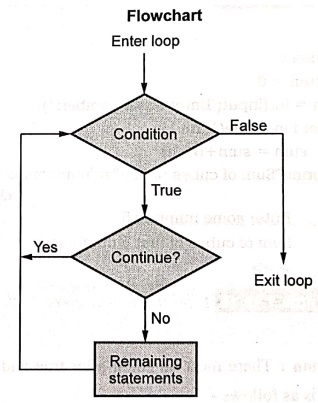
Flowchart
Syntax
continue
Example
In while loop the continue passes the program control to conditional test.Following example illustrates the idea of Condition
i=0
while i<10:
i=i+1
if i%2==0:
continue
print(i)
Output
1
3
5
7
9
5. The pass
The pass statement is used when we do not
want to execute any statement. Thus the desired statements can be bypassed.
Syntax
Pass
Example
for i in range(1,5):
if i==3:
pass
print("Reached
at pass statement")
print("The current number is ",i)
Output
The current number is
1
The current number is
2
Reached at pass
statement
The current number is
3
The current number is
4
Example:14
Write a
python program to print sum of cubes of the values of n variables.
Solution :
sum = 0
n = int(input("Enter some number: "))
for i in range(1, n+1):
sum = sum+(i*i*i)
print("Sum of cubes of first",n,"numbers is = ",sum)
Output
Enter some number: 5
Sum of cubes of first
5 numbers is = 225
>>>
Example:15
Find the
syntax error in the code given: while True print('Hello world').
Solution:
There
must be colon after true and the print
statement must be indented. The correct code is as follows ‒
while True:
print('Hello world')
Review Question
1. Mention the
different types of iterative structure allowed in python. Explain the use of
continue and break statements with an example.
Python for Data Science: Chapter 1: Basics of Python : Tag: Computer Programming, Python, Data Science : - Python: Looping
Python for Data Science: Chapter 1: Basics of Python
Under Subject

Python for Data Science
AD25201 2nd Semester AIDS Dept | 2025 Regulation | 2nd Semester 2025 Regulation
Related Subjects

English Essentials II
EN25C02 2nd Semester | 2025 Regulation | 2nd Semester 2025 Regulation

Tamils and Technology தமிழர்களும் தொழில்நுட்பமும்
UC25H02 2nd Semester | 2025 Regulation | 2nd Semester 2025 Regulation

Linear Algebra
MA25C02 2nd Semester | 2025 Regulation

Applied Physics (CSIE) II
PH25C03 2nd Semester AIDS, CSE, IT, CSE(CY) Dept | 2025 Regulation | 2nd Semester 2025 Regulation

Digital Principles and Computer Organization
CS25C06 2nd Semester AIDS, CSE, IT, CSE(CY) Dept | 2025 Regulation | 2nd Semester 2025 Regulation

Basic Electrical and Electronics Engineering
EE25C01 2nd Semester | 2025 Regulation | 2nd Semester 2025 Regulation
Python for Data Science
AD25201 2nd Semester AIDS Dept | 2025 Regulation | 2nd Semester 2025 Regulation

Re-Engineering for Innovation
ME25C05 2nd Semester | 2025 Regulation | 2nd Semester 2025 Regulation

Python for Data Science - Laboratory
AD25201 2nd Semester AIDS Dept | 2025 Regulation | 2nd Semester 2025 Regulation