Python for Data Science: Chapter 1: Basics of Python
Python: Set
1. Introduction to Sets: Accessing Values in Set, Deleting Values in Set, Updating Values in Set 2. Basic Set Operations 3. Built in Set Function
Set
1. Introduction to Sets
Sets
are data structures that, based on specific rules they define. The specific
rules that are followed by sets are ‒
1)
Items in a set are unique. We can
not have a set that contains two items that are equal.
2)
Items in a set are not ordered.
Depending on the implementation, items may be sorted
using
the hash of the value stored, but when you use sets you need to assume items
are ordered in a random manner.
How to create a set ?
The
set can be created using set function. For example ‒
>>>color=set(['red', 'green','blue'])
1. Accessing Values in Set
We
cannot access the values in set using index as the set is unordered and has no index. We can display the
contents of set using following python code
>>> A={10,20,30,40}
>>> print(A)
{40, 10, 20, 30}
It
is also possible to iterate through each item of a set using for loop. The code
is as follows
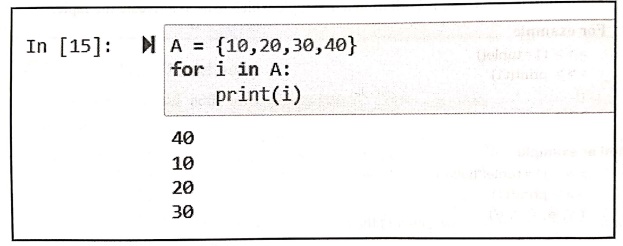
In [15]:
A = {10,20,30,40}
for i in A:
print(i)
40
10
20
30
2. Deleting Values in Set
For
removing the item from the set either remove or discard method is used. The
remove() method is illustrated below‒
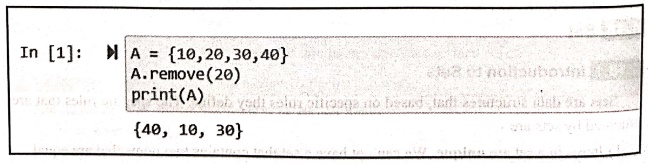
In [1]:
A = {10,20,30,40}
A.remove(20)
print (A)
{40, 10, 30}
Similarly
we can use discard method to remove an element from the set.
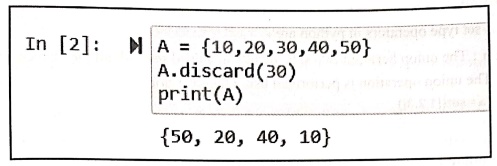
In [2]:
A = {10, 20, 30, 40,50}
A.discard(30)
print (A)
{50, 20, 40, 10}
The
del keyword is used to delete the
set completely. The illustration of this function is as follows ‒
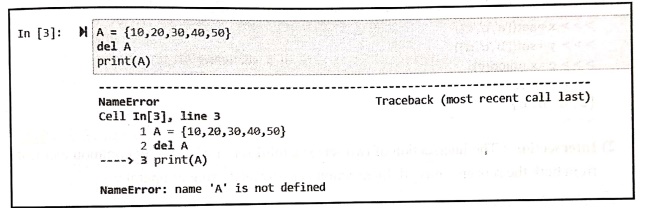
In [3]:
A = {10,20,30,40,50}
del A
print(A)
‒‒‒‒‒‒‒‒‒‒‒‒‒‒‒‒‒‒‒‒‒‒‒‒‒‒‒‒‒‒‒‒‒‒‒‒‒‒‒‒‒‒‒‒‒‒‒‒‒‒‒‒‒‒‒‒‒‒‒‒‒‒‒‒‒‒‒‒‒‒‒‒‒‒‒‒‒‒‒‒‒‒‒‒‒‒‒‒‒‒‒‒
Traceback (most recent call
last)
NameError
Cell In[3], line 3
1
A{10,20,30,40,50}
2 del A
‒‒‒‒> 3 print(A)
NameError: name 'A' is not defined
3. Updating Values in Set
Once
the set is created, we cannot change the values in the set. But we can add the
element to the set.
•
Using the add() method we can add
the element to the set.
>>> A={10,20,30,40}
>>> A.add(25)
>>> print(A)
{40, 10, 20, 25, 30}
>>>
•
Using the update() method more than
one elements can be added to the set.
>>> A={10,20,30,40}
>>> A.update([25,35,45])
>>> print(A)
{35, 40, 10, 45, 20, 25, 30}
>>>
2. Basic Set Operations
Various
set type operators in python are ‒
1) Union:
The union between two sets, results in a third set with all the elements from
both
sets.
The union operation is performed using the operator |.
>>> a=set([1,2,3])
>>> b=set([2,3,4])
>>> c=a|b
>>> print(c) {1, 2, 3, 4}
>>>
There
exists a method named union for union
of two sets. For example ‒
>>> x=set(['a','b','c'])
>>> y=set(['b','c','d'])
>>> c=x.union(y)
>>> print(c)
{'a', 'd', 'b', 'c'}
>>>
2)
Intersection: The intersection of two sets is a third
set in which only common elements
from
both the sets are enlisted. Intersection is performed using & operator.
For
example ‒
>>> a=set([10,20,30])
>>> b=set([20,30,40])
>>> c=a&b
>>> print(c)
{20, 30}
There
exists a method named intersection
for intersection of two sets for example
>>> a=set([10,20,30])
>>> b=set([20,30,40])
>>> c=a.intersection(b)
>>> print(c)
{20, 30}
3)
Difference:
Difference
of A and B i.e. (A ‒ B) is a set of elements that are only in A but not in B.
Similarly, B ‒ A is a set of element in B but not in A. The operator ‒ is used
for difference. Similarly the method named difference
is also used for specifying the difference. For example ‒
>>> a=set([10,20,30,40,50])
>>> b=set([40,50,60,70,80])
>>> c‒a‒b
>>> print(c)
{10, 20, 30}
>>>a.difference(b)
{10, 20, 30}
>>>
4)
Symmetric difference: Symmetric difference of A and B is a
set of elements in both A
and
B except those that are common in both.
Symmetric
difference is performed using ^ operator. Same can be accomplished using the
method symmetric_difference(). For
example ‒
>>> a=set([10,20,30,40,50])
>>> b=set([40,50,60,70,80])
>>> c=a^b
>>> print(c)
{80, 20, 70, 10, 60, 30)← Note that 40 and 50
are the common elements which are not present in set c.
>>>a.symmetric_difference(b)
{80, 20, 70, 10, 60, 30}
>>>
3. Built in Set Function
Various
built in set functions are enlisted in the following table.
Function : Purpose
all()
: This function return True if all elements of the set are true. This function
also returns a true value is the set is empty.
any()
: This function return True if any element of the set is true. If the set is
empty, return False.
enumerate()
: This function return an enumerate object. It contains the index and value of
all the items of set as a pair.
len()
: This function return the length of the set. That means it returns number of
elements present in the set.
max()
: This function returns the maximum value present in the set.
min()
: This function returns the minimum value present in the set.
sorted()
: This function returns a new sorted list from the elements.
sum()
: This function returns the sum of all elements in the set.
The
illustration of above functions in represented by following screenshot ‒
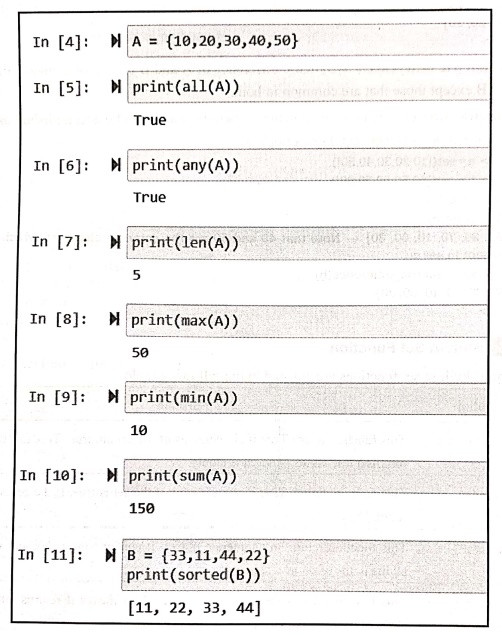
In [4]:
A = {10,20,30,40,50)
In [5]: print(all (A))
True
In [6]:
print(any (A)).
True
In [7]: print(len(A))
5
In [8]: print(max(A))
50
In [9]:
print (min(A))
10
In [10]: print(sum(A))
150
In [11]:
B = {33,11,44,22}
print (sorted (B))
[11, 22, 33, 44]
Python for Data Science: Chapter 1: Basics of Python : Tag: Computer Programming, Python, Data Science : - Python: Set
Python for Data Science: Chapter 1: Basics of Python
Under Subject

Python for Data Science
AD25201 2nd Semester AIDS Dept | 2025 Regulation | 2nd Semester 2025 Regulation
Related Subjects

English Essentials II
EN25C02 2nd Semester | 2025 Regulation | 2nd Semester 2025 Regulation

Tamils and Technology தமிழர்களும் தொழில்நுட்பமும்
UC25H02 2nd Semester | 2025 Regulation | 2nd Semester 2025 Regulation

Linear Algebra
MA25C02 2nd Semester | 2025 Regulation

Applied Physics (CSIE) II
PH25C03 2nd Semester AIDS, CSE, IT, CSE(CY) Dept | 2025 Regulation | 2nd Semester 2025 Regulation

Digital Principles and Computer Organization
CS25C06 2nd Semester AIDS, CSE, IT, CSE(CY) Dept | 2025 Regulation | 2nd Semester 2025 Regulation

Basic Electrical and Electronics Engineering
EE25C01 2nd Semester | 2025 Regulation | 2nd Semester 2025 Regulation
Python for Data Science
AD25201 2nd Semester AIDS Dept | 2025 Regulation | 2nd Semester 2025 Regulation

Re-Engineering for Innovation
ME25C05 2nd Semester | 2025 Regulation | 2nd Semester 2025 Regulation

Python for Data Science - Laboratory
AD25201 2nd Semester AIDS Dept | 2025 Regulation | 2nd Semester 2025 Regulation