English Essentials II: Unit III: Academic Writing
User Guides or Manuals
A user guide is a technical document which takes the buyer to install and use the product through a step-by-step approach.
USER GUIDES/MANUALS
A
user guide is a technical document which takes the buyer to install and use the
product through a step-by-step approach.
User
guides may include the following details and information:
• Product introduction:
Gives users an overview of what users can expect from a guide, like what the
product is intended for or a summary of topics covered in the guide.
• Installation and set
up:
Provides a quick reference guide with step-by-step instructions guiding users
through getting a product ready for use, integrating with other products, etc.
• Product features and
use cases: Explains the product's capabilities and how they
can be maximized across different groups of users.
• How to operate the
product: Describes using a product's core features or
advanced capabilities. Unlike the installation and set-up instructions, this
section aims to familiarise users with the product and educate them on
day-to-day operations.
• Troubleshooting tips:
Teaches users how to solve everyday challenges or errors that may arise during
setup, installation, or regular use.
• Frequently asked
questions (FAQs): FAQ pages cover all common questions
that a user may run into when familiarizing themselves with the product.
• Glossary:
Lists down all jargon or technical terms mentioned in the guide that users may
not know or understand immediately.
User
guides have an obvious purpose of filling knowledge gaps and providing a
comprehensive overview of a product.
To
create an effective user manual, the following points have to be kept in mind.
✔ Use simple clear
language.
✔ Use a mix of
images/videos
✔ Use search engines by
googling
✔ Provide in-app guidance
✔ Create guides for
different types of users
✔ Ask for User feedback
Example:
Prepare
a personal user manual
•
A personal user manual outlines an individual's work style, preferences,
strengths, and communication habits.
•
It helps to highlight ones' leadership quality and working style.
•
Makes onboard notification easier
•
Helps to understand team members and choose as per their proficiency and the
user's requirement.
•
Helps to increase productivity and less time consuming,
Create a personal user
manual using the template given below:
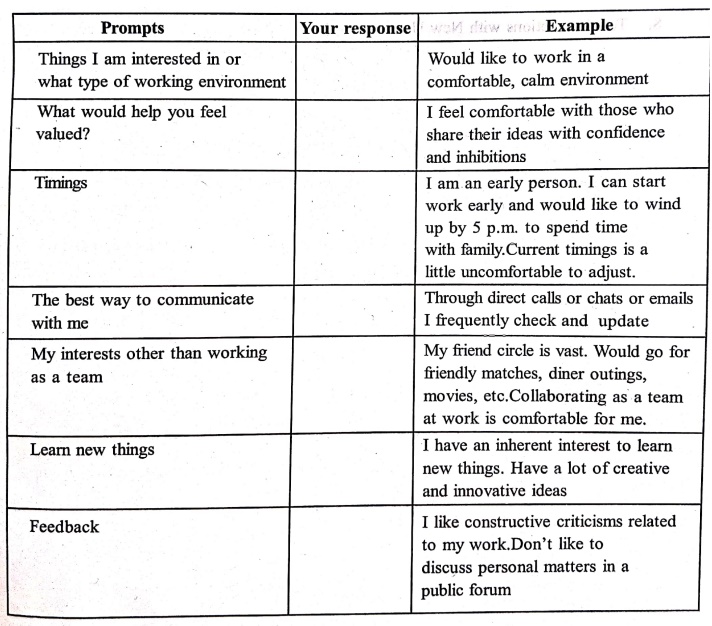
How to Create a User Manual for a product
1.
Identify the Users. ...
2.
Focus on the Problem.
3.
Use Sequential Steps....
4.
Map the User Journey….
5.
Choose a Template…
6.
Write Simple, Easy-to-Follow Content.
7.
Treat All Users as Laymen....
8.
Test Instructions with New Users.
EXAMPLE:
Read the following from the user manual and do the task given below:
To
save power and achieve longer battery life
•
Features like Bluetooth and Wi-Fi consume more power, please disable these
features when you phone is not in use.
•
The brighter the screen is set, more energy will be consumed; you can dim the
screen brightness and shorten the sleep time in the settings.
•
Make sure only using outlets with the correct voltages (as labelled on the
adapter) for charging. Using the sockets with incorrect voltage can damage your
phone and/or battery and lead to injury.
•
Do not use unsafe plugs or outlets.
•
Do not use a short-circuit charger.
•
Do not disassemble or modify the charger, as this may lead to personal injury,
electric shock or fire.
•
Do not use the charger in humid environment.
•
Do not touch the charger, cable or power socket with wet hands, as this may
cause electric shock.
•
Do not place heavy objects on the power cord or attempt to modify any cables.
•
Make sure to grasp the charger firmly while unplugging it. Do not pull the
power cord as this may lead to damage and cause electric shock or fire.
•
Before cleaning the device, unplug the power plug from the socket.
•
Do not charge the battery under the following conditions: in direct sunlight,
in temperatures below 5°C or above 40°C; in the environment with humidity, dust
or strong vibrations; in areas near a TV, radio or other electrical appliances.
•
The maximum ambient charging temperature of the equipment declared by
manufacturer is 25°C.
•
The charger is intended for indoor use only.
(https://s3.amazonaws.com/oneplussupport/user-manual/OnePlus
5 User Manual.pdf)
TASK
Note
how the manual gives instructions in a simple and a clear language. Write at
least five instructions for keeping your mobile phone in a good condition. Use
imperative form.
Exercise:
1.
Prepare an instruction manual for a newly launched car accessory. Give the
Standard Operating Procedures and troubleshooting techniques.
2.
Prepare an instruction manual for the initial setup of your iphone.
English Essentials II: Unit III: Academic Writing : Tag: English : - User Guides or Manuals
English Essentials II: Unit III: Academic Writing
Under Subject

English Essentials II
EN25C02 2nd Semester | 2025 Regulation | 2nd Semester 2025 Regulation
Related Subjects
English Essentials II
EN25C02 2nd Semester | 2025 Regulation | 2nd Semester 2025 Regulation

Tamils and Technology தமிழர்களும் தொழில்நுட்பமும்
UC25H02 2nd Semester | 2025 Regulation | 2nd Semester 2025 Regulation

Linear Algebra
MA25C02 2nd Semester | 2025 Regulation
Transforms and its Applications
MA25C03 2nd Semester EEE Dept | 2025 Regulation | 2nd Semester 2025 Regulation

Applied Physics (CE) II
PH25C02 2nd Semester Civil, Agri Depts | 2025 Regulation | 2nd Semester 2025 Regulation

Applied Physics (CSIE) II
PH25C03 2nd Semester AIDS, CSE, IT, CSE(CY) Dept | 2025 Regulation | 2nd Semester 2025 Regulation
Applied Physics (EE) II
PH25C04 2nd Semester EEE Dept | 2025 Regulation | 2nd Semester 2025 Regulation

Applied Physics (ME) II
PH25C05 2nd Semester Mechanical Dept | 2025 Regulation | 2nd Semester 2025 Regulation
Applied Chemistry (CE) II
CY25C02 2nd Semester Civil Dept | 2025 Regulation | 2nd Semester 2025 Regulation

Applied Chemistry (ME) II
CY25C03 2nd Semester Mechanical Dept | 2025 Regulation | 2nd Semester 2025 Regulation

Electron Devices
EC25C01 2nd Semester ECE Dept | 2025 Regulation | 2nd Semester 2025 Regulation

Digital Principles and Computer Organization
CS25C06 2nd Semester AIDS, CSE, IT, CSE(CY) Dept | 2025 Regulation | 2nd Semester 2025 Regulation

Basic Electrical and Electronics Engineering
EE25C01 2nd Semester | 2025 Regulation | 2nd Semester 2025 Regulation

Basic Civil and Mechanical Engineering
GE25C01 2nd Semester EEE Dept | 2025 Regulation | 2nd Semester 2025 Regulation
Data Structures using CPlusPlus
CS25C05 2nd Semester ECE Dept | 2025 Regulation | 2nd Semester 2025 Regulation
Engineering Drawing
ME25C01 EEE, Mech, Agri, EEE Depts | 2025 Regulation | 2nd Semester 2025 Regulation
Data Structures and Algorithms
CS25C04 2nd Semester EEE Dept | 2025 Regulation

Circuits and Network Analysis
EC25C02 2nd Semester ECE Dept | 2025 Regulation | 2nd Semester 2025 Regulation

Engineering Mechanics
ME25C02 2nd Semester Mech, Civil, Agri Depts | 2025 Regulation | 2nd Semester 2025 Regulation
Object Oriented Programming (OOPs)
CS25C07 2nd Semester CSE, CSE(CY) Depts | 2025 Regulation | 2nd Semester 2025 Regulation