Computer Organization and Architecture: Chapter 2: Arithmetic for Computers
Arithmetic for Computers: Important Example Solved Problems
Computer Organization and Architecture
Computer Organization and Architecture: Chapter 2: Arithmetic for Computers: Anna University Solved Problems, Assignment Problems and Important Solved Problems
Integer Arithmetic
Example: 1
Find 1's complement of (11010100)2.
Solution :

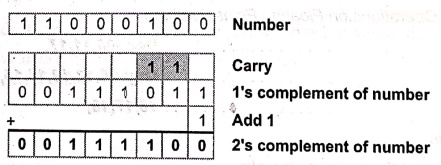
Example: 2
Find 2's complement of (11000100)2.
Solution :
Example: 3
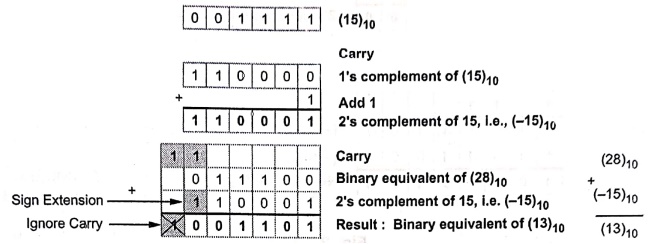
Perform (28)10 ‒ (15)10 using 6‒bit 2's complement representation.
Solution :
(28)10 = (011100)2
(15)10 = (001111)2
Example: 4
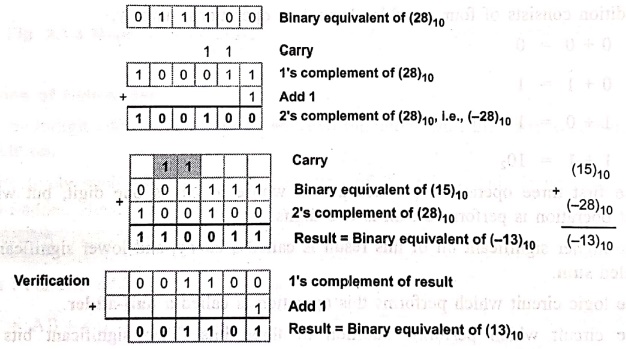
Perform (15)10 − (28)10 using 6‒bit 2's complement representation.
Solution:
(15)10 = (001111)2
(28)10 = (011100)2
Example: 5
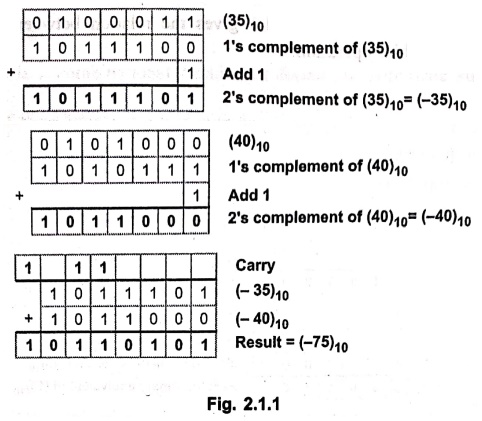
Perform (‒35) + (‒40) in binary with negative numbers in 2's complement format.
Solution:
(35)10 = (0100011)2
(40)10 = (0101000)2
Example: 6
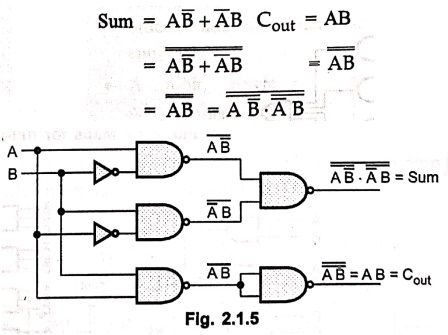
Draw half adder using NAND gates.
Solution: For half adder :
Example: 7
Give means to identify on whether or not an overflow has occurred in 2's complement addition or subtraction operations. Take one example for each possible situation and explain. Assume 4‒bit registers.
Solution:
Case 1: Both numbers positive
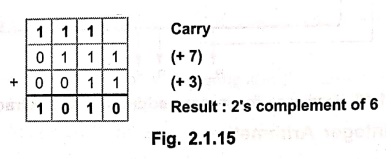
Result is – 6 ; it is wrong due to overflow.
Case 2: Both numbers negative
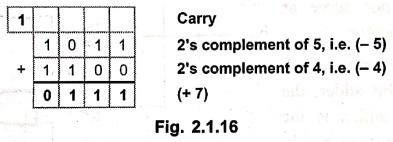
Result is +7 ; it is wrong due to overflow.
Binary Multiplication
Example: 1
Recode the multiplier 1 0 1 1 0 0 for Booth's multiplication.
Solution :

Example: 2
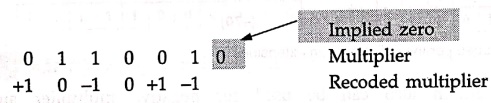
Recode the multiplier 0 1 1 0 0 1 for Booth's multiplication.
Solution :
Example: 3
Multiply 0 1 1 1 0 (+14) and 1 1 0 1 1(‒5).
Solution :
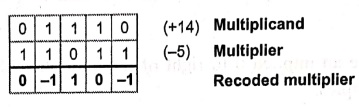
Multiplication:
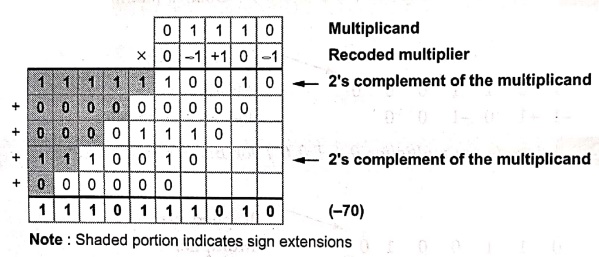
Note: Shaded portion indicates sign extensions
• The same algorithm also can be used for negative multiplier and negative multiplicand. This is illustrated in the following example.
Example: 4
Explain the following pair of signed 2's complement numbers.
Multiplicand: 1 1 0 0 1 1 (‒13)
Multiplier : 1 0 1 1 0 0 (‒20)
Solution :

Multiplication :
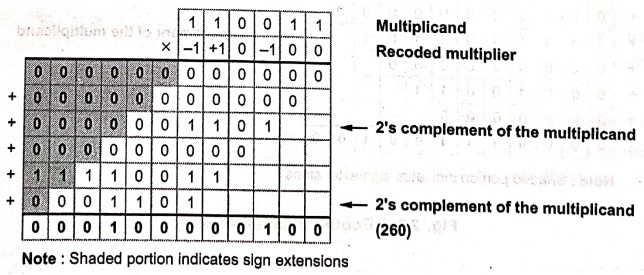
Note: Shaded portion indicates sign extensions
Example: 5
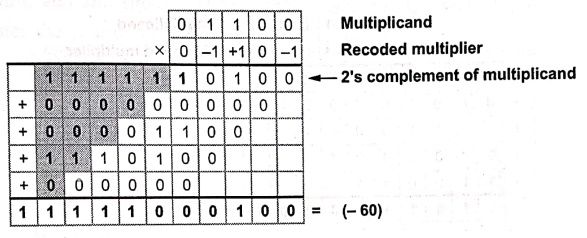
Using Booth's algorithm multiply the following:
Multiplicand+ 12
Multiplier = ‒5
Solution:
Multiplicand = + 12 (0 1 1 0 0)
Multiplier = ‒5 (1 1 0 1 1)
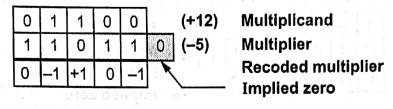
Multiplication :
Example: 6
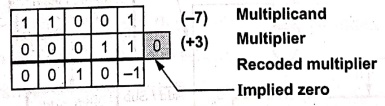
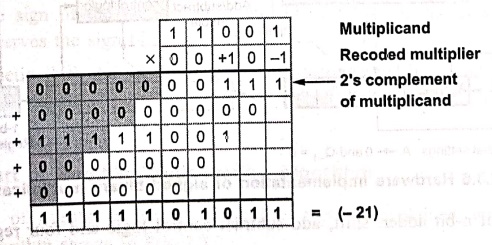
Multiply (‒7) and (+ 3) using Booth's algorithm. Register size is 5 bits.
Solution:
Multiplicand = ‒7 (1 1 0 0 1)
Multiplier = + 3 (0 0 0 1 1)
Multiplication :
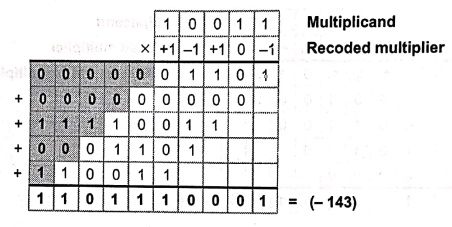
Example: 7
Using Booth's algorithm multiply the following:
Multiplicand = ‒13
Multiplier = + 11
Solution:
Multiplicand = ‒13 (1 0 0 1 1)
Multiplier = + 11 (0 1 0 1 1)
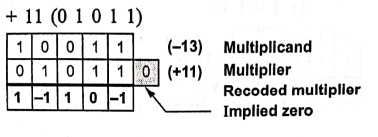
Multiplication :
Example: 8
Using Booth's algorithm multiply the following :
Multiplicand= + 13 Multiplier = ‒5
Example: 9
Using Booth's algorithm multiply
Multiplicand = ‒ 13 Multiplier = + 15.
Fast Multiplication
Example: 1
Find the bit‒pair code for multiplier.
1 1 0 1 0.
Solution: By referring table we can derive bit‒pair code as follows:

Example: 2
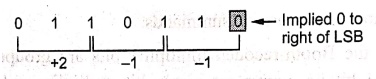
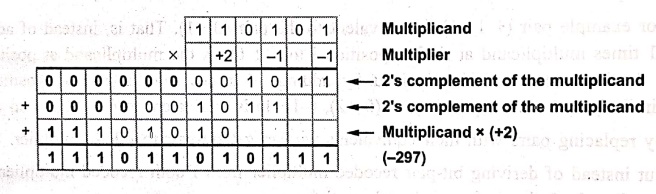
Multiply given signed 2's complement numbers using bit‒pair recoding
A = 1 1 0 1 0 1 multiplicand (‒11)
B = 0 1 1 0 1 1 multiplier (+27)
Solution:
Let us find the bit‒pair code for multiplier.
Multiplication:
Example: 3
Give the Booth's recoding and bit‒pair recoding of the number.
1 0 0 0 1 1 1 1 0 1 0 0 0 1 0 1
Solution: Booth's recoding

Bit‒Pair recoding

Example: 4
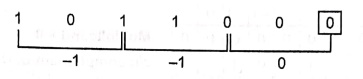
Multiply the following pair of signed 2's complement numbers using bit‒pair recoding of the multipliers: A = 010111, B = 101100.
Solution :
A = 0 10 1 1 1 Multiplicand (+23)
B = 1 0 1 1 0 0 Multiplier (‒20)
Let us find the bit‒pair code for multiplier
Multiplication
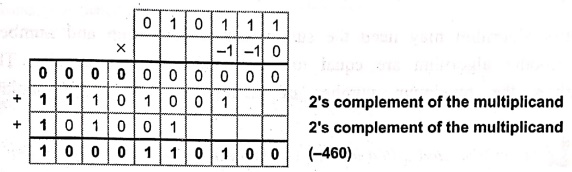
2's complement of the multiplicand
2's complement of the multiplicand
(‒460)
Example: 5
Explain Booth's algorithm to multiply the following pair of signed two's complement numbers
A = 110011 multiplicand
B = 101100 multiplier
Also, implement the above using bit‒pair Recoding and explain how it achieves faster multiplication
Solution :
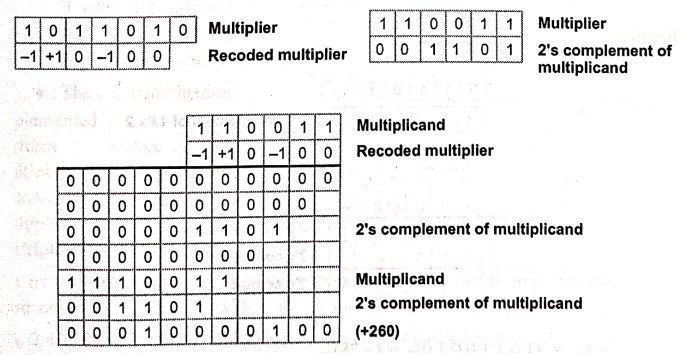
Implementation with bit‒pair recoding
Bit‒pair recoding for multiplier : ‒1 ‒1 0
Multiplication
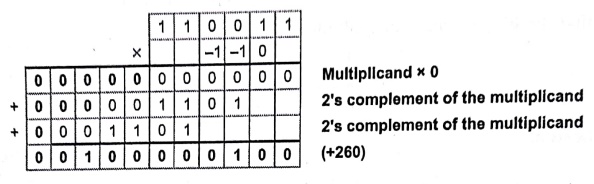
The Booth's algorithm may need the summation at each step and number of steps required in Booth's algorithm are equal to length of multiplier in bits. The bit‒pair recoding halves the maximum number of summations. Hence it achieves faster multiplication.
Example: 6
Show the multiplication of (+13) and (‒6) using multiplier bit pair recoding technique.
Solution :
+ 13 = 0 1 1 0 1
‒ 6 = 1 0 1 0 2's complement of 6
Bit pair recoding of ‒ 6
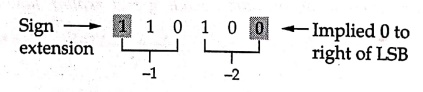
Multiplication
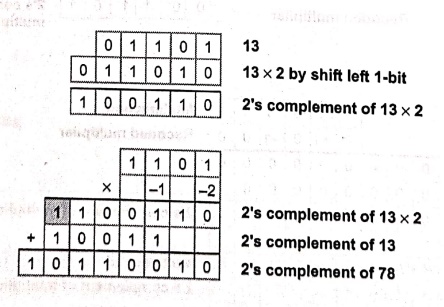
(+13) × (‒6) = (10110010)2 = (‒78)10
Example for Practice
Example: 7
Illustrate multiplication of signed 2's complement numbers 01101 and 11010 using bit‒pairing of the multipliers.
Example: 8
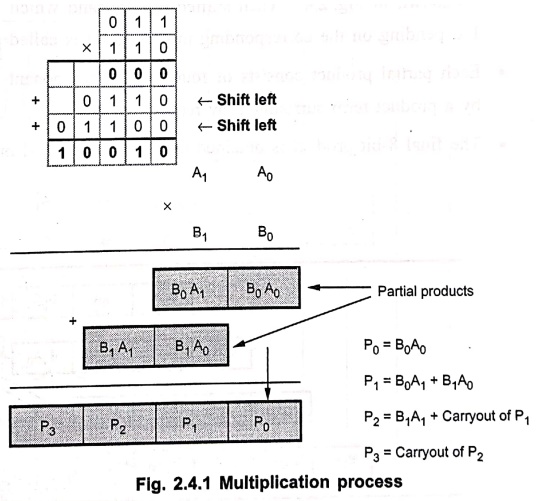
Multiply 0112 by 1102 using binary multiplication method.
Solution :
• For multiplication in binary numbers, it uses n shifts and adds to multiply n‒bit binary number.
• The combination logic circuit implemented to perform such multiplication is called combinational multiplier or array multiplier.
Binary Division
Example: 1
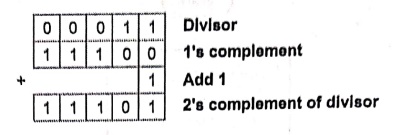
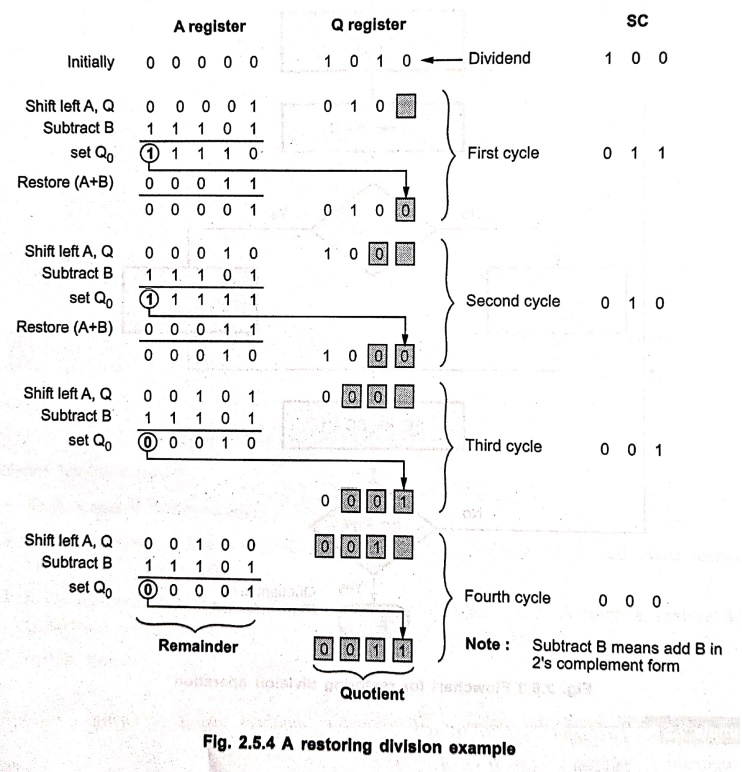
Perform the division of following numbers using restoring division algorithm.
Dividend = 1 0 1 0
Divisor = 0 0 1 1
Solution:
Fig. 2.5.2 shows steps involved in the above binary division.
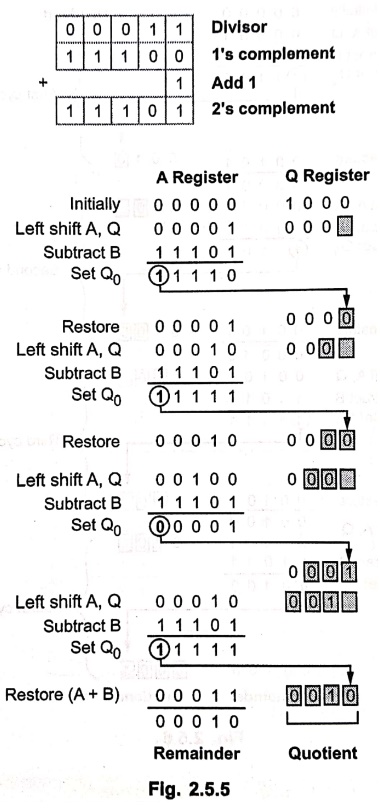
Example: 2
Divide the following unsigned numbers using restoring division method
Dividend = 1000, Divisior = 11.
Solution :
Example: 3
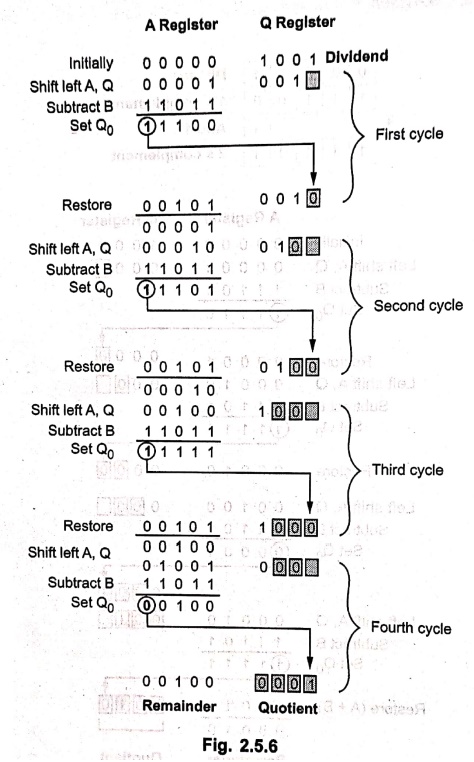
Perform the following division using restoring division algorithm :
Dividend = 1001
Divisor = 0101.
Solution :
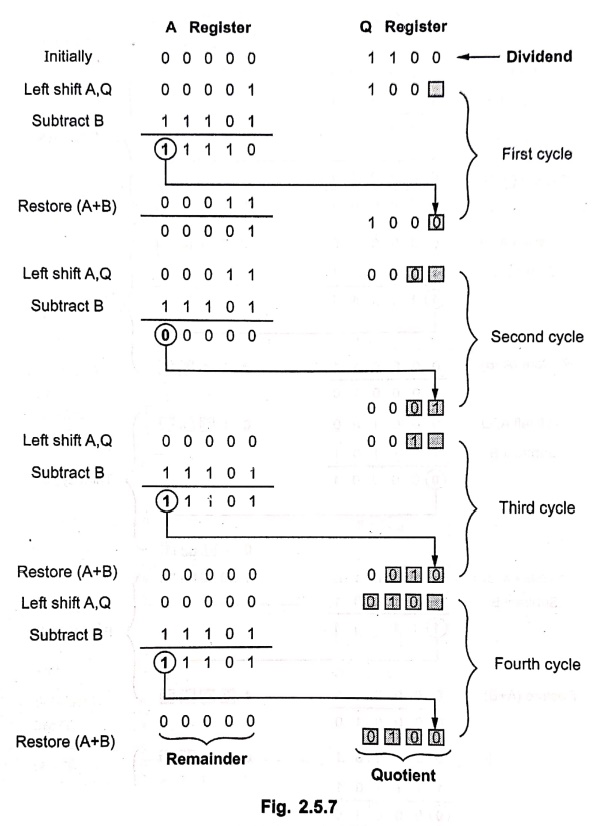
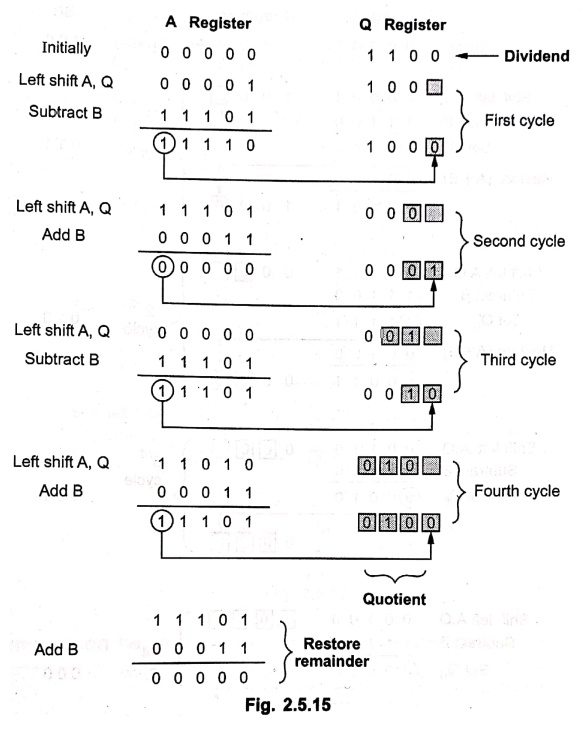
Example: 4
Perform 1100+ 11 using restoring algorithm.
Solution:
Restoring Division: Q← Dividend (1100), B← Divisor (11).
2's Complement of divisor (B) = 11101.
Example: 5
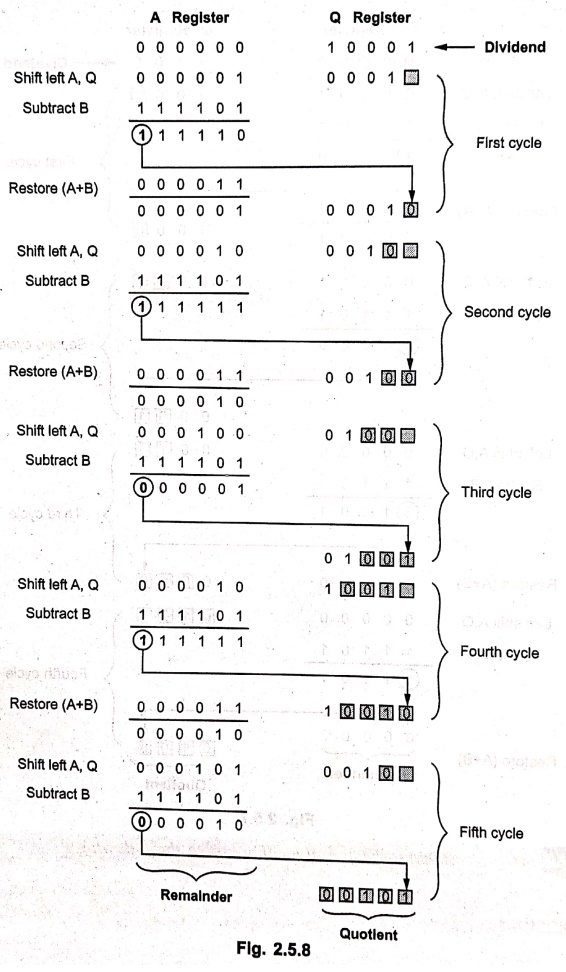
Using restoring division algorithm solve the following:
Dividend = 17.
Divisor = 03
Solution :
Dividend = 17 = 17 = (10001)2 → Q
Divisor = 03 = 03 = (00011)2 → B
2's complement of B = (111101)2
• The division algorithm just discussed needs restoring register A after each unsuccessful subtraction. (Subtraction is said to be unsuccessful if the result is negative). Therefore it is referred to as restoring division algorithm.
Example: 6
Perform restoring division when divisor V = 3 and dividend D = 7. Also give the results for all possible combinations of signs of D and V.
Solution:
The restoring division algorithm assumes positive signs of D and V.
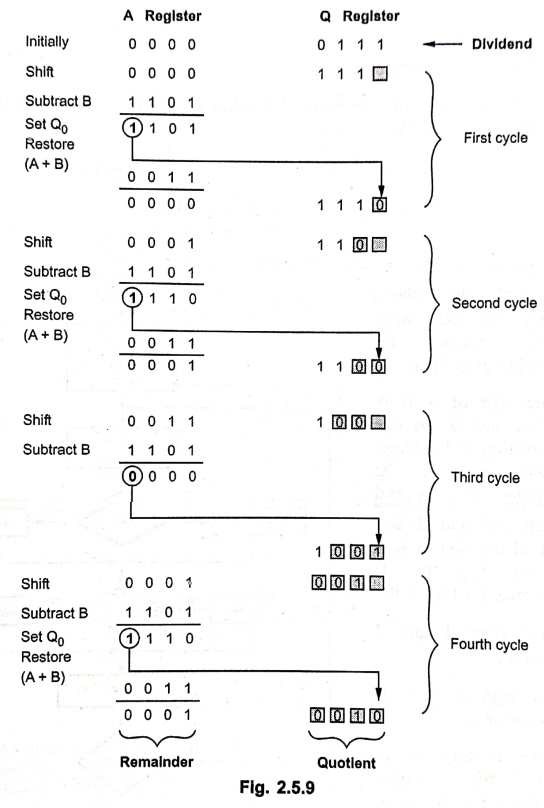
Remainder = (0001)2 = 1 and Quotient = (0010)2 = 2
• In the division operation, the magnitudes of quotient (Q) and remainder (R) are unaffected by the input signs. The signs of Q and R are easily derived from the signs of D and V using expression: D=Q × V + R
• The signs of Q and R for all possible combinations of signs of D and V are as FB follows:
D =7, V=3 ⇒ Q=2, R=1
D =7, V= ‒3 ⇒ Q= ‒2, R=1
D = ‒7, V=3 ⇒ Q= ‒2, R= ‒1
D = ‒7, V= ‒3 ⇒ Q=2, R= ‒1
Example: 7
Perform the division of following numbers using non‒restoring division algorithm:
Dividend = 1 0 1 0
Divisor = 0 0 1 1.
Solution:
Fig. 2.5.11 shows steps involved in the non-restoring binary division.
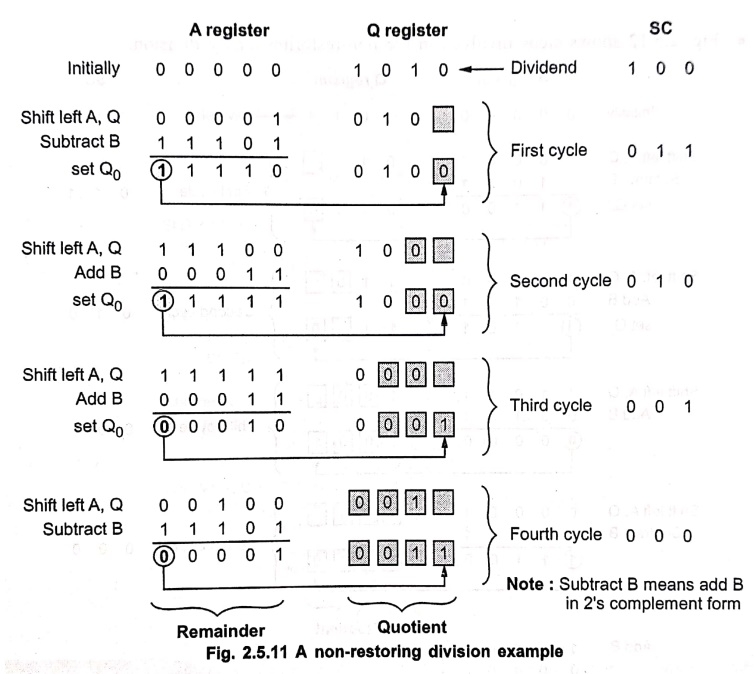
In this example, after 4 cycles A is positive and hence step 3 is not required.
Example: 8
Perform the division of following numbers using non‒restoring division algorithm:
Dividend = 1 0 1 1
Divisor = 0 1 0 1.
Solution :
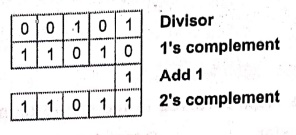
• Fig. 2.5.12 shows steps involved in the non‒restoring binary division.
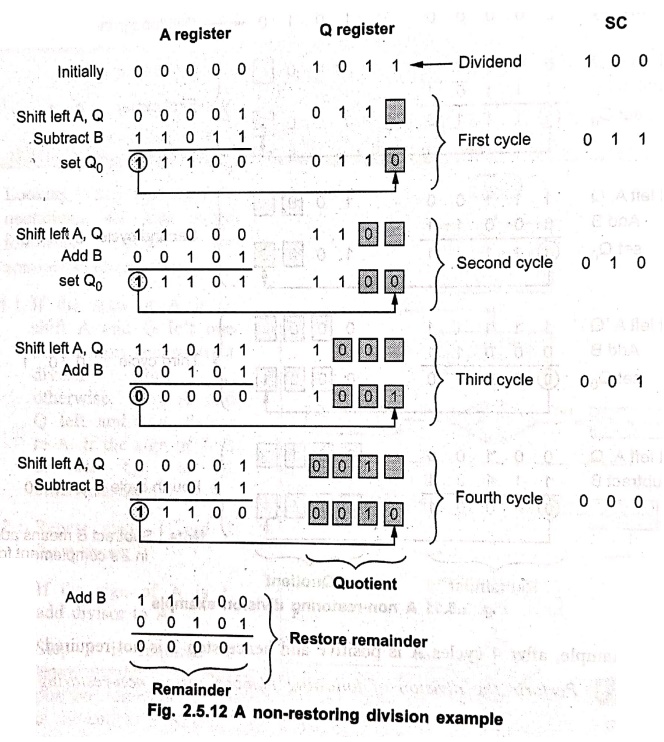
• The hardware shown in Fig. 2.5.2 can also be used to perform non‒restoring. algorithm. There is no simple algorithm for signed division. In signed division, the operands are pre‒processed to transform them into positive values. Then using one of the algorithms just discussed quotients and remainders are calculated. The quotients and remainders are then transformed to the correct signed values.
Example: 9
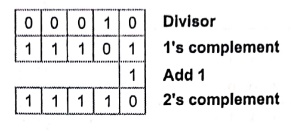
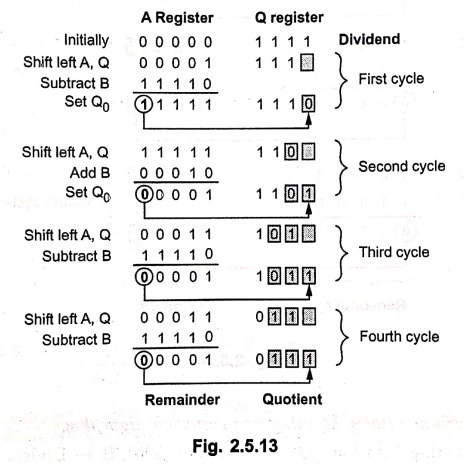
Divide the following unsigned numbers using non‒restoring division method.
Dividend = (15)10, Divisor = (2)10
Solution :
Dividend = (15)10 = (01111)2
Divisor = (2)10 = (00010)2
Example: 10
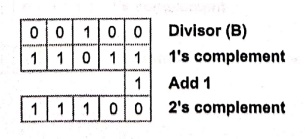
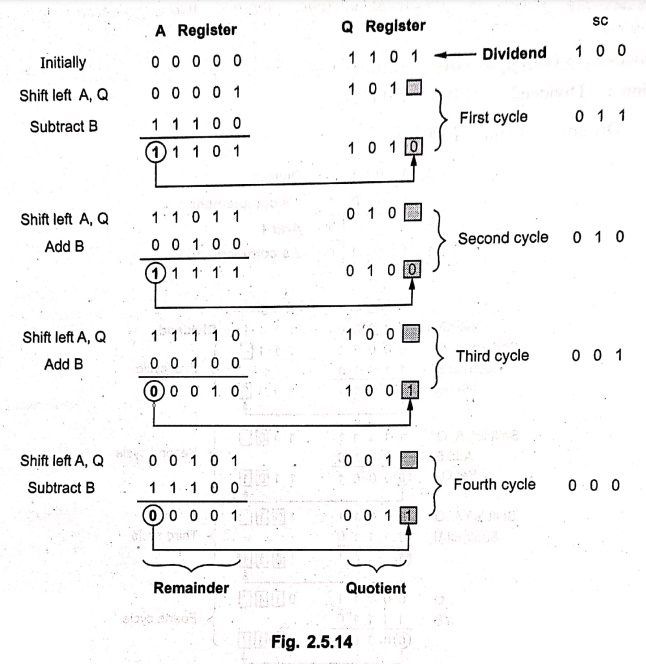
Perform division operation on the following numbers using the non‒restoring division algorithm.
Dividend = 1101 Divisor = 0100
Solution :
Example: 11
Perform 1100 + 11 using non‒restoring algorithm.
Solution:
Non‒Restoring Division: Q← Dividend (1100), B← Divisor (11).
Complement and divisor (B) = 11101.
Example: 12
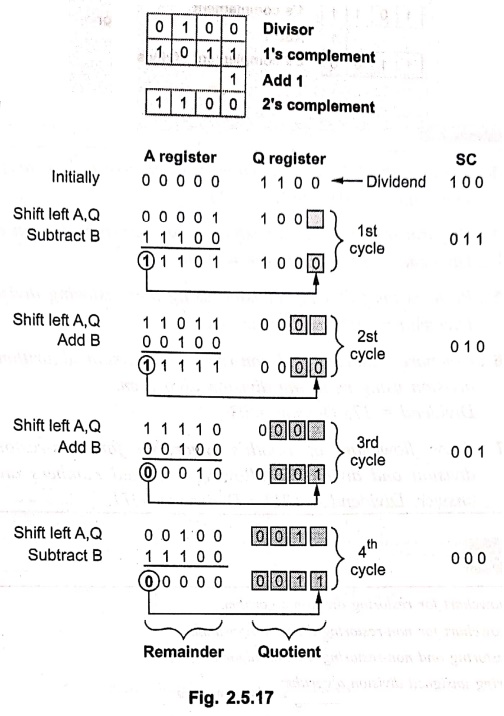
Perform division of the following numbers using restoring and non restoring division algorithm.
A : 1100 and B : 0100
Solution:
A = 1100 B = 0100 (Using restoring division)
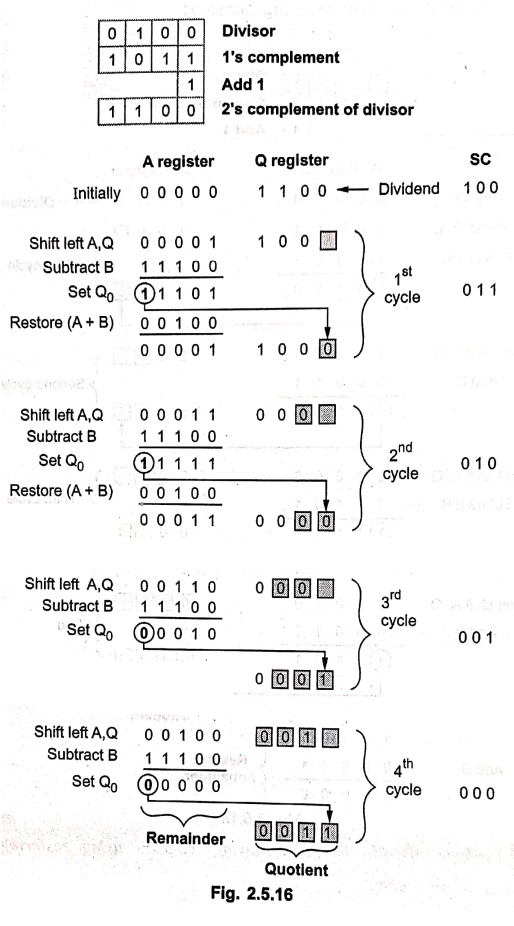
Note: Subtract B means add B in 2's complement form.
A = 1100 B = 0100 (Using non restoring division)
Example: 13
Perform the following division using non‒restoring division algorithm.
Dividend = 1101, Divisor = 11.
Example: 14
Perform the following division using restoring division algorithm.
Dividend = 1100 Divisor = 0100.
Example: 15
Perform the following division using non‒restoring division algorithm.
Dividend = 1000, Divisor =11.
Example: 16
Compare restoring and non‒restoring division algorithm. Perform the division using restoring division algorithm.
Dividend = 17; Divisor = 03.
Example: 17
Draw flowchart of Booth's algorithm for non‒restoring unsigned division and divide the following unsigned numbers and justify your answer.
Dividend = 1011; Divisor = 0011.
Floating Point Numbers and their Representation
Example: 1
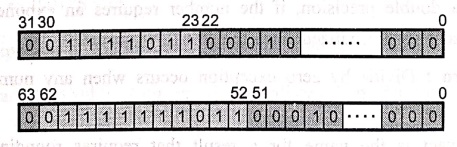
Represent 1259.12510 in single precision and double precision formats.
Solution:
Step 1: Convert decimal number in binary format
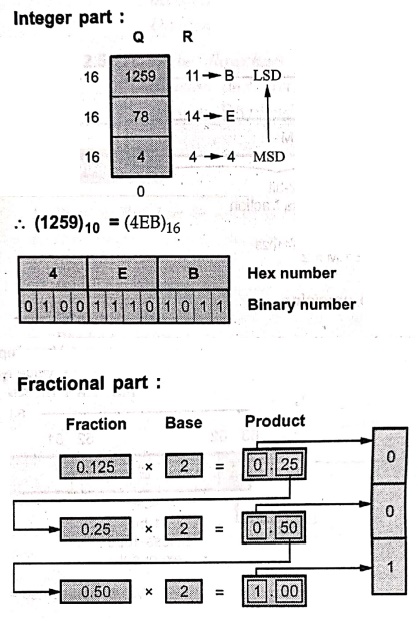
(1259)10 = (100 1110 1011)2
(0.125)10 = (0.001)2
Binary number = 10011101011+ 0.0 0 1= 1 0 0 1 1 1 0 1 0 1 1 . 0 0 1
Step 2: Normalize the number
1. 0 0 1 1 1 0 1 0 1 1. 0 0 1
1. 0 0 1 1 1 0 1 0 1 10 0 1 1 × 210
Step 3: Single precision representation
For a given number S = 0, E = 10 and M = 0 0 1 1 1 0 1 0 1 1 0 0 1
Bias for single precision format is = 127
E' = E + 127 = 10 + 127 = 13710
= 1000 10012
Number in single precision format is given as

Step 4: Double precision representation
For a given number
S = 0, E = 10, and M = 0 0 1 1 1 0 1 0 1 1 0 0 1
Bias for double precision format is = 1023
E' = E+ 1023 = 10 + 1023 = 103310 = 1 0 0 0 0 0 0 1 0 0 12
Number in double precision format is given as

Example: 2
Represent ‒ 307.187510 in single precision and double precision formats.
Solution:
Step 1: Convert decimal number in binary format integer part
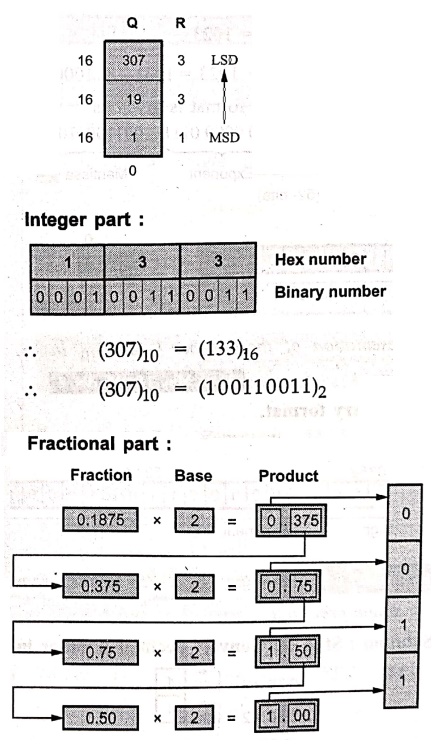
Integer part:
(307)10 = (133)16
(307)10 = (100110011)2
Fractional part :
(0.1875) 10 = (0.0011)2
Binary number = ‒ 100110011 + .0011
= ‒ 100110011. 0011
Step 2: Normalize the number
‒100 11001 1.00 11 = ‒ 1.0 0 1 1 0 0 1 1 0 0 1 1 ×28
Step 3: Single precision representation
For a given number
S = 1, E = 8, and M = 0011 0011 0011
Bias for single precision format is = 127
E' = E + 127 = 8 + 127 = 13510 = 100001112
Number in single precision format is given as

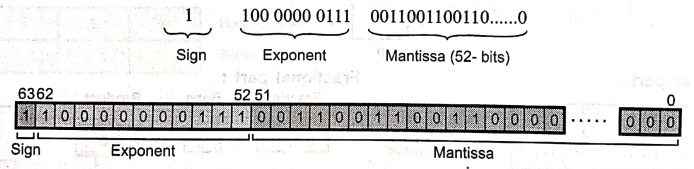
Step 4: Double precision representation
For a given number
S = 1, E = 8 and M = 0011 0011 0011
Bias for double precision format is = 1023
E' = E + 1023 = 8 + 1023 = 103110 = 100000001112
Number in double precision format is given as
Example: 3
Show the IEEE 754 binary representation of the number (‒0.75)10 in single precision.
Solution:
Step 1: Convert decimal number in binary format.
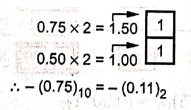
‒ (0.75)10 = ‒ (0.11)2
Step 2: Normalize the number.
‒ 0.11 = ‒1.1×2‒1
Step 3: Single precision representation
For a given number S = 1, E = ‒1 and M = 1
Bias for single precision format is = 127
E' = E + 127 = (− 1) + 127 12610 = (01111110)2
Number in single precision format is given as,

Examples for Practice
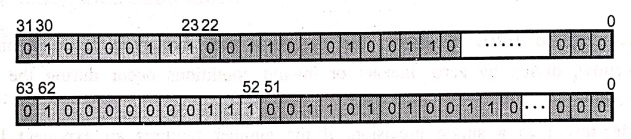
Example: 4
Represent (309.1875)10 in single precision and double precision format.
Answer:
Example: 5
Represent (0.0625)10 Represent (0.0625)10 in single precision and double precision formats.
Answer:
Example: 6
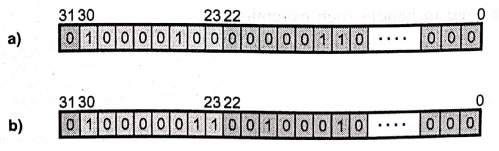
Represent 32.75 and 18.125 in single precision IEEE 754 representation.
Answer:
Arithmetic Operations on Floating Point Numbers
Example: 1
Perform addition and subtraction of single precision floating point numbers A and B, where A = 44900000H and B = 42A00000H
Solution:
Step 1: Represent numbers in single precision format
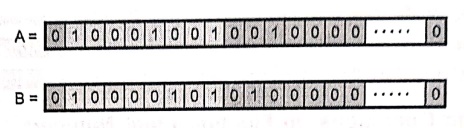
Exponent for A = 1 0 0 0 1 0 0 1 = 137
Actual exponent = 137 ‒ 127 (Bias) = 10
Exponent for B = 1 0 0 0 0 1 0 1 = 133
Actual exponent = 133 ‒ 127 (Bias) = 6
Number B has smaller exponent with difference 4. Hence its mantissa is shifted right by 4‒bits as shown below.
Step 2: Shift mantissa : Shifted mantissa of B = 0 0 0 0 0 1 0 0 ….. 0
Step 3: Add mantissas :
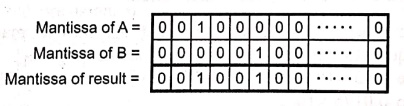
As both numbers are positive, sign of the result is positive.
Result (A + B) = 44920000 H

• In subtraction, two mantissas are subtracted instead of addition and the sign of greater mantissa is assigned to the result.
Step 4: Subtract mantissa

Mantissa for A is greater than mantissa for B therefore sign of result is sign of A.
Result (A‒B) = 0448E0000H

Example: 2
Add the numbers (0.5)10 and (0.4375)10 using the floating point addition.
Solution :
(0.5)10 = (0.1)2= 1.0×2‒1
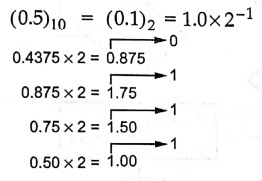
(0.4375)10 = (0.0111)2 = (1.110)2 × 2‒2
Step 1: Shift right the number with lesser exponent until its exponent matches the larger number (1.110)2 × 2‒2 = 0.111×2‒1
Step 2: Add
1.0 × 2‒1 = 1.111×2‒1 = 0.111×2‒1
Example: 3
Add the numbers (0.75)10 and (‒0275)10 in binary using the Floating point addition algorithm.
Solution:
Step 1: Convert given decimal numbers in binary.
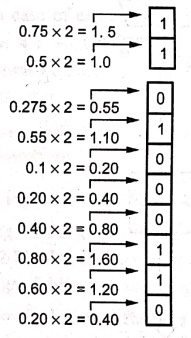
(0.75)10 = (0.11)2 = 1.1×2‒1
‒ (0.275)10 = ‒ (0.01000110)2
= ‒ (1.000110×2‒2)
= ‒ (0.1000110×2‒1)
Step 2: Add the significants
1.1×2‒1+(‒ 0.1000110×2‒1)= 0.1111010×2‒1
Step 3: Normalize the sum
0.1111010×2‒1 = 1.111010×2−2
Since 127 ≥ ‒ 2 ≥ 126, there is no overflow or underflow. The bias exponent would be ‒ 2 + 127 = 125, which is between 1 and 254, the smallest and largest unreserved biased exponents.)
Step 4: Round the sum.
Assuming 8‒bit precision the sum is already rounded.
Example: 4
Multiply the numbers (0.5)10 and (0.4375)10 using the floating point multiplication.
Solution :
(0.5)10 = 1.0×2‒1
(0.4375) 10 = (1.110)2×2‒2
Step 1: Add the exponents without bias
− 1 + (‒2) = − 3
Step 2: Multiply
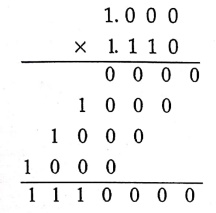
The product is 1.110000×2‒3. Since the signs of two operands are same, the product is positive.
1.110000×2‒3 = 0.00111
= 1×2‒3 + 1×2‒4 + 1×2‒5 = (0.21875)10
ALU Design
Example: 1
Draw the block diagram for the hardware that implements the following statements:
i) x + yz : AR←AR + BR
ii) x + xy + xz : AR←AR +1.
Solution:
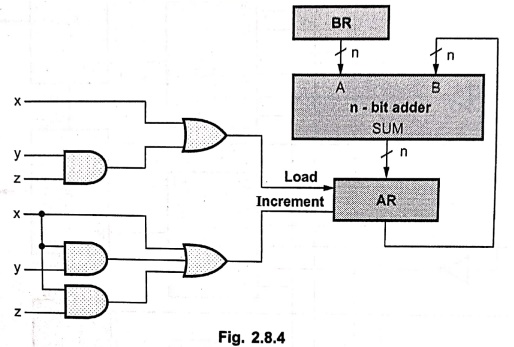
i) Fig. 2.8.4 shows the hardware that implements statement
x+yz: AR← AR + BR and statement x + xy + xz: AR ← AR + 1.
Computer Organization and Architecture: Chapter 2: Arithmetic for Computers : Tag: Computer : Computer Organization and Architecture - Arithmetic for Computers: Important Example Solved Problems
Computer Organization and Architecture: Chapter 2: Arithmetic for Computers
Under Subject
Computer Organization and Architecture
CW25201 3rd Semester IT department. | 2025 Regulation | 3rd Semester 2025 Regulation
Related Subjects
Discrete Mathematics
MA25C14 3rd Semester CSE,IT,CY,AIDS departments. | 2025 Regulation | 3rd Semester 2025 Regulation
Data Structures
CS25C08 3rd Semester CSE,IT,CY,AIDS departments. | 2025 Regulation | 3rd Semester 2025 Regulation
Computer Organization and Architecture
CW25201 3rd Semester IT department. | 2025 Regulation | 3rd Semester 2025 Regulation
Object Oriented Programming
CS25C07 3rd Semester IT department. | 2025 Regulation | 3rd Semester 2025 Regulation
Web Technologies
IT25301 3rd Semester IT department. | 2025 Regulation | 3rd Semester 2025 Regulation
English Communication Skills Laboratory I
EN25C03 3rd Semester all department. | 2025 Regulation | 3rd Semester 2025 Regulation
Skill Development Course I
3rd Semester all department. | 2025 Regulation | 3rd Semester 2025 Regulation