Computer Organization and Architecture: Chapter 2: Arithmetic for Computers
Arithmetic Operations on Floating Point Numbers
Arithmetic for Computers
In this section we are going to see general procedures for addition, subtraction, multiplication and division of floating point numbers.
Arithmetic
Operations on Floating Point Numbers
•
In this section we are going to see general procedures for addition,
subtraction, multiplication and division of floating point numbers.
1. Addition and Subtraction
•
Consider two floating point numbers:
A
= m1 . re1 and
B
= m2.re2 Assume: e1 ≥ e2
•
Let us see the rules for addition and subtraction.
Step 1:
Select the number with a smaller exponent and shift its mantissa right, a
number of steps equal to the difference in exponents | e2‒e1
|. For examples, if the numbers are 1.75 × 10² and 6.8 ×10⁴,
then the number 1.75 × 10² is selected and converted to 0.0175 × 10⁴.
Step 2: Set
the exponent of the result equal to the larger exponent.
Step 3:
Perform addition/subtraction on the mantissas and determine the sign of the result.
Step 4:
Normalize the result, if necessary.
Example: 1
Perform addition and subtraction of single
precision floating point numbers A and B, where A = 44900000H and B = 42A00000H
Solution:
Step
1:
Represent numbers in single precision format
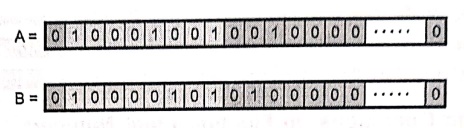
Exponent
for A = 1 0 0 0 1 0 0 1 = 137
Actual
exponent = 137 ‒ 127 (Bias) = 10
Exponent
for B = 1 0 0 0 0 1 0 1 = 133
Actual
exponent = 133 ‒ 127 (Bias) = 6
Number
B has smaller exponent with difference 4. Hence its mantissa is shifted right
by 4‒bits as shown below.
Step 2:
Shift mantissa : Shifted mantissa of
B = 0 0 0 0 0 1 0 0 ….. 0
Step 3: Add mantissas :
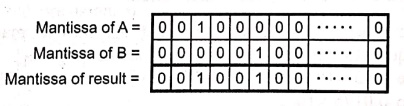
As
both numbers are positive, sign of the result is positive.
Result
(A + B) = 44920000 H

•
In subtraction, two mantissas are subtracted instead of addition and the sign
of greater mantissa is assigned to the result.
Step 4:
Subtract mantissa

Mantissa
for A is greater than mantissa for B therefore sign of result is sign of A.
Result
(A‒B) = 0448E0000H

Example: 2
Add the numbers (0.5)10
and (0.4375)10 using the floating point addition.
Solution :
(0.5)10
= (0.1)2= 1.0×2‒1
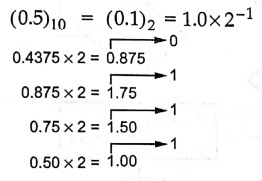
(0.4375)10 = (0.0111)2 =
(1.110)2 × 2‒2
Step 1:
Shift right the number with lesser exponent until its exponent matches the
larger number (1.110)2 × 2‒2 = 0.111×2‒1
Step 2:
Add
1.0
× 2‒1 = 1.111×2‒1 = 0.111×2‒1
1. Overflows and Underflows in Mantissa and Exponent
• Mantissa
overflow: The addition of two mantissas of the
same sign may result in a carryout of the most significant bit. If so, the
mantissa is shifted right and the exponent is incremented.
• Mantissa
underflow: In the process of aligning mantissas,
digits may flow off the right end of the mantissa. In such case truncation
methods such as chopping, rounding are used.
• Exponent
overflow: Exponent overflow occurs when a positive
exponent exceeds the maximum possible exponent value. In some systems this may
be designated as +∞ or ‒ ∞.
• Exponent
underflow: Exponent underflow occurs when a
negative exponent exceeds the maximum possible exponent value. In such cases,
the number is designated as zero.
2. Flowchart for Floating Point Addition and Subtraction
•
Fig. 2.7.1 (a) and (b) shows the flowcharts for floating point addition and
subtraction.
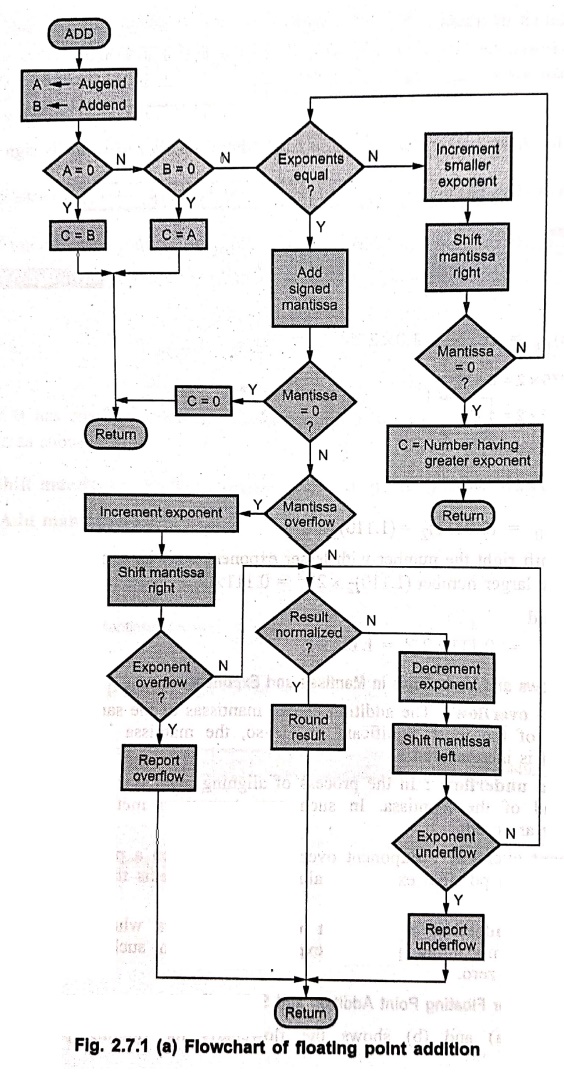
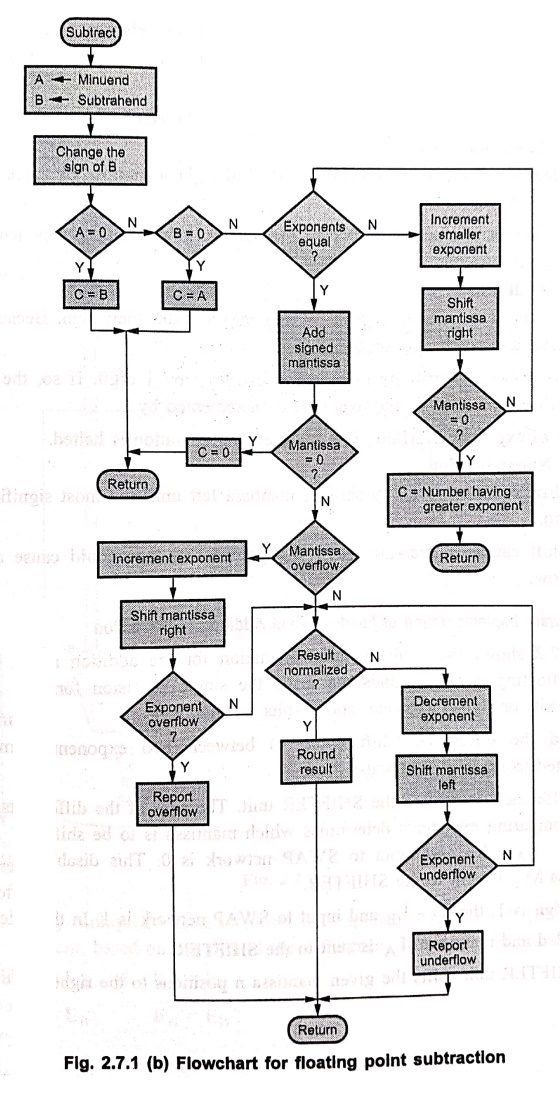
Phase 1:
Changing sign of B for subtraction and zero check.
•
Addition and subtraction are identical except for a sign change in case of
subtraction.
•
If either operand is zero, the other is reported as the result.
Phase 2:
Align mantissa
•
The mantissa of the smaller exponent is shift right a number of times equal to
the difference in exponents.
•
In this process, if mantissa is 0 then the number having higher exponent is
reported as the result.
Phase 3:
Addition
•
Two mantissas are added together, taking into account their sign. Because the
signs may differ and result may be 0.
•
There is also the possibility of mantissa overflow by 1 digit. If so, the
mantissa of the result is shifted right and exponent is incremented by 1.
•
In case of exponent overflow, it is reported and operation is halted.
Phase 4:
Normalization
•
Normalization is achieved by shifting mantissa left until the most significant
digit is non zero.
•
Each shift causes a decrement of the exponent and thus could cause an exponent
underflow.
3. Hardware Implementation of Floating Point Addition/ Subtraction
•
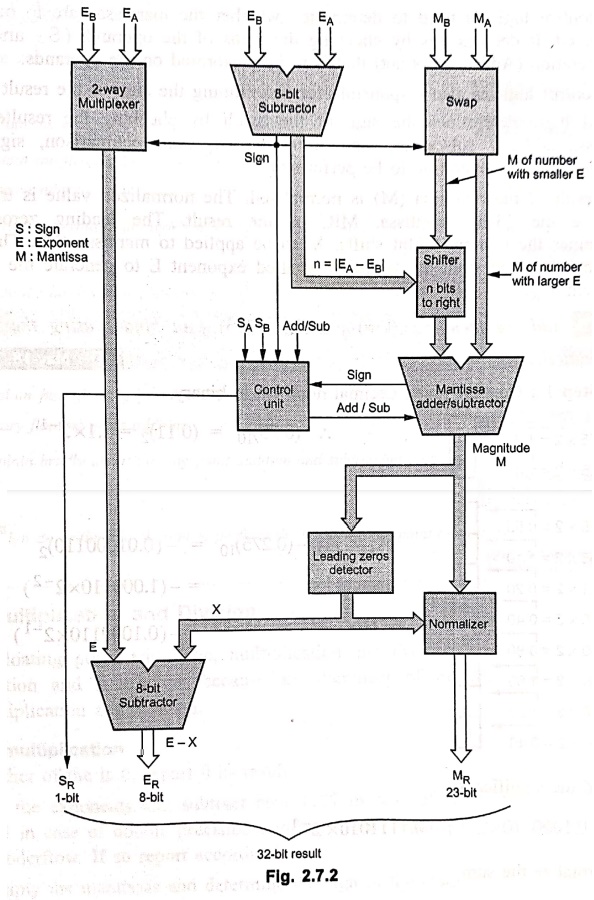
Fig. 2.7.2 shows the hardware implementation for the addition and subtraction
of 32‒bit floating point operands that have the single precision format, i.e. 1‒bit
for sign, 8‒bits or signed exponent and 23‒bits for mantissa.
•
To find the difference (shift count n) between two exponents, exponents are
subtracted using 8‒bit subtractor.
•
This difference, is sent to the SHIFTER unit. The sign of the difference that
results from comparing exponents determines which mantissa is to be shifted. If
the sign is 0, then EA ≥ EB and input to SWAP network is
0. This disables swapping and mantissa MB is sent to the SHIFTER.
•
If the sign is 1, the EA‒EB and input to SWAP network is
1. In this case swapping is enabled and mantissa MA is sent to the
SHIFTER.
•
The SHIFTER unit shifts the given mantissa n positions to the right.
•
The two way multiplexer is used to set the exponent of the result (E) equal to
the larger exponent, based on the sign of the difference. The output of
multiplexer is
E
= EA if EA ≥ EB
or
E
= EB EA < EB
•
The control logic is used to determine whether the mantissas are to be added or
subtracted. It decides this by checking the signs of the operands (SA
and SB) and the operation (Add or Subtract) that is to be performed
on the operands.
•
The control logic is also responsible for determining the sign of the result (SR).
The control logic determines the sign of the result by checking the resulted
sign of mantissa adder / subtractor, sign from the exponent comparison, signs
of the operands and the operation to be performed.
•
The result of the mantissa (M) is normalized. The normalized value is truncated
to generate the 23‒bit mantissa, MR, of the result. The leading zeros detector
determines the number of bit shifts, X, to be applied to mantissa (M). The
value X is then subtracted from the tentative resulted exponent E to generate
the true result exponent, ER.
Example: 3
Add the numbers (0.75)10
and (‒0275)10 in binary using the Floating point addition algorithm.
Solution:
Step 1:
Convert given decimal numbers in binary.
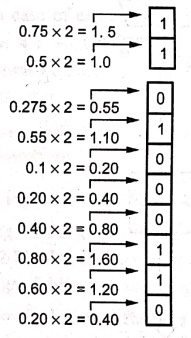
(0.75)10
= (0.11)2 = 1.1×2‒1
‒
(0.275)10 = ‒ (0.01000110)2
= ‒ (1.000110×2‒2)
= ‒ (0.1000110×2‒1)
Step 2:
Add the significants
1.1×2‒1+(‒
0.1000110×2‒1)= 0.1111010×2‒1
Step 3:
Normalize the sum
0.1111010×2‒1
= 1.111010×2−2
Since
127 ≥ ‒ 2 ≥ 126, there is no overflow or underflow. The bias exponent would be ‒
2 + 127 = 125, which is between 1 and 254, the smallest and largest unreserved
biased exponents.)
Step 4:
Round the sum.
Assuming
8‒bit precision the sum is already rounded.
2. Multiplication and Division
•
In floating point arithmetic, multiplication and division are somewhat easier
than addition and subtraction because an alignment of mantissas is not required
in multiplication and division.
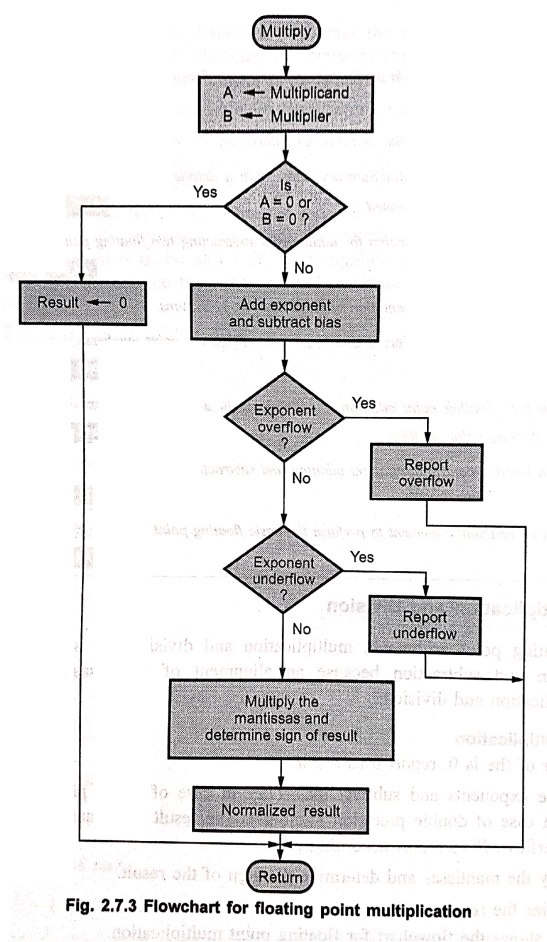
Rules of multiplication
1.
If either of the is 0, report 0 as result.
2.
Add the exponents and subtract bias. (127 in case of single precision numbers
and 1023 in case of double precision numbers). The result may cause exponent
overflow or underflow. If so report accordingly.
3.
Multiply the mantissas and determine the sign of the result.
4.
Normalize the result.
Fig.
2.7.3 shows the flowchart for floating point multiplication.
Example: 4
Multiply the numbers
(0.5)10 and (0.4375)10 using the floating point multiplication.
Solution :
(0.5)10
= 1.0×2‒1
(0.4375)
10 = (1.110)2×2‒2
Step 1:
Add the exponents without bias
−
1 + (‒2) = − 3
Step 2:
Multiply
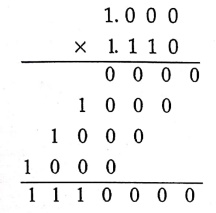
The
product is 1.110000×2‒3. Since the signs of two operands are same,
the product is positive.
1.110000×2‒3
= 0.00111
=
1×2‒3 + 1×2‒4 + 1×2‒5 = (0.21875)10
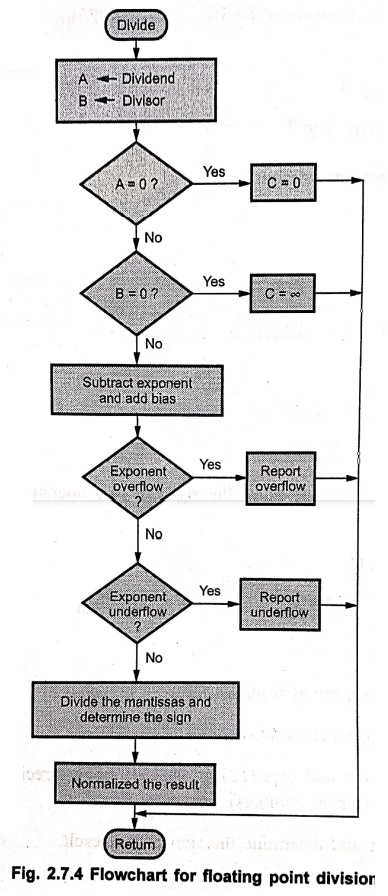
Rules of division
1.
If the dividend is zero, report result as zero.
2.
If the divider is zero, report result as ∞.
3.
Subtract exponents and add bias (127 in case of single precision numbers and
1023 in case of double precision numbers).
4.
Divide the mantissas and determine the sign of the result.
5.
Normalize the result.
Fig.
2.7.4 shows the flowchart for floating point division.
Review Questions
1. State and explain
the rules in arithmetic operations on floating point numbers.
2. Explain the working
of floating point adder/subtractor.
3. Explain the
floating point Add/Subtract rules. With a detailed flowchart explain how
floating point addition/subtraction is performed.
4. Derive and explain
an algorithm for adding and subtracting two floating point binary numbers.
5. Draw the hardware
implementation of floating point operations.
6. Explain the rules
for basic arithmetic operations of floating point numbers.
7. Explain how
floating point addition is carried out in a computer system. Give an example
for a binary floating point addition.
8. Explain briefly
about floating point addition and subtraction alogorithms.
9. Design an
arithmatic element to perform the basic floating point operations.
Review Questions
1. How do you perform
the floating point multiplication and division?
2. Rules of
multiplication.
3. Rules of division.
Computer Organization and Architecture: Chapter 2: Arithmetic for Computers : Tag: Computer : Arithmetic for Computers - Arithmetic Operations on Floating Point Numbers
Computer Organization and Architecture: Chapter 2: Arithmetic for Computers
Under Subject
Computer Organization and Architecture
CW25201 3rd Semester IT department. | 2025 Regulation | 3rd Semester 2025 Regulation
Related Subjects
Discrete Mathematics
MA25C14 3rd Semester CSE,IT,CY,AIDS departments. | 2025 Regulation | 3rd Semester 2025 Regulation
Data Structures
CS25C08 3rd Semester CSE,IT,CY,AIDS departments. | 2025 Regulation | 3rd Semester 2025 Regulation
Computer Organization and Architecture
CW25201 3rd Semester IT department. | 2025 Regulation | 3rd Semester 2025 Regulation
Object Oriented Programming
CS25C07 3rd Semester IT department. | 2025 Regulation | 3rd Semester 2025 Regulation
Web Technologies
IT25301 3rd Semester IT department. | 2025 Regulation | 3rd Semester 2025 Regulation
English Communication Skills Laboratory I
EN25C03 3rd Semester all department. | 2025 Regulation | 3rd Semester 2025 Regulation
Skill Development Course I
3rd Semester all department. | 2025 Regulation | 3rd Semester 2025 Regulation