Computer Organization and Architecture: Chapter 4: Memory and IO
Types of Memories
Questions: 1. Define a memory cell. Give an example. 2. Define a 'memory location' and a 'cell'. 3. Write a short note on semiconductor memories. 4. State various characteristics of memory devices and explain in brief any two. 5. Distinguish between volatile and non ‒ volatile memories. 6. Explain the key characteristics of computer memory systems 7. Explain the various characteristics of memory system. 8. Classify memories on the basic of principle of operation, physical characteristics, mode of access and fabrication technology. 9. Give the classification of semiconductor memories. 10. Which memory is called volatile? Why? 11. Explain static memory. 12. Give the classification of primary memory.
Computer
Organization and Architecture
Chapter 4:
Memory
and I/O
Types of Memories
•
Memories are made up of registers. Each register in the memory is one storage
location also called memory location.
•
Each memory location is identified by an address.
The number of storage locations can vary from a few in some memories to
hundreds of thousand in others. Each location can accommodate one or more bits.
•
Generally, the total number of bits that a memory can store is its capacity. Most of the types the
capacity is specified in terms of bytes (group of eight bits).
•
Each register consists of storage elements (flip flops or capacitors in
semiconductor memories and magnetic domain in magnetic storage), each of which
stores one bit of data. A storage element is called a cell.
•
The data stored in a memory by a process called writing and are retrieved from the memory by a process called reading. Fig. 4.1.1 illustrates in a
very simplified way the concept of write, read, address and storage capacity
for a generalized memory.
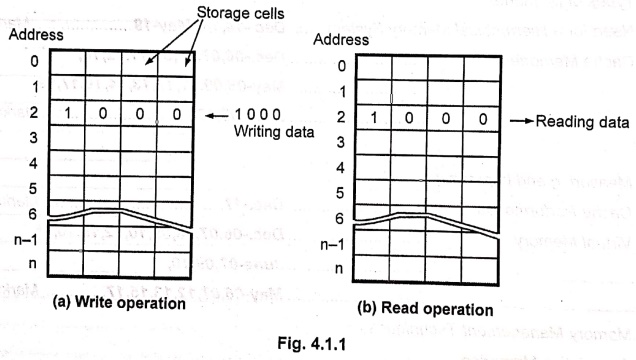
• As shown in Fig. 4.1.1 a memory unit stores binary information in groups of bits called words. A word in memory is an entity of bits that moves in and out of storage as a unit. A word having group of 8‒bits is called a byte. Most computer memories use words that are multiples of eight bits in length. Thus, a 16‒bit word contains two bytes and a 32‒bit word is made of 4‒bytes.
•
The communication between a memory and its environment is achieved through data
lines, address selection lines and control lines that specify the direction of
transfer.
•
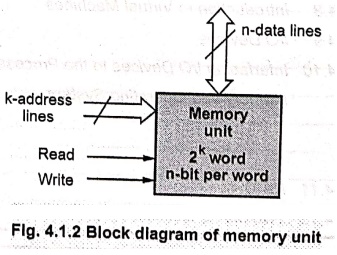
Fig. 4.1.2 shows the block diagram of memory unit. Then data lines provide the
information to be stored in memory and the k address lines specify the
particular word chosen among the many available. The two control inputs specify
the direction transfer.
•
When there are k address lines we can access 2k memory words. For
example, if k = 10 we can access 210 = 1024 memory words.
Illustrative Examples
Example: 1
A bipolar RAM chip is arranged as
16 words. How many bits are stored in the chip?
Solution:
16
× 8 = 128 bits.
One
word = 8 bits.
Example: 2
How many address bits are needed to
operate a 2 K × 8 ROM?
Solution :
2
K memory locations = 2048 locations
Since
211 = 2048, we need 11 address lines.
Example: 3
How many locations are addressed
using 18 address bits ?
Solution:
The number of locations addressed = 218 = 262144.
1. Characteristics of Memory
Table
4.1.1 lists the key characteristics of memory systems.
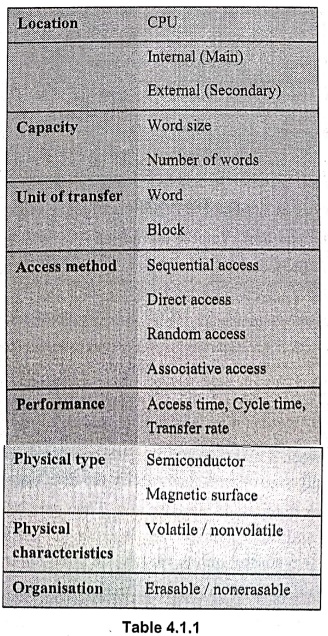
Physical characteristics :
Volatile / Nonvolatile
If
memory can hold data even if power is turned off, it is called nonvolatile memory; otherwise it is
called volatile memory.
Erasable / Nonerasable
The
memories in which data is once programmed cannot be erased are called nonerasable memories. On the other hand, if data in the memory is erasable then
memory is called erasable memory.
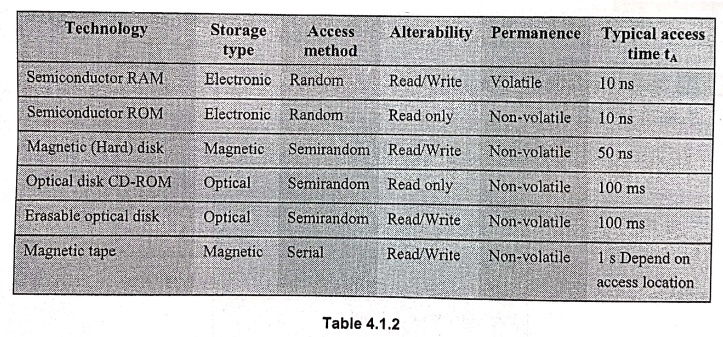
Table
4.1.2 shows the characteristics of some common memory technologies.
Characteristics of some common memory technologies
Distinguish between volatile and non-volatile memories
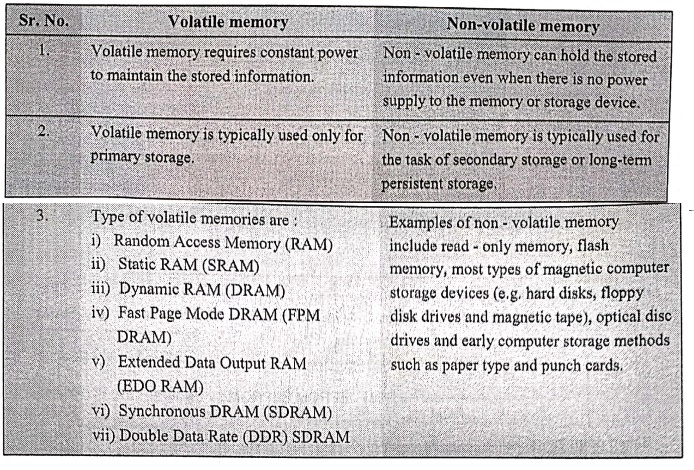
Volatile memory
1. Volatile memory
requires constant power to maintain the stored information.
2. Volatile memory is
typically used only for primary storage.
3. Type of volatile
memories are: i) Random Access Memory (RAM) ii) Static RAM (SRAM) iii) Dynamic
RAM (DRAM) iv) Fast Page Mode DRAM (FPM DRAM) v) Extended Data Output RAM (EDO
RAM) vi) Synchronous DRAM (SDRAM) vii) Double Data Rate (DDR) SDRAM
Non-volatile memory
1. Non-volatile memory
can hold the stored information even when there is no power supply to the
memory or storage device.
2. Non- volatile
memory is typically used for the task of secondary storage or long-term
persistent storage.
3. Examples of non-
volatile memory include read-only memory, flash memory, most types of magnetic
computer storage devices (e.g. hard disks, floppy disk drives and magnetic
tape), optical disc drives and early computer storage methods such as paper
type and punch cards.
•
The processor of a computer can usually process instructions and data faster
than they are fetched from the memory unit. The memory cycle time, then is the
bottleneck in the system. One way to avoid this bottleneck is to use a cache memory. Cache memory is a small,
fast memory that is inserted between the larger, slower main memory and the
processor. It usually holds the currently active segments of a program and
their data.
•
In most modern computers, the physical main memory is not as large as the
address space spanned by an address issued by the processor. Here, the virtual
memory technique is used to extend the apparent size of the physical memory. It
uses secondary storage such as disks, to extend the apparent size of the
physical memory.
2. Classification of Primary Memory
•
The memory devices can be classified based on following parameters:
■
Principle of operation
■
Physical characteristics
■
Mode of access and
■
Terminology used for fabrication
•
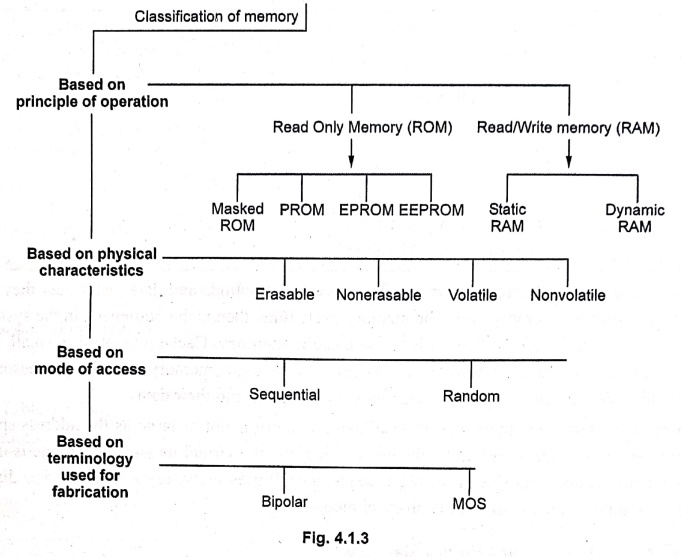
Fig. 4.1.3 shows the classification of memory.
•
Broadly semiconductor memories are classified as volatile memories and non ‒ Volatile
memories. volatile memories can retain their state as long as power is applied.
On the other hand, non‒volatile memories can hold data even if power is turned
off.
•
Read/Write Memories (RWMs) are those memories, which allows both read and write
operations. They are used in applications where data has to change
continuously. They are also used for temporary storage of data. ROM memories
allow only read operation. They are used to store monitor programs and
constants used in the program.
•
The volatile memories which can hold data as long as power is ON are called Static RAMS (SRAMS). Dynamic RAMs (DRAMs) stores the data as a charge on the
capacitor and they need refreshing of charge on the capacitor after every few
milliseconds to hold the data even if power is ON.
•
EPROM and EEPROM are erasable memories in which the stored data can be erased
and new data can be stored.
•
The semiconductor memories are also classified as Bipolar and MOS memories
depending upon the type of transistors used to construct the individual cell.
3. Classification of Secondary Memory
•
A primary memory is costly and has a limited size. This memory is mainly used
for storing the currently processing data.
•
Secondary storage is used to store data and instructions (programs) when they
are not being processed.
•
The devices those are used as secondary storage are non‒volatile and have a
larger storage capacity. Also, they are less expensive as compared to primary
storage devices.
•
However, they are slower in comparison. The examples are hard disks, floppies,
CD‒ROMs, magnetic tapes etc. This type of memory is also called secondary memory, auxiliary memory or
peripheral storage.
•
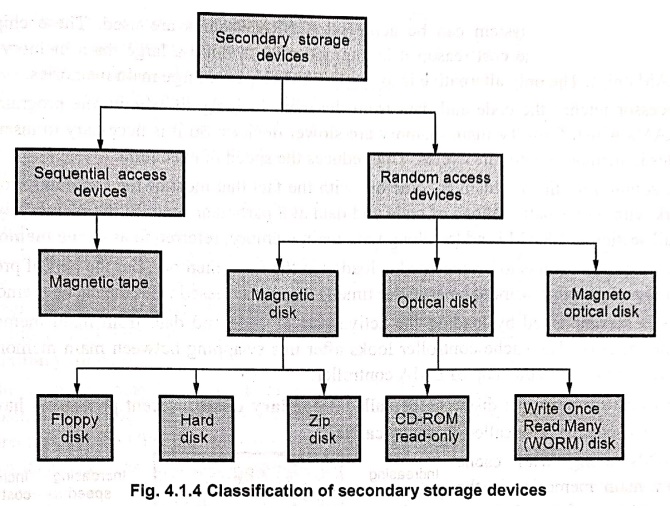
Fig. 4.1.4 shows the classification of secondary storage devices. They can be
categorized broadly according to their access types as sequential and random
(direct).
Review Questions
1. Define a memory
cell. Give an example.
2. Define a 'memory
location' and a 'cell'.
3. Write a short note
on semiconductor memories.
4. State various
characteristics of memory devices and explain in brief any two.
5. Distinguish between
volatile and non ‒ volatile memories.
6. Explain the key
characteristics of computer memory systems
7. Explain the various
characteristics of memory system.
8. Classify memories
on the basic of principle of operation, physical characteristics, mode of
access and fabrication technology.
9. Give the
classification of semiconductor memories.
10. Which memory is
called volatile? Why?
11. Explain static
memory.
12. Give the
classification of primary memory.
Computer Organization and Architecture: Chapter 4: Memory and IO : Tag: Computer : - Types of Memories
Computer Organization and Architecture: Chapter 4: Memory and IO
Under Subject
Computer Organization and Architecture
CW25201 3rd Semester IT department. | 2025 Regulation | 3rd Semester 2025 Regulation
Related Subjects
Discrete Mathematics
MA25C14 3rd Semester CSE,IT,CY,AIDS departments. | 2025 Regulation | 3rd Semester 2025 Regulation
Data Structures
CS25C08 3rd Semester CSE,IT,CY,AIDS departments. | 2025 Regulation | 3rd Semester 2025 Regulation
Computer Organization and Architecture
CW25201 3rd Semester IT department. | 2025 Regulation | 3rd Semester 2025 Regulation
Object Oriented Programming
CS25C07 3rd Semester IT department. | 2025 Regulation | 3rd Semester 2025 Regulation
Web Technologies
IT25301 3rd Semester IT department. | 2025 Regulation | 3rd Semester 2025 Regulation
English Communication Skills Laboratory I
EN25C03 3rd Semester all department. | 2025 Regulation | 3rd Semester 2025 Regulation
Skill Development Course I
3rd Semester all department. | 2025 Regulation | 3rd Semester 2025 Regulation