Computer Programming C: UNIT I: Introduction to C
C Programming: Decision Making, Switch Statements
1. Conditional and Control statements 2. The if statement 3. The if‒else statement 4. Nested if....else statement 5. The if....else Ladder 6. The switch statement
DECISION MAKING, SWITCH STATEMENTS
1. Conditional and Control
statements
2. The if statement
3. The if‒else statement
4. Nested if....else statement
5. The if....else Ladder
6. The switch statement
1. CONDITIONAL AND CONTROL STATEMENTS
A
piece of data is called logical, if it conveys the idea of true or false. In
real life, logical data are created in answer to a question that needs a yes or
no answer.
The
basic decision statements in computer are selection structure. The decision is
described to computer as a conditional statement that can be answered True or
False.
In
a program all the instructions are executed sequentially by default, when no
repetition of some calculations is necessary. In some situations we may have to
change the execution order of statements based on condition or to repeat a set
of statements until certain conditions are met. In such situations Conditional
and Control statements are very useful.
'C'
language provides four general categories of control structures.
i) Sequential structure,
in which instructions are executed in sequence.
Example:
i=i+1;
j= j+1;
The
above statements are executed one by one.
ii) Selection structure,
here the sequence of the instructions are determined by using the result of the
condition.
Example:
if(x>y)
i=i+1;
else
j = j+1;
If
the condition is true, then the statement i=i+1 will be executed otherwise it
executes j=j+1;
iii) Iteration structure,
in which statements are repeatedly executed. These forms program loops.
Example
for(i=1; i<=5; i++)
{
i = i+1;
}
Where
the statement i=i+1 will be executed 5 times and value of i will change from
1,2,3,4 and 5.
iv) Encapsulation structure,
in which the other compound structures are included.
Example :
We can
include an if statement in a for loop or a for in a if statement.
'C'
language provides all the standard control structure that are available in
programming languages. These structures are capable of processing any information.
'C'
language provides the following conditional (decision making) statements.
if statement
if....else statement
nested if....else statement
if....else Ladder
2. The if statement
The
if statement is a decision making statement. It is used to control the flow of
execution of the statements and also used to test logically whether the
condition is true or false. It is always used in conjunction with condition.
This statement is used when a question requires answer.
Syntax:
if(condition is true)
{
True statements;
}
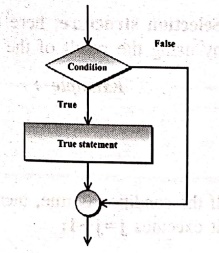
If
the condition is true, then the True
statements are executed. The "True
statements' may be a single statement or group of statements. If the
condition is false then the true statements are not executed, instead the
program skip past it. The condition is given by the relational operator like
==, !=, <=, >=, etc.
Example 1: Program to
illustrates the use of if statement.
/* Program to check whether the number is less than 25*/
#include <stdio.h>
main()
{
int i;/* Local
definition */
/* Statement */
printf("\nEnter
the number < 10....");
scanf("%d",
&i);
if(i<10)
printf("\nThe
entered number %d is < 10", i);
} /* main */
OUTPUT
Enter the number <
10....5
The entered number 5
is <10
EXPLANATION:
Get the value for variable i from input and check if it is lesser than 10 and
print message.
If
you want to execute multiple statements in the if statement, that statements must be blocked with in braces.
Example 2: Program to
interchange values between two variables.
#include <stdio.h>
#include <conio.h>
void main()
{
int m,n,a; /*
Local definitions */
printf("Enter
two numbers: ");
scanf("%d%d",&m,&n);
if(m>n) /* if
statement checks the condition */
{
a=m;
m=n;
n=a;
} /* if */
printf("The
interchanged values are: %d %d",m,n);
} /* main */
OUTPUT
Enter two numbers : 34
28
The interchanged
values are: 28 34
EXPLANATION:
The program reads values for m and n. If statement checks the condition m>n
or not. When condition is true the statement block interchanges the values of
two variables using third variable and prints the values.
3. The if‒else statement
It
is basically two way decision making statement and always used in conjunction
with condition. It is used to control the flow of execution and also used to
carry out the logical test and then pickup one of the two possible actions
depending on the logical test.
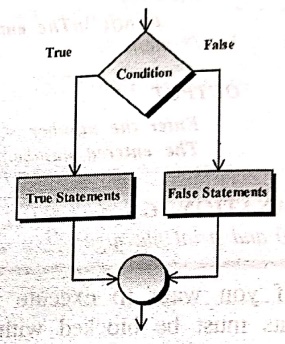
It
is used to execute some statements when the condition is true and execute some
other statements, when the condition is false.
Syntax:
if(condition)
{
True statements;
}
else
{
False statements;
}
If
there is only one statement in the if block (or) else block, then the braces
are optional. But if there is more than one statement, the braces are
compulsory.
Example 1: Program to
determine the given number is even or odd ?
/* Program to determine given number is even or odd */
#include <stdio.h>
#include <conio.h>
void main()
{
int num,rem; /*
Local definitions */
printf("Enter
your number: ");
scanf("%i",
&num);
rem=num % 2;
if(rem==0) /* if
statement checks the condition */
printf("The
entered number is even. ");
else
printf("The
entered number is odd.");
} /* main */
OUTPUT 1
Enter your number: 80
The entered number is
even.
OUTPUT 2
Enter your number: 59
The entered number is
odd.
EXPLANATION: The
program reads the integer variable num through scanf() function. The variable
num is modular divided by 2 then assigned remainder value to rem. If statement
checks the condition rem=0, when condition is true the program prints even
number otherwise prints odd number.
Example 2: Program to
find biggest among two numbers
/* To find biggest among
two numbers */
#include <stdio.h>
#include <conio.h>
void main()
{
int i,j,big; /*
Local definitions */
printf("Enter
two values: ");
scanf("%d
%d", &i, &j);
big = i;
if(big <j)
{
big = j;
} /* if */
printf("biggest
of two numbers is %d\n", big);
if(i < j)
{
big = j;
}
else
{
big =I;
} /* if‒else */
printf("biggest
of two numbers(using else) is %d\n", big);
getch();
} /* main */
OUTPUT:
Enter two values: 45
78
biggest of two numbers
is 78
biggest of two
numbers(using else) is 78
EXPLANATION:
This program is used to find the biggest in two numbers which are taken from
input using if..else statement.
4. Nested if....else statement
When
a series of if..else statements
occur in a program, we can write an entire if..else statement in another
if..else statement called nesting, and the statement is called nested if.
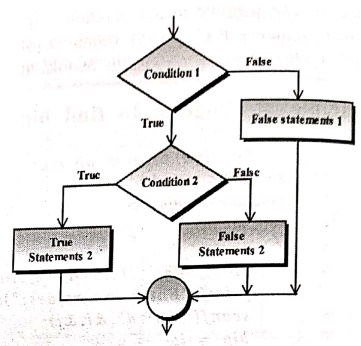
Syntax:
if(condition 1)
if(condition 2)
{
True statement2;
}
else
{
False statement2;
}
else
{
False statement 1;
}
5. The if....else Ladder
Nested
if statements can become quite complex. If there are more than three
alternatives and indentation is not consistent, it may be different for you to
determine the logical structure of the if statement. In situations, you can use
the nested if as the else if ladder.
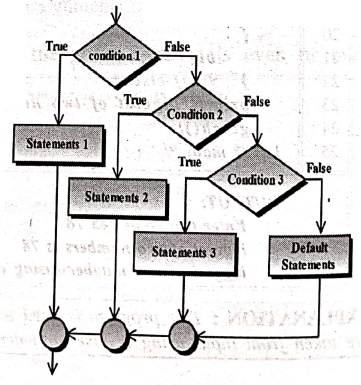
Syntax:
if (condition 1)
{
Statement 1;
}
else if (condition 2)
{
Statement 2;
}
else if (condition 3)
{
Statement 3;
}
else
{
default‒statements;
}
Example 1: Program to
demonstrate nested if..else statement.
/* Program using nested if..else statements */
#include <stdio.h>
main()
{
int n; /* Local
definition */
printf("\nEnter
a number...");
scanf("%d",
&n);
if(n= =15)
printf("\nPlay
Foot ball");
else
{
if(n= =10)
printf("Play
Cricket");
else
printf("don't
play");
} /* if*/
} /* main*/
OUTPUT
Enter a number...10
Play Cricket
EXPLANATION: Read
a number n from input, If the entered value is equal to 15 then print "Play football" else once again
check If the value of n is 10, then
print the statement "Play Cricket"
else print "don't play".
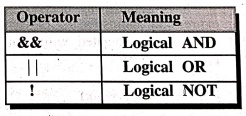
If
you want to test more than one condition in if statement, the logical operator
are used as specified below. These are used to combine the results of two or
more conditions.
Example 2: Program to
display the types of character using if‒els.
/* Program to display the types of character */
#include <stdio.h>
#include <conio.h>
void main()
{
char chr; /* Local
definitions */
/* Statements */
printf("Enter a
single character: ");
scanf("%c",
&chr);
/* nested if
statement is used to checks the conditios */
if((chr>='a'
&& chr<='z') || (chr >= 'A' && chr <= 'Z'))
printf("Entered
character is an alphabetic. \n");
else
if(chr>= '0'
&& chr <= '9')
printf("Entered
character is an digit. \n");
else
printf("Entered character is an special character. \n");
} /* main"/
OUTPUT 1:
Enter a single
character: M
Entered character is
an alphabetic.
OUTPUT 2:
Enter a single
character: 5
Entered character is
an digit.
OUTPUT 3:
Enter a single
character : &
Entered character is
an special character.
EXPLANATION:
The above program reads the character from the keyboard. The character chr is
tested while the given character is alphabet, or digits or special characters
or not using nested if‒else statement according to the condition the result is
printed.
6. THE SWITCH STATEMENT
The
switch statement is used to pickup or execute a particular group of statements
from several available group of statements. It allows us to make a decision
from the number of choices.
It
is a multiway decision statement, it tests the value of given variable or
expression against a list of case values and when a match is found, a block of
statements associated with that case is executed.
Syntax:
switch(expression)
{
case constant 1:
block1;
break;
case constant 2:
block2;
break;
.
.
default:
default
block;
break;
}
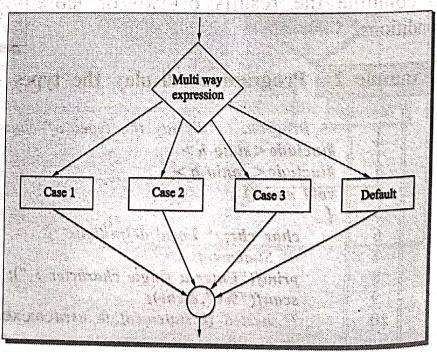
The
expression following the keyword switch is any 'C' expression that must yield
an integer value. It must be an integer constant like 1,2,3 or an expression
that evaluates to an integer. The keyword case is followed by an integer or a
character constant, each constant in each case must be different from all the
other.
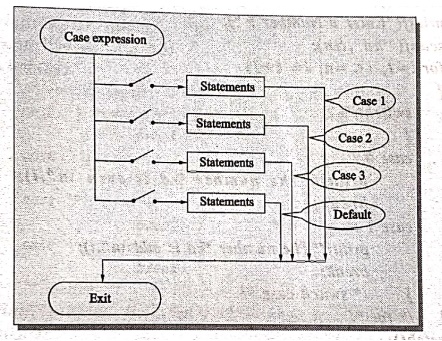
First
the integer expression following the keyword switch is evaluated. The value it gives is searched against the
constant values that follow the case statements. When a match is found, the program
executes the statements following the case. If no match is found with any of
the case statements, then the statements following the default are executed.
1. Rules for writing switch() statement
a)
The expression in switch statement must be an integer value or a character
constant.
b)
No real numbers are used in an expression.
c)
Each case block and default blocks must be terminated with break statements.
d)
The default is optional and can be placed anywhere, but usually placed at end.
f)
The case keyword must terminate with colon (:).
f)
No two case constants are identical.
g)
The case labels must be constants.
h)
The switch can be nested.
i)
The value of switch is compared with the case constant expression in the order
specified, i.e., from top to bottom.
j)
In the absence of break statement, all statements that are followed by matched
cases are executed.
Example 1: Program to
print the given number is odd/even using switch case statement.
/* Prints the given number is odd/even */
#include<stdio.h>
#include <conio.h>
void main()
{
int i,n; /* Local
definitions */
/*Statements*/
clrscr();
printf("Enter
a Number: ");
scanf("%d",
&n);
for(i=1; i<=n;
i= i+1)
{
switch(i%2)
{
case 0:
printf("The
number %d is even \n", i);
break;
case 1:
printf("The
number %d is odd \n",i);
break;
} /* switch
case */
} /* for */
getch();
} /* main */
OUTPUT:
Enter a Number: 7
The number 1 is odd
The number 2 is even
The number 3 is odd
The number 4 is even
The number 5 is odd
The number 6 is even
The number 7 is odd
EXPLANATION:
This program is used to find out whether the given number is even or odd and it
checks for the n number. If the number is divided by 2 then it is even, if the
number is not divided by 2 then it is odd number.
Example 2: Program to
use the computer as calculator. The user input a code +,‒,,/ and values that
are to be computed.
/* Program to use the computer as calculator */
#include <stdio.h>
main()
{
int a,b,c=0;
char op;
printf("CALCULATION
CODE");
printf("\n+ADD\n‒SUB\n*MUL\n/DIV\n");
printf("Enter
Code.....");
scanf("%c",&op);
printf("Enter
values.....");
scanf("%d
%d",&a, &b);
switch(op)
{ /* switch open
*/
case
'+':c=a+b;
break;
case '‒':
c=a‒b;
break;
case '*':
c=a*b;
break;
case '/':
c=a/b;
break;
} /* switch */
printf("\nResult
is.....%d", c);
getch();
} /* main */
OUTPUT
CALCULATION CODE
+ADD
‒SUB
*MUL
/DIV
Enter Code.....+
Enter values.....20 10
Result is.....30
EXPLANATION:
In the program the switch statement consists of four options. The option is
entered according to user's choice. The four options are addition, subtraction,
multiplication and division. Each option contains several operations. Thus
statement is executed according to selected choice. In the program the
character variable op reads the character entered by the users. According to
the entered character, the switch statement is executed and prints the output.
Computer Programming C: UNIT I: Introduction to C : Tag: Computer Science : - C Programming: Decision Making, Switch Statements
Computer Programming C: UNIT I: Introduction to C
Under Subject
Computer Programming C
CS25C01 1st Semester | 2025 Regulation | 1st Semester 2025 Regulation
Related Subjects

English Essentials I
EN25C01 1st Semester | 2025 Regulation | 1st Semester 2025 Regulation

தமிழர் மரபு - Heritage of Tamils
UC25H01 1st Semester | 2025 Regulation | 1st Semester 2025 Regulation
Applied Calculus
MA25C01 Maths 1 M1 - 1st Semester | 2025 Regulation | 1st Semester 2025 Regulation

Applied Physics I
PH25C01 1st Semester | 2025 Regulation | 1st Semester 2025 Regulation

Applied Chemistry I
CY25C01 1st Semester | 2025 Regulation | 1st Semester 2025 Regulation
Makerspace
ME25C04 1st Semester | 2025 Regulation | 1st Semester 2025 Regulation
Computer Programming C
CS25C01 1st Semester | 2025 Regulation | 1st Semester 2025 Regulation
Computer Programming Python
CS25C02 1st Semester | 2025 Regulation | 1st Semester 2025 Regulation

Fundamentals of Electrical and Electronics Engineering
EE25C03 1st Semester EEE Depart | 2025 Regulation | 1st Semester 2025 Regulation

Introduction to Mechanical Engineering
ME25C03 1st Semester Mechanical Dept | 2025 Regulation | 1st Semester 2025 Regulation

Introduction to Civil Engineering
CE25C01 1st Semester Civil, Agri Departments | 2025 Regulation | 1st Semester 2025 Regulation
Essentials of Computing
CS25C03 1st Semester - AIDS, CSE, CSE(CY), IT Department | 2025 Regulation | 1st Semester 2025 Regulation

Applied Physics I Laboratory
PH25C01 1st Semester practical Laboratory Manual | 2025 Regulation | 1st Semester Laboratory 2025 Regulation

Applied Chemistry I Laboratory
CY25C01 1st Semester practical Laboratory Manual | 2025 Regulation | 1st Semester Laboratory 2025 Regulation

Computer Programming C Laboratory
CS25C01 1st Semester EEE, ECE, CSE, CSE(CY), AIDS, IT practical Laboratory Manual | 2025 Regulation | 1st Semester Laboratory 2025 Regulation

Computer Programming Python Laboratory
CS25C02 1st Semester practical Laboratory Manual | 2025 Regulation | 1st Semester Laboratory 2025 Regulation
Engineering Drawing
ME25C01 EEE, Mech, Agri, EEE Depts | 2025 Regulation | 2nd Semester 2025 Regulation

Basic Electronics and Electrical Engineering
EE25C04 1st Semester ECE Dept | 2025 Regulation | 1st Semester 2025 Regulation
Essentials of Computing - Laboratory
CS25C03 1st Semester AIDS, CSE, CSE(CY), IT Depts | practical Laboratory Manual | 2025 Regulation | 1st Semester 2025 Regulation