Computer Programming C: UNIT I: Introduction to C
Fundamentals of Computing
C Programming
1. Introduction 2. Computational Problem 3. Problem Solving Process 4. Identification of Computational Problems 5. Problem analysis charts (PACS)
IDENTIFICATION OF COMPUTATIONAL
PROBLEMS
FUNDAMENTALS OF COMPUTING
1. Introduction
2. Computational Problem
2.1 Types of computational problems
3 Problem Solving Process
3.1 Problem Analysis
3.2 Program Design ‒ Algorithm, Flowchart and Pseudocode
3.3 Coding
3.4 Compilation and Execution
3.5 Debugging and Testing
3.6 Program Documentation
4. Identification of Computational Problems
4.1 Problem Solving with Computers
5. Problem analysis charts (PACS)
5.1 Components of a Problem Analysis Chart
5.2 When to use Problem Analysis Charts
5.3 Creating a Problem Analysis Chart
5.4 Relationship with other problem‒solving tools
1. INTRODUCTION
In computer science, computational problem is a problem that a computer might be able to solve or a question that a computer may be able to answer.
A
computational problem can be viewed as a set of instances or cases together
with a, possibly empty, set of solutions for every instance/case.
What is computation?:
It is any type of calculation that includes both arithmetical and non‒arithmetical
steps and follows a well‒defined model Eg:
Algorithm.
The
first step in the problem solving and decision making process is to identify
and define the problem. Therefore, before a program is written for solving a
problem, it is important to define the problem clearly. For most software
projects, systems analysts approach the user requirements and define the
problem that a system aims to solve. They typically look at the following
issues:
•
What is the problem?
•
What is the input required for supporting the solution process?
•
What is the expected output of the solution?
•
How do people solve the problem currently?
•
Can the problem or part of the problem be more effectively solved by a software
solution?
2. COMPUTATIONAL PROBLEM
In computer science, a computational problem
is a mathematical object representing a collection of questions that computers
might be able to solve. For example, the problem of factorial "Given a
positive integer n, find a factorial of n.” is a computational problem.
Computational
problems are one of the main objects of study in computer science. The field of
algorithms studies methods of solving computational problems efficiently.
Types of computational problems
A
Decision Problem is a computational
problem where the answer for every instance is either yes or no.
In
a Search Problem, the answers can be
arbitrary strings.
A
Counting Problem asks for the number
of solutions to a given search problem.
An
Optimization Problem asks for finding
a "best possible" solution among the set of all possible solutions to
a search problem.
In
a Function Problem a single output
(of a total function) is expected for every input, but the output is more
complex than that of a decision problem, that is, it isn't just "yes"
or "no".
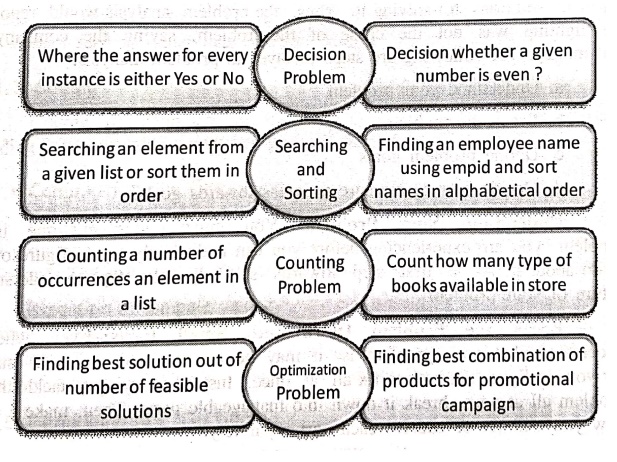
Decision Problem :
Where the answer for every instance is either Yes or No
Decision whether a given number is even ?
Searching and Sorting:
Searching an element from a given list or sort them in order
Finding an employee name using empid and sort names in alphabetical order
Counting Problem:
Counting a number of ban occurrences an element in a list
Count how many type of books available in store
Optimization Problem:
Finding best solution out of number of feasible solutions
Finding best combination of products for promotional campaign
3. PROBLEM SOLVING PROCESS
A
computer cannot solve a problem on its own. One has to provide step by step
solutions of the problem to the computer. In fact, the task of problem solving is
not that of the computer.
It
is the programmer who has to write down the solution to the problem in terms of
simple operations which the computer can understand and execute.
The
following are six steps that must be followed to solve a problem using computer
1.
Problem Analysis
2.
Program Design ‒ Algorithm, Flowchart and Pseudocode
3.
Coding
4.
Compilation and Execution
5.
Debugging and Testing
6.
Program Documentation
1. Problem Analysis
A
Problem Analysis investigates a situation/problem in order to allow the
researcher to understand more fully the problem, in order to recommend
practical solutions for solving it. Thus, the problem analysis would report
that the lighting was not the cause of the problem, saving the company time and
money. The following are steps involves in problem analysis.
a.
Understand your problem
b.
Break the problem
c.
Define problem goals
d.
Decide how to measure progress towards goals.
Understand Your Problem:
You must understand the issue or problem you are experiencing before you can
realistically try to figure out what to do about it. As a first step towards
self‒help, take steps to understand the nature of your problem.
Break the Problem Down Into Small
Parts: Even when you understand what your problem is, it
may be too big and too well established for you to figure out how to fix all at
once. Instead of trying to tackle the entire problem all at once, break it down
into manageable parts. Then, make a plan for how you will fix or address each part
separately.
Define Problem Goals:
For each of your small manageable problem parts, figure out what your goals
are; where you want to end up at the end of the self‒help process for each part
of your problem. If you don't know what you are working towards, you will never
know when you've arrived there.
Decide How To Measure Progress
Towards Goals: Find ways to measure progress you make
towards accomplishing each of your problem goals, so that you will always know:
i.
What your problem starting point looked like.
ii.
How far you've come towards meeting your goals at any given moment.
iii.
How you wil know when when you have met yours goals and are done.
2. Program Design ‒ Algorithm, Flowchart and Pseudocode
Algorithm:
A set of sequential steps usually written in Ordinary Language to solve a given
problem is called Algorithm.
A
flowchart is a type of diagram that
represents a workflow or process. A flowchart can also be defined as a
diagrammatic representation of an algorithm, a step‒by‒step approach to solving
a task.
In
computer science, pseudocode is a
plain language description of the steps in an algorithm or another system.
Pseudocode often uses structural conventions of a normal programming language,
but is intended for human reading rather than machine reading.
3. Coding
Coding
or computer programming is the process of designing and building an executable
computer program to perform a specific task.
4. Compilation and Execution
Compilation
is the process the computer takes to convert a high‒ level programming language
into a machine language that the computer can understand. The software which
performs this conversion is called a compiler.
Execution
in computer and software engineering is the process by which a computer reads
and acts on the instructions of a computer program. Each instruction of a
program is a description of a particular action which must be carried out, in
order for a specific problem to be solved.
5. Debugging and Testing
In
computer programming and software development, debugging is the process of finding and resolving bugs within
computer programs, software, or systems. Debugging tactics can involve
interactive debugging, control flow analysis, unit testing, integration
testing, log file analysis, monitoring at the application or system level,
memory dumps, and profiling. Many programming languages and software
development tools also offer programs to aid in debugging, known as debuggers.
Software
testing is an investigation conducted to provide stakeholders with information
about the quality of the software product or service under test. Test
techniques include the process of executing a program or application with the
intent of finding failures, and verifying that the software product is fit for
use.
6. Program Documentation
Software
documentation is written text or illustration that accompanies computer
software or is embedded in the source code. The documentation either explains
how the software operates or how to use it, or may mean different things to
people in different roles.saheb od ode de in
4. IDENTIFICATION OF COMPUTATIONAL PROBLEMS
Problem:
Problem is a thing that requires logical thought and /or mathematics
Problem Solving:
Problem solving is the systematic approach to define the problem and creating
number of solutions. The problem solving process starts with the problem
specifications and ends with a Correct program.
Problem Solving with Computers
•
Computers are built to solve problems with algorithmic solutions, which are
often difficult or very time consuming when input is large.
•
Solving a complicated calculus problem or alphabetizing 10,000 names is an easy
task for the computer.
•
So the basis for solving any problem through computers is by developing an
algorithm.
•
Field of computers that deals with heuristic types of problems is called
Artificial Intelligence (AI)
•
Artificial intelligence enables a computer to do things like human by building
its own knowledge bank
•
As a result, the computer's problem‒solving abilities are similar to those of a
human being.
•
Artificial intelligence is an expanding computer field, especially with the
increased use of Robotics.
5. PROBLEM ANALYSIS CHARTS (PACS)
Problem
analysus charts are structured visual tools that help in breaking down complex
problems into manageable components to better understand, analyze, and address
them. They are often used as an initial step in problem‒solving, particularly
in the context of designing algorithms and flowcharts, to organize information
and develop a structured approach to a solution.
1. Components of a Problem Analysis Chart
A
typical Problem Analysis Chart might involve these key sections:
•
Given Data (Inputs): Information or data provided or available to address the
problem.
•
Required Results (Outputs): The desired outcome or solution expected after
processing the given data.
•
Processing Required: The steps, calculations, or logic needed to transform the
inputs into the desired outputs.
•
Solution Alternatives: A list of different ideas or approaches that could be
used to solve the problem.
2. When to use Problem Analysis Charts
Problem
Analysis Charts are particularly useful in various situations:
•
Complex Problems: Breaking down multifaceted issues with multiple steps or
variables into manageable parts.
•
Team Collaboration: Providing a shared understanding of a problem and potential
solutions among team members.
•
Analyzing Processes: Mapping out a process to understand its intricacies and
identify areas for improvement or bottlenecks.
•
Decision Making: Visualizing various paths or decisions and their potential
outcomes to aid in informed choices.
•
Identifying Root Causes: Facilitating a systematic approach to identify the
underlying causes of a problem.
3. Creating a Problem Analysis Chart
Here's
a general approach to creating a problem analyses charts.
•
Define the Problem: Start by clearly and concisely articulating the problem or
task you want to solve.
•
Identify Inputs and Outputs: Determine the necessary inputs (data, information,
resources) and desired outputs or outcomes.
Computer Programming C: UNIT I: Introduction to C : Tag: : C Programming - Fundamentals of Computing
Computer Programming C: UNIT I: Introduction to C
Under Subject
Computer Programming C
CS25C01 1st Semester | 2025 Regulation | 1st Semester 2025 Regulation
Related Subjects

English Essentials I
EN25C01 1st Semester | 2025 Regulation | 1st Semester 2025 Regulation

தமிழர் மரபு - Heritage of Tamils
UC25H01 1st Semester | 2025 Regulation | 1st Semester 2025 Regulation
Applied Calculus
MA25C01 Maths 1 M1 - 1st Semester | 2025 Regulation | 1st Semester 2025 Regulation
Applied Physics I
PH25C01 1st Semester | 2025 Regulation | 1st Semester 2025 Regulation

Applied Chemistry I
CY25C01 1st Semester | 2025 Regulation | 1st Semester 2025 Regulation
Makerspace
ME25C04 1st Semester | 2025 Regulation | 1st Semester 2025 Regulation
Computer Programming C
CS25C01 1st Semester | 2025 Regulation | 1st Semester 2025 Regulation
Computer Programming Python
CS25C02 1st Semester | 2025 Regulation | 1st Semester 2025 Regulation
Fundamentals of Electrical and Electronics Engineering
EE25C03 1st Semester EEE Depart | 2025 Regulation | 1st Semester 2025 Regulation
Introduction to Mechanical Engineering
ME25C03 1st Semester Mechanical Dept | 2025 Regulation | 1st Semester 2025 Regulation

Introduction to Civil Engineering
CE25C01 1st Semester Civil, Agri Departments | 2025 Regulation | 1st Semester 2025 Regulation
Essentials of Computing
CS25C03 1st Semester - AIDS, CSE, CSE(CY), IT Department | 2025 Regulation | 1st Semester 2025 Regulation

Applied Physics I Laboratory
PH25C01 1st Semester practical Laboratory Manual | 2025 Regulation | 1st Semester Laboratory 2025 Regulation

Applied Chemistry I Laboratory
CY25C01 1st Semester practical Laboratory Manual | 2025 Regulation | 1st Semester Laboratory 2025 Regulation

Computer Programming C Laboratory
CS25C01 1st Semester EEE, ECE, CSE, CSE(CY), AIDS, IT practical Laboratory Manual | 2025 Regulation | 1st Semester Laboratory 2025 Regulation

Computer Programming Python Laboratory
CS25C02 1st Semester practical Laboratory Manual | 2025 Regulation | 1st Semester Laboratory 2025 Regulation
Engineering Drawing
ME25C01 EEE, Mech, Agri, EEE Depts | 2025 Regulation | 2nd Semester 2025 Regulation

Basic Electronics and Electrical Engineering
EE25C04 1st Semester ECE Dept | 2025 Regulation | 1st Semester 2025 Regulation
Essentials of Computing - Laboratory
CS25C03 1st Semester AIDS, CSE, CSE(CY), IT Depts | practical Laboratory Manual | 2025 Regulation | 1st Semester 2025 Regulation