Computer Programming C: UNIT I: Introduction to C
Types of Operators in 'C' Programming
Operators with Syntax, Description, Example
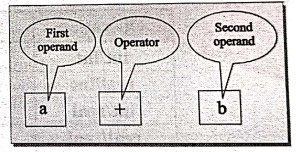
An operator is a symbol that specifies an operation to be performed on the operands. The data items that operators acts upon are called operands. Some operators require two operands called binary operators, while other acts upon only one operand called unary operator.
OPERATORS IN 'C'
1. OPERATORS
An
operator is a symbol that specifies an operation to be performed on the
operands. The data items that operators acts upon are called operands. Some
operators require two operands called binary operators, while other acts upon
only one operand called unary operator.
C
programming language provides several operators to perform different kinds of
operations. These operators generally work on many types of variables or
constants, though some are restricted to work on certain types.
The
symbols which are used to perform logical and mathematical operations in a C
program are called C operators.
These
C operators join individual constants and variables to form expressions.
Operators, functions, constants and variables are combined together to form
expressions.
Example:
a+b; Where '+' is Operator and 'a', 'b' are the Operands.
Consider
the expression a + b * 2. where, +, * are operators, a, b variables, 2 is
constant and a + b * 5 is an expression.
The
operators tell the computer to perform the specified operation on operands and
these are used in programs to manipulate data and variables.
2. TYPES OF OPERATORS
'C'
provides a rich set of operators, depending upon their operation. They are
classified as;
a) Arithmetic operators.
b) Relational operators.
c) Logical operators.
d) Assignment operators.
e) Increment and decrement operators.
f) Conditional operators (Ternary operator).
g) Bitwise operators.
h) Special operators.
1. Arithmetic Operators
'C'
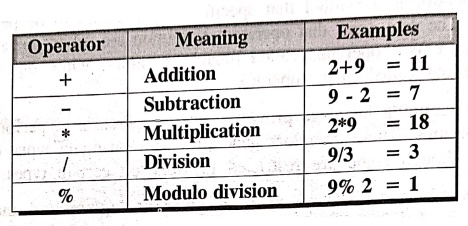
allows us to carryout basic arithmetic operations like addition, subtraction,
multiplication, and division. The following table shows the Arithmetic Operators and their meaning.
All
the above operators are called 'Binary' operators as they act upon two operands
at a time.
NOTE: The Modulo
division gives the remainder of an integer division.
The
following table shows how the division operator operates on various data types.
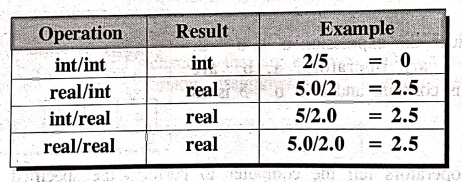
In
the first example the integer division truncates the fractional part.
Arithmetic operators can be classified as
i) Unary arithmetic -
It requires only one operand.
Example:
+x, ‒y
ii) Binary arithmetic
- It requires two operands.
Example:
a+b, a‒b, a/b, a*b, a%b
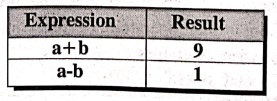
iii) Integer arithmetic
- It requires both operands are integer values for arithmetic operation.
Example:
a=5, b=4
iv) Floating Point arithmetic -
It requires both operands are float type for arithmetic operation.
Example:a=6.5,
b=3.5
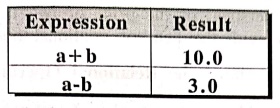
Example: Program to
find out all arithmetic operation on two given values.
/*Program to find all arithmetic operation on two given values*/
#include <stdio.h>
#include <conio.h>
void main()
{
/* Local definitions
*/
int a,b,c,d;
int sum,sub,mul,rem;
float div;
/* Statements */
printf("ENTER
VALUES OF b, c, d: ");
scanf("%d %d
%d", &b, &c, &d);
sum b+c; /* Addition
operation */
sub = b‒c; /*
Subtract operation */
mul = b*c; /*
Multiplication operation */
div = b/c; /
*Division operation */
rem = b%d; /* Modulo
division operation */
a = b/c * d; /*
Division and multiplication */
printf("\n sum =
%d, sub = %d, mul = %d , div = %f", sum, sub, mul,div);
printf("\n
Remainder of division of b & d is %d", rem);
printf("\n a
%d",a);
} /* main */
OUTPUT
ENTER VALUES OF b, c,
d : 2 6 45
sum = 8, sub = ‒4, mul
= 12, div = 0.000000
Remainder of division
of b & d is 2
a = 0
EXPLANATION:
This program performs all the arithmetic operations such as Addition,
subtraction, division, multiplication and modulo division on two operands which
are inputted by the user.
2. Relational Operators
Relational
operators are used to compare two or more operands. Operands may be variables,
constants or expressions. For example, we may compare the age of two persons,
or the price of two items and so on. These comparisons can be done with the
help of relational operators.
The
following table shows the Relational
Operators.
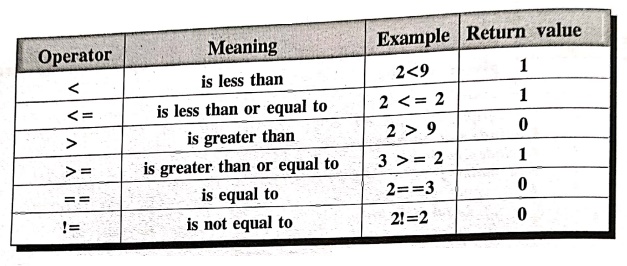
Syntax:
AE1
relational operator AE2
Description:
AEI &
AE2 are constants or an expression variables.
Example:
9>2
yields True, which is equal to 1.
When
arithmetic expressions are used on either side of a relational operator, the
arithmetic expression will be evaluated first and then the result compared.
Suppose
the 'a', 'b' and 'c' are integer variables, whose values are 1,2,3 respectively.
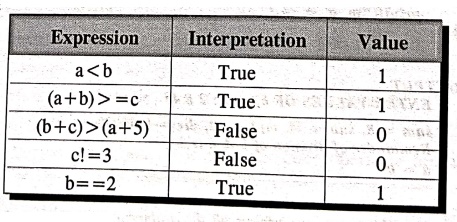
The
value of relational expression is either one or zero. Relational operators are
used in decision making process. They are generally used in conditional and
control statements.
Example: Program to
use relational operators and display their values.
/* Program to use various relational operators
#include <stdio.h>
#include <conio.h>
void main()
{
/* Statements "/
printf("\nCondition:
Return values \n");
printf("\n5!=5
: %5d",5!=5); /* != is assignment operator */
printf("\n5==5:
%5d",5==5); /* == is assignment operator */
printf("\n5>=50:
%5d",5>=5); /* >= is assignment operator */
printf("\n5<=50: %5d",5<=50);
/* <= is assignment operator*/
printf("\n5!=3
: %5d",5!=3);
} /* main */
OUTPUT
Condition : Return
values
5!=5 : 0
5==5 : 1
5>=5 : 1
5<=50: 1
5!=3 : 1
EXPLANATION:
In this example, the first condition is false and the remaining conditions are
true. Hence, the return value for the first statement is 0 and the return value
for all the remaining statements are 1.
3. Logical Operators
Logical
operators are used to combine the results of two or more conditions. 'C' has
the following logical operators.
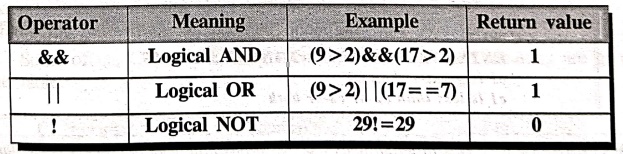
&&
This
operator is usually used in situations, where a set of statements are to be
executed, if two or more expressions are true.
Example:
(expl)&&(exp2)
'| |':
This
is used in situation, if either of them (one at least) is true from two or more
conditions, then the set of statements are executed.
Example:
(exp1)||(exp2)
!
This
operator reverses the value of the expression it operates on. i.e., It makes a
true expression false and false expression true.
Example:
!(exp1)
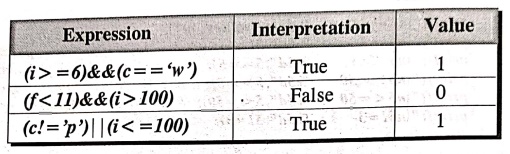
'i'
is an integer variable, whose value is 7.
'f ' is a float variable, whose value is
5.5.
'c'
is a character variable, that represents a character 'w'.
Example: Program to
demonstrate logical operators.
*Program on demonstration of logical operator */
#include <stdio.h>
#include <conio.h>
void main()
{
int c1, c2, c3; /*
Local definitions */
/* Statements */
printf("ENTER
VALUES OF c1, c2 AND c3: ");
scanf("%d %d
%d", &c1, &c2, &c3);
if((cl <
c2)&&(c1<c3)) /* && is a logical operator */
printf(“\n c1 is
less than c2 and c3");
if (!(c1< c2))
printf("\n cl is greater than
c2");
if ((c1 <
c2)||(c1 < c3)) /* || is a logical operator */
printf("\n c1
is less than c2 or c3 or both");
} /* main *
OUTPUT
ENTER VALUES OF c1, c2
AND c3: 45 32 98
cl is greater than c2
cl is less than c2 or
c3 or both
EXPLANATION:
This program finds out and prints differentiation between the three given input
values, i.e., which value is lesser than which and which is greater than which
using logical operators && and !.
4. Assignment Operator
Assignment
operators are used to assign a value or an expression or a value of a variable
to another variable.
Syntax:
variable
= expression (or) value
Description:
It is any
valid 'c' variable, assigned value can be anything.
Example:
x=10;
x=a+b;
x=y;
Example: Program to
demonstrate assignment operator.
/* Demonstration of assignment operator */
#include <stdio.h>
#include <conio.h>
void main()
{
int i,j,k; /*
Local definitions */
k = (i = 4, j =
5); /* is a assignment operator */
printf("k =
%d",k);
} /* main */
OUTPUT
k = 5
EXPLANATION:
This program prints the value of variable that it contains but that variable in
terms assigned by two assignment variables. Such as k=(i=4, j=5) means where
first 'i' value is assigned to 'k', then 'j' value assigned and replaced the
value of 'i', so the latest assignment value only contains the variable 'k'.
i)
Compound Assignment
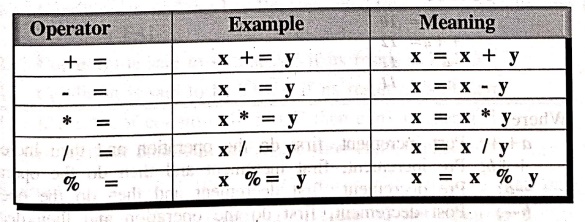
Apart
from assignment operator (=), 'C' provides compound assignment operators to
assign a value to a variable in order to assign a new value to a variable after
performing a specified operation.
Some
of the Compound Assignment operators and their meaning are given in the table.
5. Increment and Decrement Operators (Unary Operators)
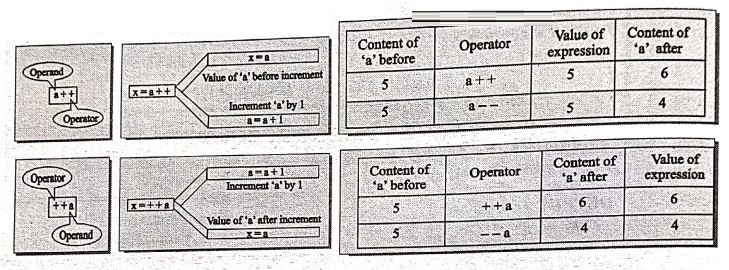
'C'
has two way useful operators not generally found in other languages, these are
the increment (++) and decrement (‒‒) operators. The '++' adds one to the
variables and '‒‒' subtracts one from the variable. These operators are called
unary operators. Because they acts upon only one variable.
++x:
Pre increment
‒
‒x: Pre decrement
x++
Post increment
x‒
‒ : Post decrement
Example: Program
using Increment and Decrement operators.
*Program using increment and decrement operators */
#include <stdio.h>
main ()
{
int a=10; /* Local
definition */
/* Statements */
printf("a++ =
%d\n", a++); /* ++ is a post increment */
printf("++b =
%d\n", ++b); /* ++ is a
pre‒increment*/
printf("‒ ‒a =
%d\n", ‒ ‒a); /* ‒ ‒ is a pre‒decrement */
printf("b‒ ‒ =
%d\n", b‒ ‒); /* ‒ ‒ is a post‒decrement */
} /* main */
OUTPUT
a++= 10
++a= 12
‒ ‒a = 11
a ‒ ‒ = 11
Where
a++;
Post increment, first do the operation and then increment.
++b;
Pre increment, first increment and then do the operation.
‒
‒a; Pre decrement, first decrement and then do the operation.
b‒
‒; Post decrement, first do the operation and then decrement.
6. Conditional Operator (or) Ternary Operator
Conditional
operator itself checks the condition and executes the statement depending on
the condition.
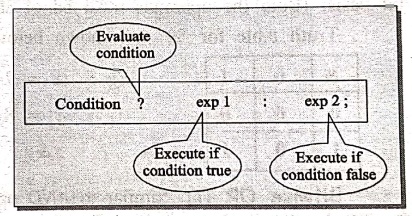
Syntax:
condition?expl:exp2;
Description:
The '?: '
operator acts as a ternary operator, it first evaluates the condition, if it is
true then the 'expl' is evaluated, if the condition is false then the 'exp2' is
evaluated.
Example:
main()
{
int a=5,b=3, big;
big=a>b?a:b:
printf("Big is... %d", big);
}
OUTPUT
Big is...5
In this case, it checks the condition 'a>b' if it is true, then the value of 'a' is stored in 'big' otherwise the value of 'b' is stored in 'big'.
The
conditional operator is also known as ternary operator, because it takes three
arguments, the conditional operator evaluates an expression returning a value
if that expression is true and different one if the expression is evaluated as
false.
Meaning of syntax
1.
Condition is nothing but Boolean condition, ie., it results into either TRUE or
FALSE.
2.
Condition is said to be FALSE if its result is ZERO.
3.
Condition is said to be TRUE if its result is Non‒Zero.
4.
If results of condition is TRUE then exp1 is executed.
5.
If result of condition is FALSE then exp2 is executed.
Examples:
13==8? 100: 200 // returns 200, since 13 not equal to 8.
13!=8 ? 100 : 200 // returns 100, since 13 not equal to 8.
13>8 ? x : y // returns the value of x, since 13 is greater
than 8.
7. Bitwise Operators
Bitwise
operators are used to manipulate the data at bit level. It operates on integers
only. It may not be applied to float or real. The operators and its meaning are
given below.
Meaning
&
- Bitwise AND
|
- Bitwise OR
^
- Bitwise XOR
<<
- Shift left
>>
- Shift right
~
- One's complement
Bitwise AND (&):
This operator is represented as '&' and operates on two operands of integer
type.
While
operating upon these two operands they are compared on a bit by bit basis.
(Both the operands must be of same type i.e. int).
Truth
table for '&' is shown below
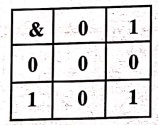
Eg:
x = 7 = 0000 0111
y = 8 = 0000 1000
x&y = 0000 0000
Bitwise OR (|):
Similar to AND operator in all aspects, the truth table for Bitwise OR is shown
below. But this operator gives if either of the operand bit is '1' then '1'
then result is '1' or both operands are 1's then also given '1'.
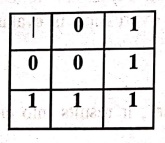
Eg
:
x = 7 = 0000 0111
y = 8 = 0000 1000
x|y = = 0000 1111
Bitwise Exclusive OR
(^): Similar to AND operator in all aspects but integer
gives if either of the operand bit is high(1) then it gives high(1) result. If
both operand bits are same then it gives low(0) result.
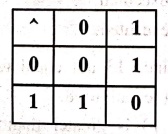
Eg:
x = 13 = 0000 1101
y = 8 = 0000 1000
x^y = 0000 0101
For
all the above operators, in all possible combinations of bits as shown below.
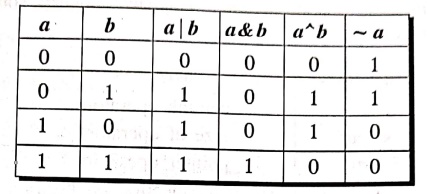
Example: Program to
demonstrate bitwise operators.
/* Program to demonstrate bitwise operator */
#include <stdio.h>
#include<conio.h>
void main()
{
char c1, c2, c3; /* Local definitions */
/* Statements */
clrscr();
printf("ENTER VAULES OF c1 and c2 : ");
scanf("%c, %c", &c1, &c2);
c3 = c1 & c2; /* & is a bitwise AND */
printf("\n Bitwise AND i.e. cl & c2 = %c",c3);
c3 = c1 | c2; /* | is a bitwise OR */
printf("\n Bitwise OR i.e. c1 | c2 = %c", c3);
c3 = cl ^ c2; /* ^ is a bitwise XOR */
printf("\n Bitwise XOR i.e. cl^ c2 = %c", c3);
c3 = ~cl; /*~ is a one's complement */
printf("\n ones compliment of c1 = %c", c3);
c3 = cl<<2; /* << is a shift left */
printf("\n Left shift by 2 bits c1 << 2 =
%c",c3);
c3 = cl>>2; /* >> is a shift right */
printf("\n Right shift by 2 bits c1 >> 2 =%c",c3);
getch();
} /* main *
OUTPUT:
ENTER VAULES OF cl and
c2: 23 67
Bitwise AND i.e. cl
& c2 = ?
Bitwise OR i.e. cl |
c2 = -
Bitwise XOR i.e. c1^c2
= t
ones compliment of cl
= -
Left shift by 2 bits
cl << 2 = +
Right shift by 2 bits
cl >> 2 = ?
EXPLANATION: This
program prints the result of bitwise operations between two operands cl and c2,
which are inputting by the user.
8. The Special Operator
Along
with these operators, the C language supports some of the special operators
given below.
Meaning
, : comma
operators
sizeof : size
of operators
& and * :pointer
operators
• and --> : Member
selection operators
The
pointer and member selection operators are discussed in the pointers concept.
(a) Comma operator(,):
Usually, the comma operator is used to separate the statement elements such as
variables, constants or expression etc, and this operator is used to link the
related expressions together. Such expressions can be evaluated from left to
right and the value of right most expressions is the value of combined expression.
Example:
val =
(a=3, b=9, c=77, a+c);
Where,
First
assigns the value 3 to a
Then
assigns the value 9 to b
Then
assigns the value 77 to c
Finally
assigns 80 to the val.
(b) The sizeof() operator:
The sizeof() is a unary operator, that returns the length in bytes of the
specified variable, and it is very useful to find the bytes occupied by the
specified variable in the memory.
Syntax:
sizeof(var);
Description:
var is
the variable for which to find the size.
Example:
main()
{
int a;
printf("Size of
variable a is….%d", sizeof(a));
}
OUTPUT
Size of variable a
is........ 2
The
sizeof() operator is a compile time operator.
(c) Pointer operators:
&:
This symbol specifies the address of the variable.
*:
This symbol specifies the value of the variable.
(d) member selection
operators:
. and ‒>: These symbols used to access the
elements from a structure.
Computer Programming C: UNIT I: Introduction to C : Tag: Computer Science : Operators with Syntax, Description, Example - Types of Operators in 'C' Programming
Computer Programming C: UNIT I: Introduction to C
Under Subject
Computer Programming C
CS25C01 1st Semester | 2025 Regulation | 1st Semester 2025 Regulation
Related Subjects

English Essentials I
EN25C01 1st Semester | 2025 Regulation | 1st Semester 2025 Regulation

தமிழர் மரபு - Heritage of Tamils
UC25H01 1st Semester | 2025 Regulation | 1st Semester 2025 Regulation
Applied Calculus
MA25C01 Maths 1 M1 - 1st Semester | 2025 Regulation | 1st Semester 2025 Regulation

Applied Physics I
PH25C01 1st Semester | 2025 Regulation | 1st Semester 2025 Regulation

Applied Chemistry I
CY25C01 1st Semester | 2025 Regulation | 1st Semester 2025 Regulation

Makerspace
ME25C04 1st Semester | 2025 Regulation | 1st Semester 2025 Regulation
Computer Programming C
CS25C01 1st Semester | 2025 Regulation | 1st Semester 2025 Regulation
Computer Programming Python
CS25C02 1st Semester | 2025 Regulation | 1st Semester 2025 Regulation

Fundamentals of Electrical and Electronics Engineering
EE25C03 1st Semester EEE Depart | 2025 Regulation | 1st Semester 2025 Regulation

Introduction to Mechanical Engineering
ME25C03 1st Semester Mechanical Dept | 2025 Regulation | 1st Semester 2025 Regulation

Introduction to Civil Engineering
CE25C01 1st Semester Civil, Agri Departments | 2025 Regulation | 1st Semester 2025 Regulation
Essentials of Computing
CS25C03 1st Semester - AIDS, CSE, CSE(CY), IT Department | 2025 Regulation | 1st Semester 2025 Regulation

Applied Physics I Laboratory
PH25C01 1st Semester practical Laboratory Manual | 2025 Regulation | 1st Semester Laboratory 2025 Regulation

Applied Chemistry I Laboratory
CY25C01 1st Semester practical Laboratory Manual | 2025 Regulation | 1st Semester Laboratory 2025 Regulation

Computer Programming C Laboratory
CS25C01 1st Semester EEE, ECE, CSE, CSE(CY), AIDS, IT practical Laboratory Manual | 2025 Regulation | 1st Semester Laboratory 2025 Regulation

Computer Programming Python Laboratory
CS25C02 1st Semester practical Laboratory Manual | 2025 Regulation | 1st Semester Laboratory 2025 Regulation

Engineering Drawing
ME25C01 EEE, Mech, Agri, EEE Depts | 2025 Regulation | 2nd Semester 2025 Regulation

Basic Electronics and Electrical Engineering
EE25C04 1st Semester ECE Dept | 2025 Regulation | 1st Semester 2025 Regulation
Essentials of Computing - Laboratory
CS25C03 1st Semester AIDS, CSE, CSE(CY), IT Depts | practical Laboratory Manual | 2025 Regulation | 1st Semester 2025 Regulation