Computer Programming C: UNIT I: Introduction to C
C Programming: Input/Output Statements
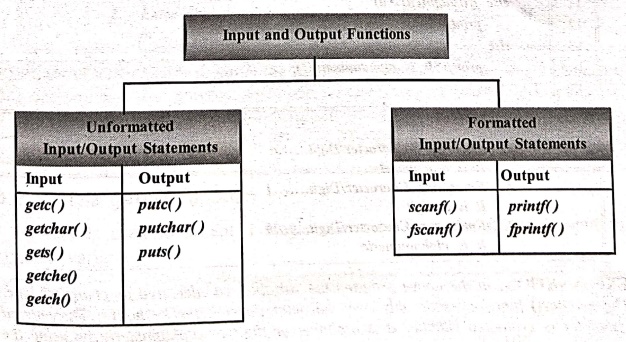
1. Input output statements 2. Unformatted Input/Output Statements 3. Formatted Input/Output Statements
INPUT/OUTPUT STATEMENTS
1. INPUT OUTPUT STATEMENTS
We
know that input, process, output are the three essential features of computer
program. The program takes some input data, processes it and gives the output.
We
have two methods for providing data to the program.
•
Assigning the data to the variables in a program.
•
By using the Input/Output statements.
In
'C' language, two types of Input/Output statements are available, and all input
and output operations are carried out through function calls. Several functions
are available for input/output operations in 'C'. These functions are
collectively known as the standard I/O library.
i)
Unformatted Input/Output statements
ii)
Formatted Input/Output statements
2. UNFORMATTED INPUT/OUTPUT STATEMENTS
These
statements are used to Input/Output a single or Data saved in file group of
characters from/to the input/output devices. Here the user cannot specify the
type of data that is going to be input/output.
1. Single Character Input‒getchar() function
A
Single character can be given to the computer using 'C' input library function
getchar()
Syntax:
char
variable=getchar();
Description:
char datatype;
variable Any valid 'c' variable
Example:
char x /* declaration statement*/
x=getchar(); /* input statement */
The
getchar() function is written in
standard I/O library. It reads a single character from a standard input device.
This function do not require any arguments, through a pair of empty
parentheses, must follow the statement getchar().
Example: Testing a
character type.
/* Program to testing a character type */
#include<stdio.h>
main()
{
char ch; /* Local
definition */
/* statements */
printf("Enter
any Character/Digit........");
ch=getchar();
if(isalpha(ch)>0)
printf("It
is a alphabet");
else
if(isdigit(ch)>0)
printf("It
is a digit");
else
printf("It
is alphanumeric");
} /* main */
OUTPUT
1. Enter any
Character/Digit......a
It is a alphabet
2. Enter any
Character/Digit.......1
It is a digit
3. Enter any
Character/Digit.......#
It is alphanumeric
EXPLANATION:
In the above program the variable 'ch'
declared as character type. The getchar()
function reads only one character through the keyboard. The entered character
is evaluated whether it is alphabet or digit or alphanumeric by using the
respective functions. According to the entered character the output was
produced.
2. Single Character Output‒putchar() function
The
putchar() function is used to
display one character at a time on the standard output device. This function
does the reverse operation of the single character input function as discussed
above.
Syntax:
putchar(character
variable);
Description:
Character
variable is the valid 'c' variable of the type of char data type.
Example:
char x; /declaration
part */
putchar(x); /* output
statement */
Example : Convert a
Character from Lowercase to Uppercase and viceversa.
/* Program to convert a character from Lowercase to Uppercase */
#include <stdio.h>
main()
{
char ch; /* Local
definition */
printf("Enter
any alphabet either in Lower or Uppercase......");
ch=getchar();
if(islower(ch))
putchar(toupper(ch));
/* tape converts the character to upper case */
else
putchar(tolower(ch));
/* tolower() converts the character to
lower case */
} /* main */
OUTPUT:
1. Enter any alphabet
either in Lower or Uppercase........s
S
2. Enter any alphabet
either in Lower or Uppercase........M
m
EXPLANATION:
In this program the getchar()
function reads the single character from the terminal. The program finds
whether the character is lower or upper case if the character is lower case
then it is converts to uppercase using toupper()
function, else if the character is uppercase then it is changed to lowercase
using tolower() function and
produced the output.
3. The getc() function
This
is used to accept a single character from the standard input to a character
variable.
Syntax:
character
variable=getc();
Description:
Variable
is valid 'c' variable of char data type
Example:
char c;
c=getc();
4. The putc() function
This
is used to display a single character in a character variable to standard
output device.
Syntax:
putc(character
variable);
Description:
Variable
is valid 'c' variable char data type
Example:
char c;
putc(c);
NOTE:
The getc() and putc() are often used in file processing
5. The gets() and puts() function
The
gets() function is used to read the
string (string is a group of characters) from the standard input device
(keyboard).
Syntax:
gets(char
type of array variable);
Description:
Valid 'c'
variable declared as one dimension char type
Example:
gets(s);
The
puts() function is used to
display/write the string to the standard output device(Monitor).
Syntax:
puts(char
type of array variable);
Description:
Valid 'c'
variable declared as one dimension char type
Example:
puts(s);
6. The getch() and getche() Functions
The
getch reads a single character directly from the keyboard, without echoing to
the screen. The getche reads a
single character from the keyboard and echoes it to the current text window.
Syntax:
int getch(void);
int getche(void);
Return Value:
Both functions return the character read from the keyboard.
7. Character Test functions
The
'C' language provides many library functions for manipulating characters. They
are divided into two major groups, classifying functions and converting
functions. The prototypes of these functions are in <ctype.h> headerfile. The table below summarizes some of the 'C'
character test functions.
Function:
Test
isalnum(ch):
Is ch an alphanumeric character?
isalpha(ch):
Is ch an alphabetic character?
isdigit(ch):
Is ch a digit?
islower(ch):
Is ch a lowercase letter?
isupper(ch):
Is ch a uppercase letter?
isspace(ch):
Is ch a blank space character?
tolower(ch):
Convert ch to lowercase.
toupper(ch):
Convert ch to uppercase.
iscntrl
(ch): Is ch is ASCII control character?
isprint(ch):
Is ch is printable?
isgraph(ch):
Is ch is a graphic character?
ispunct(ch):
Is ch is punctuation character?
isxdigit(ch):
Is ch is hexadecimal digit?
3. Formatted Input/Output Statements
Formatted
Input/Output refers to input and output, that has been arranged in a particular
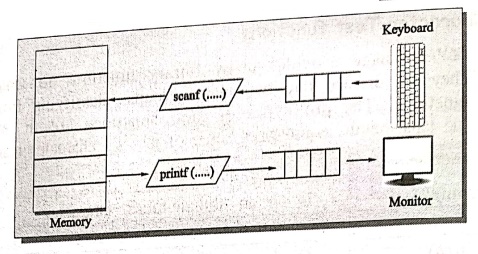
format. The input and output functions in C are built around the concept of a
set of standard data streams being connected from each executing program to the
basic input/output devices.
Example:
MSSM 9293
This
line contains two parts of data, that is arranged in a format, such data can be
read to the format of its appearance, as the first data should be read into a
variable char, the second into int. Such operation can be made possible in 'C'
language by using the formatted Input/Output statements.
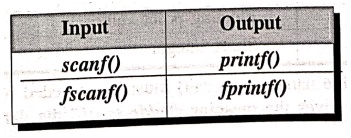
The
following are the formatted Input/Output statements.
1. The scanf() Function
Input
data can be entered into the computer using the standard input 'C' library
function called scanf(). This
function is used to enter any combination of input. The scanf() function is used to read information from the standard
input device (keyboard), scanf()
function starts with a string argument and may contain additional arguments.
Any additional arguments must be pointers.
Syntax:
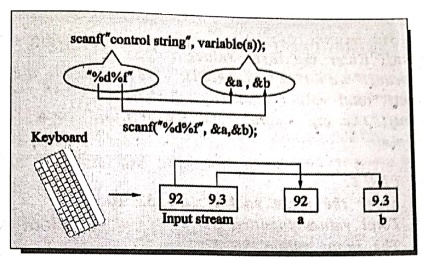
scanf("control
string", &var1, &var2,…..&varn);
Description:
The
Control String consists of character groups.
Example:
int n;
scanf("%d",
&n);
Control string:
It is the type of data that the user going to accept via the input statements,
this can be formatted and always preceded with a "%' sign. The table below
illustrates code formats (control strings) in Input/Output statements.
Format
code
%C:
Single character
%d:
Decimal integer up to ‒32,768 to +32,767
%S:
Strings
%f:
Float values
%ld:
Long integer up to ‒65,536 to + 65,535
%u:
Unsigned decimal
%O:
Octal number
%x:
Hexadecimal number
%e:
Floating point value
%h:
Short integer
Each
variable name (argument) must be preceded by an ampersand (&). The
('&') symbol gives the meaning "address
of" the variable.
The
scanf control string or placeholder
consists of % at the beginning and type indicator at the end. Apart from that
it can have * width indicator and a type indicator modified.
Example:
%10.2f
%10d
If
input consists of 6 values and we want to ignore the middle 3 values, we can
write.
The
* is used to suppress input.
scanf("%d%d%*d%*d%*d%d",&i,&j,&k);
Example:
%*d
So,
if our input is 10 20 30 40 50 60. It will get values 10 to i, 20 to j and 30
to k.
2. Rules for writing scanf() function
a)
The control string must be preceded with (%) sign and must be within quotations.
i.e., the address of variable should be passed.
b)
If there is a number of input data items, items must be separated by commas and
must be preceded with (&) sign except for string input.
c)
The control string and the variables going to input should match with each
other.
d)
It must have termination with semicolon.
e)
The scanf() reads the data values until the blank space in numeric input or
maximum number of character have been read, or an error is detected.
Example: Program to
count the number of input values using scanf() function.
/* Program to demonstrate scanf() function */
#include<stdio.h>
#include <conio.h>
void main()
{
int i=0, j=10, k; /*
Local definitions */
/* Statements */
printf("Enter
the three values: ");
i=scanf("%d %d %d", &j,
&k, &i); scanf() reads the values*/
printf("total
values inputted %d\n", i);
printf("The
input values %d %d\n",j,k);
} /* main */
OUTPUT:
Enter the three values
: 56 32 10
Total values inputted
3
The input values 56 32
EXPLANATION:
This program displays the number of values inputted to the specified variables
using scanf() statement.
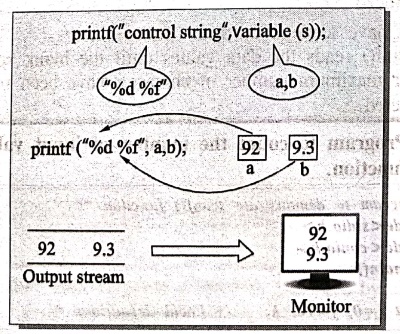
3. The printf() function
Output
data or result of an operation can be displayed from the computer to a standard
output device using the library function printf().
This function used to output any combination of data. It is similar to the
input function scanf(), except that
it displays data rather than input.
Syntax:
printf("control
string", varl, var2,....... varn);
Description:
Control string is any
of the following.
a) Format code
character.
b) Execution character
set or Escape sequences.
c) Characters/String
that will be displayed
varl, var2, varn are
the arguments or variables from which the data is going to output.
Example:
printf("Result
is....%d", n);
printf("%f",f);
printf("%s",s);
Field
width plays an important role in printf statements while producing reports in a
formatted manner. Field width indicates the least number of columns that will
be located to the output.
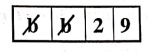
Example:
i=29, its
field width is %4d.
So,
the four columns are allocated for i and 2 blanks are added on left side of
value of i.
The
output look like
If
the value is more than specified column, field width is ignored and the number
of column used is equal to the number of column required by the arguments.
Example: i=12345,
5 columns are required and used even if 4d specified.
If
we specify * instead of field width then we have to specify additional
arguments.
Example:
printf("%d\n",5,29);
printf("%d\n",10,5);
The
first statement 5 is substituted for *, and it means putting the value of 29 in
5 column.
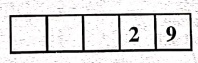
In
second statement 10 is substituted for *, and it means putting value of 5 in 10
columns.

4. Rules for writing printf() function
a)
Place appropriate headings in the output.
b)
The variable must be separated by commas, and need not be preceded with '&'
sign.
c)
The control string and the variables must match in their order.
d)
The control string must be in quotations and there we can also use any other
text to print with data.
e)
Provide blank space in between the numbers for better readability.
f)
Print special messages wherever required in output.
Example 1: Program to
print the number of given character using
printf function.
/* Program to print the number of given character */
#include <stdio.h>
#include <conio.h>
void main()
{
int i = 0; /*
Local definitions */
i=printf("abcde\n");
printf("Total
Number characters printed : %d\n", i);
} /* main */
OUTPUT:
abcde
Total Number
characters printed: 6
EXPLANATION:
This program prints the number of characters printed on the screen, the
printf() statement is assigned to variable, which holds the number of
characters printed on screen.
Example 2: Reading
and printing data via terminals using scanf() and printf() statements.
/*Program using scanf() and printf() statements */
#include<stdio.h>
main()
{
/* Local definition */
int sno, m1,m2,m3;
char name[20]
float total, avg;
printf("Enter sno, sname, 3 sub marks");
/* Read sno, name and marks */
scanf("%d %s %d %d %d", &sno,name, &m1,
&m2, &m3);
total=m1+m2+m3;
avg=total/3;
printf("Sno.....%d", sno);
printf("Name.....%s", name);
printf("Marks..... %d\t%d\t%d\t", ml,m2, m3);
printf("Total.....%f", total);
printf("Average.....%f", avg);
} /* main */
OUTPUT
Enter
sno, sname, 3 sub marks
1
Mahi 90 95 98
Sno.....1
Name.....Mahi
Marks.....90
95 98
Total.....284.000000
Average.....94.333336
CASE STUDIES
(Simple Computational Problems)
1. Program to read two integers 'a'
and 'b' and print quotient and remainder when 'a' is divided by 'b' without
using the "%' operator or 'mod' function.
Suppose
a=39, b=7, if 'a' is divided by 'b' quotient is '5' and remainder is 4;
Consider
q=a/b, so 'q' is the quotient.
a=39,
b=7, the statement q=a/b evaluates q=5
remainder
= a‒q*b = 39‒5*7= 39‒35 = 4
so
r=a‒q*b will calculate the remainder.
/* Program to print quotient and remainder without "%' and
'mod' function */
#include <stdio.h>
main()
{
/* Local definition */
int a,b,q,r;
/*statements */
printf("Enter
a,b values.....");
scanf("%d
%d", &a,&b);
q=a/b;
r=a‒q*b;
printf("Quotient
is.....%d", q);
printf("Remainder
is.....%d", r);
} /* main */
OUTPUT
Enter a, b
values.....39 7
Quotient is.....5
Remainder is.....4
EXPLANATION:
In the above program the variables a,b,q,r are declared as integer type. The
scanf() function reads values of the two variables ‘a' and 'b'. 'q' is a variable
holds the result of a/b and variable 'r' holds the result of (a‒q*b). After
computing quotient 'q' and remainder 'r' are printed. Note that in this program
the remainder is calculated without modular division.
2. Write a 'C' program to calculate
slope and midpoint of a line.
Let
x1, y1 and x2, y2 are the coordinates of the extremities of the line.
The
slope of this line is
Slope
= [y2‒yl] / [x2‒x1]
For
mid point of the line is
x
co‒ordinate is x = [x1+x2] / 2
y
co‒ordinate is y = [y2+yl] / 2
for
this problem x1,y1, x2,y2 are the inputs, slope is output.
/* Program to calculates slope and midpoint of a line */
#include<stdio.h>
main()
{
/* Local definition
*/
float x,y,x1,x2, yl,
y2, slope;
*Statements */
printf("Enter
the First Point xl,yl...");
scanf("%f%f",
&x1, &yl);
printf("Enter
the Second Point x2,y2..........");
scanf("%f%f",
&x2, &y2);
slope = (y2‒y1)/(x2‒x1);
/* calculates the slope value */
x=(x1+x2)/2.0; /*
calculates x value */
y=(y1+y2)/2.0; /* calculates y value */
printf("Slope
is.....%f\n", slope);
printf("Mid
Point is.....%f, %f", x,y);
} /* main */
OUTPUT
Enter the First Point
x1,y1... 10 20
Enter the Second Point
x2,y2... 30 40
Slope is.....1.000000
Mid Point
is.....20.000000, 30.000000
EXPLANATION:
In the program the variables x1, y1 and x2, y2 are read through the keyboard.
The variable slope holds the result of (y2‒y1)/(x2‒x1) then x is calculated by
(x1+x2)/2.0 and y value is calculated by (y1+y2)/2.0. Finally the slope value
is printed and midpoint is printed from the variables x and y.
Computer Programming C: UNIT I: Introduction to C : Tag: Computer Science : - C Programming: Input/Output Statements
Computer Programming C: UNIT I: Introduction to C
Under Subject
Computer Programming C
CS25C01 1st Semester | 2025 Regulation | 1st Semester 2025 Regulation
Related Subjects

English Essentials I
EN25C01 1st Semester | 2025 Regulation | 1st Semester 2025 Regulation

தமிழர் மரபு - Heritage of Tamils
UC25H01 1st Semester | 2025 Regulation | 1st Semester 2025 Regulation
Applied Calculus
MA25C01 Maths 1 M1 - 1st Semester | 2025 Regulation | 1st Semester 2025 Regulation

Applied Physics I
PH25C01 1st Semester | 2025 Regulation | 1st Semester 2025 Regulation

Applied Chemistry I
CY25C01 1st Semester | 2025 Regulation | 1st Semester 2025 Regulation

Makerspace
ME25C04 1st Semester | 2025 Regulation | 1st Semester 2025 Regulation
Computer Programming C
CS25C01 1st Semester | 2025 Regulation | 1st Semester 2025 Regulation
Computer Programming Python
CS25C02 1st Semester | 2025 Regulation | 1st Semester 2025 Regulation

Fundamentals of Electrical and Electronics Engineering
EE25C03 1st Semester EEE Depart | 2025 Regulation | 1st Semester 2025 Regulation

Introduction to Mechanical Engineering
ME25C03 1st Semester Mechanical Dept | 2025 Regulation | 1st Semester 2025 Regulation

Introduction to Civil Engineering
CE25C01 1st Semester Civil, Agri Departments | 2025 Regulation | 1st Semester 2025 Regulation
Essentials of Computing
CS25C03 1st Semester - AIDS, CSE, CSE(CY), IT Department | 2025 Regulation | 1st Semester 2025 Regulation

Applied Physics I Laboratory
PH25C01 1st Semester practical Laboratory Manual | 2025 Regulation | 1st Semester Laboratory 2025 Regulation

Applied Chemistry I Laboratory
CY25C01 1st Semester practical Laboratory Manual | 2025 Regulation | 1st Semester Laboratory 2025 Regulation

Computer Programming C Laboratory
CS25C01 1st Semester EEE, ECE, CSE, CSE(CY), AIDS, IT practical Laboratory Manual | 2025 Regulation | 1st Semester Laboratory 2025 Regulation

Computer Programming Python Laboratory
CS25C02 1st Semester practical Laboratory Manual | 2025 Regulation | 1st Semester Laboratory 2025 Regulation
Engineering Drawing
ME25C01 EEE, Mech, Agri, EEE Depts | 2025 Regulation | 2nd Semester 2025 Regulation

Basic Electronics and Electrical Engineering
EE25C04 1st Semester ECE Dept | 2025 Regulation | 1st Semester 2025 Regulation
Essentials of Computing - Laboratory
CS25C03 1st Semester AIDS, CSE, CSE(CY), IT Depts | practical Laboratory Manual | 2025 Regulation | 1st Semester 2025 Regulation