Computer Programming C: UNIT I: Introduction to C
C Programming: Looping Statements
1. The while loop 2. The do..while loop 3. The for loop 4. jump statements 4.1. The break statement 4.2 The continue Statement 4.3 The goto statement
LOOPING STATEMENTS
Introduction
1. The while loop
2. The do..while loop
3. The for loop
4. jump statements
4.1. The break statement
4.2 The continue Statement
4.3 The goto statement
INTRODUCTION
So
far, we have discussed, sequential execution of the program. In some situations there is a need to repeat a set of
instructions in specified number of times or until a particular condition is
satisfied. This repetitive operations are done through a loop control
structure. The loop is defined as the block of statements which are repeatedly
executed for certain number of times.
The
loop in a program consists two parts, one is body of the loop and another one
is control statement. The control statement is used to test the condition and then
directs the repeated execution of the statements in the body of the loop. Any
looping statement, would include the following steps:
i)
Initialization of a condition variable.
ii)
Test the control statement.
iii)
Executing the body of the loop depending on the condition.
iv)
Updating the condition variable.
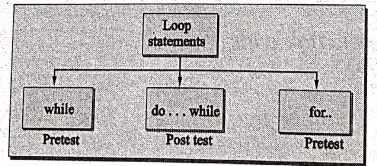
The
following are the loop structures available in 'C'
while..
do...while
for...
1. The while loop
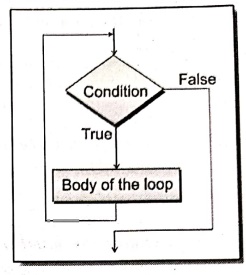
It
is a repetitive control structure, used to execute the statements within the
body, until the condition becomes false. The while loop is an entry controlled
loop statement, which means the condition is evaluated first and if it is true,
then the body of the loop is executed.
After
executing the body of the loop, the condition is once again evaluated and if it
is true, the body is executed once again, the process of repeated execution of
the body of the loop continues until the condition finally becomes false and
the control is transferred out of the loop.
Syntax:
while(condition)
{
………….
body of the loop;
………
}
The
body of the loop may have one or more statements, the blocking with the braces
are needed only if the body contains two or more statements.
Example 1: Addition
of numbers up to 10 by using the while loop.
/* Program for addition of numbers using while loop */
#include <stdio.h>
main ()
{
int i=1,sum=0; /*
Local definitions */
while (i<=10)
{ /* while loop starting */
sum=sum+i;
i++;
} /* while */
printf("The
sum of numbers upto 10 is %d", sum);
} /* main */
OUTPUT
The sum of numbers
upto 10 is 55
EXPLANATION:
Body of the loop executes until the condition becomes false. When the condition
is false the printf() displays the result.
Example 2: Program to reverse the given number using
while loop.
/* Program to reverse the number */
#include<stdio.h>
#include <conio.h>
void main()
{
int number,digit,
rev=0; /* Local definitions */
clrscr();
printf("Enter
the number : ");
scanf("%i",
&number);
while(number != 0)
/* while loop checks the condition */.
{
digit number
%10;
rev=rev*10+
digit;
number = number/10;
} /* while */
printf("%d",
rev);
getch();
} /* main */
OUTPUT 1:
Enter the number :
9293
3929
OUTPUT 2:
Enter the number: 9081
1809
2. The do..while loop
The
while loop makes a test of condition before the loop is executed. Therefore,
the body of the loop may not be executed at all, if the condition is not
satisfied at the first attempt. In some situations, it may be necessary to
execute the body of the loop, before the test condition is performed. In such a
situation the do..while loop is useful.
It
is also repetitive control structure and executes the body of the loop once
irrespective of the condition, then it checks the condition and continues the
execution until the condition becomes false.
Syntax:
do
{
………..
body of the loop;
…………
} while(condition);
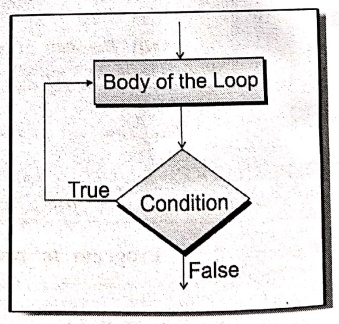
Here,
the statements within the body of the loop is executed once, then it evaluates
the condition, if it is true, then it executes body until the condition becomes
false.
Example 1: Addition
of numbers up to 10 by using the do..while loop.
/* Program for addition of numbers using do..while loop */
#include <stdio.h>
main()
{
int i=1,sum=0; /*
Local definition */
do
{
/*do..while
loop starting */
sum=sum+i;
i++;
} /* do while **/
while(i<=10);
printf("Sum of
the numbers up to 10 is ...%d", sum);
} /* main */
OUTPUT
Sum of the numbers up
to 10 is ...55
EXPLANATION:
The do..while loop is executes the body until i<=10 and calculates the sum
and increment the i value by 1.
Example 2: Program to
print n numbers using do..while loop.
/* Program to print n numbers */
#include <stdio.h>
#include <conio.h>
void main()
{
int i,n; /* Local
definitions */
/* Statements */
printf("Enter
the number : ");
scanf("%d",
&n);
i = 0;
do
{
printf("the
numbers are %d\n",i);
i = i + 1;
} /* do..while */
while(i<n);
} /* main */
OUTPUT
Enter the number : 6
the numbers are 0
the numbers are 1
the numbers are 2
the numbers are 3
the numbers are 4
the numbers are 5
EXPLANATION:
This program prints n numbers on the screen, where n value can be supplied by
the user.
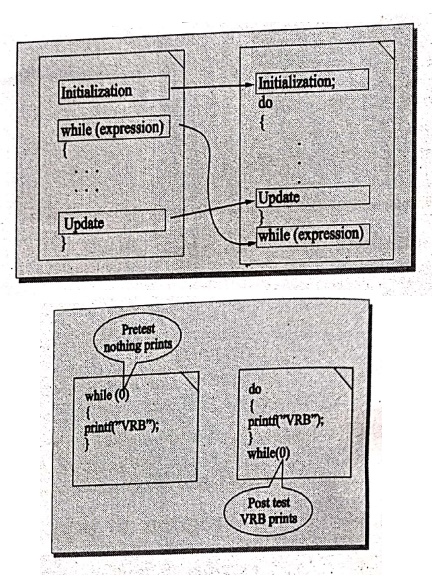
Comparison between while and do while statements.
while
1.
This is the top tested loop.
2.
The condition is first tested, if the condition is true then the block is executed
until the condition becomes false.
3.
Loop will not be executed if the condition is false.
do....while
1.
This is the bottom tested loop.
2.
It executes the body once, after it checks the condition, if it is true the
body is executed until the condition becomes false.
3.
Loop is executed at least once even though the condition is false.
3. The for loop
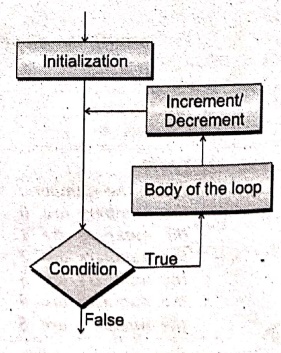
The
for loop is another repetitive
control structure, and is used to execute a set of instructions repeatedly,
until the condition becomes false.
The
assignment, incrementation or decrementation and condition checking is done in for statement only, where as other
control structures are not offered all these features in one statement.
Syntax:
for(initialise counter;
condition; counter)
{
……….
body of the loop;
………
}
for
loop has three parts
i)
Initialise counter is used to
initialize counter variable.
ii)
Test condition is used to test the
condition.
iii)
Increment/decrement counter is used
to increment or decrement counter variable.
If
there is a single statement within the for loop, the blocking with braces is
not necessary, if more than one statement includes in body of the loop, the
statements within the body must be blocked with braces.
Example 1: Addition
of number upto 10 by using the for loop.
/* Program for addition of numbers using for loop */
#include <stdio.h>
main()
{
int i,sum=0; /*
Local definitions */
for(i=1;i<=10;i++)
{ /* for loop
starting */
sum=sum+i;
} /* for */
printf("The
addition of numbers upto 10 is %d", sum);
} /* main */
OUTPUT
The addition of
numbers upto 10 is 55.
EXPLANATION:
In the program the variables i and sum are declared as an integer type variable.
The body of the for loop is executed at 10 times, each time the sum is
calculated as sum=sum+i. Finally the prints the value of sum as output.
Note
that the initialisation, testing and incrementation of loop is done in the for
statement itself. Now, the above program is written in different ways as given
below.
main()
{
int i;
for(i=1;i<=10;)
{
printf("%d\n",i);
i=i+1;
}
}
Here
the incrementation is done within the body of the for loop and. not in the for
statement. Note that in spite of this, the semicolon after the condition is
necessary.
main()
{
int i;
for(i=0;i++<10;)
printf("%d\n",i);
}
Here
the comparison as well as the incrementation is done through the same
statement, i++<10. Since the ++' operator adds after 'i' then comparison is
done followed by incrementation. Note that it is necessary to initialise 'i' to
0.
Example 2: Program to print the
numbers in decreasing and increasing order using for loop structure.
#include <stdio.h>
#include <conio.h>
void main()
{
int n,x,y; /* Local
definitions */
printf("Enter a
number: ");
scanf("%d",
&n);
x=y=n;
printf("‒‒‒\n");
printf("(‒‒)
(++)\n");
printf("‒‒‒‒‒‒‒‒‒‒‒\n");
for(;;(x++,y‒‒))
{
printf("%d\t%d\n",y,x);
if(y==0)
break;
} /* for */
getch();
} /* main */
OUTPUT:
Enter a number: 5
-------------
(‒‒) (++)
----------
5 11
4 12
3 13
2 14
1 15
0 16
EXPLANATION:
The program prints the increment and decrement values of upto given n number
using for loop structure.
4. JUMP STATEMENTS
There
are statements used to control the flow in programs discussed here.
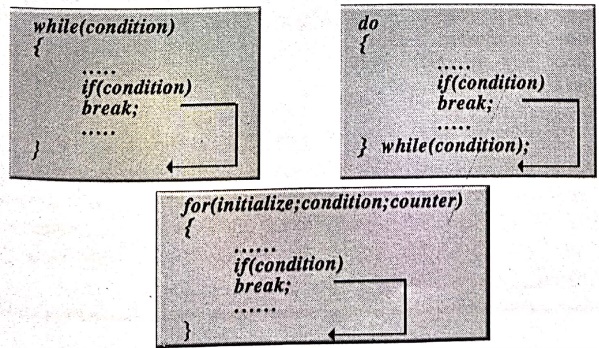
1. The break statement
The
break statement is used to terminate the loop. When the keyword break is used
inside any 'C' loop, control is automatically transferred to the first
statement after the loop. A break is usually associated with an if statement.
When
the break statement is encountered inside a loop, the loop is immediately
exited and the program continues with the statement immediately following the
loop.
Syntax:
break;
Example: Program to
print the number upto 5 using break statement.
/* Program using break statement */
#include <stdio.h>
#include <conio.h>
main ()
{
int i;
for(i=1;i<=10;i++)
{
if(i==6)
break; /*
break statement */
printf("%d", i);
} /* for */
} /* main */
OUTPUT:
1 2 3 4 5
EXPLANATION:
printf value of 'ï' upto 5 when ï' reaches 6 the if statement becomes true. So
the break statement transfers the control to the outside of the for loop.
Terminating loop with break
statement
2. The continue Statement
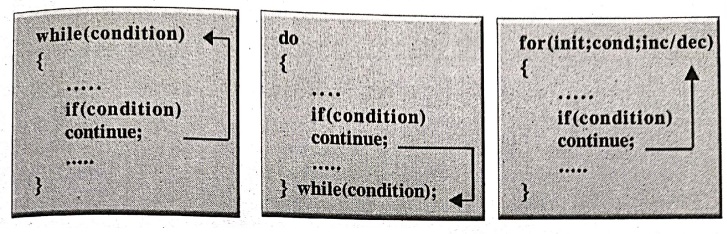
In
some situations, we want to take the control to the beginning of the loop,
bypassing the statements inside the loop which have not yet been executed, for
this purpose the continue is used. When the statement continue is encountered
inside any 'C' loop control automatically passes to the beginning of the loop.
Syntax:
continue;
Like
break statement, the continue statements also associate with if statement.
Example: Calculate
the sum of the given positive numbers.
/* Program to calculate the sum of the given positive numbers */
#include <stdio.h>
main
{
int i,n,sum=0; /*
Local definitions */
/* Statements */
for(i=1;i<=5;i++)
{
printf("Enter
any number.....\n");
scanf("%d",
&n);
if(n<0)
continue;
else
sum sum+n;
}/* for */
printf("Sum is….%d",
sum);
} /* main */
OUTPUT
Enter any
number.....10
Enter any number.....5
Enter any
number.....15
Enter any
number.....25
Enter any number.....‒10
Enter any number.....50
Sum is .....105.
EXPLANATION :
Here, the for loops reads 5 numbers, for each number it checks whether it is
less than zero, if it is less than zero it can not add and asks for next number
(i.e. the control will automatically transfer to the for loop using the
continue), if it is greater than zero, it adds to the variable sum, finally
after completing the loop it displays the results.
Continue loop with continue statement
Difference between the break and continue
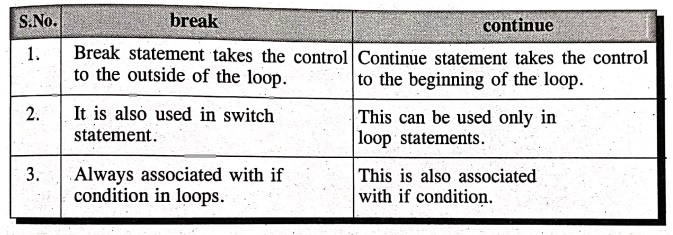
break
1.
Break statement takes the control to the outside of the loop.
2.
It is also used in switch statement.
3.
Always associated with if condition in loops.
continue
1.
Continue statement takes the control to the beginning of the loop.
2.
This can be used only in loop statements.
3.
This is also associated with if condition.
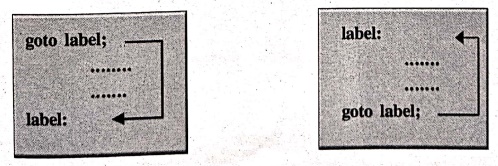
3. The goto statement
So
far, we have seen a number of ways of controlling the flow of execution based
on the conditions. 'C' provides the goto
statement to transfer control unconditionally from one place to another place
in the program.
A
goto statement can cause program
control almost anywhere in the program unconditionally.
The
goto statement requires a label to
identify the place to move the execution. A label is a valid variable name and
must be ended with colon (:).
Syntax :
Computer Programming C: UNIT I: Introduction to C : Tag: Computer Science : - C Programming: Looping Statements
Computer Programming C: UNIT I: Introduction to C
Under Subject
Computer Programming C
CS25C01 1st Semester | 2025 Regulation | 1st Semester 2025 Regulation
Related Subjects

English Essentials I
EN25C01 1st Semester | 2025 Regulation | 1st Semester 2025 Regulation

தமிழர் மரபு - Heritage of Tamils
UC25H01 1st Semester | 2025 Regulation | 1st Semester 2025 Regulation
Applied Calculus
MA25C01 Maths 1 M1 - 1st Semester | 2025 Regulation | 1st Semester 2025 Regulation

Applied Physics I
PH25C01 1st Semester | 2025 Regulation | 1st Semester 2025 Regulation

Applied Chemistry I
CY25C01 1st Semester | 2025 Regulation | 1st Semester 2025 Regulation

Makerspace
ME25C04 1st Semester | 2025 Regulation | 1st Semester 2025 Regulation
Computer Programming C
CS25C01 1st Semester | 2025 Regulation | 1st Semester 2025 Regulation
Computer Programming Python
CS25C02 1st Semester | 2025 Regulation | 1st Semester 2025 Regulation

Fundamentals of Electrical and Electronics Engineering
EE25C03 1st Semester EEE Depart | 2025 Regulation | 1st Semester 2025 Regulation

Introduction to Mechanical Engineering
ME25C03 1st Semester Mechanical Dept | 2025 Regulation | 1st Semester 2025 Regulation

Introduction to Civil Engineering
CE25C01 1st Semester Civil, Agri Departments | 2025 Regulation | 1st Semester 2025 Regulation
Essentials of Computing
CS25C03 1st Semester - AIDS, CSE, CSE(CY), IT Department | 2025 Regulation | 1st Semester 2025 Regulation

Applied Physics I Laboratory
PH25C01 1st Semester practical Laboratory Manual | 2025 Regulation | 1st Semester Laboratory 2025 Regulation

Applied Chemistry I Laboratory
CY25C01 1st Semester practical Laboratory Manual | 2025 Regulation | 1st Semester Laboratory 2025 Regulation

Computer Programming C Laboratory
CS25C01 1st Semester EEE, ECE, CSE, CSE(CY), AIDS, IT practical Laboratory Manual | 2025 Regulation | 1st Semester Laboratory 2025 Regulation

Computer Programming Python Laboratory
CS25C02 1st Semester practical Laboratory Manual | 2025 Regulation | 1st Semester Laboratory 2025 Regulation

Engineering Drawing
ME25C01 EEE, Mech, Agri, EEE Depts | 2025 Regulation | 2nd Semester 2025 Regulation

Basic Electronics and Electrical Engineering
EE25C04 1st Semester ECE Dept | 2025 Regulation | 1st Semester 2025 Regulation
Essentials of Computing - Laboratory
CS25C03 1st Semester AIDS, CSE, CSE(CY), IT Depts | practical Laboratory Manual | 2025 Regulation | 1st Semester 2025 Regulation